10 Benefits of Geo-fencing for Employee Attendance Management
10 Benefits of Geo-fencing for Employee Attendance Management
Managing employee attendance becomes more challenging when businesses have multiple branches, field employees, construction sites, remote teams, or employees who move between different work locations. Traditional attendance methods may not provide enough visibility into where employees actually checked in.
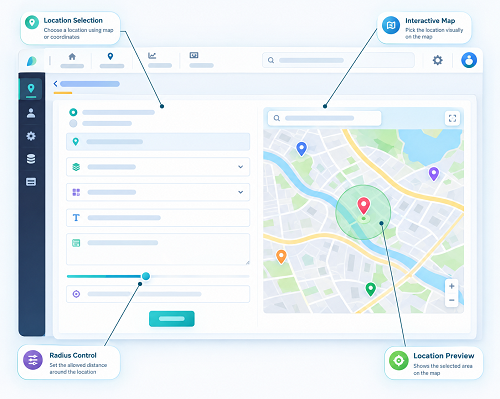
Geo-fencing for employee attendance management provides a location-based approach to employee check-ins and check-outs. Businesses can create a virtual boundary around an approved workplace and use location information from an employee's mobile device to verify whether the employee is within that area when attendance is marked.
When combined with GPS attendance and mobile attendance software, geo-fencing can help businesses improve attendance accuracy, reduce manual verification, and manage employees across multiple locations.
Here are 10 key benefits of geo-fencing for employee attendance management.
1. Improves Attendance Location Verification
One of the main benefits of geo-fencing is that it helps businesses verify whether an employee is marking attendance from an approved location.
For example, a company can create a geo-fence around its office. When an employee attempts to check in using a mobile attendance app, the system can compare the employee's available location information with the configured boundary.
The basic process is:
Employee → Mobile App → Location Check → Geo-fence Verification → Attendance
This provides more location context than a simple time-based attendance record.
2. Helps Reduce Unauthorized Check-Ins
Businesses may want employees to mark attendance only from their assigned workplace.
Geo-fencing can help enforce this requirement.
For example:
- Inside approved geo-fence → Check-in allowed
- Outside approved geo-fence → Check-in restricted or flagged
The exact action depends on the company's attendance policy and software configuration.
This can help reduce attendance events that occur from unauthorized locations.
3. Supports Field Employees
Field employees often work outside a traditional office.
Examples include:
- Sales representatives
- Service technicians
- Installation teams
- Construction workers
- Delivery employees
- Maintenance teams
- Marketing employees
A mobile attendance system with geo-fencing can support attendance at approved field locations.
For example:
Employee reaches assigned location → Opens mobile app → Location verified → Geo-fence checked → Attendance recorded
This can make attendance management more practical for mobile workforces.
4. Simplifies Multi-Location Attendance Management
Businesses with multiple offices, stores, factories, or project sites can create separate geo-fences for each location.
For example:
| Workplace | Employee Group | Geo-fence |
|---|---|---|
| Head Office | Office Staff | Location A |
| Factory | Production Team | Location B |
| Retail Store | Store Employees | Location C |
| Construction Site | Project Team | Location D |
HR teams can manage attendance across different locations from a centralized system.
This can be especially useful for organizations with employees distributed across multiple branches.
5. Reduces Manual Attendance Verification
Traditional attendance processes may require managers or HR teams to manually verify attendance registers, spreadsheets, or employee-submitted information.
Geo-fencing can automate part of this verification process.
Instead of asking: "Where did the employee mark attendance?" the system can associate the attendance event with the relevant location information and geo-fence status.
This can reduce repetitive administrative work and allow HR teams to focus on other workforce-management activities.
6. Helps Manage Construction and Project Sites
Construction and project-based businesses often have employees working at different sites.
A geo-fence can be configured around each project location.
For example:
- Project A → Geo-fence A
- Project B → Geo-fence B
- Project C → Geo-fence C
Employees can be assigned to the appropriate project and use mobile attendance according to the company's rules.
This can provide businesses with a structured way to manage attendance across temporary or changing workplaces.
7. Provides Better Attendance Visibility
Geo-fencing can give managers additional context about employee attendance events.
Depending on the software, administrators may be able to review information such as:
- Employee
- Check-in time
- Check-out time
- Assigned location
- Attendance status
- Shift
- Location verification status
This can help managers identify attendance exceptions and review unusual check-in patterns.
For example, if an employee repeatedly attempts to check in outside the assigned workplace, the manager can investigate the situation.
8. Works With GPS and Mobile Attendance
Geo-fencing becomes particularly useful when combined with GPS-enabled mobile attendance.
GPS can provide location information, while geo-fencing applies the workplace boundary.
The difference can be summarized as:
- GPS: Where is the employee's device?
- Geo-fence: Is that location within the approved area?
Together:
GPS Location + Geo-fence Rule = Location-Based Attendance Verification
This combination can be used for employees working at offices, branches, project sites, and approved field locations.
9. Supports Shift and Payroll Management
Attendance is closely connected with other HR processes.
Geo-fenced attendance can become part of a larger workforce management workflow:
Geo-fence Check-In → Working Hours → Shift → Leave → Overtime → Payroll
For example, an employee may check in at an approved workplace at the beginning of a shift and check out at the end of the shift.
The attendance data can then support calculations and reporting related to working hours, leave, and overtime according to company policies.
When attendance and payroll systems are integrated, HR teams may also reduce duplicate data entry.
10. Creates Digital Attendance Records
Geo-fencing can help businesses move away from paper-based attendance registers and manually maintained spreadsheets.
Attendance events can be stored digitally and made available through an HR or workforce management dashboard.
Digital records can make it easier to:
- Search attendance history
- Review employee check-ins
- Analyze attendance patterns
- Identify exceptions
- Generate reports
- Manage multiple locations
- Support payroll processes
This can improve the overall efficiency of attendance administration.
Geo-fencing vs Traditional Attendance
| Traditional Attendance | Geo-fence Attendance |
|---|---|
| Register or fixed device | Mobile-based attendance can be used |
| Limited location information | Location can be checked against a boundary |
| More manual verification | Automated location-based rules |
| Less flexible for field employees | Supports approved mobile work locations |
| Difficult to manage many sites manually | Multiple geo-fenced locations can be configured |
| Paper or spreadsheet records may be used | Digital attendance records |
Geo-fencing does not necessarily replace every traditional attendance method. Businesses can select the approach that best fits their workforce and workplace requirements.
Geo-fencing With Face Attendance
Businesses can combine geo-fencing with face recognition attendance where appropriate.
For example:
Face Verification → GPS Location Check → Geo-fence Verification → Time Verification → Attendance Recorded
Face verification can help confirm employee identity, while geo-fencing can help verify the approved location.
This creates multiple layers of attendance verification.
However, businesses should use facial and location data responsibly, with appropriate security, transparency, and privacy controls.
Geo-fencing for Different Industries
Manufacturing
Factories can create geo-fences around production facilities and use location-based attendance for employees working on-site.
Retail
Each store or showroom can have a separate geo-fence, allowing businesses to manage attendance across multiple branches.
Construction
Project sites can have dedicated geo-fences for employees assigned to specific projects.
Healthcare
Hospitals and healthcare facilities can use location-based attendance where appropriate for staff working at designated facilities.
Sales and Marketing
Field teams can use mobile attendance at approved business or customer locations, depending on organizational requirements.
Service Businesses
Technicians can record attendance from assigned service or project locations.
What Happens When Employees Are Outside the Geo-fence?
A good geo-fence attendance system should account for legitimate exceptions.
Depending on the software and company policy, an employee outside the boundary may:
- Be prevented from checking in
- Receive a location warning
- Have the attendance event flagged
- Submit an exception request
- Provide a reason for the location mismatch
- Request manager approval
For example, an employee may be assigned to an urgent customer visit outside the normal workplace. Automatically treating this as an attendance violation may not be appropriate.
An exception workflow gives businesses greater flexibility.
Important Considerations When Using Geo-fencing
Although geo-fencing offers several benefits, businesses should implement it carefully.
GPS Accuracy
Mobile location accuracy can vary because of:
- Indoor environments
- Buildings
- Device hardware
- Network conditions
- GPS signal availability
- Device settings
Therefore, a small location mismatch does not necessarily mean that an employee is not at the workplace.
Practical Geo-fence Boundaries
Businesses should configure boundaries appropriate to the actual workplace.
A boundary that is too small may result in legitimate employees being incorrectly blocked from checking in.
Employee Privacy
Businesses should clearly communicate:
- Why location information is collected
- When location is checked
- What information is stored
- Who can access it
- How long it is retained
Geo-fencing for attendance does not necessarily require continuous employee tracking. In many situations, location verification can be limited to relevant attendance events.
Businesses should collect and use location information only for legitimate purposes and follow applicable privacy and data-protection requirements.
Best Practices for Geo-fenced Attendance
To get the most value from geo-fencing, businesses should:
- Define approved workplaces clearly.
- Create practical geo-fence boundaries.
- Assign employees to the correct locations.
- Test location accuracy before deployment.
- Explain the attendance process to employees.
- Provide an exception and approval workflow.
- Protect attendance and location data.
- Restrict access to authorized HR and management users.
- Review geo-fence settings periodically.
- Integrate attendance with shifts, leave, overtime, and payroll where appropriate.
Complete Geo-fence Attendance Workflow
A modern location-based attendance process can look like this:
Employee Arrives at Workplace → Opens Mobile Attendance App → Identity Verification → GPS Location Check → Geo-fence Verification → Check-In → Working Hours and Shift Tracking → Check-Out → Attendance Report → Payroll Processing
This workflow can help businesses connect employee attendance with broader workforce management.
Conclusion
Geo-fencing can make employee attendance management more location-aware, flexible, and efficient. By creating virtual boundaries around approved workplaces, businesses can verify employee check-ins against defined locations and reduce reliance on manual attendance verification.
The benefits include better location verification, support for field employees, easier multi-location management, reduced administrative work, improved attendance visibility, and digital attendance records.
When combined with GPS attendance, mobile attendance, face verification, shift management, leave, overtime, and payroll, geo-fencing can become an important component of a modern employee attendance management system.
Businesses should implement geo-fencing with practical boundaries, clear attendance policies, appropriate exception handling, strong data security, and respect for employee privacy.
Using geo-fencing with InnBuilt Attendance Software improves attendance accuracy, reduces proxy entries, supports mobile teams, strengthens location compliance, and provides real-time workforce visibility. It also removes dependence on manual registers and fixed attendance hardware.