Common Geo-fencing and GPS Tracking Challenges Businesses Face
Common Geo-fencing and GPS Tracking Challenges Businesses Face
Geo-fencing and GPS tracking have become useful technologies for businesses managing remote, field, and mobile employees. They can support location-based attendance, field visits, employee movement monitoring, and workforce coordination.
However, implementing these technologies is not always straightforward. GPS accuracy, connectivity issues, incorrect geo-fence settings, battery consumption, employee privacy, and device limitations can affect how effectively a GPS-based workforce management system operates.
Understanding these challenges can help businesses choose appropriate technology and create better policies for employee location monitoring.
1. GPS Accuracy Issues
GPS accuracy is one of the most common challenges businesses face. A mobile device may not always report its exact physical position.
Accuracy can be affected by:
- Indoor environments
- Tall buildings
- Poor satellite visibility
- Network conditions
- Device hardware
- Battery-saving settings
- Environmental interference
For example, an employee may be physically inside an office but appear slightly outside the geo-fenced boundary.
Businesses should therefore avoid creating unnecessarily small geo-fences and should test location accuracy at each workplace.
2. Incorrect Geo-fence Configuration
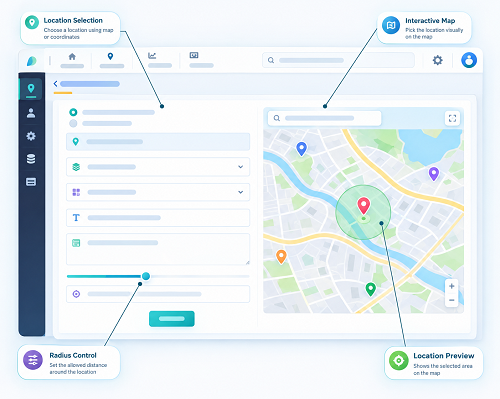
A geo-fence must be configured carefully. If the boundary is too small, employees may have difficulty marking attendance. If it is too large, employees could potentially check in from locations that are not part of the actual workplace.
For each office, branch, customer site, or project location, businesses should determine an appropriate boundary based on the physical environment.
Regular testing can help identify and correct configuration problems.
3. Poor Internet Connectivity
GPS tracking applications often rely on mobile data or Wi-Fi to transmit location information to the central system.
Employees working in rural areas, construction sites, remote locations, basements, or areas with weak network coverage may experience connectivity problems.
When connectivity is poor, location updates may be delayed or temporarily unavailable.
Businesses should choose systems that can handle intermittent connectivity appropriately, such as storing relevant information on the device and synchronizing it when connectivity becomes available, where supported.
4. Mobile Device Limitations
GPS tracking depends partly on the employee's smartphone or other tracking device.
Different devices may have different:
- GPS capabilities
- Operating systems
- Battery performance
- Location permissions
- Background-app restrictions
- Hardware specifications
Businesses should ensure that employees use supported devices and that required location permissions are configured correctly.
5. Battery Consumption
Continuous GPS usage can consume more battery power than ordinary mobile applications.
Field employees who spend long hours outside the office may be particularly affected if their phones are being used for navigation, communication, attendance, and GPS tracking simultaneously.
Businesses should avoid unnecessary location tracking and configure location updates according to actual operational requirements.
6. Employee Privacy Concerns
Employee location monitoring can raise privacy concerns, particularly when employees use personal smartphones.
Employees may want to know:
- When location tracking is active
- What information is collected
- Why location information is required
- Who can access the data
- How long the data is retained
Businesses should establish a clear location-monitoring policy and communicate it to employees.
GPS tracking should be limited to legitimate business requirements and implemented in accordance with applicable privacy and employment requirements.
7. Excessive Tracking
Tracking employee locations continuously may not always be necessary.
For attendance management, a business may only need location verification when an employee checks in or checks out. For field operations, periodic location updates may be sufficient in some situations.
Businesses should determine the appropriate tracking frequency based on the actual use case rather than collecting more location information than necessary.
8. False Alerts
GPS and geo-fencing systems can sometimes generate unexpected alerts because of GPS inaccuracies, temporary connectivity problems, or incorrectly configured boundaries.
For example, an employee standing near the edge of a geo-fence may appear to move outside the boundary even though they remain at the workplace.
To reduce false alerts, businesses should use practical geo-fence sizes and avoid treating every location event as an immediate policy violation.
9. Employees Moving Between Locations
Some employees work across multiple locations during the same day.
Sales representatives, service technicians, auditors, delivery employees, and project managers may visit several offices or customer sites.
A system designed around one fixed workplace may not work well for these employees. Businesses should allow multiple approved locations or assignment-based geo-fencing where required.
10. Managing Multiple Office Locations
Organizations with many branches may need to create and maintain numerous geo-fences.
Each location may have different:
- Employees
- Shifts
- Attendance rules
- Working hours
- Geo-fence boundaries
- Managers
Without centralized administration, maintaining these settings can become complicated.
A workforce management platform with location-wise administration and reporting can make multi-location management easier.
11. GPS Spoofing and Attendance Fraud
Some employees may attempt to manipulate location information using unauthorized applications or device settings.
Businesses that depend heavily on location-based attendance should consider combining geo-fencing with additional verification methods.
Depending on business requirements, these may include:
- Mobile authentication
- Face recognition
- Device verification
- Location validation
- Time-based rules
- Attendance audit reports
Using multiple verification methods can provide stronger attendance controls than relying on GPS alone.
12. Integration With Existing Systems
GPS and geo-fencing software may need to work with existing attendance, HR, payroll, shift, leave, or task-management systems.
If systems do not integrate properly, businesses may end up maintaining information across multiple platforms.
An integrated workforce management solution can connect location-based attendance with other employee-management processes, reducing duplicate data entry.
13. Data Storage and Security
GPS tracking can generate a significant amount of location-related information. Businesses need to consider how this information is stored, accessed, protected, and retained.
Access should be limited to authorized personnel, and organizations should establish appropriate data-security and retention practices.
Sensitive employee location information should be handled carefully to reduce the risk of unauthorized access.
14. Employee Adoption
Even technically reliable GPS software can face adoption problems if employees do not understand how it works.
Employees may experience difficulty with:
- Enabling location permissions
- Using the mobile application
- Checking in correctly
- Understanding geo-fence rules
- Keeping GPS enabled when required
Proper onboarding, simple instructions, and employee support can improve adoption.
15. Different Working Environments
GPS tracking behaves differently in different environments.
An outdoor construction site may provide better GPS visibility than an indoor office located inside a large commercial building.
Businesses should test their chosen system in the actual environments where employees work instead of assuming that GPS performance will be identical everywhere.
How Businesses Can Overcome GPS and Geo-fencing Challenges
A practical approach can include:
- Choose reliable GPS-enabled workforce software.
- Configure geo-fences based on actual workplace conditions.
- Test GPS accuracy at every important location.
- Avoid unnecessarily small geo-fence boundaries.
- Provide clear employee instructions.
- Configure tracking frequency according to business needs.
- Establish transparent location-monitoring policies.
- Provide multiple approved locations for mobile employees where necessary.
- Combine GPS with other attendance-verification methods when appropriate.
- Regularly review location reports and system alerts.
GPS and Geo-fencing Should Support Workforce Management
GPS tracking and geo-fencing should not be treated as standalone surveillance technologies. Their primary value comes from helping businesses solve practical workforce-management problems.
For example, a field service company can use geo-fencing to verify that a technician reached a customer location. A construction company can use location-based attendance at project sites. A sales organization can use GPS information to support field-visit management.
The technology becomes more useful when combined with attendance management, shift scheduling, task management, leave management, and payroll processes.
Conclusion
Geo-fencing and GPS tracking can significantly improve workforce visibility, but businesses need to address several practical challenges before implementing them. GPS accuracy, connectivity, device limitations, battery usage, incorrect geo-fence configuration, employee privacy, false alerts, and multi-location management can all affect system effectiveness.
By configuring geo-fences carefully, using appropriate tracking settings, educating employees, protecting location data, and integrating GPS with attendance and workforce-management software, businesses can make location-based employee management more reliable and practical.
The goal should be to use GPS and geo-fencing to improve attendance accuracy, field operations, and workforce coordination while maintaining transparency and responsible data practices.
,p>Common GPS and geo-fencing issues such as weak signals, incorrect boundaries, battery usage, privacy concerns, and false location exceptions can be managed through InnBuilt Field Management Software with configurable tolerances, permissions, and review workflows.