How Automated Payroll Software Manages PF, ESI, and Professional Tax
How Automated Payroll Software Manages PF, ESI, and Professional Tax
Managing payroll involves more than calculating employee salaries. Businesses in India may also need to calculate and manage statutory deductions such as Provident Fund (PF), Employees’ State Insurance (ESI), and Professional Tax (PT), depending on employee eligibility and applicable state rules.
When these calculations are performed manually, HR and payroll teams may need to maintain employee records, check applicable rules, calculate deductions, prepare reports, and complete statutory processes every month. Automated payroll software can simplify these activities by applying configured payroll rules and integrating statutory calculations into the salary-processing workflow.
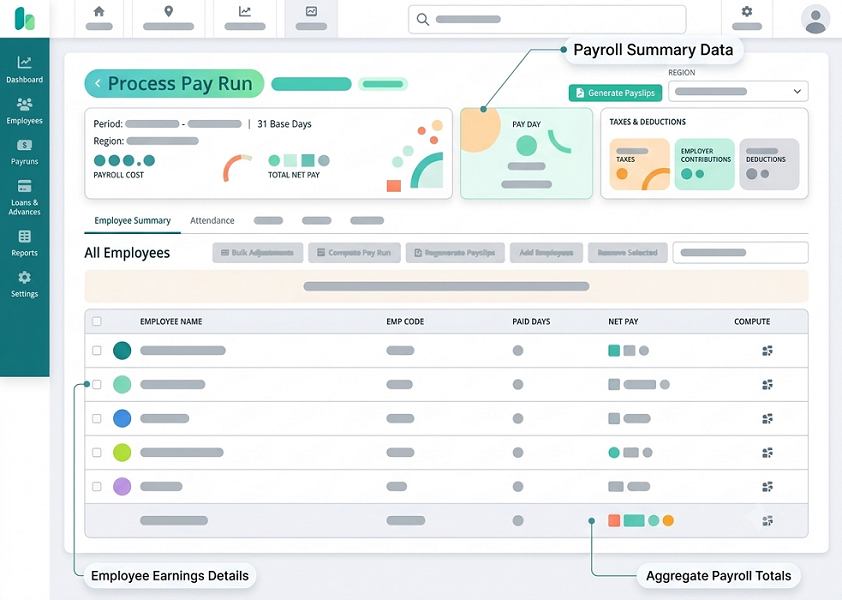
What Is Automated Payroll Software?
Automated payroll software is a system that helps businesses calculate and process employee salaries using predefined salary structures, attendance information, leave records, deductions, and statutory rules.
A payroll system can help automate activities such as:
- Salary calculation
- PF calculation
- ESI calculation
- Professional Tax calculation
- Income tax-related payroll deductions
- Attendance and leave integration
- Overtime calculation
- Payslip generation
- Payroll reports
- Statutory reports
- Payroll approval workflows
This allows HR teams to manage payroll through a structured and repeatable process instead of relying heavily on spreadsheets and manual calculations.
How Payroll Software Manages PF
Provident Fund (PF) is a statutory social-security contribution applicable to covered establishments and eligible employees under the relevant provisions.
PF calculations can depend on factors such as the employee's eligible wages, applicable contribution rules, salary structure, and organizational configuration.
Automated PF Calculation
Payroll software can use employee salary information and configured PF rules to calculate the applicable employee and employer contributions.
Instead of calculating PF separately for every employee, HR teams can configure the relevant payroll rules within the system. During payroll processing, the software uses those rules to calculate the applicable contribution.
PF Deduction in Salary
Once the applicable employee contribution is calculated, the amount can be included as a deduction in the employee's payroll calculation.
The system can then show the relevant PF deduction on the employee's payslip, providing greater visibility into salary components.
PF Reports
Automated payroll systems may also provide reports containing information required for payroll review and statutory processing. Depending on the software, these reports can help payroll teams verify employee contributions and prepare required records.
How Payroll Software Manages ESI
Employees’ State Insurance (ESI) provides social-security benefits to eligible employees covered under the ESI framework.
ESI applicability and contribution calculations depend on the applicable statutory rules and employee eligibility.
Automated ESI Eligibility Checks
Payroll software can store employee salary and eligibility information and apply configured ESI rules during payroll processing.
This helps payroll teams identify employees who need to be included in ESI calculations based on the applicable criteria.
Automated ESI Contributions
Once an employee is identified as eligible, the payroll system can calculate the applicable employee and employer contributions according to the configured rules.
The calculated employee contribution can be included as a salary deduction, while the employer contribution can be recorded separately for payroll and statutory reporting purposes.
ESI Payroll Records
Automated payroll software can maintain ESI-related payroll information along with employee salary records. This gives HR and payroll teams a centralized view of applicable contributions and makes monthly payroll review easier.
How Payroll Software Manages Professional Tax
Professional Tax (PT) is a state-level tax applicable in certain Indian states and subject to the rules prescribed by the relevant state or local authority.
Because Professional Tax rules can vary by state, payroll teams need to apply the appropriate rules based on the employee's applicable location and circumstances.
State-Specific Professional Tax Rules
Automated payroll software can be configured with applicable Professional Tax rules for different states.
For businesses operating across multiple locations, this can help payroll teams manage different PT calculations within the same payroll system.
Automatic PT Deduction
Once the applicable Professional Tax rule is configured, the system can calculate the employee's deduction during payroll processing.
The applicable PT amount can then be reflected in the employee's salary calculation and payslip.
PT Reports
Payroll systems can generate Professional Tax-related reports that help HR and payroll teams review deductions and prepare relevant statutory records or filings, depending on the software's capabilities.
PF, ESI, and PT in One Payroll Workflow
One of the major advantages of payroll automation is that statutory deductions can be incorporated into the overall payroll process.
A typical automated workflow can include:
Employee Data → Salary Structure → Attendance & Leave → Statutory Calculations → Salary Calculation → Payroll Review → Approval → Payslip & Reports
This reduces the need for HR teams to perform separate calculations for every statutory component.
Benefits of Automating PF, ESI, and Professional Tax
1. Reduces Manual Calculations
HR teams do not have to repeatedly calculate PF, ESI, and PT for every employee using spreadsheets. Configured rules can be applied automatically during payroll processing.
2. Saves Payroll Processing Time
When statutory calculations are integrated with salary processing, payroll teams can process large employee populations more efficiently.
3. Helps Reduce Data Entry Errors
Using centralized employee and salary information can reduce repeated manual data entry and the associated risk of calculation or transcription errors.
4. Supports Multiple Locations
Businesses with employees working across different states can configure applicable state-specific Professional Tax rules and manage payroll information centrally.
5. Improves Payroll Transparency
Employees can view applicable deductions on their payslips. This makes it easier to understand how PF, ESI, Professional Tax, and other deductions affect net salary.
6. Simplifies Payroll Reports
Automated payroll systems can generate payroll and statutory reports from processed data, reducing the time required to prepare reports manually.
7. Creates Consistent Payroll Processes
Automation helps businesses apply configured payroll rules consistently across employees, while allowing HR teams to review exceptions and special cases.
Why Regular Compliance Updates Matter
Payroll automation can simplify statutory calculations, but businesses should not assume that software automatically guarantees compliance.
PF, ESI, Professional Tax, and other payroll requirements can be affected by changes in legislation, contribution rates, wage limits, eligibility criteria, state rules, notifications, or filing procedures.
Therefore, businesses should:
- Keep payroll rules updated
- Verify statutory configurations
- Review government notifications
- Check employee eligibility
- Validate payroll calculations
- Review statutory reports before submission
- Ensure required payments and filings are completed on time
Payroll software should support compliance management, while appropriate human review remains important.
Automated Payroll Software vs Manual Payroll
| Manual Payroll | Automated Payroll Software |
|---|---|
| PF calculated manually | PF calculation based on configured rules |
| ESI calculations handled separately | ESI integrated into payroll processing |
| PT rules checked manually | State-specific PT rules can be configured |
| Spreadsheet-based records | Centralized payroll records |
| Manual report preparation | Automated payroll/statutory reports |
| Repeated data entry | Reusable employee information |
| More administrative work | Reduced repetitive workload |
| Manual payslip preparation | Automated payslip generation |
Who Should Use Automated Payroll Software?
Automated payroll software can benefit businesses that need to manage payroll for multiple employees, particularly organizations with:
- Growing employee populations
- Multiple branches or locations
- Employees across different states
- Complex salary structures
- Shift-based employees
- Attendance-linked payroll
- Overtime calculations
- Multiple statutory deductions
- Frequent payroll reporting requirements
For multi-location organizations, centralized payroll automation can be particularly useful because HR teams can manage employee payroll information and applicable rules within one system.
Conclusion
Automated payroll software helps businesses manage PF, ESI, and Professional Tax by incorporating statutory calculations into the regular payroll workflow. It can reduce repetitive calculations, simplify deductions, improve payroll data management, and generate useful payroll and statutory reports.
For businesses in India, automation can make monthly payroll processing more organized and efficient. However, statutory rules should always be configured correctly and reviewed regularly because PF, ESI, Professional Tax, and related requirements may change.
When payroll automation is combined with attendance, leave, employee management, and reporting, HR teams can create a more streamlined payroll process while reducing routine administrative workload.
Frequently Asked Questions
1. Can payroll software automatically calculate PF?
Yes. Payroll software can calculate PF contributions using employee salary information and configured applicable PF rules.
2. Can automated payroll software calculate ESI?
Yes. Payroll software can calculate applicable employee and employer ESI contributions based on configured eligibility and contribution rules.
3. Can payroll software manage Professional Tax for different states?
Many payroll systems support state-specific Professional Tax configurations. This can help businesses manage employees working in different states, subject to the software's supported jurisdictions and current rule configuration.
4. Does payroll automation guarantee statutory compliance?
No software by itself guarantees compliance. Payroll configurations need to be kept current, and businesses should review applicable laws, notifications, calculations, payments, and filings.
5. Can PF, ESI, and Professional Tax appear on employee payslips?
Yes. Payroll software can display applicable statutory deductions on employee payslips, depending on the system's payslip configuration.
6. How does payroll automation reduce HR workload?
It reduces repetitive tasks such as calculating deductions manually, tracking attendance/leave separately, creating individual payslips, and consolidating statutory data for monthly reporting.
Staying compliant with local tax laws and statutory contributions requires constant precision. InnBuilt Payroll manages statutory compliance effortlessly by auto-calculating PF, ESI, and PT deductions for error-free filings. This automated accuracy protects organizations from costly legal penalties and ensures smooth end-of-month reporting.