How Automated Shift Scheduling Saves HR Teams Time
How Automated Shift Scheduling Saves HR Teams Time
Managing employee shifts can be a time-consuming responsibility for HR teams, especially in businesses with multiple departments, locations, rotating shifts, or large workforces. Creating schedules manually often involves spreadsheets, attendance records, employee availability, leave requests, and frequent last-minute changes.
Automated shift scheduling software helps HR teams simplify this process by using predefined rules, employee information, availability, and business requirements to create and manage work schedules.
By reducing repetitive administrative work, automated scheduling allows HR professionals to spend more time on important activities such as employee engagement, workforce planning, compliance, and organizational development.
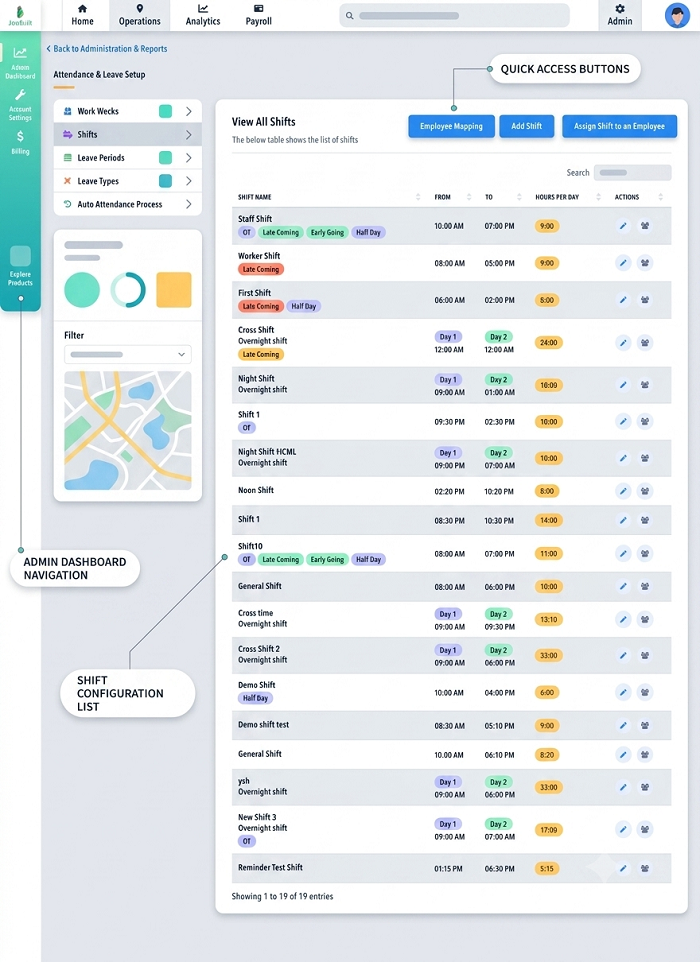
What Is Automated Shift Scheduling?
Automated shift scheduling is a software-based approach to creating and managing employee work schedules.
Instead of preparing every roster manually, HR teams can define scheduling rules and assign employees based on factors such as:
- Working hours
- Employee availability
- Shift requirements
- Skills and roles
- Department
- Work location
- Weekly offs
- Leave schedules
- Staffing requirements
The software can then help generate schedules and make them easier to manage when changes occur.
How Automated Shift Scheduling Saves HR Time
1. Reduces Manual Roster Preparation
Creating employee rosters manually can take hours every week. HR teams may need to check employee availability, previous schedules, leave applications, and staffing requirements before assigning each shift.
Automated scheduling reduces this repetitive work by using predefined rules and employee information to assist with roster creation.
This allows HR teams to create schedules faster and focus on reviewing the results instead of preparing every shift from scratch.
2. Makes Shift Planning Faster
Businesses with rotating or multiple shifts often need to prepare schedules several weeks in advance.
For example, a manufacturing company may have morning, evening, and night shifts. A retail business may need different schedules for weekdays and weekends.
Automated scheduling helps HR teams organize these requirements in a centralized system, making shift planning faster and more structured.
3. Handles Employee Availability
Employees may have different availability based on their roles, working arrangements, or approved schedules.
An automated scheduling system can use employee availability information when creating rosters.
This can reduce the time HR teams spend checking individual employee availability before assigning shifts.
4. Simplifies Shift Changes
Shift schedules frequently change because of leave, absenteeism, employee transfers, workload changes, or business requirements.
With manual scheduling, every change may require updating spreadsheets and informing several employees.
Automated shift management allows HR teams to update schedules centrally and communicate changes through the system.
5. Reduces Scheduling Conflicts
Manual scheduling can result in problems such as:
- Overlapping shifts
- Too many working hours
- Incorrect employee assignments
- Insufficient staffing
- Employees being assigned to unavailable shifts
Automated scheduling rules can help identify or prevent common scheduling conflicts before the roster is finalized.
6. Saves Time on Employee Communication
HR teams often spend considerable time informing employees about their shifts.
A centralized shift-management system can provide employees with access to their schedules through a web portal or mobile application, depending on the software.
Employees can check information such as:
- Shift date
- Start time
- End time
- Work location
- Assigned shift
- Shift changes
This reduces repetitive calls, emails, and messages to HR.
7. Makes Leave and Shift Planning Easier
Employee leave can directly affect shift coverage.
When an employee applies for approved leave, HR may need to find another employee to cover the shift. An automated system can bring leave information and shift schedules together, making it easier to identify scheduling gaps.
This can reduce the amount of manual cross-checking required by HR teams.
8. Supports Multiple Shifts
Organizations operating throughout the day may have several shifts.
Examples include:
- General shift
- Morning shift
- Afternoon shift
- Evening shift
- Night shift
- Rotational shift
Automated scheduling helps HR teams manage different shift patterns without maintaining separate spreadsheets for every department.
9. Helps Manage Multiple Locations
Businesses with multiple offices, stores, factories, branches, or project sites often have location-specific staffing requirements.
Automated shift scheduling can help HR teams create schedules based on work locations and employee assignments.
This provides a centralized view of workforce schedules across different sites.
10. Reduces Repetitive Data Entry
Manual scheduling often requires HR teams to enter the same employee and shift information into multiple files.
Automated workforce management software can store employee information centrally and use it across scheduling and attendance processes.
This reduces repetitive data entry and the possibility of basic administrative errors.
Automated Scheduling and Attendance Management
Shift scheduling becomes even more useful when integrated with employee attendance software.
The scheduled shift can be compared with actual attendance information to identify:
- Late arrivals
- Early departures
- Absences
- Overtime
- Missed shifts
- Shift deviations
Instead of manually comparing attendance registers with shift rosters, HR teams can review this information through a centralized system.
Automated Scheduling and Payroll
Employee shifts can affect payroll calculations, particularly when organizations manage overtime, night shifts, attendance deductions, or shift allowances.
When shift schedules are connected with attendance and payroll processes, HR teams can reduce manual calculations and data transfer.
For example, scheduled working hours can be compared with actual attendance to support overtime or attendance-related payroll processing according to the organization's rules.
Benefits Beyond Saving HR Time
Although saving administrative time is a major advantage, automated scheduling can also improve workforce management.
Better Workforce Utilization
Managers can understand staffing requirements and assign employees more systematically.
Improved Employee Experience
Employees can access their schedules without repeatedly contacting HR.
Fewer Scheduling Errors
Automated rules can help reduce common manual scheduling mistakes.
Faster Schedule Updates
Changes can be made centrally and communicated more quickly.
Better Workforce Visibility
HR and managers can see employee schedules across departments and locations.
How to Implement Automated Shift Scheduling
Businesses can introduce automated scheduling through a structured process:
- Identify current shift patterns.
- Define employee working hours and availability.
- Set up departments and work locations.
- Create shift templates.
- Define scheduling rules.
- Configure weekly offs and leave rules.
- Assign employees to appropriate shifts.
- Publish schedules through the system.
- Allow managers to make approved changes.
- Connect schedules with attendance and payroll.
Tips for Getting the Most From Automated Shift Scheduling
To maximize the benefits:
- Keep employee information updated.
- Create standardized shift templates.
- Define clear scheduling rules.
- Review staffing requirements regularly.
- Give employees access to their schedules.
- Monitor shift changes.
- Integrate scheduling with attendance.
- Use reports to identify staffing patterns.
- Review overtime and workload distribution.
Automation works best when the underlying employee and scheduling information is accurate.
Who Can Benefit From Automated Shift Scheduling?
Automated shift scheduling can be useful for many types of businesses, including:
- Manufacturing companies
- Retail businesses
- Hospitals and healthcare organizations
- Restaurants and hotels
- Security services
- Construction companies
- Logistics businesses
- Customer support teams
- IT and service organizations
- Businesses with field employees
Any organization that manages multiple employees and changing work schedules can potentially benefit from automated scheduling.
Conclusion
Automated shift scheduling can save HR teams significant time by reducing manual roster preparation, simplifying shift changes, managing employee availability, and connecting schedules with attendance and payroll processes.
Instead of spending hours maintaining spreadsheets and communicating routine schedule updates, HR teams can use centralized scheduling software to manage shifts more efficiently.
When combined with attendance management, leave management, GPS attendance, employee mobile apps, task management, and payroll automation, automated shift scheduling can become an important part of a complete workforce management system.
For growing organizations, moving from manual shift planning to automated scheduling can reduce administrative workload while giving HR teams and managers better visibility and control over employee schedules.
Automated rostering in InnBuilt Shift Management Software saves HR teams time by generating schedules from employee availability, shift rules, weekly offs, and staffing needs. Notifications, swap approvals, and attendance matching further reduce manual coordination and last-minute corrections.