How GPS Attendance and Geo-fencing Work Together
How GPS Attendance and Geo-fencing Work Together
Managing employee attendance can become difficult when employees work across different locations, customer sites, construction projects, branches, or remotely. Traditional attendance methods may not provide enough information to verify where an employee marked attendance.
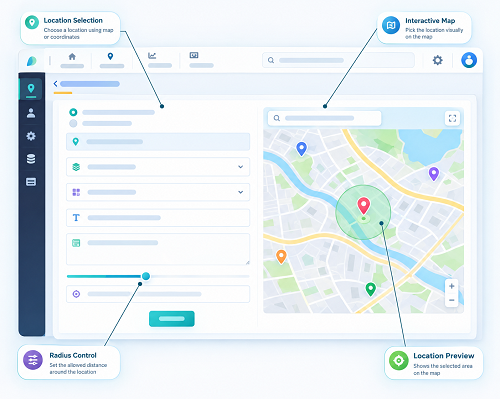
GPS attendance and geo-fencing work together to provide location-based attendance verification. GPS identifies an employee's approximate location, while geo-fencing checks whether that location falls within an approved workplace boundary.
This combination can help businesses improve attendance accuracy, reduce unauthorized attendance, and simplify workforce management.
What Is GPS Attendance?
GPS attendance is an attendance system that uses the location capabilities of a mobile device to record where an employee marks attendance.
When an employee checks in or checks out through a mobile attendance app, the system can capture location information along with the attendance event, depending on the organization's settings and applicable permissions.
For example:
Employee → Opens mobile app → Marks attendance → Location captured → Attendance recorded
GPS attendance is particularly useful for:
- Field employees
- Sales teams
- Service technicians
- Construction workers
- Delivery teams
- Remote employees
- Employees working at multiple locations
- Employees visiting customer sites
GPS by itself can tell the system where the attendance event occurred. However, businesses may also want to determine whether that location is an approved workplace.
This is where geo-fencing becomes useful.
What Is Geo-fencing?
Geo-fencing creates a virtual geographical boundary around a specific physical location.
A business can create a geo-fence around:
- Corporate offices
- Factories
- Warehouses
- Retail stores
- Construction sites
- Hospitals
- Schools
- Customer locations
- Project sites
For example, a company may create a geo-fence around its Chennai office. Employees assigned to that location can be required to be within the defined area before attendance is accepted.
A geo-fence can be configured according to the capabilities of the attendance software and the organization's requirements.
How GPS Attendance and Geo-fencing Work Together
GPS attendance and geo-fencing perform different but complementary functions.
GPS answers:
"Where is the employee?"
Geo-fencing answers:
"Is the employee within the approved location?"
Together, they provide stronger location-based attendance verification.
Typical Workflow
Step 1: Create a workplace location
The administrator adds the office, factory, branch, or project site to the attendance system.
Step 2: Define the geo-fence
A virtual boundary is created around the approved location.
Step 3: Assign employees
Employees are assigned to the relevant workplace, shift, project, or location.
Step 4: Employee opens the attendance app
The employee uses the authorized mobile application to mark attendance.
Step 5: GPS location is captured
The system checks the device's available location information.
Step 6: Geo-fence is verified
The software determines whether the employee's location falls within the configured boundary.
Step 7: Attendance is recorded
If the attendance conditions are satisfied, the system records the check-in or check-out along with the relevant attendance information.
Simple Example
Consider a construction company with employees working at three project sites.
The company creates three geo-fenced locations:
| Project | Location | Attendance Boundary |
|---|---|---|
| Project A | Chennai | Configured geo-fence |
| Project B | Coimbatore | Configured geo-fence |
| Project C | Madurai | Configured geo-fence |
An employee assigned to Project A attempts to check in.
The GPS location indicates that the employee is near Project A. The system then checks the geo-fence.
If the employee is within the permitted boundary, the attendance can be accepted according to company policy.
If the employee is outside the permitted boundary, the system can reject the attendance, flag it for review, or request an exception, depending on the software configuration.
GPS Attendance vs. Geo-fencing
Although they are often used together, GPS attendance and geo-fencing are not the same.
| GPS Attendance | Geo-fencing |
|---|---|
| Captures location information | Defines an approved geographical boundary |
| Helps identify where attendance was marked | Checks whether the location is within the boundary |
| Can support field attendance | Helps restrict attendance to approved locations |
| Provides location verification | Provides boundary-based verification |
| Useful for mobile employees | Useful for offices, branches, and project sites |
The combination provides a more complete attendance verification process.
Benefits of Combining GPS Attendance and Geo-fencing
1. Improves Attendance Verification
Businesses can verify whether an attendance event occurred at an approved location instead of relying only on manual confirmation.
2. Helps Reduce Unauthorized Attendance
Geo-fencing can prevent attendance from being accepted outside designated locations when the organization's attendance policy requires location restrictions.
3. Supports Field Employees
Employees who do not work from a fixed office can use mobile attendance while visiting customer sites, project locations, or assigned territories.
4. Simplifies Multi-Location Attendance
Companies with multiple branches can configure separate locations and geo-fences for different employee groups.
5. Supports Construction and Project-Based Work
Construction companies can create geo-fences around project sites and associate employees with the appropriate location.
6. Reduces Manual Attendance Work
HR teams can reduce dependence on paper registers, spreadsheets, and manual location verification.
7. Creates Digital Attendance Records
Attendance events can be maintained digitally along with relevant location and time information, making records easier to review.
8. Supports Attendance and Payroll Processes
Verified attendance data can be used as an input for working hours, leave, overtime, and payroll processes, subject to company rules.
GPS Attendance and Geo-fencing for Field Employees
Field employees frequently move between different locations. Examples include:
- Sales representatives
- Service engineers
- Delivery personnel
- Installation teams
- Maintenance workers
- Healthcare field staff
- Insurance agents
- Construction teams
For these employees, fixed biometric machines may not always be practical.
A mobile attendance application can allow an employee to mark attendance from an approved location.
For example:
Employee reaches customer site → Opens app → GPS verifies location → Geo-fence checks approved area → Attendance recorded
This provides businesses with a digital method for managing location-based attendance.
GPS Attendance, Geo-fencing, and Face Attendance
Businesses can combine multiple verification methods when appropriate.
For example:
Face verification + GPS location + Geo-fence + Time → Attendance
Face verification can help confirm the employee's identity.
GPS can provide location information.
Geo-fencing can determine whether the employee is inside the approved area.
Time information records when the attendance event occurred.
Together, these mechanisms can provide multiple layers of attendance verification.
However, businesses should configure these features according to their actual operational requirements rather than collecting unnecessary employee information.
How Geo-fencing Helps Prevent Location-Based Attendance Issues
Without a geo-fence, a mobile attendance system may capture an employee's location but may not enforce a specific workplace boundary.
With geo-fencing, the system can apply a location rule.
For example:
Approved location: Factory premises
Geo-fence: Configured around factory
Employee location: Inside boundary
Result: Attendance can be accepted
Another employee may attempt to check in from outside the permitted area:
Approved location: Factory premises
Geo-fence: Configured around factory
Employee location: Outside boundary
Result: Attendance may be blocked or flagged according to company policy
This can help HR teams identify attendance events that require attention.
Use Cases Across Different Industries
Manufacturing
Factories can create geo-fences around production facilities and monitor attendance events from authorized workplace locations.
Construction
Project sites can have separate geo-fences so employees can mark attendance at their assigned worksite.
Retail
Businesses with multiple stores can assign employees to specific branches and configure location-based attendance rules.
Sales and Marketing
Field sales teams can use mobile attendance while working at approved customer or business locations, where appropriate.
Service Businesses
Technicians can record attendance when they reach assigned service locations.
Logistics
Delivery and operations teams can use mobile attendance and location verification as part of workforce management.
What Happens When an Employee Is Outside the Geo-fence?
The system's response depends on the organization's attendance policy and software configuration.
Possible actions include:
- Preventing attendance from being marked
- Showing a location warning
- Recording the event for HR review
- Allowing an attendance request with justification
- Applying an exception workflow
- Allowing authorized managers to approve the attendance
A good system should provide flexibility for legitimate situations.
For example, an employee may be temporarily outside the boundary because of an emergency assignment, customer visit, road closure, or change in work location.
GPS Accuracy and Geo-fencing Limitations
GPS and geo-fencing are useful, but they are not perfect.
Location accuracy can be affected by:
- Indoor environments
- Weak GPS signals
- Mobile network conditions
- Device settings
- Building structures
- Device-level permissions
- Environmental conditions
Therefore, businesses should avoid treating every location mismatch as employee misconduct.
A reasonable attendance system should provide an exception or review process.
Employee Privacy and Data Protection
GPS attendance involves employee location information, so privacy should be considered when implementing the system.
Businesses should:
- Clearly explain why location information is collected
- Use location data only for legitimate business purposes
- Avoid unnecessary continuous tracking
- Define when location information is collected
- Limit access to authorized personnel
- Apply appropriate security controls
- Establish suitable data retention practices
- Provide clear employee policies
- Follow applicable privacy and employment requirements
Geo-fencing for attendance does not automatically mean that an organization needs to continuously track an employee's location.
The system can instead be configured around specific attendance events or approved work activities where appropriate.
Best Practices for Implementing GPS Attendance and Geo-fencing
1. Define Clear Attendance Locations
Identify exactly where employees are expected to work before creating geo-fences.
2. Set Practical Boundaries
A boundary should be appropriate for the physical workplace. Extremely small boundaries may create unnecessary attendance failures because of normal GPS accuracy limitations.
3. Assign Employees Correctly
Ensure employees are linked to the correct office, branch, project, or worksite.
4. Create an Exception Process
Provide a method for employees to explain legitimate location-related attendance issues.
5. Train Employees
Explain how mobile attendance, GPS permissions, geo-fencing, and attendance exceptions work.
6. Protect Location Information
Use appropriate access controls and security measures to protect attendance and location records.
7. Integrate With Other HR Functions
Where useful, connect attendance with:
- Shift management
- Leave management
- Overtime
- Working hours
- Payroll
- Employee records
- Reports
This can reduce duplicate HR work.
GPS Attendance and Geo-fencing Workflow
A complete location-based attendance process can look like this:
Employee → Mobile Attendance App → Identity Verification → GPS Location → Geo-fence Verification → Check-in/Check-out → Attendance Record → HR Dashboard → Payroll
This workflow allows businesses to bring attendance, location verification, and workforce management into one process.
How to Choose GPS and Geo-fencing Attendance Software
Before selecting a solution, businesses should evaluate:
- Mobile attendance support
- GPS location verification
- Geo-fence configuration
- Multiple workplace support
- Employee assignment by location
- Face or identity verification options
- Shift management
- Leave management
- Overtime tracking
- Payroll integration
- Attendance reports
- Exception handling
- Role-based access
- Data security
- Privacy controls
- Scalability
- Ease of use
The right solution should match the company's workforce structure rather than simply offering the largest number of features.
Conclusion
GPS attendance and geo-fencing work together by combining location identification with location-based rules. GPS helps determine where an employee's attendance event occurs, while geo-fencing checks whether that location is within an approved workplace boundary.
This combination can be particularly useful for businesses managing multiple branches, field employees, construction sites, sales teams, service workers, and mobile workforces.
When combined with features such as face attendance, shift management, leave, overtime, and payroll integration, GPS and geo-fencing can become part of a broader employee attendance and workforce management system.
The key is to implement these technologies with clear policies, practical geo-fence boundaries, appropriate exception handling, and respect for employee privacy.
InnBuilt GPS Attendance combines employee location data with configurable geo-fences to verify both when and where attendance is marked. This helps managers approve genuine check-ins while maintaining centralised records for payroll and reporting.