How to Choose the Best Shift Management Software for Your Business
How to Choose the Best Shift Management Software for Your Business
Managing employee shifts can become difficult as a business grows. HR teams and managers may need to create rosters, manage rotating shifts, handle employee availability, fill staffing gaps, track attendance, and make last-minute schedule changes.
Using spreadsheets or manual registers for these activities can consume significant time and may lead to scheduling errors. Shift management software helps businesses automate and centralize shift planning, employee scheduling, attendance, and workforce coordination.
However, choosing the right solution requires more than selecting software with the most features. Businesses should evaluate the system based on their workforce size, shift patterns, locations, industry requirements, integrations, ease of use, and future growth.
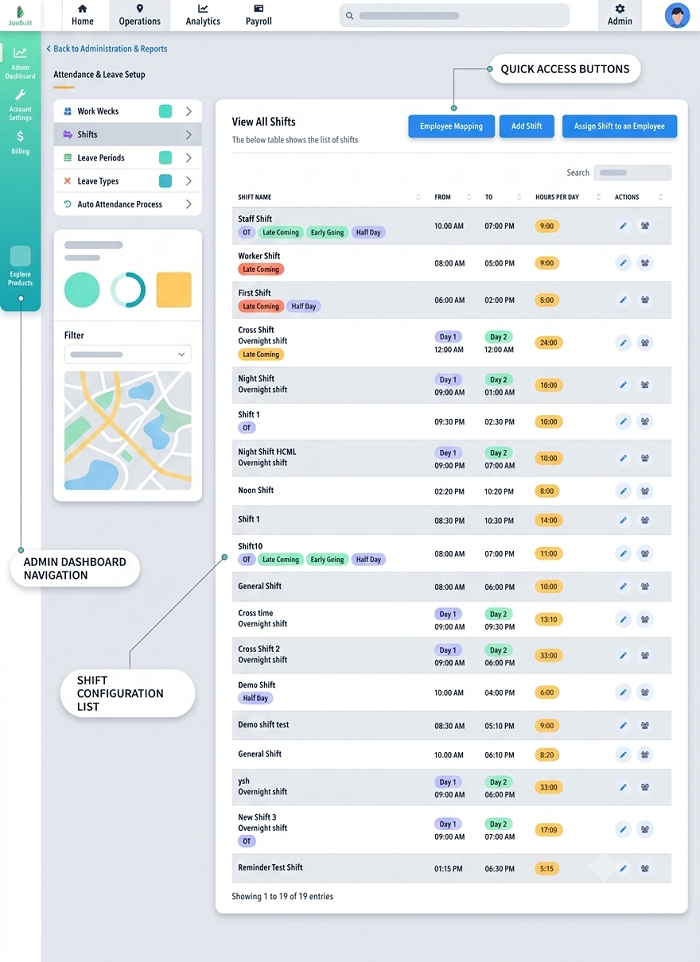
What Is Shift Management Software?
Shift management software is a digital solution that helps businesses create, assign, publish, and manage employee work schedules.
Depending on the system, it may support:
- Shift scheduling
- Rotational shifts
- Employee availability
- Shift swapping
- Attendance tracking
- Leave management
- Overtime management
- Multiple locations
- Mobile employee access
- Shift notifications
- Workforce reports
The goal is to replace repetitive manual scheduling processes with a centralized and organized system.
Why Businesses Need Shift Management Software
Manual shift management can create several challenges:
- Time-consuming roster preparation
- Scheduling conflicts
- Last-minute changes
- Poor visibility into employee availability
- Difficulty managing multiple locations
- Communication gaps
- Attendance mismatches
- Manual overtime calculations
Shift management software can help reduce these challenges by bringing employee schedules and workforce information into one platform.
Factors to Consider When Choosing Shift Management Software
1. Understand Your Scheduling Requirements
Before evaluating software, identify how your business currently manages shifts.
Consider:
- Number of employees
- Number of departments
- Number of locations
- Number of daily shifts
- Rotational schedules
- Weekend shifts
- Night shifts
- Employee availability
- Seasonal staffing
- Temporary workers
A small office with fixed working hours will have different requirements from a manufacturing company with multiple rotating shifts.
2. Look for Flexible Shift Scheduling
The software should allow HR teams to create different types of shifts according to business requirements.
Useful scheduling options may include:
- Fixed shifts
- Flexible shifts
- Rotational shifts
- Split shifts
- Overnight shifts
- Weekend shifts
- Custom shifts
The ability to create reusable shift templates can also save HR teams time.
3. Automated Shift Scheduling
Automation is one of the most valuable features to consider.
Instead of manually assigning every employee, the software can use predefined rules and employee information to help create schedules.
This can reduce administrative work and make it easier to manage large teams.
4. Employee Availability Management
Employee availability can change because of personal schedules, approved leave, temporary assignments, or other business requirements.
Choose software that allows employees or managers to update availability where appropriate.
This information can then be considered when creating schedules, helping reduce conflicts.
5. Shift Swap and Change Management
Employees may sometimes need to exchange shifts with colleagues.
A useful shift management system can provide a structured process for requesting and approving shift changes.
Instead of relying on phone calls, messaging applications, or spreadsheets, employees and managers can manage changes through a centralized workflow.
6. Attendance Integration
Shift schedules should ideally connect with employee attendance.
When shift management and attendance software are integrated, businesses can compare scheduled hours with actual working hours.
This can help identify:
- Late arrivals
- Early departures
- Absences
- Missed shifts
- Overtime
- Attendance deviations
This integration reduces the need for HR teams to manually compare separate records.
7. Leave Management Integration
Employee leave can affect shift coverage.
A good shift management system should work with leave information so managers can identify employees who are unavailable before finalizing a schedule.
This can make workforce planning easier and reduce unexpected staffing gaps.
8. Overtime Management
Employees may work beyond their scheduled hours, particularly in industries that operate around the clock.
The software should make it easy to identify overtime based on scheduled and actual working hours.
If connected with payroll, approved overtime information can potentially flow into payroll processing according to the organization's rules.
9. Mobile Application
A mobile application can be particularly useful for employees who are not always at a desk.
Employees should be able to access their schedules through their mobile devices and, depending on the system, perform actions such as:
- View upcoming shifts
- Receive schedule notifications
- Request shift changes
- Check attendance
- Submit requests
- View assigned work locations
Mobile access can improve communication between employees, managers, and HR teams.
10. Multiple Location Support
Businesses operating across different offices, branches, stores, factories, or project sites should choose software that supports multiple locations.
Managers should be able to view and manage schedules based on:
- Location
- Department
- Team
- Employee
- Shift
This is particularly important for organizations with distributed workforces.
11. GPS and Geo-fencing Support
For businesses with field or location-based employees, GPS and geo-fencing can add another layer of workforce management.
Geo-fencing can create virtual boundaries around approved workplaces, while GPS can support location-based attendance.
This can be useful for:
- Field service teams
- Sales employees
- Construction workers
- Delivery teams
- Remote employees
- Employees working across customer locations
Businesses should choose tracking features based on actual operational requirements and maintain clear employee location-monitoring policies.
12. Shift Notifications
Employees need timely information about their schedules.
The software should provide appropriate notifications for:
- New shift assignments
- Shift changes
- Upcoming shifts
- Shift cancellations
- Approved shift swaps
Clear notifications can reduce missed shifts and communication problems.
13. Reporting and Analytics
Reports help HR teams understand workforce scheduling patterns.
Useful reports may include:
- Employee shift schedules
- Department-wise schedules
- Location-wise schedules
- Attendance versus scheduled hours
- Overtime
- Absence
- Shift changes
- Staffing gaps
Reports can help managers identify recurring scheduling issues and improve workforce planning.
14. Payroll Integration
Shift schedules can influence payroll, particularly when businesses calculate overtime, shift allowances, attendance deductions, or other wage-related components.
A shift management solution that integrates with payroll can reduce duplicate data entry and manual calculations.
Before choosing software, check whether it supports your existing payroll process or provides suitable integration options.
15. Ease of Use
The software should be simple enough for HR administrators, managers, and employees.
A complicated system can increase training requirements and reduce adoption.
During a demo, test common activities such as:
- Creating a shift
- Assigning employees
- Publishing a roster
- Changing a shift
- Approving a swap
- Checking attendance
- Generating reports
If these tasks are difficult, the software may create additional administrative work instead of reducing it.
16. Security and Data Privacy
Employee schedules and attendance information should be protected appropriately.
Businesses should evaluate:
- User permissions
- Role-based access
- Account security
- Data protection
- Data storage
- Audit records
If GPS or location information is collected, businesses should also review how location data is handled and retained.
17. Scalability
Choose software that can grow with your business.
A solution should ideally support increasing numbers of:
- Employees
- Departments
- Locations
- Shifts
- Managers
- Field workers
Scalability can prevent businesses from having to replace their workforce management system as they expand.
18. Customer Support
Reliable support can make implementation easier.
Evaluate the provider's onboarding, training, documentation, support channels, and troubleshooting process.
This is especially important when migrating from spreadsheets or another attendance system.
Common Mistakes to Avoid
Businesses should avoid selecting shift management software based only on price or the number of features.
Common mistakes include:
- Choosing software without testing it
- Ignoring employee usability
- Failing to check attendance integration
- Overlooking mobile access
- Not considering multiple locations
- Ignoring future workforce growth
- Choosing unnecessary tracking features
- Failing to evaluate data security
- Not involving managers and employees in the evaluation
A trial or product demonstration can help identify whether the system fits the organization's actual workflow.
Conclusion
Choosing the best shift management software for your business requires a clear understanding of your workforce and scheduling requirements. Businesses should evaluate flexible scheduling, automation, employee availability, shift swaps, attendance integration, leave management, overtime, mobile access, reporting, payroll integration, security, and scalability.
For organizations with field employees or multiple workplaces, GPS attendance and geo-fencing can provide additional location-based workforce management capabilities.
The right shift management software should reduce manual HR work, improve schedule visibility, simplify communication, and connect employee schedules with attendance and payroll processes. A practical demo or trial is often the best way to determine whether a solution fits your business before implementation.
Businesses evaluating shift technology can choose InnBuilt Shift Management Software for flexible roster creation, rotational schedules, conflict alerts, employee availability, shift swaps, attendance integration, and payroll-ready reports. Configurable workflows allow the system to match different industries and operating hours.