How to Prevent Attendance Fraud with GPS and Geo-fencing
How to Prevent Attendance Fraud with GPS and Geo-fencing
Employee attendance fraud can create significant challenges for businesses. Practices such as proxy attendance, marking attendance from unauthorized locations, inaccurate manual records, and false check-in information can affect working-hour calculations, payroll, productivity, and workforce planning.
Traditional attendance methods may not always provide enough information to verify where an employee actually marked attendance. This is particularly challenging for businesses with field employees, multiple branches, construction sites, sales teams, and distributed workforces.
GPS attendance and geo-fencing can help businesses strengthen attendance verification by connecting employee check-ins with approved locations. GPS can provide location information associated with an attendance event, while geo-fencing can determine whether the employee is within a defined workplace boundary.
When implemented with appropriate policies and exception handling, these technologies can help reduce attendance fraud and improve the reliability of attendance records.
What Is Attendance Fraud?
Attendance fraud refers to intentionally providing inaccurate attendance information or attempting to bypass an organization's attendance rules.
Common examples include:
- Proxy attendance
- Checking in from an unauthorized location
- Sharing attendance credentials
- Falsifying attendance records
- Misrepresenting check-in or check-out times
- Marking attendance without being at the assigned workplace
- Manipulating manual attendance records
Not every attendance discrepancy is fraud. Technical issues, unexpected work assignments, GPS limitations, or genuine emergencies can also create incorrect attendance information.
Therefore, businesses should use technology to identify and verify exceptions, rather than automatically treating every unusual event as misconduct.
How GPS Attendance Helps Prevent Attendance Fraud
GPS attendance uses location information from an employee's mobile device when they perform an attendance action.
For example:
Employee → Opens Attendance App → Marks Check-In → Location Captured → Attendance Recorded
Depending on the software, the attendance record may contain information such as the employee, time, and relevant location information.
This gives managers additional context when reviewing attendance.
For example, if an employee is expected to work at a particular office but repeatedly attempts to check in from a substantially different location, the attendance events can be flagged for review.
How Geo-fencing Helps Prevent Attendance Fraud
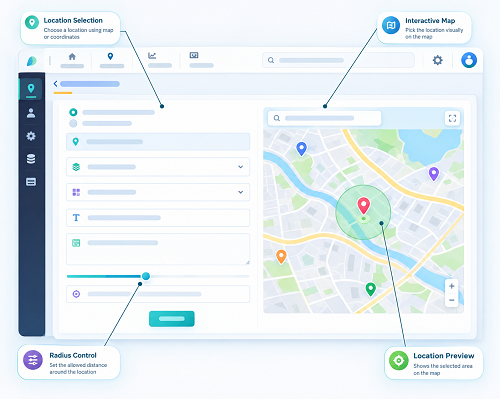
Geo-fencing creates a virtual boundary around an approved workplace.
For example, a business can create a geo-fence around:
- Office premises
- Factory
- Warehouse
- Retail store
- Construction site
- Project location
- Customer site
When an employee attempts to check in, the system can compare the available location information with the configured boundary.
The basic process is:
Employee Location → Geo-fence Check → Inside/Outside Boundary → Attendance Rule Applied
If the employee is within the approved area, attendance can proceed according to the organization's policy.
If the employee is outside the boundary, the system can restrict the check-in, flag it, or route it through an exception process.
GPS + Geo-fencing: A Stronger Attendance Verification Process
GPS and geo-fencing perform different functions.
GPS helps answer:
"Where is the employee's device?"
Geo-fencing helps answer:
"Is that location within the approved workplace?"
Together, they can create a location-based attendance verification process.
Example
Suppose a company creates a geo-fence around its Chennai office.
An employee attempts to check in from several kilometres away.
The system identifies the available location information and compares it with the office geo-fence.
Location outside approved boundary → Attendance exception
The manager can then review the event.
This is more informative than a traditional attendance record that simply says: Employee: Present
1. Reduce Proxy Attendance
Proxy attendance occurs when one person marks attendance on behalf of another employee.
Traditional attendance systems may make this difficult to detect.
Businesses can combine location verification with identity verification to create stronger controls.
For example:
Employee Identity Verification + GPS + Geo-fence + Time → Attendance
Face attendance or another appropriate identity-verification method can help confirm who is marking attendance.
GPS and geo-fencing can then provide location-related verification.
This layered approach can make unauthorized attendance practices more difficult.
2. Restrict Check-Ins From Unauthorized Locations
One common attendance issue is an employee attempting to mark attendance from a location that is not their assigned workplace.
Geo-fencing can help businesses establish approved check-in areas.
For example:
- Inside Geo-fence: Check-in permitted
- Outside Geo-fence: Check-in restricted or flagged
The exact behavior depends on the company's attendance policy and software configuration.
3. Improve Location-Based Attendance Records
GPS can associate location information with attendance events.
This can help managers review questions such as:
- Where was the attendance event recorded?
- Was the employee at the assigned workplace?
- Was the employee at an approved project site?
- Was the check-in location unexpected?
This additional context can help HR teams investigate suspicious or unusual attendance patterns.
4. Support Multiple Work Locations
Employees may work at different offices, branches, customer sites, or projects.
Instead of using one attendance location for everyone, businesses can create multiple approved geo-fences.
| Workplace | Assigned Employees | Location Rule |
|---|---|---|
| Head Office | Administration | Geo-fence A |
| Factory | Production | Geo-fence B |
| Branch Office | Branch Team | Geo-fence C |
| Project Site | Construction Team | Geo-fence D |
This makes location-based attendance rules more suitable for distributed organizations.
5. Improve Field Employee Attendance
Field employees cannot always use a fixed biometric machine.
Examples include:
- Sales representatives
- Service technicians
- Installation teams
- Construction workers
- Maintenance staff
- Delivery teams
Mobile GPS attendance can allow these employees to check in from approved work locations.
For example:
Employee reaches assigned location → GPS verified → Geo-fence checked → Attendance recorded
This provides a practical alternative to paper attendance or informal check-ins.
6. Help Prevent False Location Claims
Employees may sometimes report that they have reached a workplace without actually being there.
Location-based attendance can provide additional information to verify the attendance event.
For example:
- Reported Location: Project Site
- Location Associated With Check-In: Outside Project Geo-fence
This does not automatically prove wrongdoing, but it provides an exception that can be reviewed.
Businesses should consider legitimate reasons for discrepancies before taking disciplinary action.
7. Create an Attendance Exception Workflow
Technology should not simply block every unusual attendance event.
A better approach is to create an exception process.
Employee Check-In → GPS Location Check → Geo-fence Verification → Location Outside Boundary → Attendance Exception → Employee Provides Reason → Manager Reviews → Approve / Reject / Correct Record
This gives businesses stronger control while allowing legitimate situations to be handled fairly.
8. Connect Attendance With Shift Management
Attendance fraud can sometimes involve employees marking attendance for a shift they were not actually assigned to.
Integrating attendance with shift management can provide additional context.
For example:
Employee Assigned Shift → Scheduled Workplace → Check-In Time → Location Verification → Attendance
Managers can compare:
- Scheduled shift
- Assigned location
- Check-in time
- Check-out time
- Working hours
- Location information
This can make attendance administration more consistent.
9. Improve Payroll Accuracy
Attendance information can affect:
- Working hours
- Leave
- Overtime
- Late coming
- Early leaving
- Payroll calculations
If attendance records contain inaccurate information, payroll calculations may also be affected.
A location-verified attendance workflow can help improve the quality of attendance data used in payroll processes.
For example:
GPS + Geo-fence Attendance → Working Hours → Overtime/Leave → Payroll
The actual payroll treatment should always follow company policy and applicable employment requirements.
10. Identify Suspicious Attendance Patterns
GPS and geo-fencing can help businesses identify repeated exceptions.
For example, a manager may notice that an employee:
- Frequently checks in outside the assigned workplace
- Repeatedly checks in just outside the geo-fence
- Has unusual check-in locations
- Frequently requires attendance corrections
- Attempts check-ins at unexpected times
These patterns can be reviewed by authorized managers or HR personnel.
Again, unusual patterns should be investigated rather than automatically classified as fraud.
GPS and Geo-fencing for Construction Companies
Construction businesses can use geo-fences around project sites.
For example:
- Project A → Geo-fence A
- Project B → Geo-fence B
- Project C → Geo-fence C
Employees can be assigned to the relevant project.
When an employee checks in, the system can verify the location according to the configured attendance rules.
This can help construction companies manage workers across multiple sites without relying entirely on manual attendance registers.
GPS and Geo-fencing for Sales Employees
Sales representatives may visit multiple customers during the day.
Businesses can use location-based attendance or visit verification where appropriate.
For example:
Customer Visit → Mobile Check-In → GPS Location → Approved Area → Visit/Attendance Record
This can provide managers with additional information about field activities.
It can also be combined with customer visit schedules and task management.
GPS and Geo-fencing for Retail Businesses
Retail organizations with multiple stores can create separate geo-fences for each location.
For example:
- Store A → Geo-fence A
- Store B → Geo-fence B
- Store C → Geo-fence C
Employees can be assigned to their respective stores.
This can help businesses reduce attendance confusion across branches and provide centralized visibility.
Combining GPS, Geo-fencing, and Face Attendance
Businesses looking for stronger attendance verification can combine multiple technologies.
A typical workflow may be:
Employee Opens Mobile App → Face Verification → GPS Location Check → Geo-fence Verification → Time Verification → Attendance Recorded
Each component addresses a different part of the attendance process.
| Technology | Main Purpose |
|---|---|
| Face Attendance | Helps verify employee identity |
| GPS | Provides location information |
| Geo-fencing | Checks approved geographical area |
| Time Tracking | Records check-in/check-out timing |
| Attendance Software | Stores and manages attendance records |
This layered approach can help businesses strengthen attendance controls without relying on a single verification method.
Common Attendance Fraud Problems and Technology-Based Controls
| Attendance Problem | Possible Technology Control |
|---|---|
| Proxy attendance | Face or identity verification |
| Check-in from unauthorized location | Geo-fencing |
| Unverified field attendance | GPS-enabled mobile attendance |
| Manual record manipulation | Digital attendance records |
| Incorrect workplace assignment | Location-based employee assignment |
| Suspicious attendance patterns | Attendance reports and exception alerts |
| Multiple branch attendance | Separate geo-fences |
| Field attendance verification | GPS + approved location |
These controls should be implemented according to the organization's actual operational requirements.
Can GPS and Geo-fencing Completely Prevent Attendance Fraud?
No technology can guarantee that all attendance fraud will be eliminated.
GPS and geo-fencing can reduce opportunities for certain types of attendance manipulation and provide additional verification information, but they should be part of a broader attendance-management process.
Businesses should also consider:
- Identity verification
- Clear attendance policies
- Manager approvals
- Exception workflows
- Regular attendance audits
- Employee communication
- Appropriate system permissions
- Data security
Technology works best when combined with clear processes and responsible management.
GPS Accuracy and False Attendance Exceptions
GPS is not perfectly accurate in every environment.
Location information can be affected by:
- Indoor environments
- Buildings
- Device hardware
- GPS signal availability
- Mobile network conditions
- Device permissions
- Battery-saving settings
Therefore, businesses should avoid treating every geo-fence exception as evidence of fraud.
For example, an employee may be physically present inside a large factory but appear slightly outside the configured boundary because of location accuracy limitations.
A practical exception workflow can help resolve these situations.
Employee Privacy and Responsible Location Use
GPS and geo-fencing involve employee location information, so privacy should be an important part of implementation.
Businesses should:
- Clearly explain the purpose of GPS attendance
- Inform employees about location-based verification
- Define when location information is collected
- Avoid unnecessary tracking outside work requirements
- Limit access to authorized personnel
- Protect location and attendance records
- Establish suitable retention policies
- Follow applicable privacy and employment requirements
Geo-fenced attendance does not necessarily require continuous location monitoring.
For many attendance use cases, location verification at check-in and check-out may be sufficient.
Best Practices to Prevent Attendance Fraud
Businesses can improve their attendance controls by following these practices:
1. Define Approved Work Locations
Clearly identify offices, branches, factories, project sites, and other authorized locations.
2. Configure Practical Geo-fences
The boundary should reflect the actual workplace and account for reasonable GPS accuracy limitations.
3. Use Identity Verification
Where appropriate, combine geo-fencing with face or other identity-verification methods.
4. Create Exception Rules
Allow managers to review legitimate attendance discrepancies.
5. Integrate With Shift Management
Compare attendance with assigned shifts and workplaces.
6. Review Attendance Reports
Look for repeated unusual patterns rather than focusing only on individual events.
7. Train Employees
Explain how attendance, GPS, and geo-fencing work.
8. Protect Data
Use appropriate access controls and security measures.
9. Avoid Excessive Monitoring
Collect only the location information required for legitimate business purposes.
10. Audit the System Regularly
Review geo-fences, employee assignments, permissions, and attendance rules periodically.
Conclusion
GPS and geo-fencing can help businesses prevent and reduce several forms of attendance fraud by adding location-based verification to employee check-ins and check-outs.
GPS provides location information, while geo-fencing checks whether the employee is within an approved workplace boundary. When combined with identity verification, attendance policies, exception workflows, and regular reviews, these technologies can strengthen attendance management.
They are particularly useful for field employees, construction teams, sales representatives, retail workers, multi-location businesses, and organizations with mobile workforces.
However, GPS and geo-fencing should not be treated as a complete solution on their own. Businesses should combine technology with clear policies, practical geo-fence settings, employee communication, privacy safeguards, and fair exception handling.
Used responsibly, GPS attendance and geo-fencing can help create more accurate, transparent, and reliable employee attendance processes.
Attendance fraud can be reduced through the InnBuilt Employee Tracking App by combining GPS verification, geo-fence boundaries, time stamps, and employee identity checks. Suspicious or out-of-zone check-ins become easier to identify and review.