What Is Payroll Automation? A Complete Guide for Businesses
What Is Payroll Automation? A Complete Guide for Businesses
Payroll is one of the most important administrative processes in any business. Every month, HR and payroll teams need to collect attendance data, calculate salaries, process deductions, manage leave and overtime, generate payslips, and complete statutory payroll requirements.
When these activities are performed manually, payroll processing can become time-consuming and prone to errors.
Payroll automation uses software to automate repetitive payroll activities and reduce the amount of manual work required from HR and payroll teams. It can connect employee information, attendance, leave, salary structures, deductions, and payroll calculations within a centralized system.
For businesses in India, payroll automation can also help organizations manage payroll processes alongside applicable statutory requirements when the software is properly configured and maintained.
What Is Payroll Automation?
Payroll automation is the use of software to automate payroll-related calculations and administrative processes.
Instead of manually collecting information from spreadsheets, attendance registers, and separate HR systems, payroll software can use centralized employee data to perform configured calculations.
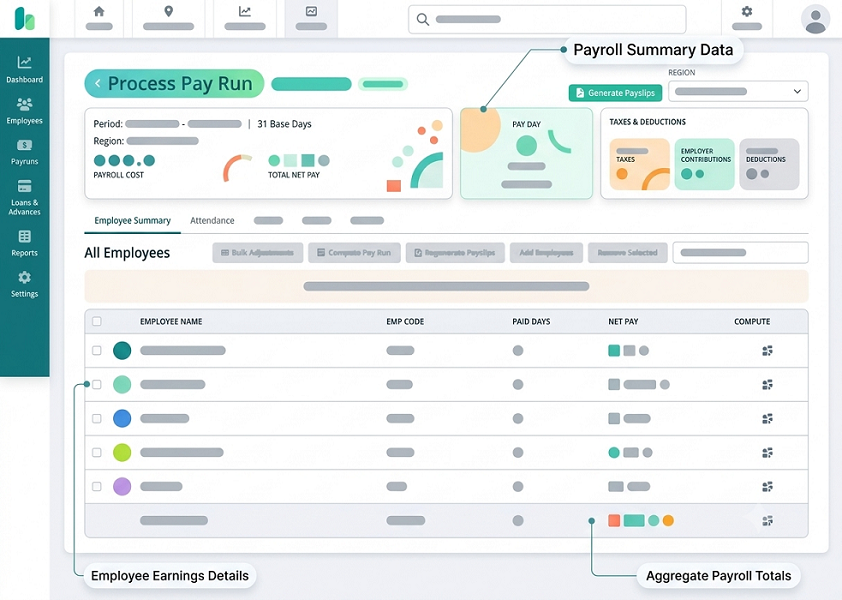
A typical automated payroll workflow may include:
- Employee data is maintained in the system.
- Attendance and leave information is collected.
- Working days and other payroll inputs are calculated.
- Salary components are processed according to configured rules.
- Applicable deductions are calculated.
- Payroll is reviewed and approved.
- Payslips are generated.
- Payroll reports are produced.
- Required payroll information can be exported or integrated with other systems.
The exact workflow depends on the payroll software and the organization's policies.
Why Businesses Need Payroll Automation
Manual payroll processing can require HR teams to perform the same activities every month.
Common challenges include:
- Repeated data entry
- Spreadsheet-based calculations
- Attendance reconciliation
- Manual overtime calculations
- Leave balance checking
- Salary calculation errors
- Delayed payslip generation
- Difficulty managing multiple locations
- Repetitive payroll reports
- Maintaining statutory payroll information
Payroll automation can reduce repetitive work by bringing important payroll inputs together in one system.
How Payroll Automation Works
Payroll automation typically connects several HR processes.
Step 1: Maintain Employee Information
The system stores employee information such as:
- Employee ID
- Department
- Designation
- Joining date
- Salary structure
- Bank details
- Tax-related information
- Statutory information, where applicable
Keeping employee information centralized can reduce duplicate data entry.
Step 2: Collect Attendance Data
Attendance information can be integrated from an employee attendance software or attendance system.
Depending on the organization's setup, this may include:
- Working days
- Present days
- Absences
- Late arrivals
- Early departures
- Overtime
- Shift information
This information can become an input for payroll processing according to company policies.
Step 3: Process Leave
Leave information can be connected with payroll.
Approved leave, unpaid leave, and applicable leave adjustments can be considered according to the organization's configured salary and leave rules.
Step 4: Calculate Salary
The payroll system processes configured salary components.
These may include:
- Basic salary
- Allowances
- Incentives
- Bonuses
- Overtime
- Deductions
- Other configured components
The actual calculation depends on the employee's salary structure and applicable policies.
Step 5: Calculate Deductions
Payroll software can automate configured deductions and other payroll adjustments.
For Indian businesses, organizations may configure applicable statutory deductions based on the relevant rules and employee circumstances.
Step 6: Review and Approve Payroll
Before payroll is finalized, authorized users can review payroll calculations and identify exceptions.
An approval workflow can help businesses establish a defined process for payroll review and authorization.
Step 7: Generate Payslips and Reports
After payroll is approved, the system can generate employee payslips and payroll reports.
This can eliminate the need to prepare individual payslips manually.
Key Features of Payroll Automation Software
Automated Salary Calculation
The system can calculate employee salaries using configured salary structures and payroll rules.
Attendance Integration
Connecting payroll with attendance can reduce the need to manually transfer working-day information.
Leave Integration
Approved leave and applicable payroll adjustments can be connected to salary processing.
Overtime Management
Where applicable, overtime information can be incorporated into payroll calculations according to company policies.
Payroll Approval Workflow
Businesses can define approval steps for payroll review before processing is completed.
Automated Payslips
Employees can receive digitally generated payslips through the system or employee portal, depending on the solution.
Payroll Reports
Payroll software can generate reports for HR, finance, management, and other authorized users.
Employee Self-Service
Some systems provide employee portals or mobile applications where employees can access payslips and relevant payroll information.
Multi-Location Payroll
Businesses operating across different offices, branches, or locations can manage employees through a centralized payroll system.
Benefits of Payroll Automation
1. Saves HR and Payroll Time
Automation reduces repetitive calculations and manual data entry, allowing payroll teams to spend more time on review and exception handling.
2. Reduces Manual Errors
Automated calculations can reduce errors caused by copying information between spreadsheets or manually performing repetitive calculations. However, payroll automation does not eliminate the need for proper configuration and review.
3. Faster Payroll Processing
Once attendance, leave, salary, and other inputs are available, the payroll process can be completed more efficiently.
4. Better Data Accuracy
A centralized employee database helps keep payroll information consistent across HR processes.
5. Easier Payslip Management
Automated payslip generation reduces the administrative effort involved in preparing and distributing individual payslips.
6. Better Payroll Visibility
HR and finance teams can access payroll reports and review payroll information through a centralized system.
7. Supports Business Growth
As employee numbers increase, manual payroll processes can become increasingly difficult to manage. Automation can provide a more scalable approach.
8. Better Integration with HR Processes
Payroll automation can connect salary processing with:
- Attendance
- Leave
- Shifts
- Employee information
- Overtime
- Approval workflows
- Reports
This creates a more connected HR and payroll environment.
Payroll Automation for Small Businesses
Small businesses often rely on spreadsheets or manual payroll calculations because they have relatively small teams. However, manual payroll can still consume significant administrative time.
Payroll automation can help small businesses:
- Maintain employee records
- Automate salary calculations
- Generate payslips
- Track attendance
- Manage leave
- Process configured deductions
- Maintain payroll reports
A cloud-based solution can also provide access to payroll information without requiring complex infrastructure.
Payroll Automation for Large Businesses
Large organizations may have hundreds or thousands of employees across multiple departments and locations.
Their payroll requirements may include:
- Multiple salary structures
- Different departments
- Multiple locations
- Shift employees
- Overtime
- Leave policies
- Variable pay
- Complex approval workflows
- Payroll reporting
- Integration with HR and finance systems
Payroll automation can help centralize these processes while providing role-based access and reporting.
Payroll Automation and Attendance Management
Attendance is often closely connected to payroll.
For example:
Attendance → Leave → Working Days → Overtime → Payroll
When these systems are integrated, HR teams do not have to repeatedly enter attendance information into payroll spreadsheets.
An employee attendance system can provide payroll with configured inputs such as working days, leave, absences, and overtime. This can reduce repetitive data handling and improve payroll workflow efficiency.
Payroll Automation and Statutory Compliance
Payroll processing in India may involve various statutory requirements depending on the organization, employee, location, and applicable laws.
Payroll software can help organizations maintain configured statutory calculations and reports.
However, businesses should not assume that automation alone guarantees compliance. Statutory rules can change, and organizations remain responsible for ensuring that their payroll configuration and processes reflect the requirements applicable to them.
Regular review of payroll settings and statutory updates is therefore important.
Payroll Automation Security
Payroll contains confidential employee and financial information. Security should be an important consideration when selecting payroll software.
Businesses should evaluate:
- Role-based access
- User authentication
- Data encryption
- Access controls
- Audit logs
- Backup procedures
- Data storage
- Data retention
- Secure data transmission
Only authorized users should have access to sensitive payroll information.
How to Choose Payroll Automation Software
Before selecting a payroll solution, businesses should evaluate their requirements.
Understand Your Payroll Process
Document how salaries are currently calculated and identify repetitive activities that can be automated.
Check Attendance and Leave Integration
If attendance and leave are managed separately, look for software that can connect these processes with payroll.
Evaluate Salary Configuration
Make sure the software supports the salary structures and payroll components used by your organization.
Check Statutory Features
For Indian businesses, review whether the system supports the applicable statutory payroll processes and provides mechanisms for keeping them updated.
Review Reporting
Check whether the system provides the payroll reports required by HR, finance, management, and compliance teams.
Evaluate Ease of Use
Payroll administrators should be able to configure employees, review calculations, identify exceptions, and complete payroll without unnecessary complexity.
Consider Scalability
Choose a system that can support your expected growth in employees, locations, departments, and payroll complexity.
Check Integrations
Look for integrations with attendance, HR, leave, accounting, banking, and other systems that are important to your payroll workflow.
Common Payroll Automation Mistakes
Businesses can avoid common problems by:
- Not reviewing payroll configurations
- Using outdated statutory settings
- Failing to reconcile attendance
- Giving excessive system access
- Not reviewing payroll exceptions
- Relying entirely on automation without approval checks
- Failing to maintain employee information
- Choosing software without checking scalability
- Ignoring employee communication and training
Automation works best when supported by accurate data and well-defined processes.
Payroll Automation Implementation Checklist
Before going live, businesses should:
- Clean existing employee data.
- Define salary structures.
- Configure payroll rules.
- Connect attendance and leave systems.
- Set up approval workflows.
- Configure applicable statutory requirements.
- Define user permissions.
- Test payroll calculations.
- Compare automated results with previous payroll records.
- Train HR and payroll administrators.
- Establish a process for handling payroll exceptions.
- Review the system regularly.
Conclusion
Payroll automation helps businesses replace repetitive manual payroll activities with a structured, software-driven process. By connecting employee information, attendance, leave, salary structures, deductions, overtime, approvals, and payslips, organizations can make payroll processing more organized and efficient.
For businesses in India, payroll automation can also support configured statutory payroll processes, provided the software is maintained correctly and the organization reviews its compliance requirements regularly.
Whether you are a small business or a large organization with multiple locations, the right payroll automation software can reduce administrative work, improve payroll visibility, support accurate processing, and create a more connected HR and payroll workflow.
Payroll automation transforms how organizations manage employee compensation by removing manual calculations from monthly workflows. InnBuilt Payroll Software automates salary processing, tax compliance, and payouts to eliminate costly human errors and streamline administrative efforts. This allows HR teams to save time, reduce overhead, and focus on strategic workforce initiatives.