How Can Qatar Field Sales Managers Verify Customer Visits Without Paper Reports?
How Can Qatar Field Sales Managers Verify Customer Visits Without Paper Reports?
Introduction
Field sales teams in Qatar often visit customers across commercial districts, retail outlets, showrooms, offices, warehouses, construction sites, and industrial areas. Sales representatives may be responsible for product demonstrations, client meetings, order collection, relationship management, merchandising, and follow-up visits.
When managers rely on handwritten visit reports, paper forms, and end-of-day spreadsheets, verifying customer visits can become difficult. Reports may be submitted late, contain incomplete information, or lack reliable evidence that a visit took place. Managers may also struggle to compare planned routes with completed appointments and sales outcomes.
Digital field sales management tools provide a more efficient alternative. By combining mobile check-ins, customer visit records, CRM updates, location verification where appropriate, and supervisor review, Qatar businesses can improve visibility without requiring representatives to submit paper reports after every visit.
The goal is not simply to monitor employee movements. It is to maintain accurate visit records, improve customer follow-up, strengthen sales planning, and ensure that field activity contributes to measurable business results.
1. Use a Mobile App to Record Every Customer Visit
The first step is to introduce a mobile system that allows sales representatives to record customer visits directly from their phones.
Instead of completing paper forms after returning to the office, representatives can open the application at the customer location and create a digital visit record.
Each record should include:
- Sales representative's name or employee ID.
- Customer or business name.
- Customer location or branch.
- Date and time of arrival.
- Visit purpose.
- Meeting outcome.
- Products discussed or demonstrated.
- Order or sales opportunity details, where applicable.
- Follow-up action and due date.
- Visit completion status.
A mobile application can make the process faster by allowing representatives to select customers from an existing list rather than entering the same details repeatedly.
For example, a representative visiting five retail outlets in Doha can record each visit individually, update the discussion outcome, and schedule follow-ups before moving to the next customer.
Managers can then review visit activity throughout the day rather than waiting for handwritten reports at the end of the week.
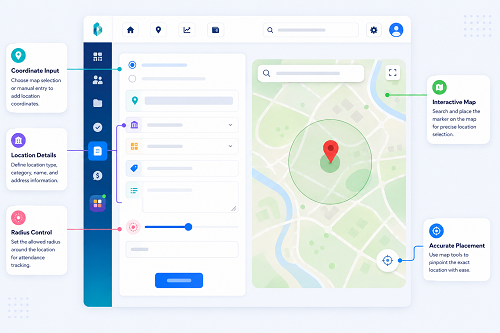
2. Use GPS Check-In and Geofencing for Location Verification
GPS-enabled attendance and field sales applications can help confirm whether a representative checked in near the assigned customer location.
A geofence is a virtual boundary around a defined location. When an authorised application records a check-in within that boundary, the system can flag the visit as location-matched for review.
This can be useful when sales teams cover multiple customer sites across Qatar and managers cannot personally accompany every representative.
A suitable process includes:
- Register the customer's address or approved meeting location.
- Assign the customer visit to the representative.
- Allow the representative to check in using the mobile application.
- Record the timestamp and, where appropriate, location information.
- Compare the check-in with the assigned location.
- Flag unusual or incomplete records for review.
However, GPS should not be treated as conclusive proof of a completed customer meeting. Location accuracy can vary indoors, in dense urban areas, and around large buildings. A representative may also arrive at a site but be unable to meet the customer.
For these reasons, location data should support a broader verification process rather than automatically determine whether a visit was successful.
3. Record Planned Visits and Actual Visits Separately
Sales managers need to understand the difference between the appointments a representative was expected to attend and the visits that actually took place.
A digital system should maintain separate records for the planned schedule and the actual visit outcome.
| Visit status | Meaning |
|---|---|
| Planned | The appointment is scheduled |
| Checked in | The representative has recorded arrival |
| In progress | The meeting or customer activity is underway |
| Completed | The representative has recorded the visit outcome |
| Rescheduled | The appointment has been moved |
| Customer unavailable | The representative could not meet the customer |
| Cancelled | The appointment will not take place |
| Pending verification | Additional evidence or review is required |
This distinction prevents managers from assuming that a scheduled appointment was completed simply because it appears on a calendar.
For example, if a sales representative has eight appointments scheduled and completes six, the system should show the two remaining appointments as cancelled, rescheduled, or unsuccessful, as appropriate.
Accurate statuses help managers distinguish attendance issues from customer cancellations, traffic delays, and other operational factors.
4. Capture Customer Confirmation Digitally
Location data can confirm that a representative checked in near a customer site, but customer confirmation provides additional evidence that a meeting or business interaction occurred.
Depending on the type of sales activity, businesses can use:
- A digital acknowledgement from the customer.
- A meeting confirmation through the CRM.
- A customer-approved service or visit form.
- An order or quotation linked to the visit.
- A follow-up email or message recorded in the CRM.
- A supervisor's verification for exceptional cases.
For example, after meeting a retailer, a sales representative can record the discussion and send a quotation through the company's approved system. The quotation and meeting notes can be linked to the same customer visit.
Not every visit will produce an order or a customer signature. Representatives may conduct prospecting visits, meet unavailable contacts, or discuss future opportunities. The verification policy should therefore allow different forms of evidence depending on the purpose of the visit.
Customer contact details and confirmations should be collected only when necessary and handled according to applicable privacy and business policies.
5. Integrate Visit Records With the CRM
A customer relationship management (CRM) system helps connect field activity with sales opportunities and customer history.
Without integration, a representative may record attendance in one application, meeting notes in another, and orders in a separate spreadsheet. This creates duplicate work and makes it difficult for managers to understand what happened during a visit.
An integrated system can link the visit record to:
- Customer profile.
- Contact person.
- Sales opportunity.
- Product interest.
- Quotation or order.
- Outstanding customer issue.
- Next follow-up date.
- Previous meeting history.
Consider a representative who visits a construction company to discuss supplying equipment. The representative can log the visit, record the products discussed, update the opportunity stage, and assign a follow-up task to the relevant sales team.
The manager can then evaluate not only whether the visit was recorded but also whether it advanced the sales process.
CRM integration is particularly valuable for businesses with repeat customers, account-based sales, distributor networks, and long sales cycles.
6. Replace Paper Reports With Digital Visit Forms
Digital forms provide a consistent way to collect visit information across the sales team.
Instead of allowing each representative to submit notes in a different format, managers can define standard fields for every visit. The form should be short enough to complete in the field without creating an unnecessary administrative burden.
A useful digital visit form may include:
Customer details
- Customer name and branch.
- Contact person, if relevant.
- Visit date and time.
Visit purpose
- Sales presentation.
- Product demonstration.
- Order collection.
- Relationship management.
- Payment or account follow-up.
- Complaint resolution.
- New-customer prospecting.
Visit outcome
- Meeting completed.
- Customer unavailable.
- Follow-up required.
- Quotation requested.
- Order received.
- No immediate opportunity.
Next steps
- Follow-up action.
- Responsible person.
- Target date.
- Supporting notes or documents, where necessary.
Mandatory fields should be limited to information needed for verification, reporting, or business operations. Excessive mandatory questions can encourage rushed entries and reduce data quality.
7. Monitor Field Sales Activity Through a Central Dashboard
A central dashboard allows managers to review field visits across representatives, territories, customer groups, and reporting periods.
Useful indicators include:
- Planned visits.
- Completed visits.
- Visits awaiting verification.
- Customer cancellations.
- Missed appointments.
- Follow-up tasks overdue.
- New leads generated.
- Quotations issued.
- Orders linked to visits.
- Customer issues requiring escalation.
A manager overseeing several representatives can identify which customer appointments remain outstanding and contact the relevant employee before the end of the working day.
The dashboard should show both activity and outcomes. A high number of recorded visits does not necessarily mean that a representative is building strong customer relationships or generating valuable sales opportunities.
Managers should interpret visit counts alongside customer feedback, conversion rates, order values, and the quality of follow-up.
8. Verify Visits Without Excessive Employee Monitoring
Digital verification should support business accountability without collecting more employee information than necessary.
GPS-enabled applications can raise privacy concerns if they track representatives continuously, including outside working hours or when no customer visit is taking place.
A more proportionate approach is to collect location information at relevant check-in events or during defined work-related activities, where appropriate and lawful.
Good practices include:
- Explain the purpose of visit verification to employees.
- Identify what information the application collects.
- Define when location collection is active.
- Restrict access to authorised personnel.
- Avoid unnecessary tracking outside working activities.
- Establish retention rules for visit and location records.
- Allow representatives to report incorrect location matches.
- Document how managers investigate disputed records.
Qatar's Personal Data Privacy Protection Law, Law No. 13 of 2016, may be relevant when businesses process personal information. Companies should review the applicable requirements for their data collection, use, storage, and disclosure practices.
The objective is to verify business visits accurately, not to create continuous surveillance without a clear operational purpose.
9. Make the System Work Across Qatar's Sales Territories
Field sales representatives may serve customers across Doha, Al Rayyan, Lusail, Al Wakrah, industrial zones, and other areas. Some visits may take place in office buildings, while others occur in warehouses, retail locations, or restricted-access sites.
The system should support different operating conditions.
Recommended features include:
- Customer location directories with verified addresses.
- Territory-based customer assignments.
- Route planning and appointment sequencing.
- Mobile access to customer history.
- Offline visit recording where supported.
- Synchronisation when connectivity returns.
- Arabic and English interface options where needed.
- Clear procedures for locations with poor GPS accuracy.
- Manual exception handling for restricted or inaccessible sites.
For businesses serving industrial or controlled-access locations, managers should not assume that a representative can check in precisely at a customer office. Site security, access permissions, and designated meeting points may affect the recorded location.
A flexible verification policy helps maintain accurate records without penalising representatives for conditions beyond their control.
10. Establish a Process for Missing or Disputed Visit Records
No digital system eliminates every error. Employees may forget to check in, customer appointments may change unexpectedly, or a device may lose connectivity.
Businesses should establish a formal process for correcting incomplete records.
When a visit is missing or disputed, the representative should be able to submit an explanation and supporting information. Depending on the circumstances, a supervisor may review the appointment schedule, CRM notes, customer correspondence, order records, or other relevant evidence.
The process should distinguish between:
- A technical failure.
- A missed check-in.
- A customer cancellation.
- An incorrect customer address.
- A visit that took place but was not completed as planned.
- A record that requires further investigation.
Corrections should preserve an audit trail showing who changed the record, when the change occurred, and why it was approved.
A missing GPS match should not automatically be treated as proof that a visit did not occur. Similarly, a location match alone should not automatically establish that a customer meeting took place.
11. Measure the Effectiveness of Paperless Visit Verification
Once digital visit tracking is implemented, managers should measure whether it improves reporting accuracy and sales operations.
| KPI | What it measures |
|---|---|
| Visit completion rate | Percentage of planned visits recorded as completed |
| Verification rate | Percentage of recorded visits meeting the company's verification criteria |
| Missing-record rate | Percentage of visits with incomplete or absent records |
| Follow-up completion rate | Percentage of required follow-up actions completed on time |
| Appointment adherence | How closely actual visits match the planned schedule |
| Lead conversion rate | Percentage of qualified leads converted into customers or opportunities, using a defined period |
| Average reporting delay | Time between a visit and completion of its record |
| Customer complaint rate | Frequency of complaints relating to visits or follow-up |
Managers should define each KPI consistently and avoid using one metric as the sole basis for employee evaluation.
For example, a representative may complete fewer visits because they spend more time negotiating a large contract. Another may record many visits but generate few meaningful opportunities. Performance reviews should account for territory size, customer type, travel requirements, sales cycles, and individual responsibilities.
Frequently Asked Questions
1. How can field sales managers verify customer visits without paper reports?
They can use a mobile application or CRM to record visit timestamps, customer details, meeting outcomes, and follow-up actions. GPS check-ins and customer confirmations can provide additional evidence where appropriate.
2. Is GPS tracking enough to prove that a customer visit occurred?
No. GPS may indicate that a device checked in near a customer location, but it does not necessarily prove that a meeting took place. Visit notes, customer interaction records, quotations, or other relevant evidence can provide additional context.
3. Can field sales representatives record visits offline?
Some mobile systems support offline recording and synchronise data when connectivity returns. Businesses should confirm that their chosen system supports this feature and clearly identifies the original event time and later synchronisation time.
4. How can managers prevent false visit reports?
They can combine scheduled appointments, timestamped check-ins, appropriate location verification, CRM updates, customer confirmation where practical, and documented exception reviews. Controls should be proportionate and should allow legitimate technical or access-related issues to be explained.
5. What should a digital customer visit report include?
It should generally include the customer, location, date and time, visit purpose, outcome, relevant sales opportunity, and next action. Additional evidence should be collected only when it serves a clear business need.
6. How can digital visit tracking improve sales productivity?
It reduces manual reporting, makes customer history easier to access, helps managers identify missed appointments, and supports timely follow-up. It can also reveal which visit activities contribute most effectively to sales opportunities.
Conclusion
Qatar field sales managers can verify customer visits without paper reports by adopting mobile visit logging, appropriate location verification, digital forms, CRM integration, and centralised reporting dashboards.
The most reliable approach combines several sources of evidence: a scheduled appointment, a timestamped visit record, relevant customer interaction details, and documented follow-up actions. This provides better visibility than relying on a handwritten report alone.
By keeping the process simple, protecting employee information, and evaluating both visit activity and sales outcomes, businesses can improve field sales accountability while reducing administrative work and strengthening customer relationships.
InnBuilt Field Management can help Qatar sales managers replace paper visit lists with assigned appointments, check-ins and recorded outcomes, making field activity easier to review.