How to Connect Attendance, Leave, and Payroll for Singapore Employees
How to Connect Attendance, Leave, and Payroll for Singapore Employees
Connecting attendance, leave, and payroll systems helps Singapore businesses manage employee working hours, approved absences, overtime, and salary calculations through a coordinated process. Instead of maintaining separate spreadsheets and manually transferring information between departments, employers can use integrated HR software to keep employee records consistent and reduce repetitive administrative work.
When these systems work together, approved leave can be reflected in attendance records, actual working hours can be transferred to payroll, and overtime or unpaid absences can be reviewed before salary processing. This can improve payroll accuracy, simplify month-end reconciliation, and help HR teams maintain employment records.
However, integration requires more than connecting three software applications. Employers must configure employment terms, work schedules, leave entitlements, payroll rules, approval workflows, and data permissions correctly.
This guide explains how Singapore employers can connect attendance, leave, and payroll systems, what information should flow between them, and how to implement the process effectively.
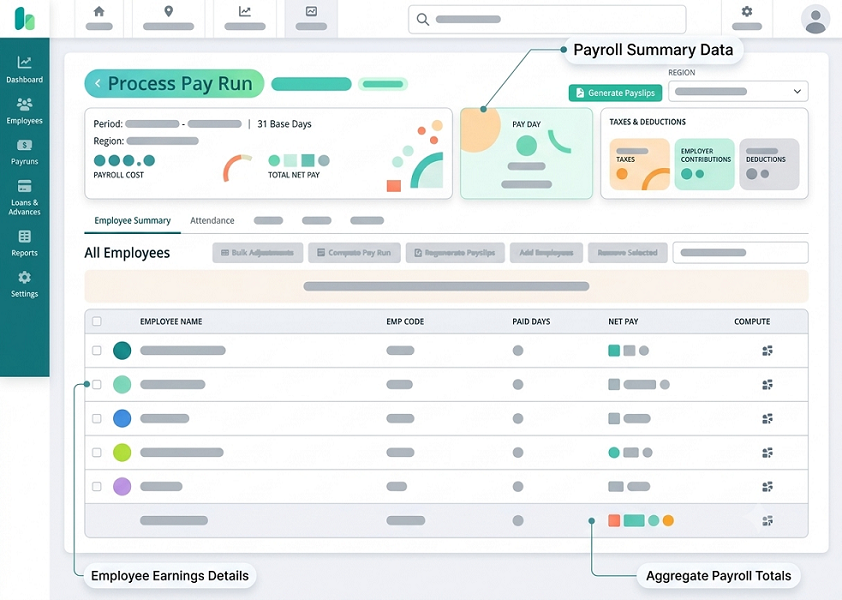
1. Understand How the Three Systems Work Together
Before connecting the systems, businesses should understand the role of each module.
Attendance management
The attendance system records when employees start and finish work. Depending on the software, it may capture:
- Clock-in and clock-out times.
- Total working hours.
- Meal and rest breaks.
- Late arrivals and early departures.
- Overtime hours.
- Rest days and public-holiday work.
- Shift schedules.
- Attendance corrections and approvals.
Leave management
The leave system manages employee absences and leave balances. It may handle:
- Annual leave.
- Sick leave.
- Hospitalisation leave.
- Maternity and paternity leave.
- Childcare and other applicable statutory leave.
- Unpaid leave.
- Company-specific leave categories.
- Leave applications and approval workflows.
Payroll management
The payroll system uses employee information and approved transactions to calculate salary payments.
It may process:
- Basic salary.
- Overtime payments.
- Fixed and variable allowances.
- Paid and unpaid leave adjustments.
- Rest-day and public-holiday payments.
- Salary deductions.
- CPF contributions.
- Net salary.
- Itemised payslips.
When these systems are connected, approved attendance and leave information can flow into payroll without repeated manual entry.
2. Choose Software That Supports Integration
The first step is selecting attendance, leave, and payroll software that can exchange information reliably.
Businesses can choose between an integrated HRMS platform and separate applications connected through APIs or other integration methods.
Option A: Integrated HRMS
An integrated HRMS provides attendance, leave, and payroll within one platform.
Its advantages include:
- A common employee database.
- Consistent employee information.
- Shared approval workflows.
- Automatic transfer of approved transactions.
- Centralised reporting.
- Fewer manual data transfers.
This option may suit small and medium-sized businesses that want a simpler HR administration process.
Option B: Separate systems connected through APIs
Some businesses already use separate attendance, leave, and payroll applications. In this situation, APIs can connect the systems and transfer relevant information.
For example, a company might use a dedicated biometric attendance platform, a separate leave application, and an existing payroll solution.
API integration can help the applications exchange employee details, approved leave, attendance summaries, and payroll transactions.
However, businesses should verify compatibility, supported data fields, API limits, synchronisation frequency, and additional integration charges.
3. Create a Centralised Employee Database
All three systems should use consistent employee information.
If the employee's name, identification number, department, or employment status differs between applications, integration errors may occur.
Create a central employee record containing information such as:
- Employee ID.
- Full name.
- Department.
- Job title.
- Employment start date.
- Employment status.
- Work location.
- Manager or reporting supervisor.
- Employment type.
- Basic salary.
- Working schedule.
- Leave eligibility.
- Payroll details.
Use a unique employee ID as the primary reference across the attendance, leave, and payroll applications.
For example, if an employee has the ID SG00125 in the attendance system, the same identifier should be used in the leave and payroll systems.
This helps prevent duplicate records and ensures that attendance and leave transactions are assigned to the correct employee.
4. Configure Working Hours and Shift Schedules
Attendance data must be interpreted using the employee's approved working arrangement.
Singapore businesses may have employees working standard office hours, rotating shifts, part-time schedules, flexible arrangements, and overnight shifts.
Configure the following details before activating integration:
- Normal working days.
- Daily working hours.
- Weekly working hours.
- Meal and rest breaks.
- Shift start and end times.
- Weekly rest days.
- Overnight shift rules.
- Public-holiday schedules.
- Overtime eligibility and calculation rules.
For example, an office employee may work from 9:00 a.m. to 6:00 p.m., while a factory employee may work on rotating 12-hour shifts.
The system should distinguish scheduled working time from actual working time and calculate payable hours according to the employee's applicable employment terms and rules.
It is also important to configure overtime eligibility correctly. Part 4 of Singapore's Employment Act contains specific working-hour and overtime provisions for eligible employees. These provisions should not be automatically applied to every employee.
5. Connect Attendance Data to Payroll
Once employee profiles and working schedules are configured, the attendance system can transfer approved working-time information to payroll.
The integration should ideally transfer:
- Regular working hours.
- Overtime hours.
- Unpaid absence.
- Late attendance information, where relevant to an authorised calculation.
- Rest-day work.
- Public-holiday work.
- Approved attendance adjustments.
- Relevant shift allowances or other attendance-linked payments.
Example of attendance-to-payroll integration
Consider an employee who works a standard monthly schedule and records the following information during a salary period:
| Attendance item | Recorded information |
|---|---|
| Scheduled working days | 22 |
| Days attended | 21 |
| Approved annual leave | 1 day |
| Overtime hours | 8 hours |
| Unpaid leave | 0 days |
| Public-holiday work | 0 days |
The attendance system transfers the approved information to payroll.
Payroll then uses the employee's salary details, applicable overtime rules, and approved transactions to calculate the relevant salary components.
The annual leave day should generally be treated as paid leave when the employee is eligible and the leave has been approved. The eight overtime hours should be processed according to the employee's applicable overtime entitlement and payment rules.
This avoids manually entering the same attendance information into payroll.
6. Connect Leave Management to Attendance
Leave integration ensures that approved employee absences are reflected in attendance records.
Without this connection, an employee who takes approved annual leave may appear as absent in the attendance system.
The leave system should automatically update the attendance calendar after an application is approved.
Information that should be synchronised
- Employee ID.
- Leave category.
- Leave start date.
- Leave end date.
- Number of leave days or hours.
- Approval status.
- Half-day or partial-day leave.
- Relevant supporting information, where necessary.
- Leave cancellation or amendment status.
Example of leave integration
An employee applies for two days of annual leave from 10 to 11 December.
The manager approves the application in the leave management system.
The integration should then:
- Update the employee's leave balance.
- Mark 10 and 11 December as approved leave in the attendance calendar.
- Prevent those dates from being incorrectly flagged as unauthorised absence.
- Transfer relevant leave information to payroll.
- Retain the approval record for future reference.
If the employee cancels the leave, the cancellation should also be synchronised so that the attendance and leave records remain consistent.
7. Configure Leave Entitlements and Payroll Treatment
Not all leave categories have the same payroll treatment. Employers should configure each leave type according to Singapore's applicable legislation, employment contracts, and company policies.
For example:
| Leave category | Attendance treatment | Payroll consideration |
|---|---|---|
| Annual leave | Mark as approved leave | Paid according to applicable entitlement and terms |
| Paid sick leave | Mark as approved medical leave | Process according to applicable statutory or contractual entitlement |
| Hospitalisation leave | Record approved absence | Apply relevant entitlement and payment rules |
| Maternity leave | Record approved leave period | Apply the applicable maternity leave payment arrangements |
| Paternity leave | Record approved leave period | Apply the relevant statutory or contractual payment arrangements |
| Childcare leave | Record approved leave | Apply the applicable entitlement and payment arrangements |
| Unpaid leave | Mark as approved unpaid absence | Calculate any applicable salary adjustment |
| Company-specific leave | Apply the configured leave category | Follow the company's approved policy |
The payroll system should not automatically treat every absence as unpaid leave.
For instance, approved annual leave and eligible paid sick leave should not be processed in the same way as unpaid leave.
Employers should also configure eligibility conditions, entitlement calculations, carry-forward rules, and leave encashment policies where applicable.
8. Automate Overtime Approvals and Payroll Processing
Overtime information should move from attendance to payroll only after the relevant validation and approval process.
A connected system can help HR and managers:
- Identify employees who worked beyond scheduled hours.
- Review overtime requests.
- Compare approved overtime with recorded attendance.
- Check overtime eligibility.
- Apply the appropriate calculation rules.
- Transfer approved overtime information to payroll.
- Track overtime payment status.
Example of an overtime approval workflow
An employee works an additional two hours after completing a scheduled shift.
The attendance system records the actual clock-out time and identifies the additional hours.
The employee or supervisor submits an overtime request, depending on the company's procedure.
The manager reviews the request and approves the eligible hours.
The approved overtime information is transferred to payroll for calculation and payment.
Businesses should configure separate rules for ordinary overtime, rest-day work, and public-holiday work where applicable.
An internal pre-approval policy should not be used to disregard overtime payment obligations for work that the employer required or permitted.
For eligible employees covered by the relevant Employment Act provisions, overtime pay is generally subject to a minimum statutory rate of 1.5 times the hourly basic rate, subject to applicable rules and exemptions.
9. Synchronise Public Holidays and Rest Days
Singapore employers should configure the official public-holiday calendar and employee-specific rest-day arrangements across the three systems.
This is important because working on a public holiday or rest day can affect payroll calculations.
The attendance system should record whether an employee:
- Was scheduled to work.
- Attended the workplace.
- Worked on a rest day.
- Worked on a public holiday.
- Received an approved substitute day off.
- Completed additional hours.
The leave system should reflect approved replacement days or applicable time-off arrangements.
The payroll system should process the relevant payment or adjustment according to the applicable employment terms and statutory requirements.
For example, if an employee works on a public holiday, the attendance record should identify the actual hours worked. The payroll team can then review the employee's eligibility and the applicable public-holiday payment arrangement before processing the salary.
A shared calendar helps prevent inconsistencies between shift rosters, approved leave, attendance records, and payroll calculations.
10. Set Up Automated Data Synchronisation
Integration should not depend entirely on HR staff manually exporting and importing spreadsheets.
Where supported, configure automatic data synchronisation between the systems.
Common integration methods include:
API integration: Applications exchange information through defined interfaces. This can support near-real-time or scheduled data transfer.
Scheduled synchronisation: Information is transferred at fixed intervals, such as every hour, every night, or at the end of each salary period.
CSV or Excel import/export: Where APIs are unavailable, systems can exchange structured files. This requires additional checks to prevent incomplete or duplicate records.
Direct database integration: Some enterprise environments use controlled database connections or middleware to transfer information. This should be implemented with suitable security and access restrictions.
For each integration, define:
- Which system is the source of truth for each data field.
- What information is transferred.
- How frequently synchronisation takes place.
- How failed transactions are handled.
- How duplicate records are prevented.
- How changes and cancellations are updated.
- Who can review integration errors.
For example, attendance should normally be the source of truth for clock-in and clock-out events, while the leave system should be the source of truth for leave applications and approvals.
11. Create a Payroll Cut-Off and Reconciliation Process
Even when systems are connected, HR and payroll teams should review the information before finalising salary calculations.
A clear payroll cut-off process helps identify missing attendance records, unapproved leave, and incorrect overtime entries.
A recommended monthly process is:
| Stage | Activity | Responsible team |
|---|---|---|
| 1 | Review employee attendance records | Employees and supervisors |
| 2 | Resolve missing punches and attendance exceptions | HR and managers |
| 3 | Verify approved leave applications | HR |
| 4 | Review overtime and rest-day work | Managers and HR |
| 5 | Synchronise approved data | System or HR administrator |
| 6 | Reconcile attendance and leave summaries | Payroll team |
| 7 | Review salary calculations and adjustments | Payroll manager |
| 8 | Approve payroll | Authorised management |
| 9 | Issue payslips and process salary payment | Payroll team |
The payroll team should compare the final attendance and leave summaries with the payroll inputs before approving the pay run.
This is particularly important when employees have changed shifts, joined or left during the salary period, taken unpaid leave, or worked additional hours.
12. Protect Employee Data Across All Three Systems
Attendance, leave, and payroll systems contain sensitive employee-related information.
Payroll applications may store salary and bank information. Leave applications may contain medical certificates or other personal information. Attendance platforms may collect location or biometric information.
Employers should implement appropriate security measures, including:
- Role-based access controls.
- Strong authentication.
- Encryption during data transfer and storage.
- Secure API connections.
- Access logs and audit trails.
- Regular access reviews.
- Appropriate data retention policies.
- Secure backups.
- Controlled employee data exports.
Access should be limited according to job responsibilities.
For example, a line manager may need access to team attendance and leave requests but should not automatically have access to employees' salary or bank account information.
If the attendance system collects biometric or location information, employers should assess whether the collection is necessary and proportionate for the stated purpose.
Singapore's Personal Data Protection Act (PDPA) requires organisations to comply with applicable obligations concerning the collection, use, disclosure, protection, and retention of personal data.
13. Test the Integration Before Going Live
Testing is essential because incorrect system configuration can affect employee attendance records and salary calculations.
Businesses should run test cases covering ordinary working arrangements and unusual situations.
| Test scenario | Expected result |
|---|---|
| Employee clocks in and out normally | Attendance data appears correctly in the attendance summary |
| Employee takes approved annual leave | Leave appears in attendance and is not treated as unauthorised absence |
| Employee takes unpaid leave | Approved unpaid absence reaches payroll for the appropriate adjustment |
| Employee works overtime | Eligible overtime hours are transferred for review and calculation |
| Employee works on a public holiday | Attendance and payroll identify the relevant work arrangement |
| Employee works an overnight shift | Hours are assigned to the correct shift and payroll period |
| Employee cancels approved leave | Attendance and leave balances are updated correctly |
| Employee changes department | Relevant records are updated without creating a duplicate employee |
| API synchronisation fails | The error is recorded and can be corrected or retried |
| Employee leaves the company | Access and future transactions are handled according to the termination process |
During testing, compare the results across all three systems.
Do not activate full automation until the business has confirmed that employee information, leave balances, attendance summaries, and payroll inputs are consistent.
14. Monitor Integration Errors and Exceptions
An integrated system still needs ongoing monitoring.
Common issues include:
- Missing employee IDs.
- Duplicate employee profiles.
- Incorrect shift schedules.
- Leave balances that do not match.
- Approved leave not appearing in attendance.
- Overtime hours transferred incorrectly.
- Payroll transactions missing from the export.
- Incorrect salary-period dates.
- Failed API synchronisation.
- Employees assigned to the wrong department or location.
Create an exception dashboard that identifies these problems before payroll is finalised.
HR teams should also review audit logs to identify who changed attendance records, approved leave, modified employee details, or adjusted payroll-related information.
This helps maintain accountability and makes it easier to investigate salary disputes or incorrect calculations.
Conclusion
Connecting attendance, leave, and payroll systems helps Singapore employers create a more coordinated employee management process. Attendance records can provide working-hour information, leave applications can update employee absence records, and approved transactions can flow into payroll for salary processing.
A successful integration requires consistent employee data, correctly configured working schedules, accurate leave entitlements, appropriate overtime rules, secure data transfers, and a reliable payroll reconciliation process.
Businesses should select compatible software, define clear data ownership, test different employee scenarios, and monitor integration errors regularly. With these controls in place, an integrated HRMS can reduce manual administration, improve payroll accuracy, and support better employment recordkeeping for Singapore employees.
Trace approved time, leave and overtime into payroll-ready data without manual re-entry. Ask InnBuilt to demonstrate the exact handoff your Singapore team needs.