What Makes an Attendance App Easy for Singapore Employees to Use?
What Makes an Attendance App Easy for Singapore Employees to Use?
Introduction
Attendance apps have become an important tool for Singapore businesses managing employee working hours, shift schedules, leave, and payroll information. Instead of relying on paper attendance registers, spreadsheets, or fixed biometric devices, employees can use mobile applications to record their working time and access attendance information.
However, installing an attendance app does not automatically improve attendance management. Employees must be able to understand the application, record attendance quickly, view their schedules, and resolve common issues without unnecessary difficulty. If the app is confusing, slow, or unreliable, employees may avoid using it or make frequent attendance mistakes.
An easy-to-use attendance app should offer a simple interface, quick check-in and check-out, clear shift information, reliable notifications, and convenient access to attendance records. It should also work effectively for employees with different job roles, technical abilities, and working arrangements.
This article explains the features that make an attendance app easy for Singapore employees to use and what employers should evaluate before choosing one.
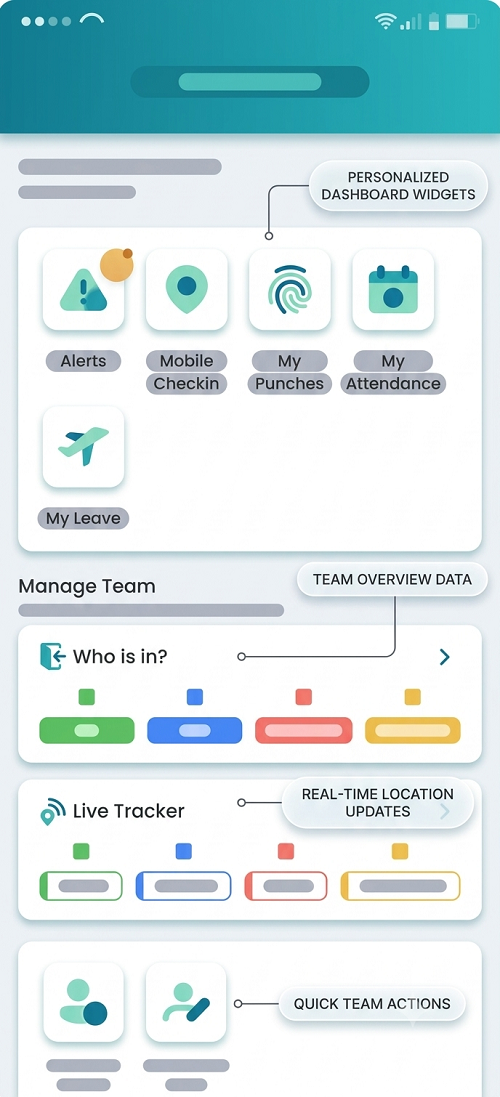
1. Simple and User-Friendly Interface
The most important feature of an employee-friendly attendance app is a straightforward interface. Employees should be able to understand the main functions without extensive training.
When opening the application, users should be able to identify essential options such as:
- Check in.
- Check out.
- View attendance history.
- View assigned shifts.
- Apply for leave.
- Submit missed-punch requests.
- Check approval status.
- View notifications.
The application should use clear labels, recognisable icons, readable fonts, and an organised layout.
For example, an employee arriving at work should not need to navigate through several menus to find the check-in option. A clearly displayed attendance button can make the process faster and reduce mistakes.
Employers should test the interface with employees from different departments rather than relying only on the software vendor's demonstration.
2. Quick Check-In and Check-Out
Employees should be able to record their attendance within a few simple steps.
A complicated check-in process can cause delays, especially when many employees report for duty at the same time.
A user-friendly attendance app should provide:
- A clearly visible check-in button.
- A simple check-out process.
- Automatic timestamp recording.
- Immediate confirmation after successful attendance.
- Clear messages when a check-in fails.
- Protection against accidental duplicate entries.
- Easy access to the next attendance action.
For example, when an employee taps the check-in button, the application should confirm whether the attendance record was successfully saved. If the check-in fails because of a network problem, the app should explain what happened and provide an appropriate next step.
The application should not leave employees uncertain about whether their attendance has been recorded.
3. Easy Login and Secure Authentication
Employees should be able to access the attendance application without repeatedly struggling with login procedures.
A good attendance app may support:
- Employee ID and password.
- Secure single sign-on.
- PIN-based access, where appropriate.
- Biometric authentication for application login.
- Multi-factor authentication where required.
- Secure password recovery.
- Session management.
The login process should balance convenience and security. For example, employees may use a secure mobile login with biometric authentication supported by their device.
Employers should also check whether the application can manage account access when employees change roles, leave the organisation, or receive replacement devices.
Security should not be weakened simply to make the app easier to use.
4. Mobile Compatibility Across Devices
Singapore employees may use different smartphone brands, operating systems, and device models. An attendance app should work consistently across supported devices.
Employers should check whether the application supports:
- Current Android versions.
- Current iOS versions.
- Different screen sizes.
- Common smartphone models.
- Tablets, where required.
- Browser-based access as an alternative.
- Accessibility settings supported by the device.
The application should also perform reasonably well on devices with limited storage or processing capacity.
Before selecting a platform, employers should test the app on the actual devices used by their workforce. A system that works smoothly on a new high-end phone may not perform equally well on older devices.
5. Clear Shift Schedule Visibility
Employees should be able to see when and where they are expected to work.
This is particularly important for Singapore businesses operating rotating shifts, retail outlets, manufacturing facilities, security services, hospitality operations, and logistics teams.
An employee-friendly app should display:
- Assigned shift dates.
- Shift start and end times.
- Work location.
- Weekly roster.
- Upcoming shifts.
- Approved shift changes.
- Rest days.
- Public holiday schedules.
- Replacement or swapped shifts, where applicable.
For example, an employee working a night shift should be able to see the complete shift period without confusion about the date on which the shift ends.
Clear roster visibility helps employees plan their schedules and reduces unnecessary communication with HR or supervisors.
6. Reliable Notifications and Reminders
Notifications help employees stay informed about attendance activities and schedule changes.
A useful attendance app should provide configurable notifications for:
- Upcoming shift reminders.
- Missed check-in.
- Missing check-out.
- Shift changes.
- Leave application updates.
- Attendance correction approvals.
- Important HR announcements.
- Pending attendance actions.
For example, an employee may receive a reminder before an assigned shift begins. If the roster changes, the application should display the updated timing and location.
Notifications should be relevant and easy to understand. Too many unnecessary alerts can cause employees to ignore important messages.
Employers should also allow employees to manage appropriate notification preferences without disabling essential workplace communications.
7. Easy Access to Attendance History
Employees should be able to review their own attendance records without depending on HR for every enquiry.
The application should provide a clear attendance history showing:
- Check-in times.
- Check-out times.
- Recorded working dates.
- Late arrivals.
- Early departures.
- Approved attendance corrections.
- Leave and absence information.
- Relevant shift details.
A calendar or monthly summary can make attendance information easier to understand.
For example, an employee who believes that a check-in was recorded incorrectly should be able to open the relevant date and review the available information.
Access to attendance history improves transparency and helps employees identify discrepancies before payroll processing.
8. Simple Missed-Punch Correction Process
Employees sometimes forget to check in or check out. They may also experience device failures, connectivity problems, or unexpected work arrangements.
A user-friendly attendance app should make it easy to report these issues.
The correction process should allow employees to:
- Select the date of the attendance issue.
- Identify the missing or incorrect entry.
- Enter the correct time, where known.
- Provide a reason for the request.
- Submit the request to the appropriate supervisor.
- Track the approval status.
- Receive a notification when the request is resolved.
The app should explain whether the request is pending, approved, or rejected.
It should also preserve the original attendance record and maintain an audit trail of approved changes.
A clear correction process reduces confusion and helps HR resolve attendance discrepancies before payroll cut-off.
9. Convenient Leave Application and Tracking
Employees should not need to switch between multiple applications to manage routine attendance and leave activities if these functions can be integrated.
A convenient attendance app may allow employees to:
- View available leave balances.
- Apply for annual leave.
- Submit sick leave information.
- Request unpaid leave.
- Apply for other applicable leave categories.
- Upload supporting documents where required.
- View approval status.
- Cancel or amend requests according to company policy.
For example, if an employee has approved leave for a particular day, the attendance application should reflect that information so the employee is not incorrectly shown as absent.
Leave entitlements and eligibility should be configured according to applicable Singapore employment requirements and the organisation's policies.
10. Accurate GPS and Location-Based Attendance
Employees working at multiple locations may need to record attendance through mobile applications.
GPS-based attendance can help confirm whether a mobile check-in was recorded near an assigned workplace. Geofencing can also define approved attendance areas.
A user-friendly app should:
- Explain when location access is required.
- Request appropriate device permissions.
- Show whether location verification was successful.
- Provide a clear error message when location cannot be obtained.
- Allow employees to report genuine technical problems.
- Support approved alternative attendance procedures.
For example, a field employee assigned to a customer location should be able to understand why location access is required and whether the application has successfully captured the attendance entry.
Location accuracy may vary because of device settings, network conditions, and surrounding buildings. Employers should not treat GPS coordinates as conclusive proof of employee presence.
They should also explain the purpose of location collection and avoid unnecessary tracking outside the intended attendance process.
11. Offline Attendance Support
Some employees work in warehouses, basements, industrial facilities, construction sites, or remote areas where mobile connectivity may be unreliable.
An attendance app with offline support can allow employees to record attendance temporarily when internet access is unavailable.
Important offline capabilities include:
- Recording attendance without an active connection, where supported.
- Storing the original attendance event timestamp.
- Displaying whether the record is pending synchronisation.
- Automatically synchronising records when connectivity returns.
- Identifying failed synchronisation attempts.
- Preventing duplicate attendance entries.
- Allowing employees to understand whether an entry has been successfully uploaded.
Employers should test offline functionality under actual workplace conditions.
The application should clearly distinguish between the time an employee recorded attendance and the later time when the record synchronised with the central system.
12. Easy Access to Payroll-Relevant Information
Employees often contact HR when their attendance records appear inconsistent with their salary calculations.
An attendance app can reduce these enquiries by making relevant information easier to access.
Depending on the software and integration, employees may be able to review:
- Recorded working days.
- Approved overtime.
- Leave and absence information.
- Attendance corrections.
- Shift allowances, where applicable.
- Payroll-related attendance summaries.
The app should clearly distinguish attendance information from final salary calculations. Attendance records may be used as payroll inputs, but salary can also depend on employment terms, allowances, deductions, and statutory requirements.
For Singapore employees, the company should ensure that the underlying attendance and payroll processes reflect applicable employment requirements.
13. Accessibility and Multilingual Support
An employee-friendly attendance app should be accessible to people with different levels of digital familiarity and language preferences.
Employers should check whether the application provides:
- Readable text and clear icons.
- Adequate contrast.
- Adjustable text size where supported.
- Simple navigation.
- Screen-reader compatibility where available.
- Clear error messages.
- Multiple language options where needed.
- Accessible alternatives for employees who cannot use a particular authentication method.
Multilingual support can be especially helpful for organisations with diverse workforces.
Employers should test the language options and translations rather than assuming that every translated label or instruction is clear.
14. Fast Performance and Minimal Battery Usage
An attendance app should not take too long to open or consume excessive mobile resources.
Employees may need to record attendance during busy shift changes or at the beginning of a scheduled work period.
A reliable application should offer:
- Fast startup.
- Responsive check-in and check-out screens.
- Stable login sessions.
- Efficient data synchronisation.
- Reasonable battery consumption.
- Limited unnecessary background activity.
- Clear indicators when the system is temporarily unavailable.
Location services and frequent background processing can affect battery usage. Employers should understand how the app handles these functions and whether location is collected only when necessary for the attendance purpose.
15. Transparent Privacy and Data Protection
Employees should understand what personal information the attendance app collects and how the organisation uses it.
Depending on its features, an attendance application may process employee names, contact information, device details, attendance timestamps, GPS coordinates, photographs, or biometric information.
Singapore employers should assess applicable obligations under the Personal Data Protection Act (PDPA).
A trustworthy attendance app should support:
- Clear privacy notices.
- Appropriate employee information and notification.
- Restricted access to personal data.
- Secure authentication.
- Encryption during transmission and storage.
- Appropriate data retention settings.
- Audit logs.
- Secure data deletion arrangements.
- Vendor security and data-processing controls.
An applicable employment-related exception may permit reasonable collection, use, or disclosure of personal data to manage employment without relying on consent as the sole basis. However, relevant notification and other PDPA obligations remain applicable.
Employers should also assess whether GPS or biometric features are reasonably necessary. An attendance app should not collect more personal information than is needed for its stated purposes.
16. Easy Communication With HR and Supervisors
Employees should know where to go when they experience attendance problems.
An employee-friendly app may provide:
- HR contact information.
- Supervisor details.
- Help or support sections.
- Frequently asked questions.
- Attendance issue reporting.
- Application troubleshooting instructions.
- Notifications about request status.
For example, if an employee cannot record attendance because the mobile application is not responding, the app should provide clear guidance on how to report the problem and follow the approved alternative process.
A well-designed support process prevents employees from repeatedly contacting different departments for the same issue.
17. Consistent Experience Across Departments and Locations
Employees working in different departments should have a consistent and predictable experience, even if their attendance methods differ.
For example:
- Office employees may use web-based attendance.
- Retail employees may use mobile check-in.
- Manufacturing workers may use biometric devices.
- Field employees may use GPS-supported attendance.
- Security officers may use location-based attendance at client premises.
The software should provide consistent access to attendance history, shift information, correction requests, and notifications.
Employers should also ensure that employees who move between locations can see their correct assignments and record attendance using the approved method.
18. Evaluate the App Through Employee Testing
Before introducing an attendance app across the organisation, employers should conduct a pilot with employees from different departments.
Testing should involve people who use different devices and work under different schedules.
Useful test scenarios include:
| Test scenario | What employers should evaluate |
|---|---|
| First-time login | Whether employees can access the app easily |
| Normal check-in | Whether attendance is recorded quickly |
| Check-out | Whether the correct time is captured |
| Night shift | Whether overnight attendance is displayed correctly |
| Shift change | Whether updated schedules are visible |
| Leave application | Whether employees can submit and track requests |
| Missed punch | Whether correction requests are straightforward |
| GPS check-in | Whether location verification works at the assigned site |
| Offline attendance | Whether records synchronise correctly after connectivity returns |
| Attendance history | Whether employees can understand their records |
| Notification | Whether reminders and approval updates are clear |
| Payroll-related review | Whether employees can identify relevant attendance information |
Employers should collect feedback and identify issues before approving the full deployment.
19. Common Usability Mistakes Employers Should Avoid
When selecting attendance software, Singapore employers should avoid the following mistakes:
- Choosing an overly complicated interface: Too many menus and unnecessary features can make basic attendance activities difficult.
- Ignoring employee feedback: Employees use the application daily, so their experience should influence the selection process.
- Providing insufficient training: Even a simple application needs basic instructions and support during implementation.
- Using unclear error messages: Employees should understand why an attendance action failed and what they need to do next.
- Ignoring older devices: Software should be tested on the actual smartphones used by employees.
- Sending excessive notifications: Unnecessary alerts can reduce employee engagement and cause important messages to be overlooked.
- Making correction requests difficult: Employees should have a clear process for reporting missed punches and incorrect records.
- Ignoring privacy concerns: Location and biometric features should be transparent, proportionate, and appropriately protected.
- Failing to test offline functionality: Employees working in areas with poor connectivity need a reliable alternative process.
Conclusion
An attendance app is easy for Singapore employees to use when it makes everyday attendance activities simple, quick, reliable, and transparent. Employees should be able to record their working hours, view shifts, submit leave requests, correct attendance errors, and receive important notifications without navigating complicated workflows.
Employers should prioritise user-friendly design, device compatibility, reliable performance, clear attendance records, accessible support, and appropriate privacy safeguards. They should also test the app with employees from different departments and working arrangements before introducing it across the organisation.
A well-designed attendance app can improve employee experience, reduce routine HR enquiries, support accurate attendance records, and make workforce administration more efficient.
Check language clarity, check-in speed and employee access to corrections. Have a mixed group of Singapore users trial the InnBuilt app.