How to Choose Mobile Attendance Software for Singapore Field Staff
How to Choose Mobile Attendance Software for Singapore Field Staff
Managing attendance for field staff can be challenging for Singapore businesses. Unlike office employees, field workers may begin their day at a customer location, travel between project sites, visit multiple outlets, or work remotely without returning to a central office. Traditional biometric attendance machines and office-based time clocks may not provide sufficient visibility into these working arrangements.
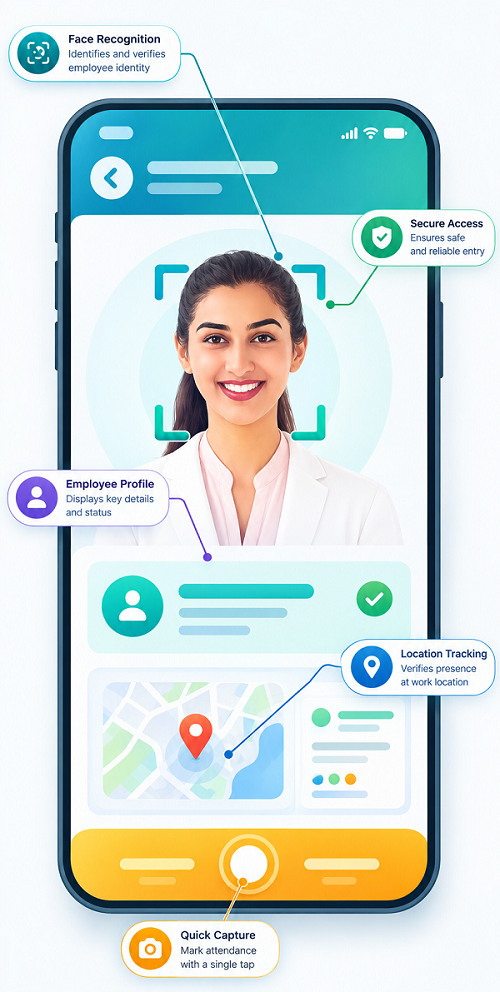
Mobile attendance software allows employees to record their working hours using smartphones. Depending on the system, employers can verify attendance through GPS location, geofencing, QR codes, mobile check-ins, and manager approvals. It can also connect attendance information with shift scheduling, leave management, overtime calculations, and payroll.
However, choosing the right solution requires more than selecting an app with a clock-in button. Singapore employers should evaluate location accuracy, employee privacy, offline functionality, reporting, payroll integration, security, and the software's ability to support different field-work arrangements.
This guide explains what to consider when choosing mobile attendance software for Singapore field staff.
1. Understand Your Field Workforce Requirements
Before comparing software providers, identify how employees work outside the office. Different field operations require different attendance features.
For example:
- Sales representatives: May visit customers, distributors, and retail outlets throughout the day.
- Service technicians: Travel between customer premises to complete maintenance and repair jobs.
- Construction workers: Report to project sites that may change over time.
- Delivery personnel: Start and finish work at depots, warehouses, or assigned delivery locations.
- Retail supervisors: Visit multiple outlets to monitor operations and staff attendance.
- Healthcare and home-service workers: Travel between client locations according to appointment schedules.
List the number of field employees, operating locations, working hours, shift arrangements, and attendance verification requirements.
Also consider whether employees use company-issued phones or personal devices. This affects device compatibility, support requirements, security controls, and employee privacy.
2. Choose an Easy-to-Use Mobile Attendance App
Field employees should be able to record attendance quickly without complicated steps. A difficult app can lead to missed punches, incorrect entries, and repeated requests for HR corrections.
Look for features such as:
- Simple clock-in and clock-out buttons.
- Clear display of attendance status.
- Employee identification through secure login.
- Mobile-friendly interface.
- Support for Android and iOS.
- Automatic date and time capture.
- Clear confirmation after each attendance action.
- Easy access to attendance history.
- Simple missed-punch correction requests.
The app should also work well on different screen sizes and avoid unnecessary navigation.
During a product demonstration, ask employees from different job roles to test the application. A sales representative, technician, and delivery employee may have different attendance requirements.
3. Evaluate GPS-Based Attendance Verification
GPS-based attendance allows employees to record their location when clocking in or out. It can help employers verify whether a field employee was at an expected work location.
Useful capabilities include:
- Capturing location coordinates at the time of check-in.
- Displaying the recorded location on a map.
- Recording the attendance timestamp.
- Identifying check-ins outside an assigned area.
- Showing location accuracy or verification status.
- Allowing authorised managers to review location exceptions.
GPS verification is useful for mobile teams, but employers should understand its limitations. Indoor locations, underground areas, tall buildings, weak mobile signals, and device settings can affect location accuracy.
The system should therefore provide a process for reviewing questionable location records rather than automatically treating every location mismatch as misconduct.
Employers should also distinguish between recording location at a clock-in event and continuously tracking an employee throughout the day. These are different levels of monitoring and should be evaluated separately.
4. Check Whether the Software Supports Geofencing
Geofencing allows employers to define a virtual boundary around a workplace or approved attendance location. The software can then compare an employee's mobile location with that boundary when attendance is recorded.
For example, a service company may define geofences around customer sites or project locations. An employee may be allowed to clock in when within the approved area.
Check whether the software supports:
- Creating multiple geofences.
- Setting different boundaries for different locations.
- Assigning employees to approved sites.
- Configuring location radius or boundary size.
- Managing temporary project locations.
- Updating geofences when work locations change.
- Alerting managers about check-ins outside an approved area.
- Recording exceptions for manual review.
Geofencing should be configurable. A small retail outlet, large construction site, and industrial facility may require different boundary settings.
Employers should test the feature at actual work locations before relying on it for attendance verification. A boundary that is too small may reject legitimate check-ins, while one that is too large may provide limited verification.
5. Look for Offline Attendance Functionality
Field employees may work in locations with weak or unavailable internet connectivity. This can happen in construction areas, basements, remote project sites, warehouses, and certain customer premises.
Without offline functionality, employees may be unable to record attendance when they need to.
A suitable mobile attendance system should ideally support:
- Offline clock-in and clock-out recording.
- Secure storage of attendance entries on the device.
- Automatic synchronisation when connectivity returns.
- Original event timestamps.
- Clear identification of offline-recorded entries.
- Duplicate-entry prevention.
- Alerts for synchronisation failures.
- A process for resolving conflicting or incomplete records.
Ask the vendor how the application handles device time changes, delayed uploads, and records created while offline.
Also test whether the system can distinguish the original attendance event time from the later synchronisation time. This helps prevent confusion when HR reviews working hours.
6. Evaluate Attendance Support for Multiple Field Locations
Field employees may work at different customer premises, project sites, outlets, or branches during the same day.
The software should allow employers to manage these locations without creating unnecessary administrative work.
Look for:
- Multiple work-location profiles.
- Location-wise employee assignments.
- Temporary site creation.
- Employee transfers between locations.
- Location-specific attendance rules.
- Site-wise attendance reports.
- Manager access limited to assigned locations.
- Centralised HR visibility across the organisation.
For example, a maintenance company may assign a technician to three customer sites in one day. The system should allow the relevant attendance events to be recorded and reviewed without confusing the technician's work location with the company's main office.
7. Check Shift Scheduling and Working-Hour Tracking
Mobile attendance software should connect actual attendance with planned working schedules.
Employers should check whether the solution can manage:
- Fixed and rotating shifts.
- Flexible working schedules.
- Part-time schedules.
- Weekend and public-holiday shifts.
- Overnight and cross-midnight shifts.
- Temporary schedule changes.
- Shift swaps and approvals.
- Employee-specific working-hour rules.
The system should compare scheduled hours with actual attendance and identify differences for review.
This is especially important for field teams that begin work at different times depending on customer appointments or project requirements.
Singapore employers should also configure working-hour and overtime rules according to the employees' applicable employment arrangements and statutory coverage. Part 4 of the Employment Act does not apply to every employee, so a software provider should allow appropriate employee categories and rules rather than applying one universal overtime calculation.
8. Examine Overtime and Rest-Day Tracking
Field staff may work beyond scheduled hours because of customer requests, emergency repairs, delayed deliveries, or project deadlines.
The software should help employers identify and review additional working time.
Check for features such as:
- Automatic identification of hours beyond scheduled work.
- Overtime request and approval workflows.
- Actual overtime start and end times.
- Rest-day work records.
- Public-holiday work records.
- Manager notifications.
- Employee-wise overtime reports.
- Payroll-ready overtime summaries.
For eligible employees, the software should support the applicable Singapore Employment Act requirements. Employers should not assume that an internal approval process removes an obligation to pay overtime that is legally payable.
The system should preserve the actual attendance records and provide a review process for disputed or unusual working-hour entries.
9. Review Mobile Leave and Absence Management
Field employees may not have regular access to an office HR team. Mobile leave management can make it easier to submit requests and check leave balances.
Useful features include:
- Mobile leave applications.
- Leave balance visibility.
- Manager approval and rejection.
- Sick leave and other applicable leave categories.
- Unpaid leave tracking.
- Absence notifications.
- Team leave calendars.
- Attendance and leave reconciliation.
For example, if a field employee applies for annual leave and receives approval, the attendance system should reflect the approved absence. This prevents the day from being incorrectly flagged as unauthorised absence.
Employers should also ensure that leave records can be reconciled with payroll.
10. Assess Manager Dashboards and Real-Time Notifications
Managers need visibility into field attendance without repeatedly contacting employees or waiting for manual spreadsheets.
A useful dashboard should display:
- Employees who have clocked in.
- Employees who have not reported for scheduled work.
- Attendance by work location.
- Late arrivals and early departures.
- Missing clock-in or clock-out entries.
- Location verification exceptions.
- Overtime and rest-day work.
- Pending attendance corrections.
- Employees working at different sites.
Notifications can alert managers when an employee misses a scheduled check-in, records attendance outside an approved location, or submits a correction request.
However, alerts should be configurable. Too many notifications can create unnecessary administrative work and cause important exceptions to be overlooked.
11. Evaluate Payroll and HRMS Integration
Mobile attendance data is useful only when it can be transferred accurately into payroll and HR systems.
Before selecting a provider, check whether the software supports:
- Direct payroll integration.
- HRMS employee data synchronisation.
- Attendance data exports.
- Overtime and additional-hours summaries.
- Leave balance updates.
- Employee and department mapping.
- Approval status transfer.
- API-based integration.
- CSV or spreadsheet exports.
- Error reports and reconciliation tools.
The system should preserve approved attendance information and flag incomplete records before payroll processing.
For Singapore employers, check whether the integration supports the information needed for applicable employment records and payslip preparation. The employer remains responsible for reviewing payroll calculations and maintaining required records, even when the process is automated.
12. Review Data Security and Singapore PDPA Requirements
Mobile attendance systems may collect personal information such as employee names, phone numbers, attendance timestamps, location data, and device-related information. Some systems also use biometric verification.
Employers should assess how the provider collects, uses, stores, protects, and retains this information.
Important controls include:
- Secure employee authentication.
- Role-based access permissions.
- Multi-factor authentication where appropriate.
- Encryption during data transmission and storage.
- Secure cloud infrastructure.
- Access and change audit logs.
- Defined data retention and deletion procedures.
- Backup and recovery arrangements.
- Security incident response procedures.
- Appropriate controls for third-party service providers.
Singapore's Personal Data Protection Act (PDPA) is relevant to the collection, use, and disclosure of employee personal data, subject to its applicable provisions and exceptions.
Employers should explain why location data is collected, how it will be used, who can access it, and how long it will be retained. They should collect only information reasonably required for the stated purposes.
Continuous location tracking should not be introduced simply because the software supports it. Employers should assess whether event-based location verification is sufficient for their operational needs.
13. Compare Software Pricing and Total Cost of Ownership
The cheapest mobile attendance app may not be the most economical option in the long term. Employers should evaluate the full cost of implementation and ongoing operation.
Possible cost components include:
- Per-employee monthly or annual subscription.
- Minimum user commitments.
- Mobile application access.
- GPS and geofencing features.
- Offline attendance functionality.
- Manager and administrator accounts.
- Payroll or HRMS integrations.
- Implementation and configuration.
- Employee training.
- Data migration.
- Technical support.
- Additional storage or reporting.
- Customisation and future upgrades.
Ask vendors to provide a complete quotation based on the expected number of field employees and locations.
Compare plans based on the features actually required rather than relying only on the advertised starting price.
14. Test the Software Through a Practical Demonstration
A product demonstration should reflect real field-work conditions instead of showing only standard office clock-ins.
Singapore employers should ask vendors to demonstrate the following scenarios:
| Test scenario | What to verify |
|---|---|
| Employee clocks in at a customer site | Timestamp and location are recorded correctly |
| Employee clocks in outside a geofence | Exception is identified and reviewed |
| Employee works without internet access | Attendance is saved and synchronised later |
| Employee visits multiple sites | Each attendance event is associated with the correct location |
| Employee works an overnight shift | Cross-midnight hours are calculated correctly |
| Employee misses a clock-out | Correction request and approval are recorded |
| Employee works overtime | Additional hours are identified and reviewed |
| Employee takes approved leave | Attendance and leave records are reconciled |
| Manager changes a shift | Updated schedule and approval history are maintained |
| Payroll administrator exports data | Approved attendance information transfers accurately |
Ask employees and managers to participate in the demonstration. Their feedback can reveal usability problems that may not be obvious during a vendor presentation.
15. Prepare a Mobile Attendance Software Evaluation Scorecard
A weighted scorecard helps employers compare shortlisted vendors using consistent criteria.
The following example can be adapted to the organisation's priorities.
| Evaluation criterion | Suggested weight |
|---|---|
| Mobile app usability | 10% |
| GPS attendance verification | 10% |
| Geofencing capabilities | 10% |
| Offline attendance and synchronisation | 10% |
| Multiple-location management | 10% |
| Shift and working-hour tracking | 10% |
| Overtime and rest-day records | 10% |
| Payroll and HRMS integration | 10% |
| Security and PDPA controls | 10% |
| Pricing, implementation, and support | 10% |
| Total | 100% |
Score each vendor against the same criteria. Give higher priority to capabilities that directly affect field operations, attendance accuracy, and payroll processing.
16. Questions to Ask Mobile Attendance Software Vendors
Before signing a contract, ask vendors practical questions about their product and service capabilities.
- Does the mobile app support both Android and iOS?
- Can employees clock in and out using GPS verification?
- Can we create separate geofences for different customer and project locations?
- Does the application support offline attendance?
- How does it synchronise records when internet connectivity returns?
- Can employees record attendance at multiple locations in one day?
- Can managers view attendance by employee, site, and department?
- Can the system manage overnight and rotating shifts?
- How are overtime and rest-day records handled?
- Can employees request corrections for missed punches?
- Does the system integrate with our existing payroll software?
- Where is employee information stored, and what security controls are available?
- Can we configure location-data collection and retention?
- What implementation, training, and technical support are included?
- Can we conduct a pilot before deploying the system across the organisation?
Request clear answers and test important claims during the demonstration or pilot.
17. Implement the Software in Phases
After selecting a provider, a phased rollout can reduce disruption and help employers identify problems early.
Step 1: Prepare employee and location data. Create accurate employee profiles, work locations, departments, shifts, and reporting structures.
Step 2: Configure attendance rules. Set up clock-in methods, location verification, geofences, working schedules, breaks, and approval workflows.
Step 3: Establish privacy and access controls. Define who can view attendance and location records, explain the collection purposes to employees, and configure appropriate retention practices.
Step 4: Conduct a pilot. Test the application with a small group of field employees working at different locations and under different network conditions.
Step 5: Train employees and managers. Explain how to clock in and out, handle missed punches, request corrections, and report technical issues.
Step 6: Integrate with payroll. Verify employee mapping, attendance summaries, leave records, overtime information, and payroll exports.
Step 7: Monitor and improve. Review exceptions, employee feedback, system reliability, and payroll reconciliation results before expanding deployment.
Conclusion
Choosing mobile attendance software for Singapore field staff requires a careful assessment of how employees work outside the office. GPS verification, geofencing, offline attendance, multiple-location management, shift scheduling, overtime tracking, and payroll integration are important capabilities to evaluate.
Employers should also examine mobile usability, employee privacy, data security, implementation costs, and vendor support. A practical demonstration using real field-work scenarios is one of the best ways to determine whether a solution will work in everyday operations.
The right system should help employees record attendance easily, give managers reliable visibility into working hours, and provide HR and payroll teams with accurate records. It should support workforce management while respecting employee privacy and the employment requirements applicable in Singapore.
Evaluate mobile check-ins, site assignments and low-connectivity use with real field staff. Compare InnBuilt with alternatives for Singapore on-the-move teams.