How Can Singapore Companies Track Attendance Across Multiple Outlets?
How Can Singapore Companies Track Attendance Across Multiple Outlets?
Businesses operating multiple outlets in Singapore need a reliable way to monitor employee attendance across different branches, stores, offices, and operational locations. Whether a company manages retail shops, restaurants, clinics, supermarkets, service centres, or franchise outlets, maintaining accurate attendance records across all locations can become challenging without a centralised system.
Manual registers, spreadsheets, and separate attendance devices often create inconsistencies. Managers may struggle to identify late arrivals, track shift changes, monitor overtime, and consolidate attendance data from different outlets. These challenges can also affect payroll processing, workforce planning, and employment recordkeeping.
Attendance software provides a centralized solution by allowing employees to record their working hours at designated locations while giving HR teams and management a consolidated view of attendance across the organisation.
This article explains how Singapore companies can track attendance across multiple outlets, which technologies and controls they should consider, and how to select an attendance management system that supports distributed workforces.
1. Understand the Challenges of Multi-Outlet Attendance Management
Before implementing an attendance tracking system, companies should identify the difficulties associated with managing employees across multiple locations.
Common challenges include:
- Different operating hours: Retail stores, restaurants, clinics, and service outlets may follow different opening and closing schedules.
- Multiple shift patterns: Employees may work morning, evening, night, rotating, or split shifts.
- Employee transfers: Staff may temporarily work at another outlet because of staff shortages, seasonal demand, or operational requirements.
- Inconsistent attendance methods: Some branches may use biometric devices, while others rely on manual registers or mobile check-ins.
- Limited managerial visibility: Head office may not have immediate access to attendance information from every location.
- Payroll discrepancies: Incomplete or inaccurate attendance records can result in incorrect working-hour and overtime calculations.
- Unauthorised attendance: Employees may attempt to record attendance for colleagues or check in from locations where they are not scheduled to work.
A centralised attendance management approach helps businesses address these issues while maintaining consistent processes across outlets.
2. Use Centralised Cloud-Based Attendance Software
Cloud-based attendance software is one of the most practical options for businesses managing employees across multiple outlets.
Instead of maintaining separate attendance records at every branch, the company can collect attendance information in one centralised platform.
Employees record their working hours using supported devices or applications. The information is then transferred to a central system where HR teams and authorised managers can review attendance records.
Important capabilities include:
- Centralised employee attendance records.
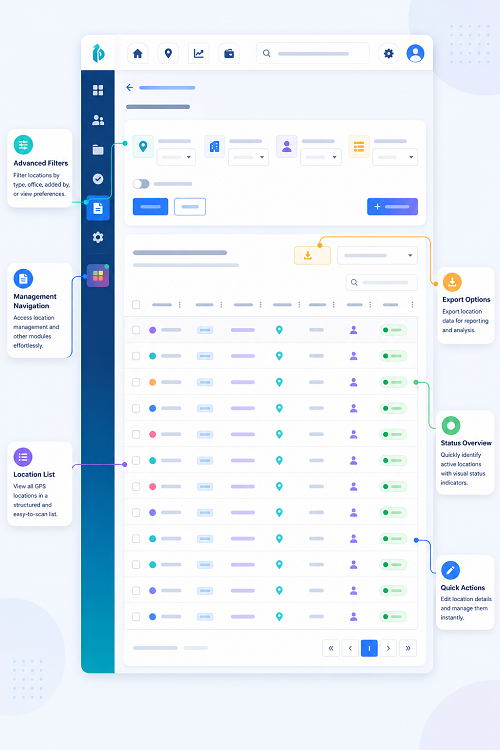
- Separate attendance dashboards for individual outlets.
- Real-time or near-real-time attendance visibility, depending on connectivity.
- Location-specific shift and attendance policies.
- Centralised leave and overtime monitoring.
- Outlet-wise attendance reports.
- Role-based access for branch managers and HR teams.
- Consolidated payroll data.
For example, a retail company operating 20 outlets in Singapore can use one attendance platform to monitor all 20 locations. Each outlet manager can access the records relevant to their branch, while the HR department can review attendance across the entire organisation.
Cloud-based software also reduces the need to exchange spreadsheets and attendance reports manually between outlets.
3. Configure Separate Attendance Locations for Every Outlet
Each business location should be configured separately within the attendance system.
This allows the company to maintain accurate records based on where employees are assigned to work.
For every outlet, administrators should configure:
- Outlet name and unique location ID.
- Physical address.
- Operating hours.
- Assigned employees.
- Reporting manager.
- Shift schedules.
- Attendance check-in and check-out methods.
- Location-specific attendance rules.
- Applicable public holiday and weekly rest-day arrangements.
For example, a company operating outlets in Orchard Road, Tampines, Jurong East, and Woodlands should create separate location profiles for each branch.
An employee scheduled at the Tampines outlet should normally record attendance against that location. If the employee is temporarily transferred to Jurong East, the system should support an authorised location change.
This structure makes it easier to identify where employees worked and which manager is responsible for reviewing their attendance.
4. Select the Right Attendance Check-In Method
Different outlets may require different attendance tracking methods depending on their workforce, infrastructure, and operational environment.
Companies should evaluate the following options.
Biometric Attendance Devices
Fingerprint and facial recognition devices can be installed at outlet entrances or designated staff areas.
Employees use their biometric credentials to record attendance. The system captures the check-in or check-out time and transfers the information to the central attendance platform.
Biometric devices may be useful for:
- Manufacturing facilities.
- Large retail outlets.
- Warehouses.
- Restaurants with fixed staff entrances.
- Locations with high employee attendance volumes.
Companies should assess device reliability, hygiene requirements, accessibility, and data protection implications before deployment.
Biometric information is sensitive personal data in practical terms, so organisations should apply appropriate safeguards and assess their obligations under Singapore's Personal Data Protection Act (PDPA). They should also consider whether a less intrusive attendance method would achieve the same purpose.
Mobile Attendance Applications
Mobile attendance applications allow employees to check in and check out using their smartphones.
Depending on the software, businesses may configure:
- GPS-based location verification.
- Geofencing around approved outlets.
- Location-specific check-in permissions.
- Mobile attendance notifications.
- Manager approval for exceptional check-ins.
- Offline attendance capture with later synchronisation, where supported.
This method is useful for employees who move between outlets or work in locations where installing physical attendance devices is impractical.
For example, a service technician who begins the day at one branch and visits another location can record attendance through an authorised mobile application.
GPS should be used proportionately. Companies should explain when location information is collected, why it is required, and how it is handled.
RFID and Access Cards
RFID cards and employee access cards can be used to record attendance at outlet entrances.
Employees tap their assigned cards on a compatible reader to register their working hours.
This approach may suit businesses that already use access cards for building or staff-area entry.
However, companies should ensure that access records are properly linked to attendance records. A building entry event does not necessarily prove that an employee started or completed their scheduled working hours.
PIN-Based and Web-Based Attendance
PIN-based terminals and web attendance portals can be useful for smaller outlets or workplaces with limited infrastructure.
Employees enter their unique identification details to record attendance.
These methods are generally easier to deploy but may require additional controls to reduce attendance fraud, such as individual authentication, supervisor review, and exception reporting.
5. Implement Location-Based Attendance Verification
When employees work across multiple outlets, companies need to ensure that attendance is recorded at the correct location.
Location-based verification can help prevent employees from recording attendance at unauthorised branches or from outside the workplace.
Useful controls include:
- Geofencing: Define an approved geographical boundary around each outlet.
- GPS verification: Check the device location when an employee records attendance.
- Outlet-specific access: Allow employees to check in only at their assigned or authorised locations.
- Device restrictions: Restrict attendance recording to approved terminals or registered devices where appropriate.
- Exception alerts: Notify managers when an employee records attendance outside an approved location.
- Temporary location permissions: Allow authorised employees to work at another outlet for a defined period.
For example, if an employee is scheduled at a restaurant in Marina Bay but attempts to check in at a branch in Bugis, the system can flag the discrepancy for review.
Location verification should not replace proper attendance supervision. GPS accuracy can vary indoors, and legitimate operational circumstances may require employees to work at different locations.
6. Manage Employee Transfers Between Outlets
Multi-outlet companies frequently move employees between branches.
A retail employee may be assigned to another outlet during a busy weekend. A restaurant may temporarily transfer kitchen staff to another location because of increased customer demand. A service centre may move employees between branches to cover staff shortages.
Attendance software should support these arrangements without creating inaccurate employee records.
Important features include:
- Temporary outlet assignment.
- Permanent employee location transfer.
- Manager-approved location changes.
- Effective dates for transfers.
- Outlet-specific shift schedules.
- Attendance records linked to the actual work location.
- Clear transfer and approval histories.
For example, an employee normally assigned to the Orchard Road outlet may be transferred to the Tampines outlet for three days.
The system should allow an authorised manager to update the employee's temporary assignment. Attendance records should then reflect the correct outlet for those dates.
Companies should avoid changing an employee's permanent location merely to accommodate a short-term transfer. Temporary assignment functionality helps preserve the employee's normal organisational details.
7. Create Outlet-Wise Shift Schedules and Rosters
Different outlets may operate under different business hours.
A shopping mall outlet may open from morning until late evening, while a corporate office may follow standard business hours. Restaurants and healthcare facilities may require rotating or overnight shifts.
Attendance software should allow HR teams to create separate rosters for each outlet.
Key scheduling capabilities include:
- Fixed and rotating shifts.
- Morning, afternoon, evening, and night shifts.
- Weekly and monthly rosters.
- Overnight shift configuration.
- Split shifts.
- Part-time and flexible schedules.
- Weekly rest-day planning.
- Shift swaps and manager approvals.
- Public holiday scheduling.
The system should compare actual attendance against the employee's assigned shift.
For example:
| Outlet | Shift | Scheduled Hours |
|---|---|---|
| Outlet A | Morning | 8:00 AM–4:00 PM |
| Outlet B | General | 9:00 AM–6:00 PM |
| Outlet C | Evening | 2:00 PM–10:00 PM |
| Outlet D | Night | 10:00 PM–6:00 AM |
These schedules should be configurable rather than hard-coded because operating hours and employee arrangements may change.
Companies should also configure appropriate rules for breaks, overtime, rest days, and shift workers based on applicable employment requirements.
8. Give Outlet Managers Controlled Access to Attendance Records
Branch managers need access to attendance information for their own locations, but they should not automatically have unrestricted access to the entire organisation's employee records.
Role-based access control helps companies define what each user can view, approve, and modify.
A typical access structure may include:
| User Role | Access and Responsibilities |
|---|---|
| HR Administrator | Manage employees, outlets, attendance policies, and organisation-wide reports |
| Regional Manager | Review attendance across assigned outlets |
| Outlet Manager | View attendance and approve exceptions for their branch |
| Supervisor | Review assigned teams and submit attendance corrections |
| Employee | View personal attendance, shifts, and relevant requests |
| Payroll Team | Access approved attendance and payroll-related information |
The system should maintain an audit trail of important activities, including attendance corrections, shift changes, approvals, and employee transfers.
This helps companies identify who made a change and when it occurred.
Access permissions should be reviewed periodically, particularly when employees change roles or leave the organisation.
9. Track Late Arrivals, Early Departures, and Absences
Monitoring attendance across several outlets requires a consistent process for identifying attendance exceptions.
Attendance software should compare employee check-in and check-out times with their assigned schedules.
Common attendance exceptions include:
- Late arrival.
- Early departure.
- Missing check-in.
- Missing check-out.
- Unauthorised absence.
- Unscheduled attendance.
- Attendance recorded at the wrong outlet.
- Incomplete shift hours.
- Unapproved shift changes.
Managers should receive alerts or notifications when important exceptions occur.
For example, if a store employee is scheduled to begin work at 9:00 AM but has not checked in by the configured grace period, the outlet manager can receive a notification.
HR teams can also review exception reports across all branches to identify recurring attendance problems.
However, automated flags should be treated as items requiring review rather than automatic proof of misconduct. Managers should consider approved schedule changes, technical problems, and other relevant circumstances before making decisions.
10. Monitor Overtime and Working Hours Across Locations
Employees working across multiple outlets may accumulate working hours at different locations.
Companies should ensure that these hours are consolidated where required rather than assessing each outlet independently.
Attendance software should support:
- Daily and weekly working-hour calculations.
- Overtime identification.
- Shift-based working-hour calculations.
- Approved and unapproved overtime records.
- Rest-day work tracking.
- Public holiday work records.
- Outlet-wise overtime reports.
- Consolidated employee working-hour summaries.
For Singapore employers, the Employment Act contains specific requirements relating to hours of work, overtime, and rest days. Part 4 provisions apply only to eligible employees, subject to the relevant statutory conditions and exclusions.
For employees covered by Part 4, employers should configure the applicable working-hour and overtime rules accurately. The general overtime limit is 72 hours per month, subject to applicable exemptions.
For employees working at more than one outlet, the company should ensure that all relevant working hours are included in the employee's overall records.
Software should not treat a transfer between outlets as a new independent working-hour calculation if the employee's hours need to be considered together.
11. Integrate Attendance Software with Payroll
Accurate attendance data is essential for payroll processing.
When employees work at multiple outlets, HR and payroll teams need consolidated records to calculate salary and other attendance-related payments correctly.
Attendance software should integrate with payroll systems or provide reliable data exports.
Important integration features include:
- Approved working hours.
- Overtime hours and amounts where applicable.
- Unpaid leave.
- Absence records.
- Late arrival and early departure records.
- Shift allowances, where applicable.
- Public holiday and rest-day work records.
- Outlet and cost-centre information.
- Attendance correction history.
For example, a company with 15 outlets can consolidate approved attendance records into one payroll system rather than collecting separate spreadsheets from every branch.
The integration should include validation checks to identify missing punches, duplicate records, incorrect employee IDs, and unapproved attendance adjustments.
Payroll teams should reconcile the imported data before finalising salary calculations.
12. Generate Outlet-Wise and Consolidated Attendance Reports
Reporting is particularly important for companies operating multiple branches.
A centralised attendance platform should allow HR teams to review individual outlet performance as well as organisation-wide attendance trends.
Useful reports include:
| Report | Business Purpose |
|---|---|
| Daily outlet attendance | Review employee presence at each branch |
| Late arrival report | Identify repeated punctuality issues |
| Absence report | Monitor unplanned employee absences |
| Overtime report | Review additional working hours and costs |
| Shift compliance report | Compare actual attendance with scheduled shifts |
| Employee movement report | Track temporary and permanent outlet transfers |
| Missing punch report | Identify incomplete attendance records |
| Outlet comparison report | Compare attendance patterns across branches |
| Monthly attendance summary | Support payroll and HR reconciliation |
Dashboards should allow authorised users to filter information by outlet, region, department, employee, date, and shift.
For example, a regional manager can compare attendance across five outlets to identify locations with frequent absenteeism or overtime.
These reports can also help management understand staffing gaps and make better workforce allocation decisions.
13. Maintain Singapore Employment Records and PDPA Compliance
Companies should consider employment recordkeeping and personal data protection when implementing attendance tracking across multiple outlets.
Under Singapore's Employment Act and applicable Employment Regulations, employers must maintain the required employment records for employees covered by the Act.
For current employees, employers generally need to retain the latest two years of records. For former employees, the last two years of records must generally be retained for one year after the employee leaves.
Relevant records include applicable working hours, overtime hours and pay, and leave information.
Companies should confirm which records are required for each employee category and ensure that their attendance system can produce them when needed.
Personal Data Protection
Attendance systems may collect personal information such as:
- Employee names and identification details.
- Attendance timestamps.
- Outlet locations.
- Mobile device information.
- GPS location data.
- Biometric identifiers, where used.
Businesses should assess their obligations under Singapore's Personal Data Protection Act (PDPA).
Recommended practices include:
- Inform employees about attendance data collection and its purposes.
- Collect only information that is reasonably necessary.
- Restrict access to authorised personnel.
- Protect attendance information using appropriate technical and organisational safeguards.
- Define suitable data retention and deletion practices.
- Review third-party vendor security and data handling arrangements.
- Establish procedures for handling data breaches and access requests.
If biometric attendance is used, companies should pay particular attention to the sensitivity of biometric information and the safeguards required.
Employers should not assume that installing attendance software automatically makes their processes compliant with employment or data protection requirements.
14. Use Real-Time Alerts to Improve Outlet-Level Control
Real-time or near-real-time alerts help management respond quickly to attendance problems.
Depending on the system's capabilities and network connectivity, alerts can be sent through dashboards, email, or mobile notifications.
Useful alerts include:
- Employee has not checked in.
- Employee arrives late.
- Employee checks in at an unauthorised outlet.
- Employee misses a check-out.
- Overtime exceeds an internal threshold.
- Shift coverage is incomplete.
- Attendance correction requires approval.
- An outlet has insufficient scheduled staff.
For example, if a restaurant has five employees scheduled for its lunch shift but only three have checked in, the outlet manager can receive an alert and arrange replacement staff.
This is particularly valuable for businesses where staff availability directly affects customer service and daily operations.
15. Test the Attendance System Before Deploying It Across All Outlets
Before implementing attendance software throughout the organisation, companies should conduct a pilot at selected locations.
Testing should cover different outlet types, shift arrangements, employee categories, and attendance methods.
A practical testing checklist includes:
| Test Scenario | Expected System Behaviour |
|---|---|
| Employee checks in at assigned outlet | Attendance is recorded against the correct location |
| Employee checks in at another outlet | System applies the authorised location rules |
| Employee is temporarily transferred | Attendance reflects the temporary assignment |
| Employee works an overnight shift | Check-in and check-out are linked to the correct shift |
| Employee misses a punch | Exception is flagged for correction |
| Manager approves attendance correction | Change is recorded in the audit trail |
| Employee works overtime | Relevant additional hours are identified |
| Internet connection is interrupted | System follows its documented offline procedure, if supported |
| HR generates a consolidated report | Records from all authorised outlets are included |
| Attendance is exported to payroll | Approved records are transferred accurately |
The pilot should include both employees and outlet managers so that the company can assess usability and identify practical problems.
After successful testing, the business can expand deployment to the remaining locations.
16. Common Mistakes to Avoid When Tracking Attendance Across Multiple Outlets
Even when businesses invest in attendance software, poor configuration and inconsistent processes can reduce its effectiveness.
Common mistakes include:
Using different attendance rules without proper control: Allowing every outlet to follow unrelated attendance procedures can create inconsistent records. Companies should establish common policies while allowing legitimate location-specific schedules.
Not updating employee transfers: Employees who temporarily work at another branch may appear absent from their original outlet if assignments are not updated.
Relying only on GPS: GPS may be inaccurate indoors or in dense urban areas. Businesses should combine location verification with other authentication and supervisory controls.
Giving managers excessive access: Outlet managers should have access only to the information required for their responsibilities.
Ignoring missing attendance records: Missing punches should be reviewed and corrected through an authorised process rather than left unresolved until payroll processing.
Failing to consolidate working hours: Employees working across multiple branches should have their relevant working hours considered together where required.
Not testing payroll integration: Incorrect employee IDs, duplicate records, and incomplete attendance exports can create payroll errors.
Overlooking data protection: Businesses should assess how attendance and location data are collected, accessed, retained, and shared.
Avoiding these mistakes helps companies establish a consistent and reliable attendance management process.
17. Checklist for Choosing Multi-Outlet Attendance Software in Singapore
Before selecting an attendance management platform, companies should evaluate whether it can support their operational requirements.
The following checklist can help HR and management teams compare solutions.
- Does the software support multiple outlets and locations?
- Can administrators configure separate schedules for each branch?
- Does it support biometric, mobile, RFID, PIN, and web-based attendance?
- Can employees check in at authorised temporary locations?
- Does it support GPS verification and geofencing where appropriate?
- Can managers access attendance records for their assigned outlets only?
- Does it support employee transfers between branches?
- Can it handle overnight, rotating, and split shifts?
- Does it identify late arrivals, absences, and missing punches?
- Can it consolidate working hours and overtime across outlets?
- Does it integrate with the company's payroll system?
- Can it generate outlet-wise and consolidated reports?
- Does it maintain audit trails for attendance corrections?
- Does it provide suitable security and data protection controls?
- Can it scale when the company opens additional outlets?
- Does the vendor provide implementation, training, and technical support?
Companies should also ask vendors to demonstrate realistic scenarios involving employee transfers, multi-location check-ins, overnight shifts, attendance exceptions, and payroll exports.
Conclusion
Singapore companies can manage attendance across multiple outlets more effectively by using a centralised attendance management system with location-specific configurations, flexible check-in methods, employee transfer controls, and consolidated reporting.
The right solution should allow employees to record attendance accurately at authorised locations while giving outlet managers appropriate control over their teams. HR and payroll departments should be able to review attendance across the organisation without relying on separate spreadsheets or manual consolidation.
Businesses should also consider Singapore employment recordkeeping requirements and PDPA obligations when selecting and configuring attendance software.
A successful multi-outlet attendance system is not simply a collection of check-in devices. It is a coordinated workforce management process that connects employees, branch managers, HR teams, and payroll operations through reliable and secure attendance information.
See how branch-level supervisors and central HR review attendance without duplicate spreadsheets. Test InnBuilt reporting for multiple Singapore locations.