How Can Singapore Employers Reconcile Payroll With Bank Payments?
How Can Singapore Employers Reconcile Payroll With Bank Payments?
Introduction
Processing payroll does not end when salaries are calculated and approved. Singapore employers must also ensure that the amounts recorded in payroll are successfully transferred to employees' bank accounts and that the payments agree with the company's financial records.
Payroll-to-bank reconciliation is the process of comparing approved payroll figures with actual bank transactions. It helps businesses confirm that employees receive the correct net salaries, identify failed or duplicate transfers, investigate payment differences and maintain accurate accounting records.
For Singapore businesses, this process also needs to distinguish between employee salary payments and other payroll-related liabilities, such as CPF contributions, Skills Development Levy (SDL), Self-Help Group (SHG) contributions and statutory deductions. These amounts may be paid through different channels and on different dates.
Payroll software can simplify reconciliation by generating payment files, recording payment statuses, producing payroll summaries and integrating with accounting systems. However, employers should still establish a clear reconciliation procedure to verify that the money actually left the company bank account and reached the intended recipients.
This article explains how Singapore employers can reconcile payroll with bank payments, the records they should compare, common discrepancies to investigate and how payroll software can improve the process.
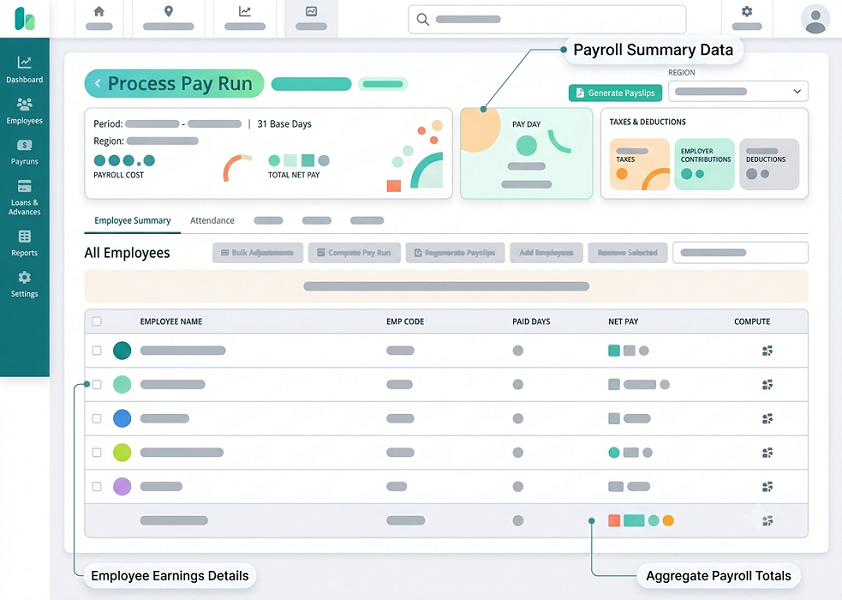
1. Understand What Payroll-to-Bank Reconciliation Involves
Payroll-to-bank reconciliation checks whether the salary payments recorded in the payroll system agree with the transactions shown in the company's bank records.
The process generally involves comparing three sets of information:
- Approved payroll register: The final payroll figures showing each employee's gross salary, deductions and net salary.
- Bank payment records: The payment file, bank transaction report or bank statement showing salary transfers.
- Accounting records: The payroll-related entries recorded in the company's general ledger or accounting system.
The main objective is to confirm that the total approved net salary agrees with the amount successfully paid to employees.
For example, if the payroll system calculates net salaries of S$85,000, the company's bank transactions should show total salary payments of S$85,000, subject to any properly documented payment adjustments or separately processed transactions.
A reconciliation should identify differences rather than simply confirm that a payment file was uploaded.
2. Separate Net Salary Payments From Other Payroll Liabilities
One of the most important reconciliation principles is to distinguish employee take-home pay from other payroll-related payments.
An employee's gross salary is not necessarily the amount transferred to their bank account. The employer may deduct the employee's CPF contribution and other permitted deductions before calculating net salary.
The employer may also have separate obligations to pay employer CPF contributions and other statutory amounts.
A simplified payroll structure is:
| Payroll component | Typical treatment |
|---|---|
| Basic salary | Included in gross salary |
| Fixed and variable allowances | Included where payable as salary |
| Overtime and additional payments | Included where applicable |
| Employee CPF contribution | Deducted from eligible employee wages |
| Other permitted deductions | Deducted where applicable |
| Net salary | Amount payable to the employee |
| Employer CPF contribution | Employer liability paid separately |
| SDL | Separate statutory levy liability |
| SHG contributions | Applicable deductions or contributions handled according to the relevant scheme |
For example, an employee may have gross wages of S$4,500 and an employee CPF deduction of S$900. If there are no other deductions, the net salary payment is S$3,600.
The employer's CPF contribution is an additional employer cost. It should not be added to the employee's net salary bank transfer.
Businesses should therefore maintain separate reconciliation schedules for:
- Employee net salary payments.
- Employer and employee CPF contributions.
- SDL.
- SHG contributions, where applicable.
- Other payroll-related liabilities and payments.
This prevents employers from comparing the total payroll expense with the salary bank transfer and incorrectly treating the difference as an error.
3. Prepare the Final Approved Payroll Register
The approved payroll register is the starting point for reconciliation.
It should be generated after payroll calculations, reviews and required approvals have been completed.
The register should contain enough information to identify each employee's payment and explain how the net salary was calculated.
Important fields include:
- Employee name and unique employee ID.
- Department or business unit.
- Salary period.
- Basic salary.
- Allowances.
- Bonuses and commissions.
- Overtime payments.
- Employee CPF deductions.
- Other permitted deductions.
- Net salary payable.
- Bank account reference or masked account details.
- Payment method.
- Payroll approval status.
Before using the register for reconciliation, payroll teams should confirm that:
- All eligible employees are included.
- Resigned employees and new joiners are handled correctly.
- Salary revisions have been approved.
- Attendance and leave adjustments are reflected.
- Overtime and variable payments have been reviewed.
- Duplicate employee records have been identified.
- Payroll adjustments have been approved.
- The payroll run is marked as final or approved.
The reconciliation should use the final approved version, not an earlier draft that may have been changed after review.
4. Verify the Total Net Salary Against the Bank Payment File
Once payroll is approved, the employer may generate a bulk salary payment file for submission through its corporate banking platform.
The file generally contains employee payment details, including the beneficiary account, payment amount and relevant transaction information. The exact file format and upload process depend on the bank and the payroll software.
The payroll team should compare the payment file with the approved payroll register before uploading it.
For example:
| Reconciliation item | Amount |
|---|---|
| Total approved net salary | S$85,000 |
| Total salary payment file | S$85,000 |
| Difference | S$0 |
A zero difference indicates that the payment file total agrees with the approved payroll total.
However, this is only a pre-payment check. It does not prove that the bank successfully processed the transfers.
Businesses should also compare individual employee amounts where possible. A payment file may have the correct overall total but still contain an incorrect employee payment or beneficiary account.
5. Match Individual Employee Payments With Bank Transactions
A total-level comparison is useful, but employers should also verify payments at the employee level.
The reconciliation should match each employee's approved net salary against the corresponding bank transaction.
Useful matching fields include:
- Employee ID or payment reference.
- Beneficiary name.
- Masked bank account number.
- Payment amount.
- Payment date.
- Transaction reference.
- Payment status.
For example:
| Employee | Approved net salary | Bank payment | Difference |
|---|---|---|---|
| Employee A | S$3,600 | S$3,600 | S$0 |
| Employee B | S$4,250 | S$4,250 | S$0 |
| Employee C | S$3,900 | S$3,900 | S$0 |
| Employee D | S$4,100 | S$0 | S$4,100 |
| Total | S$15,850 | S$11,750 | S$4,100 |
In this example, Employee D's payment is missing from the bank transaction report.
The payroll team should investigate whether the transaction was rejected, held for approval, omitted from the payment file or processed separately.
A reconciliation process should not mark the entire payroll as successfully paid merely because the bank accepted the bulk payment instruction.
6. Confirm the Actual Payment Status With the Bank
Payment file generation and payment completion are different stages.
Depending on the bank's processing arrangements, a payment may be:
- Created but not uploaded.
- Uploaded and awaiting authorisation.
- Submitted for processing.
- Successfully processed.
- Pending.
- Rejected.
- Returned.
- Cancelled.
Employers should check the bank's transaction status and obtain the relevant payment confirmation or transaction report.
For a bulk payment, the bank may provide a batch-level status and separate transaction-level results. Payroll teams should examine both where available.
The following checks are useful:
- Was the payment file uploaded successfully?
- Did the required bank approver authorise the batch?
- Did the bank accept all individual payment instructions?
- Were any payments rejected or returned?
- Does the total processed amount agree with the approved payroll?
- Were any transactions duplicated?
- Is there evidence of the actual debit from the company account?
The bank statement or transaction report should be treated as the evidence of the financial movement, while the payroll register remains the evidence of the amount authorised for payment.
7. Reconcile Failed, Rejected and Returned Salary Payments
A salary payment may fail even when the payroll calculation is correct.
Common reasons include:
- Incorrect bank account details.
- Closed or inactive beneficiary accounts.
- Invalid payment file information.
- Insufficient funds in the employer's bank account.
- Bank payment limits.
- Missing or incomplete authorisation.
- Incorrect beneficiary information.
- Bank processing restrictions.
When a payment fails, the payroll team should record the affected employee, payment amount, failure reason and corrective action.
For example, if an employee's S$4,100 salary transfer is rejected because the bank account is incorrect, the employer should verify the employee's updated bank details through an appropriate process before arranging a replacement payment.
The employer should also confirm that the original transfer was not subsequently completed before making another payment. Otherwise, the employee may receive a duplicate salary transfer.
A failed transaction should remain an outstanding reconciliation item until the employer confirms the corrective payment or another appropriate resolution.
8. Identify Duplicate Salary Payments
Duplicate salary payments can occur when a payment file is uploaded more than once, an employee appears twice in the payroll register or a replacement payment is made without checking the original transaction status.
For example, an employee may receive two transfers of S$3,600 for the same salary period.
Payroll software should help identify duplicate employee payment records, while finance teams should review bank transaction references and payment dates.
Useful duplicate-payment checks include:
- Same employee and salary period.
- Same bank account and payment amount.
- Same transaction reference.
- Repeated payment file uploads.
- Multiple payroll runs for the same employee.
- Replacement payments following an earlier rejected transaction.
If a duplicate payment has occurred, the employer should investigate the cause, document the amount and follow an appropriate recovery or adjustment process.
Any recovery from an employee must be handled carefully and in accordance with applicable employment and salary deduction requirements. Employers should not automatically deduct the amount from a future salary without checking the applicable rules and obtaining appropriate advice where necessary.
9. Reconcile Salary Payment Dates With Singapore Employment Requirements
Bank reconciliation should also help employers identify whether salary payments were completed within the required timeframe.
Under Singapore's Employment Act, employers covered by the relevant provisions must generally pay salary at least once a month and within seven days after the end of the salary period.
Overtime pay must generally be paid within 14 days after the end of the salary period.
Different final salary deadlines apply depending on whether the employee resigns, serves notice or is terminated.
For example:
| Payment situation | General statutory timing |
|---|---|
| Regular salary | Within 7 days after the salary period ends |
| Overtime pay | Within 14 days after the salary period ends |
| Employee resigns and serves notice | On the last day of employment |
| Employee resigns without serving notice | Within 7 days after the last day |
| Employer terminates employment | On the last day, or within 3 working days if payment is not possible that day |
| Dismissal for misconduct | On the last day, or within 3 working days if payment is not possible that day |
These general requirements should be checked against the employee's circumstances and the applicable MOM rules.
Payroll teams should record the actual bank payment date rather than relying only on the date printed on a payslip or the date a payment file was uploaded.
10. Reconcile CPF Contributions Separately From Salary Payments
CPF contributions should be reconciled separately because they are not normally included in the employee's net salary bank transfer.
The employer must verify the CPF amounts calculated in payroll against the CPF submission and payment records.
The reconciliation should cover:
- Employee CPF contributions.
- Employer CPF contributions.
- Employee eligibility and contribution category.
- Applicable contribution rates.
- Ordinary Wages and Additional Wages.
- Applicable wage ceilings.
- Contribution month.
- Total CPF payable.
- Payment status.
CPF contributions for a month's wages are due by the last day of that month. Enforcement action may be taken if payment is not made by the 14th of the following month, or the next working day if the 14th falls on a weekend or public holiday. Late payment interest may apply.
CPF EZPay supports submission and payment through Direct Debit or PayNow QR. Employers should check the submission and payment status because a CPF submission is only complete after successful payment.
For example, a payroll system may show CPF contributions of S$12,000 for a particular month. The finance team should verify that the CPF submission reflects the correct amount and that the bank payment or relevant payment confirmation shows the successful transaction.
A submitted CPF declaration should not be treated as proof of payment.
11. Reconcile SDL and Self-Help Group Contributions
Employers should also review other payroll-related statutory amounts that may be handled separately from employee salary payments.
Skills Development Levy
The Skills Development Levy is generally payable by employers for employees working in Singapore, subject to the applicable rules and exemptions.
The payroll team should compare the SDL amount calculated or reported for the relevant period with the amount payable and the corresponding payment record.
SDL should not be confused with the employee's net salary or treated as an employee deduction.
Self-Help Group contributions
Eligible employees may have Self-Help Group contributions deducted from their salaries under the applicable scheme.
Depending on the contribution arrangement, the employer may need to collect and remit these amounts to the relevant organisation.
The reconciliation should verify:
- Eligible employees.
- Correct contribution amounts.
- Payroll deductions.
- Amounts payable to the relevant fund.
- Successful remittance.
- Supporting payment records.
Businesses should maintain separate schedules for these liabilities rather than combining all statutory amounts into one unexplained payroll difference.
12. Reconcile Payroll With the General Ledger
Payroll-to-bank reconciliation should also connect with the company's accounting records.
Payroll transactions typically affect several general ledger accounts, including:
- Salary expense.
- Allowance and bonus expense.
- Overtime expense.
- Employer CPF expense.
- Employee CPF payable.
- Employer CPF payable.
- SDL payable.
- SHG payable.
- Net salary payable.
- Bank account.
The exact account structure depends on the company's accounting policies.
A typical accounting process may look like this:
When payroll is recorded:
| Account | Debit | Credit |
|---|---|---|
| Salary and allowance expense | S$85,000 | – |
| Employer CPF expense | S$14,000 | – |
| Net salary payable | – | S$70,000 |
| Employee CPF payable | – | S$9,000 |
| Employer CPF payable | – | S$14,000 |
| Other payroll liabilities | – | S$6,000 |
| Total | S$99,000 | S$99,000 |
Illustrative example only. The actual amounts and accounting entries depend on the payroll components and applicable contribution rules.
When net salaries are paid:
| Account | Debit | Credit |
|---|---|---|
| Net salary payable | S$70,000 | – |
| Bank | – | S$70,000 |
The payroll payable account should then be cleared for the amount successfully paid.
Other liabilities, such as CPF and SDL, remain outstanding until their respective payments are completed and recorded.
This approach helps finance teams distinguish payroll expenses from unpaid payroll liabilities and actual bank movements.
13. Investigate Differences Between Payroll and Bank Records
Differences should be categorised so that the finance team can identify their causes and resolve them efficiently.
Common reconciliation differences include:
| Difference | Possible reason | Recommended action |
|---|---|---|
| Payroll total exceeds bank payments | One or more transfers failed | Check bank transaction status |
| Bank payment exceeds payroll total | Duplicate or unauthorised transfer | Investigate payment references and approval history |
| Individual employee amount differs | Incorrect bank file or payroll adjustment | Compare employee-level records |
| Payment appears in payroll but not bank statement | Transfer pending or rejected | Check bank processing status |
| Bank payment appears without payroll entry | Manual or off-cycle payment | Obtain supporting approval and record |
| CPF amount differs | Incorrect wage classification or contribution data | Review CPF calculations and submission |
| Payroll payable remains outstanding | Payment not recorded or completed | Investigate bank and accounting entries |
| Accounting bank balance differs | Timing or posting issue | Review statement dates and ledger entries |
Each discrepancy should have an assigned owner, investigation notes and a resolution status.
Unexplained differences should not be carried forward indefinitely.
14. Handle Off-Cycle Payments and Final Salary Settlements
Not every salary payment occurs during the normal monthly payroll run.
Businesses may process additional payments for:
- Final salary settlements.
- Retrospective salary adjustments.
- Commission corrections.
- Emergency salary payments.
- Approved bonuses.
- Salary arrears.
- Other authorised payroll adjustments.
These payments should be recorded separately or clearly identified in the payroll system.
For example, if an employee receives a final settlement of S$2,800 after the regular monthly payroll has been processed, the finance team should verify the final settlement calculation, approval record, payment date and corresponding bank transaction.
The reconciliation should also check whether the payment has already been included in another payroll run.
Off-cycle payments should have their own payment references and supporting documentation wherever practical. This makes it easier to identify them during monthly reconciliation and prevents accidental double counting.
15. Use Payroll Software to Automate Bank Reconciliation
Payroll software can reduce manual reconciliation work by connecting approved payroll records with payment information.
However, the level of automation varies between products. Some systems generate payment files but do not automatically import bank transaction results. Others support bank integrations or reconciliation workflows.
Businesses should evaluate the following features:
- Bank payment file generation
The system should generate payment files in formats supported by the company's bank. - Employee-level payment summaries
Payroll teams should be able to export approved net salary amounts for comparison with bank transactions. - Payment status tracking
The system should distinguish between prepared, submitted, processed, rejected and completed payments where the relevant information is available. - Bank statement import
Where supported, the software should allow authorised users to import bank statements or transaction reports for reconciliation. - Automated transaction matching
The system should match bank transactions with payroll records using payment references, employee details, amounts and dates. - Duplicate payment detection
The system should flag potentially repeated payments for investigation. - Exception reporting
Unmatched, rejected, partially processed or unusual transactions should appear in a reconciliation report. - Accounting integration
Approved payroll entries and payment transactions should be transferable to the accounting system without creating duplicate postings. - Audit trails
The system should record who performed reconciliation, changed payment details or resolved an exception. - Secure access
Only authorised finance and payroll personnel should be able to view or modify sensitive payment information.
During a software demonstration, businesses should ask vendors to show the complete reconciliation process, including a rejected payment and a replacement transfer.
16. Establish a Monthly Payroll-to-Bank Reconciliation Workflow
A consistent workflow helps ensure that payroll reconciliation is completed on time.
A practical monthly process may follow these steps:
| Stage | Activity | Responsible team |
|---|---|---|
| 1 | Finalise payroll calculations | Payroll |
| 2 | Review and approve payroll | HR and finance |
| 3 | Generate salary payment file | Payroll |
| 4 | Check payment file against approved register | Payroll or finance |
| 5 | Upload and authorise bank payments | Authorised bank users |
| 6 | Obtain bank transaction report | Finance |
| 7 | Match individual payments and totals | Finance |
| 8 | Investigate rejected or unmatched transactions | Payroll and finance |
| 9 | Verify CPF and other statutory payments separately | Payroll and finance |
| 10 | Post or reconcile accounting entries | Finance |
| 11 | Obtain independent reconciliation review | Finance manager or authorised reviewer |
| 12 | Archive supporting records | Payroll and finance |
The person who performs the reconciliation should, where practical, be different from the person who prepared and released the payment file.
For smaller businesses, where full segregation is difficult, a director or independent finance reviewer can examine the bank statement, approved payroll register and reconciliation report.
17. Maintain Proper Payroll and Bank Reconciliation Records
Employers should retain records that explain how salary payments were calculated, authorised and completed.
Useful supporting documents include:
- Final approved payroll register.
- Payroll summary by department.
- Employee-level net salary schedule.
- Salary payment file.
- Bank upload confirmation.
- Bank authorisation record.
- Bank statement or transaction report.
- Failed and rejected payment reports.
- Replacement payment evidence.
- CPF submission and payment confirmation.
- SDL and SHG remittance records, where applicable.
- Payroll reconciliation report.
- Accounting journal entries.
- Reviewer approval and investigation notes.
MOM requires employers to maintain prescribed employment records for employees covered by the Employment Act. For current employees, the required records generally cover the latest two years. For former employees, the last two years of records must be kept for one year after they leave employment.
These requirements concern prescribed employment records. Businesses should separately determine appropriate retention periods for bank, accounting, tax and other supporting records under the relevant rules and their record-management policies.
Conclusion
Reconciling payroll with bank payments is an essential control for Singapore employers. It helps confirm that approved salaries have been transferred correctly, identifies failed or duplicate transactions and ensures that payroll expenses and liabilities are accurately reflected in the company's financial records.
A reliable process should compare the approved payroll register, employee-level bank transactions, statutory contribution records and general ledger entries. Employers should also distinguish between net salary payments and separate liabilities such as CPF, SDL and SHG contributions.
Payroll software can make reconciliation more efficient through payment file generation, bank integrations, transaction matching, exception reports and audit trails. However, businesses should verify that the system supports their actual bank and accounting workflows.
By implementing a consistent monthly reconciliation process and assigning clear responsibilities to payroll and finance teams, Singapore employers can reduce payment errors, strengthen internal controls and maintain reliable payroll records.
Compare approved payroll totals, payment files and actual transfers to spot differences. Ask InnBuilt to demonstrate the reports needed for Singapore bank reconciliation.