How Can Singapore Payroll Teams Catch Errors Before Payday?
How Can Singapore Payroll Teams Catch Errors Before Payday?
Introduction
Payroll errors can affect employee trust, create compliance risks and disrupt business operations. A missing allowance, incorrect overtime calculation, duplicate deduction or outdated employee record can result in an employee receiving the wrong salary. Even a small error repeated across multiple employees can become a significant financial and administrative problem.
For Singapore employers, payroll accuracy involves more than checking the final net salary. Payroll teams must verify employee information, attendance records, leave deductions, salary components, CPF contributions, statutory deductions, payment instructions and payslip details before releasing salaries.
A structured pre-payday review helps businesses identify discrepancies early, correct them before payment and maintain reliable payroll records. Payroll software can support this process through automated validations, exception reports, approval workflows and reconciliation tools, but human review remains important.
This article explains how Singapore payroll teams can catch common payroll errors before payday and build a consistent payroll checking process.
1. Maintain an Accurate Employee Master Database
Employee master data is the foundation of every payroll calculation. Incorrect or outdated information can affect salary payments, CPF contributions, tax reporting and employment records.
Before processing payroll, teams should review important employee details, including:
- Full legal name and employee identification details.
- Employment start date and termination date.
- Citizenship or permanent resident status.
- Permanent Resident status commencement date, where relevant to CPF calculations.
- Date of birth and age category.
- Job title, department and cost centre.
- Basic salary and salary payment frequency.
- Bank account details.
- Fixed allowances and contractual benefits.
- Employment status, including full-time, part-time or temporary arrangements.
For example, an employee who becomes a Singapore Permanent Resident may move into a different CPF contribution category depending on the applicable PR year and other rules. If the employee's status is not updated in the payroll system, the CPF calculation may be incorrect.
Payroll teams should compare employee master data against approved HR records before each payroll run. Changes to salary, bank details, employment status or statutory information should be supported by authorised documentation.
2. Reconcile Attendance and Working Hours
Attendance discrepancies are a common source of payroll errors, particularly for businesses with shift workers, hourly employees, retail teams, security personnel and field staff.
Payroll teams should compare approved attendance records with the employee's scheduled working hours and payroll period.
Important checks include:
- Missing clock-in or clock-out records.
- Duplicate attendance entries.
- Incorrect shift assignments.
- Unapproved timesheet adjustments.
- Late arrivals and early departures.
- Overnight shifts recorded against the wrong date.
- Rest-day and public-holiday work.
- Overtime hours that have not been approved or verified.
- Attendance records for employees who have already left the company.
For example, an employee may work an overnight shift from 10 p.m. to 6 a.m. If the attendance system records the entire shift against the wrong date, the payroll team may calculate working hours or overtime incorrectly.
Attendance data should be reviewed and approved by the relevant supervisor before it is transferred to payroll. However, an internal approval issue should not be used to ignore work actually performed or any payment obligations that apply.
3. Verify Overtime and Additional Working Hours
Overtime errors can arise when payroll teams use incorrect hourly rates, overlook eligible hours or apply statutory rules to the wrong employee category.
Before payday, payroll teams should check:
- Whether the employee is eligible for statutory overtime under the applicable Employment Act provisions.
- Whether the recorded overtime hours match approved timesheets and attendance records.
- Whether the correct hourly basic rate has been used.
- Whether overtime was performed on an ordinary working day, rest day or public holiday.
- Whether the overtime payment period differs from the normal salary period.
- Whether overtime amounts have been included in the correct payroll month.
Singapore's Employment Act Part 4 provisions on hours of work and overtime do not apply to every employee. For example, managers and executives are generally excluded from Part 4, while salary thresholds and employee classifications determine coverage for other groups.
For employees covered by Part 4, statutory overtime pay is generally at least 1.5 times the hourly basic rate of pay. Payroll teams should confirm the applicable rules rather than applying one overtime formula to the entire workforce.
A payroll exception report can highlight employees whose overtime hours or payments differ significantly from previous months.
4. Check Leave, Unpaid Absence and Salary Proration
Leave and absence information should be reconciled before salary calculations are finalised.
Payroll teams should review:
- Approved annual leave.
- Paid outpatient sick leave.
- Hospitalisation leave.
- Other applicable paid leave.
- Unpaid leave.
- Unauthorised absence.
- Leave taken beyond available entitlement.
- Half-day or partial-day absence.
- New joiners and employees leaving during the salary period.
A common error occurs when approved paid leave is mistakenly treated as unpaid leave. Another occurs when unpaid leave is deducted twice because both the attendance system and payroll team have entered the same absence.
For monthly-rated employees, the statutory incomplete-month salary formula may apply in situations such as starting work after the first day of a month, leaving before the last day or taking unpaid leave. Payroll teams should use the applicable MOM calculation method and distinguish it from deductions for unauthorised absence.
A useful control is to compare the leave management system's approved records with the payroll deduction report. Every unpaid leave deduction should have a corresponding attendance or leave record and the required approval.
5. Validate Basic Salary, Allowances and Variable Payments
Payroll teams should check every salary component against the employee's approved compensation structure.
Typical components include:
- Basic salary.
- Fixed transport or meal allowances.
- Shift allowances.
- Commission.
- Sales incentives.
- Performance bonuses.
- Annual Wage Supplement (AWS).
- Overtime pay.
- Rest-day and public-holiday payments.
- Reimbursements and other approved payments.
Errors can occur when an allowance is omitted, a bonus is entered twice or a reimbursement is incorrectly treated as salary.
Payroll teams should distinguish between payments that constitute wages and genuine business expense reimbursements. This distinction can affect CPF treatment and tax reporting.
For example, a cash transport allowance may be treated differently from reimbursement of actual business travel expenses supported by receipts. The payroll team should classify each payment according to its actual nature and applicable CPF and tax rules.
A useful pre-payday check is to compare the current month's salary components with the previous month's payroll. Large or unexpected changes should be investigated before approval.
6. Recalculate CPF Contributions and Check Wage Classification
CPF errors can create compliance problems and require later adjustments. Payroll teams should verify employee eligibility, applicable contribution rates, wage classification and contribution ceilings.
Key checks include:
- Confirming whether the employee is a Singapore Citizen or Permanent Resident.
- Checking the employee's age category.
- Confirming the applicable Permanent Resident contribution year.
- Verifying the employee's CPF-payable wages.
- Classifying wages as Ordinary Wages (OW) or Additional Wages (AW).
- Applying the correct OW and AW ceilings.
- Checking employer and employee contribution amounts.
- Reviewing any applicable graduated or special contribution rates.
For 2026, the Ordinary Wage ceiling is S$102,000. The Additional Wage ceiling is calculated using the formula:
S$102,000 − Total Ordinary Wages subject to CPF for the year.
The applicable rates depend on the employee's age, citizenship or PR status, PR year and wages. Payroll teams should not apply the standard full-rate table to every employee without checking eligibility.
Another important control is to ensure that actual wage amounts are declared correctly. The CPF ceilings limit the amount on which contributions are calculated; they do not mean that employers should report only the ceiling-capped wage amount.
Payroll software should generate a CPF contribution summary showing each employee's wages, contribution category, employer contribution and employee contribution. Any unexpected difference should be investigated before submission.
7. Review Statutory Deductions and Other Payroll Deductions
Incorrect deductions can reduce an employee's take-home pay and create disputes.
Payroll teams should review:
- Employee CPF contributions.
- Self-Help Group (SHG) contributions, where applicable.
- Skills Development Levy (SDL) calculations.
- Approved no-pay leave deductions.
- Other permitted salary deductions.
- Loan or salary advances recovered through payroll.
- Duplicate or expired deductions.
Each deduction should have a valid basis, correct amount and appropriate authorisation where required.
Singapore's Employment Act regulates salary deductions for employees covered by the Act. Employers should not assume that every internal charge, penalty or recovery can automatically be deducted from salary.
Payroll software should flag deductions that exceed configured limits, have no supporting record or continue after their authorised end date.
8. Verify Joiners, Leavers and Employee Transfers
Changes in employment status can produce errors if payroll records are not updated before the pay run.
For new employees, verify:
- Employment commencement date.
- Agreed basic salary.
- Salary payment frequency.
- Applicable allowances and benefits.
- CPF eligibility and contribution details.
- Bank account information.
- Any approved salary advance or deduction.
For departing employees, verify:
- Last working day.
- Final salary period.
- Outstanding overtime and variable pay.
- Unused annual leave treatment under the employment terms and applicable rules.
- Notice pay or other final settlement components, where applicable.
- Final salary payment deadline.
- CPF treatment of final wages and additional wages.
- Tax clearance requirements for applicable foreign employees.
For employees transferring between related companies, confirm the correct employing legal entity and payroll records. A transfer should not automatically be treated as a simple department change if the legal employer has changed.
These checks help prevent payments to former employees, missed final payments and incorrect statutory reporting.
9. Check Bank Account Details and Salary Payment Files
A payroll calculation can be accurate while the actual salary payment still fails because of incorrect bank information or payment-file errors.
Before payday, payroll teams should validate:
- Employee bank account numbers.
- Bank and branch details, where required.
- Account holder information.
- Duplicate bank accounts that require investigation.
- Employees with missing payment instructions.
- Payment amounts against the approved payroll register.
- Total payment-file value against the payroll funding requirement.
- Rejected or incomplete payment records.
Changes to bank account details should be independently verified using the company's approved process. This is particularly important because fraudulent requests to change employee bank details can result in salary diversion.
Where the payroll system generates a bank file, the finance team should confirm that the file has been accepted by the bank and that the payment date matches the approved payroll schedule.
A payment file should not be treated as proof that employees have received their salaries. Teams should monitor the bank's processing and rejection reports.
10. Compare Current Payroll With Previous Months
Payroll variance analysis is one of the most effective ways to identify unexpected changes.
The payroll team should compare the current payroll with the previous month and, where useful, the same month in the previous year.
Review changes in:
- Gross salary.
- Net salary.
- Basic salary.
- Allowances.
- Overtime payments.
- Bonuses and commissions.
- Unpaid leave deductions.
- CPF contributions.
- Other statutory deductions.
- Total payroll cost by department or entity.
For example, if an employee's usual monthly gross salary is S$6,200, the difference should be explained. It may be a legitimate bonus or commission payment, but it could also indicate a duplicate allowance or incorrect data entry.
Variance thresholds can be configured in payroll software. For instance, the system might flag changes above a chosen percentage or dollar amount. Thresholds should be practical and should not automatically block legitimate payments.
11. Validate Itemised Payslips Before Salary Release
Payslips provide employees with a breakdown of their salary and deductions. They also help payroll teams identify missing or inconsistent information.
For employees covered by the Employment Act, employers must issue itemised payslips. They should generally be provided together with salary payment or, if that is not possible, within three working days after payment. In cases of termination or dismissal, the payslip must be provided together with outstanding salary.
Before payday, payroll teams should check that payslips accurately show applicable details, including:
- Employer and employee names.
- Payment date.
- Salary period.
- Basic salary.
- Allowances.
- Additional payments.
- Deductions.
- Overtime hours and overtime pay, where applicable.
- Total net salary.
Payroll teams should also confirm that payslips are generated for all eligible employees and that employees can access only their own salary information.
A preview or draft-payslip review can help identify missing components, incorrect employee details and unexpected net-pay changes before payslips are released.
12. Use Payroll Exception Reports to Identify Unusual Transactions
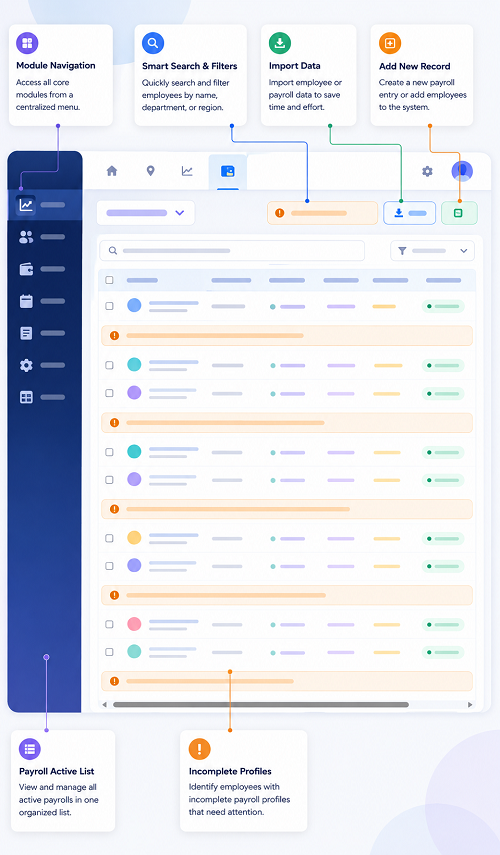
Manual checking becomes difficult as the workforce grows. Payroll software should provide exception reports that highlight transactions requiring attention.
Useful exception checks include:
| Exception report | What it helps identify |
|---|---|
| Missing employee data | Incomplete or outdated employee records |
| Unusual salary changes | Unexpected increases or reductions |
| Duplicate payments | Repeated salary or allowance entries |
| Missing attendance | Employees with incomplete working-hour records |
| Overtime exceptions | Unusual or unapproved overtime entries |
| Leave deduction exceptions | Incorrect or unsupported absence deductions |
| CPF exceptions | Unexpected contribution amounts or wage classifications |
| Bank detail changes | Recently modified payment instructions |
| Negative or zero net pay | Potential calculation or deduction issues |
| Joiner and leaver exceptions | Incorrect employment dates or final payments |
| Unusual allowances | Unexpected or duplicate variable payments |
Exception reports should identify the employee, payroll period, affected component, reason for the alert and person responsible for resolving it.
The objective is not to eliminate every unusual transaction automatically. It is to ensure that every significant exception is reviewed and documented.
13. Introduce Maker-Checker Payroll Approval Controls
Payroll should not depend on a single person entering, calculating and approving all transactions without independent review.
A maker-checker process separates payroll preparation from payroll approval.
A typical workflow is:
- HR updates employee information and approved changes.
- Supervisors approve attendance, overtime and leave records.
- Payroll staff import and validate payroll inputs.
- Payroll software calculates salary and statutory deductions.
- A payroll reviewer checks exceptions and reconciliations.
- Finance verifies the payroll register and payment total.
- An authorised approver releases the salary payment.
- The team archives the approved payroll reports and payment evidence.
Access rights should reflect each person's responsibilities. For example, an employee who changes bank details should not be the only person approving the resulting salary payment.
The software should maintain an audit trail showing who entered, changed, reviewed and approved payroll information.
14. Reconcile Payroll Totals Before Final Approval
Before releasing salaries, payroll teams should perform a final reconciliation across the payroll register, bank payment file and statutory reports.
Important reconciliation checks include:
- Total gross salary against approved salary components.
- Total deductions against deduction reports.
- Net salary against the bank payment file.
- Employer and employee CPF against the CPF contribution summary.
- Department and cost-centre totals against finance records.
- Current payroll against prior-period variance reports.
- Employee count against the active employee list.
- Joiners and leavers against HR records.
The payroll register and payment file should agree on the total net salary payable. Any difference should be investigated and resolved before the payment is authorised.
CPF submission and payment are separate from the employee's salary bank transfer. Payroll teams should maintain a separate process to verify CPF submissions and payment status. CPF contributions are due by the last day of the calendar month, and enforcement action may be taken if payment is not made by the 14th of the following month, or the next working day where applicable.
15. Check Taxable Benefits and Annual Reporting Data
Some payroll errors may not affect the monthly net salary but can create problems during annual income reporting.
Payroll teams should maintain accurate records of:
- Salary and bonus payments.
- Commissions and incentives.
- Taxable cash allowances.
- Benefits-in-kind.
- Accommodation benefits, where applicable.
- Stock and share-related gains, where reportable.
- Other employment-related benefits.
For employers participating in the Auto-Inclusion Scheme (AIS), employment income information must be submitted electronically to IRAS in the required format and by the applicable deadline. For the 2026 income year, the general AIS submission deadline is 1 March 2027.
IRAS has highlighted errors such as omitted taxable benefits and employee income or benefits that are not captured in the payroll system. Payroll teams should therefore reconcile payroll records with finance, benefits and HR information rather than relying only on the payroll register.
16. Build a Pre-Payday Payroll Checklist
A standard checklist ensures that payroll reviewers follow the same process every month.
| Review area | Pre-payday check |
|---|---|
| Employee data | Confirm new joiners, leavers and employee changes |
| Attendance | Reconcile working hours and missing punches |
| Overtime | Verify eligible hours and payment calculations |
| Leave | Check approved leave and unpaid absence |
| Salary | Confirm basic pay, allowances and variable payments |
| CPF | Verify eligibility, rates, OW/AW classification and ceilings |
| Deductions | Validate statutory and authorised deductions |
| Bank details | Confirm account changes and payment instructions |
| Variance analysis | Investigate unusual salary movements |
| Payslips | Review itemised payslip details |
| Exception reports | Resolve or document outstanding alerts |
| Approval | Obtain independent payroll and finance approval |
| Reconciliation | Match payroll totals with payment files |
| Records | Save approved reports and supporting documents |
The checklist should be adapted to the company's employee categories, payroll frequency, statutory obligations and internal approval structure.
17. Establish a Payroll Error Correction Process
Even a well-controlled payroll process can produce occasional errors. Employers should have a documented procedure for correcting them.
The process should include:
- Record the error and identify the affected employee.
- Determine whether the error affects gross pay, deductions, CPF, tax reporting or bank payment.
- Calculate the correct amount.
- Obtain the required approval for the correction.
- Make any necessary salary adjustment in accordance with applicable requirements.
- Review whether CPF or tax submissions need correction.
- Issue corrected payroll documentation where appropriate.
- Record the reason, action taken and date of resolution.
- Identify the underlying cause and update the process to prevent recurrence.
For CPF contributions paid in error, employers should follow CPF Board's adjustment or refund procedures promptly. Payroll teams should not simply overwrite historical payroll records without preserving the original transaction and correction trail.
A clear correction process helps the business resolve issues transparently and maintain reliable records.
18. What Payroll Software Features Help Catch Errors Before Payday?
Payroll software can reduce manual checking by automating validations and making exceptions visible to reviewers.
| Software feature | How it helps prevent errors |
|---|---|
| Employee master validation | Flags missing or inconsistent employee information |
| Attendance integration | Reduces manual working-hour entry |
| Leave integration | Helps prevent duplicate or incorrect leave deductions |
| CPF calculation engine | Applies configured CPF rules and contribution ceilings |
| Salary variance reports | Highlights unusual month-to-month changes |
| Duplicate transaction detection | Identifies repeated allowances or payments |
| Payroll exception dashboard | Displays unresolved issues before approval |
| Payslip preview | Helps reviewers check salary breakdowns |
| Maker-checker workflows | Separates preparation and approval |
| Bank file validation | Helps identify incomplete payment instructions |
| Audit trails | Records payroll changes and approvals |
| Historical reporting | Supports reconciliation and audit preparation |
When evaluating payroll software, businesses should ask vendors to demonstrate these controls using realistic payroll scenarios. A feature should be tested with actual examples, such as an employee changing CPF status, taking unpaid leave, receiving a bonus or working overtime.
Conclusion
Singapore payroll teams can catch errors before payday by checking employee information, attendance, overtime, leave, salary components, CPF contributions, deductions, bank details and payslips before approving payments.
A reliable process combines automated validation with human review. Payroll software can flag unusual transactions, generate exception reports, support maker-checker approvals and reconcile payroll totals. HR, supervisors, payroll and finance teams must still ensure that the underlying information is complete and accurate.
By introducing a consistent pre-payday checklist, reviewing exceptions early and maintaining a clear correction process, employers can reduce salary disputes, avoid preventable statutory errors and improve employee confidence in payroll operations.
Review exception flags for changed bank details, unusual pay and missing approvals. Compare InnBuilt pre-payday checks with current Singapore payroll controls.