What Data Export Options Matter When Changing Singapore Payroll Vendors?
What Data Export Options Matter When Changing Singapore Payroll Vendors?
Introduction
Changing payroll software vendors is an important business decision, but transferring payroll information from the existing system to a new platform requires careful planning. Employers must ensure that employee records, salary history, CPF information, leave balances, payslips and statutory reports remain accurate, complete and accessible after the transition.
A payroll system may offer many features, but businesses can face difficulties if it cannot export historical information in usable formats. Some vendors provide only PDF reports, while others support Excel, CSV, structured data files or API-based transfers. These differences can affect migration costs, payroll accuracy, audit preparation and the employer's ability to maintain records after the old subscription ends.
For Singapore employers, data portability is particularly important because payroll information supports CPF contributions, employment income reporting, itemised payslips, salary records and financial reporting. Employers must also consider their responsibilities under the Personal Data Protection Act (PDPA) when transferring employee information between providers.
This article explains the important data export options Singapore employers should evaluate when changing payroll vendors and how to plan a secure and reliable payroll data transition.
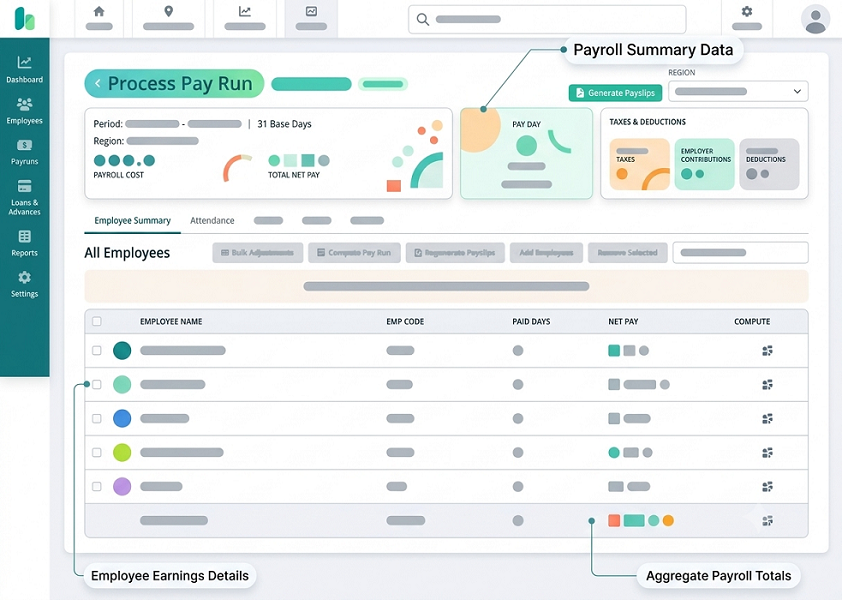
1. Why Payroll Data Export Matters When Changing Vendors
Payroll data export allows employers to retrieve information from their existing payroll platform and use it for migration, reporting, reconciliation and record retention.
A reliable export process helps businesses:
- Transfer employee information to the new payroll platform.
- Preserve historical salary and deduction records.
- Maintain accurate year-to-date payroll balances.
- Carry forward leave balances and entitlements.
- Retain historical payslips and payroll reports.
- Reconcile CPF contributions and statutory records.
- Support financial audits and tax reporting.
- Access employee records after the old contract ends.
- Reduce dependence on the outgoing payroll vendor.
For example, a company moving from one cloud payroll platform to another may need to transfer employee salary records for the current financial year. If the outgoing vendor exports only annual summary reports, the incoming provider may not have sufficient transaction-level information to validate monthly payroll calculations.
Employers should therefore evaluate data export capabilities before signing a contract with a new vendor, not only after deciding to migrate.
2. Which Payroll Data Should Employers Be Able to Export?
Before comparing export formats, businesses should prepare a list of the information they need to retrieve.
The export scope should cover both active and former employees, depending on the records the employer is required to maintain.
| Data category | Information to export |
|---|---|
| Employee master data | Employee ID, name, department, employment dates and status |
| Employment details | Job title, employment type and salary terms |
| Salary history | Basic salary, allowances, bonuses and commissions |
| Payroll transactions | Gross pay, deductions and net salary by pay period |
| CPF information | CPF-payable wages and contribution records |
| Other statutory information | SDL and applicable SHG contribution records |
| Leave information | Entitlements, leave taken and remaining balances |
| Attendance | Working hours, timesheets and overtime records |
| Payslips | Historical itemised payslips |
| Tax reporting | IR8A-related information and relevant employment income records |
| Payment information | Salary payment summaries and bank reconciliation reports |
| Audit records | Payroll approvals, adjustments and change history |
| Accounting information | Payroll journals, cost centres and department allocations |
Employers should also identify information that is stored in connected systems rather than the payroll platform itself. Attendance records, leave applications, employee documents and expense claims may require separate exports.
3. Does the Vendor Support CSV and Excel Exports?
CSV and Excel are among the most useful formats for payroll data migration and analysis.
CSV exports are particularly useful for transferring structured employee and payroll information between systems. They can be imported into spreadsheets, databases and many payroll platforms.
Excel exports are useful for reviewing information, reconciling payroll results and preparing management reports.
Ask the vendor:
- Can employee master records be exported in CSV format?
- Can payroll transactions be downloaded into Excel?
- Can reports be exported without manually copying information?
- Are all employee records included in bulk exports?
- Can exports be filtered by employee, department and payroll period?
- Are column names and data definitions documented?
- Can the vendor provide sample export files?
- Are there limits on the number of records or file size?
For example, a payroll team may need a CSV file containing employee IDs, gross salary, employee CPF, employer CPF and net pay for each monthly payroll period.
A good export should preserve the original values and clearly identify the reporting period and employee.
Employers should also check whether the system handles date formats, decimal values, leading zeros in identification or account-related fields, and special characters correctly. These details can affect data imports.
4. Can the Vendor Export Complete Historical Payroll Transactions?
Historical payroll information is important for audits, employee queries, tax reporting and future payroll reconciliation.
Employers should ask whether the outgoing vendor can export transaction-level information rather than only monthly or annual summaries.
Useful historical records include:
- Monthly basic salary.
- Fixed and variable allowances.
- Overtime payments.
- Bonuses and commissions.
- Unpaid leave deductions.
- Other salary deductions.
- Employee CPF contributions.
- Employer CPF contributions.
- Gross and net salary.
- Payroll adjustment entries.
- Payment dates and payroll periods.
For example, an annual salary summary may show that an employee received S$60,000 during a year. However, it may not explain the monthly salary payments, bonuses, overtime or deductions that make up that amount.
Transaction-level exports allow payroll teams to investigate individual payments and reconcile historical results more effectively.
Employers should agree on the required historical period before starting the migration. They should also retain any records that cannot or should not be imported into the new payroll platform.
5. Can the System Export Employee Master Data in a Reusable Format?
Employee master data is the foundation of payroll processing. It should be possible to retrieve it without manually recreating every employee record.
The export should ideally include:
- Unique employee ID.
- Full name.
- Employment start date.
- Employment end date, where applicable.
- Department and cost centre.
- Job title.
- Employment category.
- Basic salary.
- Salary frequency.
- Fixed allowances.
- Relevant CPF status and contribution information.
- Bank payment details, where needed and securely handled.
- Employment status.
Employers should ask whether the vendor exports inactive and former employee records as well as active employees.
They should also check whether employee IDs remain consistent throughout the export. If the outgoing system uses one employee ID and the new platform generates another, the migration team needs a reliable mapping file.
Sensitive employee information should be transferred only when necessary, using appropriate security controls.
6. Are Year-to-Date Payroll and CPF Balances Exportable?
Year-to-date information is particularly important when changing payroll vendors partway through a calendar year.
The new system needs accurate historical totals to avoid incorrect payroll calculations and annual reporting.
Ask whether the outgoing vendor can export employee-level year-to-date information, including:
- Gross wages paid.
- Ordinary Wages subject to CPF.
- Additional Wages subject to CPF.
- Employee CPF contributions.
- Employer CPF contributions.
- Other relevant deductions.
- Taxable employment income.
- Bonus and allowance totals.
For Singapore employers, CPF wage classification must be preserved carefully. Ordinary Wages and Additional Wages are subject to different contribution ceilings and calculation considerations.
For 2026, the Ordinary Wage ceiling is S$102,000. The Additional Wage ceiling is calculated using the annual salary ceiling less the total Ordinary Wages subject to CPF for the year.
The incoming payroll system should not simply treat historical wages as new payments or recalculate previous contributions using current rates. Historical figures should be preserved according to the contribution month and rules that applied at the time.
Employers should reconcile the exported CPF information against available CPF submission and payment records before importing year-to-date balances.
7. Can Historical Payslips Be Exported in PDF and Bulk Formats?
Payslips are important employment records and may be needed for employee requests, salary disputes and audits.
Ask the vendor:
- Can all historical payslips be downloaded?
- Can payslips be exported in PDF format?
- Is bulk download available for multiple employees?
- Can payslips be filtered by year and payroll period?
- Are payslips available for former employees?
- Are original payslip layouts preserved?
- Can the employer retain a searchable archive?
- Are payslip files named consistently?
PDF is useful because it preserves the appearance of an issued payslip. It is not, however, a substitute for structured payroll data where transaction analysis or migration is required.
Employers should consider maintaining both:
- Original PDF payslips for employee access and historical reference.
- Structured payroll transaction files for analysis, reconciliation and migration.
Under MOM's employment record requirements, employers covered by the Employment Act must generally retain the latest two years of records for current employees. For former employees, the last two years of records must be retained for one year after they leave employment.
Changing payroll vendors does not remove the employer's responsibility to maintain accessible records.
8. Can the Vendor Export Leave Balances and Leave Transaction History?
Leave balances are sometimes managed in a separate HR or leave management platform. Employers should confirm where the authoritative records are stored before planning the export.
If leave is managed through the payroll system, request exports containing:
- Annual leave entitlement.
- Annual leave taken.
- Annual leave carried forward.
- Remaining annual leave balance.
- Sick leave records.
- Hospitalisation leave records.
- Other applicable leave categories.
- Unpaid leave.
- Leave adjustments.
- Approval status and relevant dates.
A balance-only export may be sufficient for some simple migration scenarios, but detailed leave transaction history can be useful for investigating discrepancies and employee queries.
For example, if an employee's annual leave balance is 12 days, the new system should be able to establish how that balance was calculated, including entitlement, carry-forward, approved leave and adjustments.
The employer should also verify that leave balances are calculated as of the agreed migration cut-off date.
9. Can Attendance, Timesheet and Overtime Data Be Exported?
Payroll depends on accurate attendance and working-hour information for employees whose pay includes hourly wages, overtime or shift-related components.
If these records are maintained in the outgoing system, employers should check whether they can export:
- Daily attendance records.
- Clock-in and clock-out times.
- Approved timesheets.
- Scheduled working hours.
- Shift assignments.
- Overtime hours.
- Rest-day work.
- Public-holiday work.
- Attendance corrections.
- Supervisor approvals.
Employers should preserve both the recorded hours and relevant approval information.
For example, an export showing 20 overtime hours may not provide enough context if the business needs to establish which dates the overtime occurred, which manager approved it and how the hours were calculated.
If attendance is managed by a separate vendor, its data export and retention arrangements should be reviewed independently.
10. Does the Vendor Support API-Based Data Export?
An Application Programming Interface (API) allows systems to exchange information electronically.
API-based export can be useful for larger organisations, businesses with multiple legal entities and employers migrating between integrated HR and payroll platforms.
Ask:
- Does the outgoing system provide an export API?
- Can employee and payroll information be retrieved in structured formats?
- Are historical records available through the API?
- Are there record limits or request restrictions?
- Is API documentation available?
- Can the incoming payroll vendor use the same API?
- Are authentication and access permissions configurable?
- Does API access require an additional subscription?
API integration may reduce manual work, but employers should not assume that every payroll system exposes all historical data through an API.
Some systems provide API access only for current employee records or selected payroll reports. Others may require a separate data export service.
For a one-time migration, CSV or Excel files may be sufficient. For ongoing synchronisation between payroll and HR systems, an API may be more appropriate.
11. Can the Vendor Provide XML, JSON or Other Structured Data Files?
Some payroll systems support XML, JSON or other structured formats.
These formats can be useful when the incoming platform requires a defined data structure or when migration involves a large number of records.
Employers should ask:
- Which structured export formats are supported?
- Is a data schema available?
- Are field definitions documented?
- Can custom export structures be created?
- Are historical payroll transactions included?
- Can the files be validated before transfer?
- Are data relationships between employees, payroll periods and transactions preserved?
A structured export should maintain relationships between employee records and their payroll transactions.
For example, a bonus payment should remain linked to the correct employee, payment date and payroll period rather than appearing as an unlabelled amount in a separate file.
Structured formats are especially useful when the incoming vendor provides a migration template or automated import tool.
12. Can Payroll Reports Be Exported for Finance and Accounting?
Employers should retrieve the reports required by finance teams, auditors and management before terminating access to the old system.
Important reports include:
- Monthly payroll registers.
- Department-wise payroll summaries.
- Gross-to-net reports.
- CPF contribution summaries.
- SDL and applicable SHG reports.
- Salary payment summaries.
- Payroll general ledger reports.
- Cost-centre allocations.
- Bonus and commission reports.
- Payroll adjustment reports.
- Year-to-date employment income summaries.
Finance teams should check whether the exported reports contain the required account codes, department references and payroll-period information.
For example, a company may allocate employee salaries across several departments. If the old system exports only one consolidated salary total, the finance team may lose the detail needed for historical cost analysis.
The employer should also preserve the relationship between payroll reports and supporting documents such as payment records and accounting schedules.
13. Can the Vendor Export Payroll Audit Trails and Approval History?
Payroll audit trails show how information was created, changed, reviewed and approved.
These records are valuable when investigating incorrect payments or understanding why a historical payroll result changed.
Ask whether the vendor can export:
- Salary revision history.
- Employee master data changes.
- Allowance and deduction adjustments.
- Payroll calculation changes.
- Attendance corrections.
- Leave approvals.
- Payroll run approvals.
- Payslip amendments.
- User activity logs.
- Date and time of changes.
- User IDs associated with changes.
For example, if an employee's salary was changed from S$4,000 to S$4,300, the employer may need to establish when the change occurred, who approved it and which payroll period first used the revised amount.
Some vendors may provide audit logs only in a separate report or through an administrative interface. Employers should clarify this before signing the contract.
14. Can Data Be Exported for Multiple Legal Entities?
Businesses operating through multiple Singapore legal entities should verify that data exports preserve the correct employer information.
The export should distinguish between:
- Legal employer name.
- Unique Entity Number (UEN).
- Employee assignment.
- Payroll period.
- Relevant CPF Submission Number (CSN) information.
- Department and cost centre.
- Salary and statutory contribution records.
If several companies share one payroll platform, a consolidated export without entity-level identifiers can create reconciliation problems.
Employers should confirm whether each legal entity can be exported separately and whether consolidated group reports are also available.
The incoming system should preserve the underlying employer-level records even when management requires group-wide reporting.
15. Are Data Exports Secure and Protected?
Payroll exports contain personal and financial information. Employers should assess how the outgoing and incoming vendors protect data during the transfer.
Ask:
- Are exports encrypted?
- Can files be downloaded through a secure portal?
- Is multi-factor authentication supported?
- Can access to exports be restricted to authorised users?
- Are bulk exports logged?
- Can files be password-protected or encrypted?
- Does the vendor support secure file transfer methods?
- How long are exported files retained?
- Can the vendor confirm deletion of data when appropriate?
Singapore's PDPA requires organisations to make reasonable security arrangements to protect personal data in their possession or under their control.
Where personal data is transferred outside Singapore, organisations must also comply with the PDPA's overseas transfer requirements, including ensuring a comparable standard of protection.
Employers should not send payroll exports through unsecured email attachments or make them available through public file-sharing links.
See the PDPA provisions on protection, retention and overseas transfers.
16. What Are the Data Retention Requirements After Changing Vendors?
Employers should distinguish between the legal requirement to retain records and the decision to migrate those records into the new payroll system.
Not every historical record needs to be imported into the new platform. However, the employer must ensure that required information remains accessible.
Two important Singapore recordkeeping considerations are:
MOM employment records: For employees covered by the Employment Act, the general requirements are the latest two years for current employees and the last two years retained for one year after an employee leaves.
IRAS business records: Companies generally need to retain relevant business transaction records, supporting documents and accounting records for at least five years from the relevant Year of Assessment.
These are different requirements. Retaining the records required by MOM does not automatically satisfy the company's broader IRAS recordkeeping responsibilities.
IRAS has also clarified that a company changing accounting software does not necessarily need to migrate all historical accounting transactions into the new system. However, it must continue to retain and retrieve the previous records for the required period.
A similar practical approach can be used for payroll: migrate the information needed for ongoing processing and maintain a secure, accessible archive for historical records that do not need to be imported.
See IRAS record-keeping requirements.
17. Can the Vendor Provide a Complete Data Export Before Contract Termination?
Employers should not wait until their subscription is about to expire to request historical data.
The outgoing vendor may have specific procedures, fees or notice periods for bulk exports.
Ask:
- Can the employer request a full data export at any time?
- Is there a charge for bulk data extraction?
- How long does the export process take?
- Can the export include inactive employees?
- Will historical payslips remain accessible after termination?
- Is there a post-contract read-only access period?
- Can the vendor provide migration assistance?
- Will the vendor confirm that the export is complete?
- What happens if the employer discovers missing information after the contract ends?
The contract should clearly explain data ownership, export rights, access after termination, delivery formats and deletion arrangements.
Employers should also avoid assuming that a vendor's standard report download is equivalent to a complete database export.
18. How Should Employers Validate Exported Payroll Data?
Receiving files from the outgoing vendor is only the first step. Employers must verify that the information is complete and accurate before importing it into the new system.
A structured validation process should include:
Step 1: Compare employee counts
Confirm that the number of active and former employees in the export matches the source system.
Step 2: Check payroll periods
Verify that all required months and payment periods are included.
Step 3: Reconcile salary totals
Compare gross salary, deductions and net salary totals with the original payroll reports.
Step 4: Validate CPF information
Compare employee-level CPF wages and contributions with available CPF records and payment evidence.
Step 5: Verify leave balances
Check opening balances, leave taken, adjustments and remaining entitlement.
Step 6: Review historical payslips
Confirm that PDF files are complete, readable and linked to the correct employees and periods.
Step 7: Validate accounting reports
Compare payroll journals and cost-centre allocations with finance records.
Step 8: Test the new system import
Import a controlled sample and check whether the data appears in the correct fields.
Step 9: Reconcile the complete migration
After importing the full dataset, compare key totals and record counts again.
Step 10: Obtain approval
HR, payroll and finance should sign off on the migration before the new system is used for live payroll.
19. Payroll Data Export Evaluation Checklist
The following checklist can help Singapore employers compare payroll vendors before making a change.
| Evaluation area | What to confirm |
|---|---|
| Employee data | Can active and former employee records be exported? |
| CSV and Excel | Are structured spreadsheet exports available? |
| Historical payroll | Can monthly transaction-level records be downloaded? |
| Year-to-date balances | Can salary and CPF information be exported employee by employee? |
| Payslips | Are historical payslips available in bulk PDF format? |
| Leave | Can balances and transaction history be exported? |
| Attendance | Are timesheets, overtime and working-hour records available? |
| Statutory reports | Can CPF, SDL and other relevant reports be downloaded? |
| Tax information | Can employment income records be exported? |
| Audit trails | Are user changes and approvals accessible? |
| Accounting | Can payroll journals and cost-centre reports be exported? |
| API access | Are APIs available for automated migration? |
| Security | Are exports encrypted and access-controlled? |
| Retention | Can records be retrieved after contract termination? |
| Exit support | Does the vendor provide a complete export and migration process? |
Employers should request sample export files and test them before committing to the new platform.
Conclusion
Data export capabilities are an important consideration when changing payroll vendors in Singapore. Employers need more than basic report downloads. They should be able to retrieve employee master data, historical payroll transactions, CPF information, leave balances, payslips, attendance records, statutory reports and audit trails in usable formats.
CSV and Excel exports are useful for migration and reconciliation, PDF files preserve historical payslips, and APIs or structured formats can support more complex integrations. Employers should also consider data security, contract termination rights and long-term record accessibility.
A successful payroll transition depends on planning the export scope, validating the files, reconciling historical balances and confirming that the incoming system can process the information correctly. By evaluating data portability before changing vendors, Singapore employers can reduce migration risks, preserve important employment records and maintain continuity in payroll operations.
Confirm export of employee, pay, approval and historic records in usable formats. Discuss InnBuilt data access and offboarding terms before signing a Singapore contract.