How Can Singapore Retail Teams Track Split Shifts and Late Arrivals?
How Can Singapore Retail Teams Track Split Shifts and Late Arrivals?
Retail businesses in Singapore often operate beyond standard office hours. Shopping malls, supermarkets, convenience stores, fashion outlets, restaurants, and other retail establishments may require employees to work morning, afternoon, evening, weekend, and public-holiday shifts. Some employees also work split shifts, where their working day is divided into two or more separate periods with a break in between.
Managing these schedules manually can be challenging. Employees may start at different times, return after long breaks, work at multiple outlets, or arrive late because of transport delays and unexpected circumstances. If attendance records are inaccurate, managers may struggle to calculate actual working hours, identify overtime, and prepare payroll correctly.
Attendance software can help Singapore retail teams manage split shifts, record late arrivals, monitor employee working hours, and maintain consistent attendance records across outlets. However, the system must be configured to reflect actual rosters, approved breaks, employment arrangements, and applicable employment requirements.
This guide explains how Singapore retailers can track split shifts and late arrivals, configure attendance software, and improve workforce scheduling and payroll accuracy.
1. Understand Split Shifts in Retail Operations
A split shift divides an employee's working day into two or more separate working periods, with a gap between them.
For example, a retail employee may work from 9:00 a.m. to 1:00 p.m., take a break between 1:00 p.m. and 5:00 p.m., and return for another shift from 5:00 p.m. to 9:00 p.m.
Retailers may use split shifts to match staffing levels with customer demand. This can be useful when stores experience higher footfall during lunchtime, after-work shopping hours, evenings, or weekends.
Common examples include:
- Supermarkets scheduling additional staff during morning and evening rush hours.
- Shopping mall retailers increasing staffing during lunch and evening periods.
- Restaurants and food retailers scheduling employees around meal-time demand.
- Convenience stores arranging different shifts to maintain extended operating hours.
- Seasonal retail businesses adjusting schedules during promotional campaigns.
The attendance system must recognise each working period separately while maintaining an accurate daily total.
2. Configure Multiple Working Periods in the Attendance System
A basic attendance system may assume that an employee works one continuous shift. This can create problems when an employee has multiple working periods in a single day.
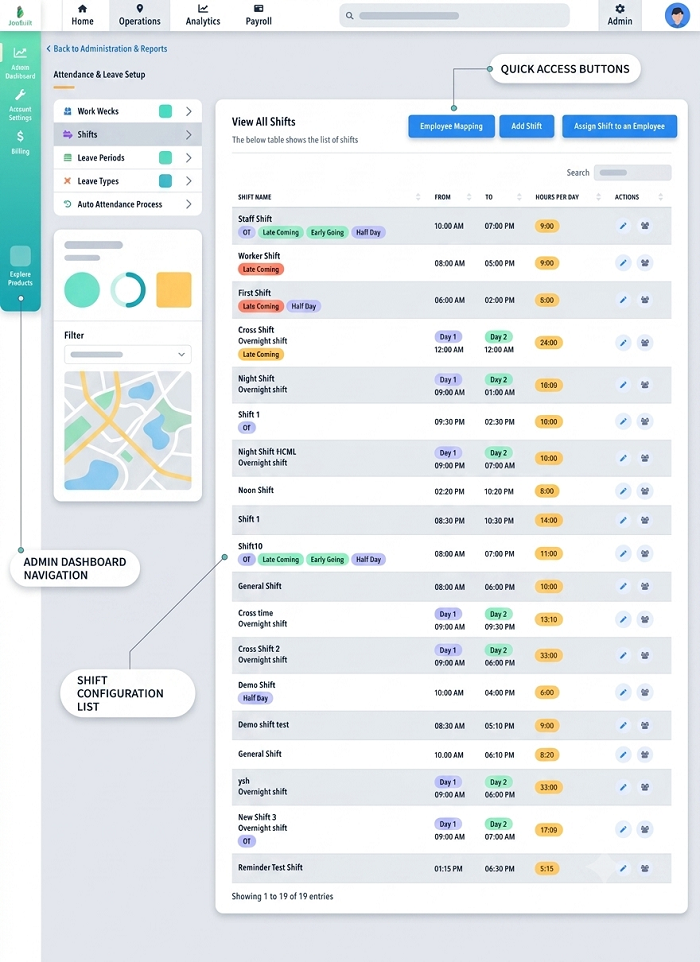
Retailers should choose software that supports multiple clock-in and clock-out events within the same workday.
For example, an employee's schedule may be configured as follows:
| Work period | Scheduled start | Scheduled end |
|---|---|---|
| Morning shift | 9:00 a.m. | 1:00 p.m. |
| Break between shifts | 1:00 p.m. | 5:00 p.m. |
| Evening shift | 5:00 p.m. | 9:00 p.m. |
The system should record the morning and evening sessions independently and calculate the total working time.
In this example, the employee works eight hours, excluding the four-hour gap between the two sessions.
The software should not incorrectly treat the entire 9:00 a.m. to 9:00 p.m. period as working time.
3. Record Clock-In and Clock-Out Times for Every Shift
Accurate attendance capture is essential for tracking split shifts.
Employees should clock in when they begin each working period and clock out when they finish it.
A typical process includes:
- The employee views the assigned split-shift schedule.
- The employee clocks in at the start of the first working period.
- The system records the actual arrival time.
- The employee clocks out at the end of the first period.
- The system records the gap between working periods.
- The employee clocks in again before starting the second period.
- The employee clocks out after completing the second period.
- The system calculates the total actual working hours.
Retailers can use different attendance methods depending on their store layout and workforce requirements.
These may include:
- Biometric fingerprint terminals.
- Facial recognition devices.
- RFID access cards.
- PIN-based attendance terminals.
- Mobile attendance applications.
- QR-code check-ins.
- Web-based attendance portals.
For employees working at fixed retail outlets, a terminal near the staff entrance may be suitable. Mobile attendance may be more practical for employees who move between branches or work at temporary retail locations.
4. Track Late Arrivals for Each Working Period
Late arrival tracking should apply to every scheduled working period, not just the employee's first shift of the day.
An employee may arrive on time for the morning session but return late after the break.
For example:
| Shift | Scheduled start | Actual arrival | Result |
|---|---|---|---|
| Morning | 9:00 a.m. | 9:00 a.m. | On time |
| Evening | 5:00 p.m. | 5:15 p.m. | 15 minutes late |
If the attendance system checks only the first clock-in, the employee's late return may go unnoticed.
To avoid this problem, configure separate attendance rules for each shift segment.
The software should compare:
- Scheduled start time.
- Actual clock-in time.
- Approved grace period, if applicable.
- Late arrival duration.
- Reason for delay.
- Manager approval or correction.
This allows supervisors to identify late arrivals accurately and distinguish between occasional delays and repeated attendance issues.
5. Set Up Late Arrival Rules and Grace Periods
Retail businesses should define a consistent late arrival policy and configure it in the attendance system.
For example, a company may allow a five-minute grace period before recording an employee as late.
A sample configuration could be:
| Scheduled start | Actual clock-in | Illustrative attendance result |
|---|---|---|
| 9:00 a.m. | 9:00 a.m. | On time |
| 9:00 a.m. | 9:03 a.m. | Within grace period |
| 9:00 a.m. | 9:08 a.m. | 8 minutes late, if grace is excluded |
| 5:00 p.m. | 5:20 p.m. | 20 minutes late, if no grace applies |
These are illustrative company-policy examples, not statutory grace periods under Singapore employment law.
The attendance system should allow HR administrators to configure different rules for different employee groups where justified by their working arrangements.
For instance, full-time store employees, part-time cashiers, and temporary promotional staff may have different schedules and attendance requirements.
Employers should apply attendance policies consistently and communicate them clearly to employees.
6. Calculate Total Working Hours Correctly
Split-shift calculations must distinguish actual working periods from the intervals between them.
Consider an employee with the following attendance:
| Session | Actual clock-in | Actual clock-out | Working time |
|---|---|---|---|
| Morning | 9:10 a.m. | 1:00 p.m. | 3 hours 50 minutes |
| Evening | 5:15 p.m. | 9:00 p.m. | 3 hours 45 minutes |
| Total | 7 hours 35 minutes |
The employee's actual recorded working time is 7 hours and 35 minutes.
The system should not include the gap from 1:00 p.m. to 5:15 p.m. as working time unless the employee was required to perform work during that interval.
Attendance software should also support:
- Different shift lengths.
- Partial-day attendance.
- Multiple breaks.
- Overnight shifts.
- Flexible working schedules.
- Approved early departures.
- Additional working periods.
- Manual corrections with an audit trail.
For payroll purposes, employers should verify the actual hours worked and apply the appropriate employment terms and statutory rules.
7. Manage Late Returns After Split-Shift Breaks
One common retail attendance problem occurs when employees do not return at the scheduled time after a long break.
For example, an employee is scheduled to resume work at 5:00 p.m. but returns at 5:25 p.m.
The attendance system should identify the late return and record the difference between the scheduled and actual start times.
A useful workflow is:
- Compare the scheduled return time with the actual clock-in.
- Identify whether the employee is late.
- Record the delay in the attendance report.
- Allow the employee to submit an explanation.
- Notify the supervisor.
- Record the manager's decision.
- Transfer verified attendance information to payroll where relevant.
Possible reasons for late returns may include transport delays, emergencies, personal circumstances, or an approved schedule change.
Managers should review the explanation before taking action under the company's attendance policy.
8. Use Real-Time Notifications for Store Managers
Retail managers often need to know whether sufficient employees are available to serve customers.
Attendance software can send notifications when:
- An employee does not clock in at the scheduled start time.
- An employee returns late after a split-shift break.
- An employee misses a clock-out.
- An employee is absent without a recorded approval.
- An employee clocks in at the wrong location.
- A shift starts without the required staffing level.
- An employee works beyond the scheduled end time.
For example, if a store has five employees scheduled for the evening shift and two have not arrived, the store manager can receive an alert.
The manager can then contact the employees or arrange replacement coverage.
These notifications help reduce staffing gaps during busy retail periods.
9. Track Attendance Across Multiple Retail Outlets
Retail businesses with several branches need a centralised attendance system to monitor employees across locations.
A connected platform can allow head-office HR teams to view attendance information from different outlets through a single dashboard.
Useful capabilities include:
- Separate attendance settings for each outlet.
- Branch-specific shift schedules.
- Location-based clock-in verification.
- Employee transfers between branches.
- Outlet-wise late arrival reports.
- Centralised employee profiles.
- Regional manager access.
- Consolidated attendance summaries.
For example, a retail chain may operate outlets in Orchard Road, Tampines, Jurong East, and Woodlands.
The HR team should be able to identify which employees are scheduled at each location, whether they have arrived on time, and whether the required staffing levels are being maintained.
Where employees are assigned temporarily to another outlet, the system should record the actual work location and avoid creating duplicate attendance entries.
10. Manage Part-Time and Temporary Retail Employees
Singapore retailers often rely on part-time and temporary employees to manage changing customer demand.
These employees may work different hours on different days, making attendance management more complicated.
The attendance system should support:
- Variable shift schedules.
- Part-time working arrangements.
- Temporary employee profiles.
- Short working periods.
- Multiple shifts in one day.
- Shift changes and substitutions.
- Accurate hours worked.
- Payroll-ready attendance reports.
For example, a part-time employee may work from 10:00 a.m. to 2:00 p.m. on weekdays and from 4:00 p.m. to 9:00 p.m. on weekends.
The system should compare actual attendance against the schedule assigned for each day.
Retailers should also ensure that employment terms, salary arrangements, and applicable statutory entitlements are correctly configured. Part-time employees should not automatically be excluded from relevant employment protections simply because they work fewer hours.
11. Connect Split-Shift Attendance With Payroll
Attendance information is often used to calculate employee wages, additional working hours, and other payroll-related payments.
A connected payroll system can receive verified attendance information without requiring HR staff to re-enter every clock-in and clock-out record.
Important data to transfer includes:
- Scheduled working hours.
- Actual working hours.
- Late arrival records.
- Early departures.
- Approved attendance adjustments.
- Overtime hours.
- Rest-day work.
- Public-holiday work.
- Unpaid absence information.
Example of payroll-related attendance data
Consider a retail employee with the following monthly attendance summary:
| Item | Monthly record |
|---|---|
| Scheduled working days | 24 |
| Days attended | 23 |
| Approved annual leave | 1 day |
| Total scheduled hours | 192 |
| Actual working hours | 186 |
| Recorded late arrivals | 3 |
| Approved overtime hours | 6 |
The payroll team can use the verified attendance information alongside the employee's salary terms and applicable rules to prepare the salary calculation.
A late arrival should not automatically trigger a salary deduction without checking the employment terms, applicable legal requirements, and the company's policy. Employers should distinguish between an attendance exception, an approved adjustment, and a lawful payroll deduction.
For eligible employees, overtime must be assessed using the applicable Employment Act rules. Part 4 applies only to specified categories of employees and does not cover managers and executives.
12. Monitor Working Hours, Breaks, and Rest Days
Split-shift scheduling should not be used as a substitute for proper working-hour and rest-day management.
Retail employers should configure their systems to monitor:
- Daily working hours.
- Weekly working hours.
- Break durations.
- Overtime.
- Weekly rest days.
- Public-holiday work.
- Shift changes.
- Consecutive working days.
Under Singapore's Employment Act, Part 4 working-hour provisions apply only to eligible employees. Managers and executives are excluded from Part 4, and employees outside its coverage generally have their working arrangements governed by their employment contracts.
For employees covered by Part 4, the rules generally provide for a break after no more than six consecutive hours of work. Where the nature of work requires continuous work for up to eight hours, meal breaks of at least 45 minutes must be provided.
A split-shift gap should be recorded accurately and should not automatically be treated as a statutory rest day. Employers must assess the actual working arrangement and applicable requirements.
The system should also support rest-day planning. For eligible shift workers, MOM recognises a continuous 30-hour period as a possible rest day arrangement under the relevant rules.
Retail managers should review weekly rosters to ensure that employees receive the required rest arrangements.
13. Maintain Attendance Records for Singapore Compliance
Attendance systems can help retail employers maintain records of employee working hours and breaks.
For employees covered by the Employment Act, MOM requires employers to maintain detailed employment records, including:
- Working hours.
- Meal and tea break durations.
- Dates and details of public holidays.
- Leave taken.
- Relevant salary and payment information.
- Overtime hours and overtime pay, where applicable.
Generally, employers must retain the latest two years of records for current employees. For former employees, records covering the last two years must be kept for one year after the employee leaves.
Retail businesses should ensure that attendance software can generate reports showing the employee's scheduled and actual working periods, including corrections and approvals.
Attendance software supports recordkeeping, but employers remain responsible for ensuring that all required records are complete and accurate.
14. Use Attendance Reports to Identify Retail Workforce Problems
Attendance reports help managers understand patterns that may affect store operations.
Useful reports include:
Daily late arrival report: Identifies employees who arrived after their scheduled start times.
Split-shift compliance report: Compares each working period with its assigned schedule.
Missed punch report: Identifies employees who failed to clock in or clock out.
Employee working-hour report: Summarises daily and weekly hours worked.
Outlet-wise attendance report: Compares attendance performance across branches.
Overtime report: Identifies additional hours requiring review.
Absence report: Shows approved and unapproved absences.
Schedule-versus-attendance report: Highlights differences between planned and actual working time.
Managers can use these reports to identify recurring problems, such as late returns after breaks, understaffed evening shifts, or frequent last-minute schedule changes.
Reports should be used to improve scheduling and workforce planning rather than relying only on attendance scores to evaluate employee performance.
15. Handle Missed Punches and Attendance Corrections
Employees may occasionally forget to clock in or out during a split shift.
A missed clock-out at the end of the morning session may cause the system to treat the break as working time. A missing evening clock-in may make the employee appear absent for the second shift.
Retailers should create a formal correction process.
A recommended process is:
- The employee submits a missed-punch correction request.
- The employee provides the actual working time and reason.
- The supervisor checks the roster and available supporting information.
- The manager approves or rejects the correction.
- HR updates the attendance record.
- The system records the correction and approver details.
- The updated information is included in payroll reconciliation.
Managers should not overwrite attendance records without retaining an audit trail.
This makes it easier to resolve payroll disputes and verify the actual hours worked.
16. Common Challenges When Tracking Split Shifts and Late Arrivals
Retailers should be aware of common attendance management problems.
| Challenge | Recommended solution |
|---|---|
| System supports only one shift per day | Choose software with multiple working periods |
| Employees forget to clock in after breaks | Enable reminders and missed-punch alerts |
| Late returns are not detected | Compare each clock-in with its assigned shift |
| Break time is counted as working time | Configure separate working and non-working intervals |
| Employees work at different outlets | Enable location-specific attendance tracking |
| Last-minute shift changes create errors | Use manager-approved roster updates |
| Attendance corrections are not documented | Maintain correction workflows and audit logs |
| Payroll receives incomplete data | Reconcile approved attendance before payroll cut-off |
| Employees have different work schedules | Configure individual or group-based schedules |
17. Best Practices for Implementing Retail Attendance Software
A structured approach can help retailers introduce split-shift and late-arrival tracking successfully.
- Review existing shift arrangements: Identify how many employees work split shifts and how frequently schedules change.
- Define attendance policies: Set clear clock-in, clock-out, grace-period, and correction procedures.
- Choose suitable attendance methods: Consider biometric terminals, mobile applications, RFID cards, or QR-code attendance.
- Configure multiple working periods: Ensure that each shift segment is recorded separately.
- Set up notifications: Alert supervisors about late arrivals and missing punches.
- Connect payroll: Transfer verified working hours and approved adjustments.
- Train store managers: Explain how to review attendance exceptions and approve corrections.
- Inform employees: Communicate attendance expectations and explain how their records are used.
- Run a pilot: Test the system at one or two outlets before expanding it.
- Review reports regularly: Identify scheduling issues and make adjustments based on actual workforce demand.
Conclusion
Tracking split shifts and late arrivals requires more than recording an employee's first clock-in of the day. Singapore retail businesses need attendance software that supports multiple working periods, compares every clock-in against the assigned schedule, records break intervals correctly, and provides clear reports for managers.
By connecting attendance with shift scheduling and payroll, retailers can improve workforce visibility, identify staffing gaps, reduce manual corrections, and maintain more accurate working-hour records.
The right system should also support part-time employees, multiple outlets, shift changes, approved attendance corrections, and applicable employment requirements. With consistent policies and proper configuration, retail teams can manage changing schedules while keeping attendance and payroll information organised.
Check how split shifts and late arrivals appear to store managers and employees. Trial InnBuilt with a typical Singapore retail roster.