10 Things to Look for When Buying Payroll Software in the UAE
10 Things to Look for When Buying Payroll Software in the UAE
Introduction
Managing payroll in the United Arab Emirates (UAE) involves more than calculating employee salaries and processing monthly payments. Employers must handle different salary structures, statutory deductions, employee benefits, leave balances, end-of-service benefits, and regulatory reporting while ensuring that employees are paid accurately and on time.
Businesses operating in the UAE may also need to manage Wage Protection System (WPS) requirements, payroll records, employee contracts, and applicable labour regulations. As organisations expand, managing these responsibilities through spreadsheets or manual processes can become time-consuming and increase the risk of payroll errors.
Payroll software helps businesses automate salary calculations, manage employee information, generate payroll reports, and streamline salary payments. However, not every payroll solution offers the same functionality. Selecting software without evaluating its compliance capabilities, integrations, security, and scalability can create operational difficulties later.
Before purchasing a payroll solution, UAE employers should assess the following ten important features.
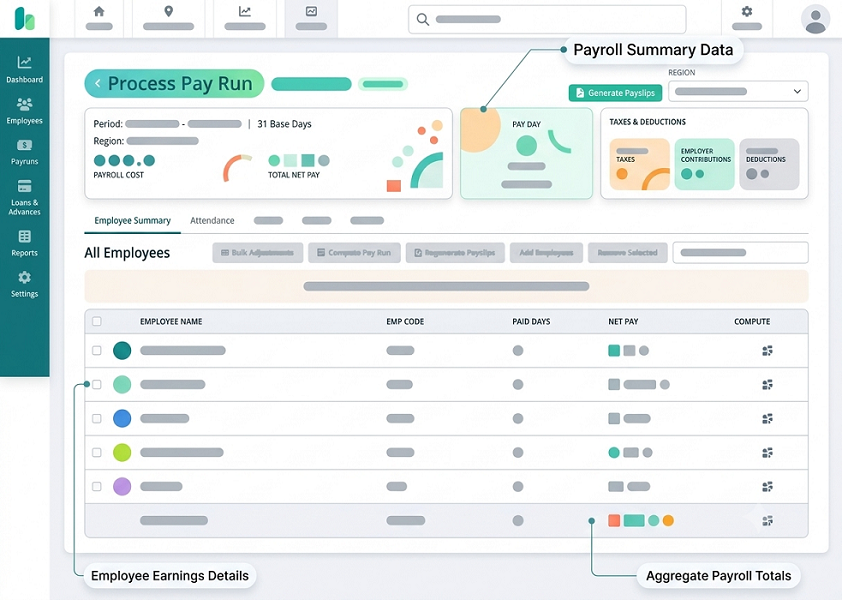
1. UAE Labour Law and Payroll Compliance Capabilities
Compliance should be one of the first considerations when purchasing payroll software in the UAE. Employers need a system that supports payroll processes in accordance with applicable UAE labour and employment regulations.
The software should help businesses manage payroll-related requirements, including:
- Employee salary and wage structures.
- Basic salary and allowances.
- Employment contract information.
- Working days and unpaid leave adjustments.
- Overtime calculations.
- Annual leave and other leave-related payments.
- End-of-service benefit calculations.
- Final salary settlements.
- Payroll records and audit documentation.
The system should also support different employee categories and contract arrangements where applicable.
For example, a company may employ permanent, part-time, temporary, and probationary employees. The payroll solution should allow administrators to configure the appropriate salary components and calculation rules for each employee category.
Employers should also check how frequently the vendor updates the software when regulations or payroll requirements change.
Questions to ask the vendor:
- Does the software support UAE labour law-related payroll calculations?
- Can payroll rules be updated when regulations change?
- Does the system maintain historical payroll records?
- Can administrators configure different employee categories?
- Does it support final settlement and end-of-service calculations?
A payroll platform can support compliance processes, but employers remain responsible for verifying that their payroll policies and calculations meet the requirements applicable to their organisation.
2. Wage Protection System (WPS) Support
The Wage Protection System is an important consideration for UAE employers. It is an electronic salary transfer framework used to help ensure that employees receive their wages through approved financial institutions and exchange channels, as applicable.
Payroll software should simplify the preparation of salary payment information and support the relevant WPS processes for the employer's jurisdiction and establishment.
Look for features such as:
- WPS-compatible salary information.
- Salary file generation in the required format.
- Employee bank and payment details management.
- Salary payment validation.
- Identification of missing or incorrect employee information.
- Payroll-to-WPS reconciliation.
- Payment status tracking, where supported.
- Historical salary file storage.
For example, a business with 200 employees may need to generate salary payment information every month. Manually preparing and checking the required records can take considerable time. A suitable payroll system can automate much of the preparation and validation process.
However, employers should confirm whether the software supports the relevant WPS requirements of their specific authority and establishment. Requirements and processes may differ between mainland UAE arrangements and certain free-zone jurisdictions.
Questions to ask the vendor:
- Can the system generate WPS salary files?
- Which file formats and payment channels are supported?
- Does it validate employee payment information before file generation?
- Can payroll totals be reconciled with the generated salary file?
- Does the vendor provide assistance when WPS files are rejected?
WPS support should be tested during the product demonstration rather than accepted based only on a vendor's marketing claims.
3. Flexible Salary Structure and Allowance Management
Salary structures in the UAE often include multiple components. Employees may receive basic salaries, housing allowances, transport allowances, communication allowances, and other benefits depending on their employment contracts.
Payroll software should allow organisations to configure these components without requiring manual calculations every month.
Important salary management features include:
- Basic salary configuration.
- Fixed and variable allowances.
- Monthly, daily, and hourly salary structures.
- Recurring and one-time payments.
- Commission and incentive calculations.
- Salary revisions and effective dates.
- Deductions and adjustments.
- Employee-specific salary structures.
For example, two employees working in the same organisation may have different salary arrangements. One employee may receive a fixed housing allowance, while another receives a transport allowance and a performance-based incentive.
The payroll system should calculate each employee's gross salary using the configured components and apply the appropriate payroll rules.
It should also maintain a clear distinction between basic salary and other salary components, particularly where calculations such as overtime or end-of-service benefits depend on the applicable salary basis.
Questions to ask the vendor:
- Can different salary structures be assigned to employees?
- Can allowances be configured as fixed or variable?
- Does the system support commissions and incentives?
- Can salary changes be scheduled for future effective dates?
- Can administrators review the breakdown of gross and net salary?
Flexible salary management helps organisations accommodate different employment arrangements while maintaining consistent payroll calculations.
4. Automated Salary, Overtime, and Deduction Calculations
Accurate salary calculations are essential for employee satisfaction and payroll compliance. Even small errors can create payment disputes, administrative work, and financial reporting problems.
Payroll software should automate recurring calculations based on employee information, approved attendance records, salary structures, and configured payroll policies.
Look for functionality covering:
Salary calculations
- Monthly salary calculations.
- Daily and hourly wage calculations.
- Pro-rated salary for employees joining or leaving during a payroll period.
- Unpaid leave adjustments.
- Salary revisions and arrears.
- Retroactive payroll adjustments, where supported.
Overtime calculations
- Approved overtime hours.
- Different overtime categories.
- Applicable overtime rates.
- Employee-specific overtime eligibility.
- Overtime approval workflows.
Deduction calculations
- Approved employee deductions.
- Salary advances and loan repayments.
- Unpaid absence adjustments.
- Other authorised payroll deductions.
- One-time and recurring deductions.
For example, if an employee joins an organisation in the middle of a month, the payroll system should calculate the payable salary based on the organisation's configured and legally appropriate pro-rating method.
Similarly, if an employee works approved overtime, the system should apply the correct calculation rules rather than relying on manual spreadsheet formulas.
Questions to ask the vendor:
- Can the software calculate salaries automatically?
- Does it support different overtime rules?
- Can unpaid leave and attendance adjustments flow into payroll?
- Does it maintain a record of salary corrections?
- Can payroll administrators review calculation details before approval?
Employers should test actual payroll scenarios during the demo to confirm that calculations work as expected.
5. End-of-Service Benefits and Final Settlement Management
End-of-service benefit calculations are an important part of UAE payroll administration. When an employee leaves an organisation, the employer may need to calculate the final salary, eligible leave encashment, applicable end-of-service gratuity, deductions, and other settlement components.
A suitable payroll system should support the organisation's applicable employment and benefit arrangements.
Important features include:
- Employee joining and termination dates.
- Employment contract and service history.
- Basic salary history.
- Eligible service period calculations.
- End-of-service benefit estimates and calculations.
- Annual leave balance and encashment.
- Notice-period salary adjustments.
- Outstanding advances or approved deductions.
- Final settlement statements.
- Settlement approval and payment records.
For example, when an employee resigns, the HR team should be able to initiate a final settlement process using the employee's employment details. The system should help calculate the applicable salary balance, eligible leave payment, and end-of-service benefit based on the relevant rules.
Employers should not assume that one standard gratuity formula applies to every employee. The applicable calculation can depend on factors such as the employment arrangement, service period, reason for termination, and relevant legal provisions. Certain employees may also be covered by alternative savings or benefit arrangements.
Questions to ask the vendor:
- Does the system support UAE end-of-service benefit calculations?
- Can it handle different employment arrangements?
- Does it maintain salary history for benefit calculations?
- Can HR review and approve final settlements?
- Can the system generate a detailed settlement statement?
A payroll solution with a structured final settlement process can reduce manual work and improve the accuracy and transparency of employee exit payments.
6. Integration with Attendance, HRMS, and Accounting Software
Payroll does not operate independently. It depends on information from several business systems, including attendance management, human resources, accounting, and sometimes ERP platforms.
A payroll solution should integrate with the applications that the organisation already uses.
Important integrations include:
Attendance management software
Attendance information can be transferred into payroll to support working-day calculations, overtime, late arrivals, unpaid absences, and approved leave adjustments.
HRMS platforms
Employee details, joining dates, job information, department changes, salary revisions, and termination details can be synchronised with payroll.
Accounting software
Payroll expenses, salary liabilities, deductions, and other accounting entries can be transferred to the finance system.
Banking and payment systems
Where supported, payroll information can be prepared for approved salary payment channels and reconciled against payment records.
ERP systems
Larger organisations may need payroll information connected with budgeting, cost centres, project accounting, and financial reporting.
For example, an organisation using separate attendance and payroll applications may face problems when HR teams manually transfer attendance data at the end of each month. Integration can reduce duplicate data entry and minimise errors.
Before purchasing, check whether integrations are available through APIs, standard connectors, file imports, or custom development.
Questions to ask the vendor:
- Does the payroll software integrate with our existing HRMS?
- Can attendance data be imported automatically?
- Does it support accounting software integration?
- Are APIs available for custom integrations?
- Are integration charges included in the subscription?
- How are failed or incomplete data synchronisations handled?
Integration capabilities become particularly important for businesses with multiple departments, locations, and employee management systems.
7. Employee Self-Service Portal and Mobile Accessibility
An employee self-service portal allows employees to access relevant payroll information without contacting HR for every request.
This feature can reduce administrative work and improve communication between employees and payroll teams.
Look for self-service functionality such as:
- Payslip downloads.
- Salary breakdown and payment history.
- Leave balance information.
- Personal information updates.
- Bank account detail submission.
- Payroll-related document access.
- Salary certificate requests.
- Expense or reimbursement submissions, where supported.
- Payroll query submission.
Mobile accessibility is equally important for organisations with employees working across offices, retail locations, construction sites, warehouses, and field operations.
Employees should be able to securely access payroll information through a mobile-friendly application or browser.
For example, an employee working at a remote project location may need to download a payslip or check salary payment information. A mobile-accessible portal makes this possible without requiring a visit to the HR department.
The system should also provide role-based access so employees can view only their own authorised information.
Questions to ask the vendor:
- Does the system provide an employee self-service portal?
- Can employees download payslips using mobile devices?
- Can employees update personal or bank details?
- Are employee requests routed through approval workflows?
- Does the portal support multiple languages?
- Can access be restricted according to employee roles?
An effective self-service portal helps employees obtain payroll information quickly while allowing HR teams to focus on more important responsibilities.
8. Payroll Reports, Analytics, and Audit Trails
Payroll software should provide more than salary calculations. It should help HR and finance teams understand payroll expenses, monitor payment activities, identify unusual transactions, and maintain reliable records.
A reporting dashboard should allow authorised users to review payroll information across employees, departments, locations, and payroll periods.
Useful payroll reports include:
| Report | Business purpose |
|---|---|
| Payroll summary report | Shows total salary expenses for a payroll period |
| Employee salary register | Displays employee-wise salary details |
| Payslip report | Provides individual employee salary breakdowns |
| Allowance and deduction report | Tracks salary components and deductions |
| Overtime report | Shows approved overtime hours and payments |
| Leave and absence report | Supports payroll adjustments |
| WPS file report | Helps review salary payment information |
| End-of-service report | Supports employee benefit and exit calculations |
| Department-wise payroll report | Compares salary expenses across departments |
| Payroll variance report | Identifies differences between payroll periods |
Audit trails are also important. The system should record who created, modified, reviewed, and approved payroll information.
For example, if an employee's salary changes from one month to another, authorised administrators should be able to identify the change, its effective date, and the person who approved it.
Look for features such as:
- Payroll approval history.
- Salary change records.
- User activity logs.
- Historical payroll reports.
- Exportable reports.
- Payroll comparison tools.
- Exception and error reports.
Questions to ask the vendor:
- Can reports be filtered by department and location?
- Does the system provide payroll variance analysis?
- Are reports exportable to Excel or PDF?
- Does it maintain a complete audit trail?
- Can report access be restricted by user role?
Strong reporting and audit capabilities improve payroll visibility and support internal reviews, financial planning, and record management.
9. Data Security, Privacy, and Access Controls
Payroll systems process confidential employee information, including salary details, bank account information, identification data, and employment records.
A security failure can expose sensitive information and damage employee trust. Therefore, employers should carefully evaluate the vendor's security architecture before selecting a solution.
Important security features include:
- Role-based access control.
- Multi-factor authentication.
- Data encryption during transmission and storage.
- Secure employee login.
- Access and activity logs.
- Regular data backups.
- Disaster recovery procedures.
- Secure file exports.
- User access restrictions.
- Data retention and deletion controls.
Employers should also understand where payroll information is hosted and how it is processed, stored, and transferred.
The UAE Personal Data Protection Law (Federal Decree-Law No. 45 of 2021) is relevant to many organisations processing personal data in the UAE, subject to its scope and exclusions. Businesses operating in the DIFC or ADGM should also consider the separate data protection frameworks applicable in those jurisdictions.
Before purchasing, ask the vendor to explain how its solution supports the organisation's applicable privacy and security obligations.
For example, a payroll administrator may need access to employee salary information, while a department manager may only need access to approved attendance or department-level reports. The software should support these different permission levels.
Questions to ask the vendor:
- Is employee payroll data encrypted?
- Does the system support multi-factor authentication?
- Where is employee data hosted?
- Can administrators restrict access based on roles?
- Are user activities recorded in audit logs?
- What backup and disaster recovery arrangements are available?
- How does the vendor handle data deletion and employee record retention?
Businesses should request appropriate security documentation and review contractual provisions relating to data processing, confidentiality, incident reporting, and subcontractors.
10. Pricing, Implementation, Training, and Vendor Support
The software subscription price is only one part of the total cost of purchasing payroll software. Employers should evaluate the complete cost of implementation, integration, employee onboarding, training, maintenance, and ongoing support.
Payroll software vendors may offer different pricing models, including:
- Per-employee monthly subscriptions.
- Per-employee annual subscriptions.
- Fixed monthly or annual packages.
- Custom enterprise pricing.
- One-time licence fees with maintenance charges.
The final cost may depend on the number of employees, selected features, payroll complexity, number of legal entities, integrations, and deployment requirements.
Costs to evaluate before purchasing:
| Cost component | What to check |
|---|---|
| Software subscription | Monthly or annual licence charges |
| Employee licences | Whether active, inactive, or temporary employees are chargeable |
| Implementation | Configuration and initial setup costs |
| Data migration | Charges for transferring existing employee and payroll records |
| Integration | Fees for connecting HRMS, attendance, accounting, or ERP systems |
| Training | Administrator and employee training costs |
| Support | Included support hours and premium support charges |
| Customisation | Charges for additional payroll rules or reports |
| Upgrades | Whether product updates are included |
| Hosting and storage | Any additional infrastructure or storage charges |
Vendor support is particularly important during payroll processing periods. Delays in resolving a payroll issue can affect salary payments and employee confidence.
Before signing a contract, check:
- Support availability and working hours.
- Response and resolution targets.
- Dedicated account management.
- Availability of implementation specialists.
- Training documentation and resources.
- Frequency of software updates.
- Contract renewal and cancellation terms.
- Data export and migration assistance if changing vendors.
Employers should request a detailed quotation that separates recurring subscription charges from one-time implementation and integration costs.
Conclusion
Choosing the right payroll software in the UAE requires careful evaluation of compliance capabilities, WPS support, salary structures, automated calculations, end-of-service benefits, integrations, employee self-service, reporting, data security, and total ownership costs.
The best solution is not necessarily the one with the largest feature list or the lowest subscription price. It is the system that accurately supports the organisation's payroll requirements, integrates with existing business applications, protects employee information, and can scale as the workforce grows.
Before making a purchase decision, shortlist suitable vendors, request detailed demonstrations, test real payroll scenarios, review security documentation, and compare complete quotations.
A well-selected payroll platform can reduce manual administration, improve salary accuracy, strengthen payroll controls, and help UAE businesses manage their payroll operations more efficiently.
Assess payroll tools against your pay policies, WPS process, approvals, audit trail, integrations and support. Use this UAE buying checklist to evaluate InnBuilt Payroll Software alongside alternatives.