How to Compare Beat Planning Software for UAE Field Sales Teams
How to Compare Beat Planning Software for UAE Field Sales Teams
Introduction
Managing field sales teams across the UAE requires careful coordination of customer visits, sales territories, daily routes, and employee schedules. Sales representatives may need to visit supermarkets, retail outlets, wholesalers, distributors, pharmacies, and corporate customers across different locations. Without a structured planning system, businesses can experience missed visits, overlapping territories, unnecessary travel, and inconsistent customer coverage.
Beat planning software helps organisations schedule customer visits, assign sales representatives to specific territories, optimise travel routes, and monitor field activities. It gives sales managers better visibility into daily operations and helps employees organise their work more efficiently.
However, not every beat planning solution offers the same capabilities. Some platforms focus mainly on route scheduling, while others include GPS tracking, customer relationship management (CRM), sales order processing, attendance monitoring, and performance analytics.
For UAE businesses, comparing these solutions requires an understanding of local field sales requirements, workforce distribution, mobile connectivity, language preferences, and data protection considerations.
This article explains how to compare beat planning software for UAE field sales teams and identify a solution that supports sales productivity, customer coverage, and operational efficiency.
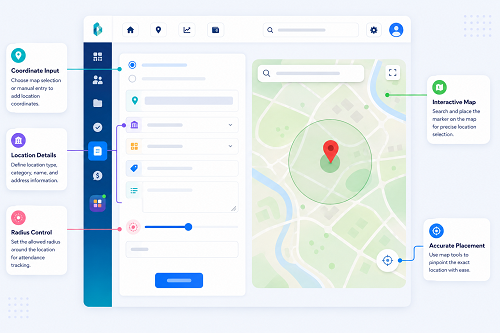
1. Identify Your Field Sales Team's Requirements
Before comparing software vendors, define the specific requirements of your sales operations. A solution suitable for a small team handling a limited customer list may not be sufficient for a company managing hundreds of representatives across multiple Emirates.
Start by reviewing how your sales team currently operates.
Consider the following questions:
- How many field sales representatives need access to the system?
- How many customer locations does each representative visit?
- Are customer visits scheduled daily, weekly, or monthly?
- Do employees follow fixed territories or flexible routes?
- Do representatives need to collect orders during customer visits?
- Do managers need real-time or periodic employee location updates?
- Does the organisation operate across Dubai, Abu Dhabi, Sharjah, Ajman, and other Emirates?
- Are sales employees required to submit photographs, visit notes, or customer feedback?
- Does the business need integration with existing CRM or ERP software?
For example, an FMCG distributor may require representatives to visit supermarkets and grocery stores regularly, while a pharmaceutical sales organisation may need to schedule visits to pharmacies, clinics, and healthcare professionals.
Preparing a requirements list helps businesses compare vendors based on actual operational needs instead of selecting software simply because it has an attractive interface or a large feature list.
2. Compare Beat Planning and Scheduling Capabilities
Beat planning is the central function of this software category. It determines which customers a representative should visit, when visits should take place, and how frequently each customer should be covered.
Compare whether the software supports flexible scheduling and whether managers can make changes without disrupting the entire sales plan.
Important features include:
- Daily, weekly, and monthly beat planning.
- Recurring customer visit schedules.
- Customer-wise and employee-wise scheduling.
- Territory-based route assignments.
- Priority-based customer visits.
- Flexible rescheduling.
- Temporary and additional visit assignments.
- Centralised visibility of all employee beat plans.
A useful system should allow managers to assign different visit frequencies based on customer importance, sales potential, and business requirements.
For example, a high-volume supermarket in Dubai may require multiple visits each week, while a smaller retail outlet may need only one scheduled visit.
When comparing vendors, check whether the software supports both fixed and flexible beat plans. Also evaluate how easily managers can add new customers, change visit frequencies, and reassign routes when employees are absent.
3. Evaluate Route Optimisation and Mapping Features
Route planning directly affects how many customers sales representatives can visit during a working day.
A basic system may allow managers to assign customer locations manually. More advanced solutions can recommend a better visit sequence based on location, travel distance, and scheduling constraints.
Compare the following route management features:
| Feature | What to evaluate |
|---|---|
| Map-based planning | Can managers view all customer locations on a map? |
| Route sequencing | Can the system arrange visits in a practical order? |
| Distance calculation | Does it estimate travel distances between locations? |
| Travel time | Can it provide estimated journey times? |
| Traffic information | Does it use traffic information where supported? |
| Multiple-stop planning | Can it optimise routes involving several customers? |
| Route modification | Can managers change routes during the working day? |
| Navigation support | Can employees open routes in supported navigation applications? |
For UAE sales teams, mapping performance should be tested across different operating environments. Routes in busy urban areas, industrial zones, residential communities, and remote locations may involve different travel conditions.
For example, a representative visiting customers in Dubai should be able to organise nearby locations into a logical route rather than travelling repeatedly between distant areas.
Do not assume that every vendor offering route planning provides full route optimisation. Ask whether the system automatically recommends visit sequences or simply displays locations on a map.
4. Assess Territory Management and Customer Allocation
Territory management is particularly important for UAE businesses operating across multiple cities and Emirates.
A well-designed system should allow managers to divide sales operations into geographic territories and assign representatives to specific customer groups.
Look for:
- Custom territory creation.
- Customer allocation by geographic area.
- Employee-to-territory mapping.
- Territory-wise customer lists.
- Territory performance reports.
- Customer reassignment.
- Identification of overlapping territories.
- Support for multiple sales teams.
For example, a distribution company may organise its sales operations into Dubai, Abu Dhabi, Sharjah, Ajman, and the Northern Emirates. Each territory can have dedicated employees and customer visit schedules.
When comparing software, check whether territory boundaries can be modified as the business expands. The system should also help managers identify areas where customer coverage is low or where multiple representatives are assigned to the same locations unnecessarily.
5. Compare GPS Tracking and Visit Verification
GPS tracking helps managers understand employee movement and monitor whether assigned customer locations are being visited.
However, location tracking and visit verification are not identical. A representative appearing near a customer location does not automatically confirm that a sales interaction took place.
Compare the following capabilities:
- Live or near-real-time employee location updates.
- GPS-based visit check-in and check-out.
- Customer location verification.
- Geofence-based notifications.
- Route history.
- Visit duration records.
- Visit completion status.
- Missed visit identification.
- Visit notes and supporting photographs.
For example, a sales manager may want to verify whether a representative completed scheduled visits to 12 retail outlets. The system should show the planned visits, recorded arrival and departure information, and the status of each visit.
Test GPS performance in different UAE environments, including high-rise buildings, indoor retail locations, underground parking areas, and industrial sites. Location accuracy may vary depending on device settings, signal conditions, and network availability.
Also check whether the system records the original event time separately from the upload time when employees work offline.
Comparison tip: Evaluate how the software verifies customer visits, not just how frequently it refreshes employee locations.
6. Check Mobile Application Usability
Field sales representatives depend heavily on mobile applications because most of their work takes place outside the office.
A complicated application can slow down daily activities and discourage employees from updating customer visits or submitting sales information.
Evaluate the mobile experience using the devices that employees actually use.
Important capabilities include:
- Easy access to daily beat plans.
- Customer details and contact information.
- Map-based route visibility.
- Navigation support.
- Visit check-in and check-out.
- Order entry, where required.
- Customer feedback and visit remarks.
- Photograph and document uploads.
- Notifications for schedule changes.
- Simple activity status updates.
For UAE businesses with diverse workforces, check whether the application supports the languages needed by employees, including Arabic and English where required.
Also compare Android and iOS compatibility, application performance, battery consumption, and ease of use on different screen sizes.
During a vendor demonstration, ask actual sales representatives to complete a sample customer visit using the mobile application. Their feedback can reveal usability problems that may not be visible in a management dashboard.
7. Evaluate Offline Access and Synchronisation
Field sales employees may occasionally work in locations where internet connectivity is weak or unavailable. A software platform that depends entirely on a continuous internet connection may interrupt field activities.
Offline functionality allows employees to access previously downloaded beat plans and record certain activities without an active connection.
Compare whether the software supports:
- Offline access to assigned customer lists.
- Offline beat plan viewing.
- Local recording of visit information.
- Temporary storage of notes and photographs.
- Automatic synchronisation after reconnection.
- Pending upload notifications.
- Duplicate record prevention.
- Recovery of unsynchronised information.
For example, a representative may complete a customer visit at an industrial site with limited connectivity. The application should allow the representative to record the activity and synchronise it when internet access becomes available.
Ask vendors how the software handles failed uploads, conflicting updates, and missing data. It should also distinguish between the time an activity occurred and the time the server received the information.
A practical test is to disable mobile data during a sample visit, record the activity, reconnect the device, and verify whether the information appears correctly in the management dashboard.
8. Compare Sales Order Management and CRM Integration
Many field sales teams do more than visit customers. They also collect orders, check product availability, record customer requirements, and follow up on sales opportunities.
If these activities are part of your operations, compare whether the beat planning platform includes sales functionality or integrates with existing business applications.
Useful features include:
- Customer profile management.
- Sales order entry.
- Product catalogue access.
- Customer purchase history.
- Order status tracking.
- Sales target monitoring.
- Customer feedback records.
- Follow-up scheduling.
- CRM synchronisation.
For example, a sales representative visiting a supermarket may need to review previous orders, record new product requirements, and submit an order during the same visit.
Integration with CRM and ERP systems can reduce duplicate data entry and improve information consistency.
| Integration | Business benefit |
|---|---|
| CRM | Connects customer information, visit history, and sales opportunities |
| ERP | Links field sales activities with orders, inventory, and billing processes |
| HRMS | Provides employee profiles and organisational details |
| Attendance software | Helps coordinate field schedules and attendance records |
| Inventory management | Provides relevant stock information to sales representatives |
| Business intelligence tools | Supports advanced sales and territory analysis |
When comparing vendors, confirm whether integrations are standard, require additional subscriptions, or involve custom development.
9. Analyse Reporting and Sales Performance Dashboards
Reporting helps managers understand whether their sales teams are following planned schedules and achieving customer coverage objectives.
A good beat planning solution should provide actionable reports instead of simply showing employee locations on a map.
Compare the availability of these reports:
| Report | What it helps managers measure |
|---|---|
| Planned versus completed visits | Whether scheduled customer visits are being completed |
| Employee-wise performance | Individual field activity and visit completion |
| Territory-wise coverage | Customer coverage across assigned areas |
| Missed visit report | Customers who were not visited as scheduled |
| Customer visit frequency | Whether customers receive the required visit frequency |
| Route adherence | Whether representatives follow assigned routes |
| Visit duration | Time spent at customer locations |
| Sales order report | Orders collected during field visits |
| Daily activity summary | Overall field sales activity |
| Sales target report | Progress against assigned sales targets, where supported |
Managers should be able to filter reports by employee, date, territory, customer, and visit status.
For example, a regional sales manager can compare customer coverage across Dubai and Abu Dhabi and identify teams that consistently miss scheduled visits.
Check whether reports can be exported to Excel or PDF and whether the system supports scheduled reporting.
The reporting dashboard should also allow managers to identify exceptions quickly, such as repeated missed visits, incomplete routes, and territories with poor customer coverage.
10. Review Data Security, Privacy, and UAE Compliance Requirements
Beat planning software may process employee location information, customer contact details, sales records, photographs, and business activity data. Security and privacy should therefore be part of the vendor comparison process.
Ask vendors about:
- Role-based access controls.
- Secure authentication.
- Encryption of data in transit and at rest.
- Audit logs.
- Data backup and recovery.
- Configurable retention policies.
- Data hosting locations.
- International data transfers.
- Access to employee location history.
- Procedures for security incidents.
UAE organisations should assess the data protection requirements applicable to their operations, including the UAE Personal Data Protection Law where applicable. Businesses operating in the DIFC or ADGM should also consider the relevant separate data protection regimes.
Employee monitoring should have a clear business purpose and be proportionate to operational needs. Employees should receive appropriate information about tracking practices, when location data is collected, who can access it, and how long it is retained.
Check whether the platform supports working-hours-based tracking policies and appropriate restrictions on access to sensitive information.
Do not assume that a vendor's statement that its product is secure automatically establishes compliance. Businesses should review contractual terms, technical safeguards, data processing arrangements, and relevant legal obligations.
11. Compare Pricing, Implementation, and Vendor Support
The lowest subscription price does not necessarily represent the best value. Some vendors charge separately for advanced features, integrations, training, or additional users.
Compare the total cost of ownership over the expected contract period.
| Cost factor | Questions to ask |
|---|---|
| Subscription | Is pricing per user, per device, or based on another model? |
| Setup | Are implementation and configuration included? |
| Mobile access | Are all mobile application features included? |
| GPS tracking | Are there additional charges for location tracking? |
| Route optimisation | Is automated optimisation part of the standard package? |
| Integrations | Are API access and third-party connectors charged separately? |
| Training | Is employee and administrator training included? |
| Support | What support hours and response commitments are provided? |
| Customisation | Are additional reports and workflows chargeable? |
| Renewal | Are renewal rates and contract terms clearly defined? |
Also evaluate the vendor's implementation capabilities.
Check whether the provider offers:
- Initial requirements assessment.
- Customer and employee data migration.
- System configuration.
- Administrator training.
- Field employee onboarding.
- Technical support.
- Software updates.
- Service availability commitments.
- Backup and recovery assistance.
For businesses operating across the UAE, support availability during relevant local working hours may be an important consideration.
12. Use a Vendor Comparison Scorecard
After shortlisting vendors, evaluate each solution using the same criteria. A scorecard makes it easier to compare features, identify gaps, and justify the final purchasing decision.
The following example can be adapted to the organisation's requirements.
| Evaluation criterion | Suggested weight |
|---|---|
| Beat planning and scheduling | 15% |
| Route optimisation and mapping | 12% |
| Territory and customer management | 10% |
| GPS tracking and visit verification | 12% |
| Mobile application usability | 10% |
| Offline functionality | 8% |
| CRM and ERP integration | 10% |
| Reporting and analytics | 8% |
| Data security and privacy controls | 7% |
| Pricing and vendor support | 8% |
| Total | 100% |
Score each vendor from 1 to 5:
- 1 – Poor: The requirement is not supported or is significantly limited.
- 2 – Basic: Only limited functionality is available.
- 3 – Satisfactory: The requirement is supported with some limitations.
- 4 – Good: The feature meets most operational requirements.
- 5 – Excellent: The feature fully supports the requirement and performs reliably in testing.
Multiply each criterion's score by its assigned weight to calculate a weighted result. This provides a consistent basis for comparing vendors.
The weights should be adjusted depending on the organisation's priorities. For example, a company with extensive customer visit requirements may give greater importance to beat scheduling and visit verification.
13. Conduct a Real-World Pilot Before Making a Decision
A software demonstration can explain how a platform works, but it cannot fully establish whether it will perform reliably in everyday field conditions.
A pilot test allows businesses to evaluate the system with actual sales representatives, customer locations, and operational schedules.
A practical pilot should include:
- Select a representative team: Include employees from different territories and experience levels.
- Create sample beat plans: Configure daily and weekly customer visit schedules.
- Import customer locations: Verify customer addresses and map positions.
- Test route optimisation: Check whether suggested routes are practical.
- Verify customer visits: Test check-in, check-out, and visit activity records.
- Test GPS performance: Compare recorded locations with actual field conditions.
- Check offline operations: Record visits without internet access and verify synchronisation.
- Test sales activities: If required, enter sample orders and customer feedback.
- Review management reports: Check whether the reports support daily decision-making.
- Collect employee feedback: Identify application usability and workflow problems.
- Check integrations: Verify data exchange with existing business systems.
- Review costs and support: Confirm the complete commercial and implementation requirements.
The pilot should cover realistic working conditions rather than only a short demonstration inside an office.
Conclusion
Comparing beat planning software for UAE field sales teams requires a structured evaluation of scheduling, route optimisation, territory management, GPS tracking, mobile usability, offline access, sales integrations, reporting, data security, and vendor support.
The right platform should help managers assign customer visits efficiently, improve territory coverage, monitor field activities, and reduce unnecessary travel. It should also provide sales representatives with a simple mobile application that supports their daily responsibilities.
Businesses should avoid selecting software based solely on subscription price or vendor presentations. Instead, define operational requirements, compare shortlisted solutions using a weighted scorecard, and conduct a real-world pilot across representative UAE locations.
A well-chosen beat planning solution can improve field sales coordination, strengthen customer coverage, and provide managers with the operational visibility needed to make better decisions.
Compare vendors using the same customer list, territory rules and visit targets. Ask InnBuilt to demonstrate how managers plan and reps execute a UAE sales beat.