How to Compare Live Employee Tracking Software Vendors in the UAE
Introduction
Live employee tracking software has become an important tool for UAE businesses that manage field employees, mobile teams, delivery personnel, technicians, sales representatives, security staff, and other employees who work outside traditional office environments. It helps employers monitor employee locations, track work activities, manage attendance, verify field visits, and improve workforce coordination in real time.
However, choosing the right solution can be challenging because different vendors offer different features, pricing structures, integrations, reporting capabilities, and levels of customer support. Some platforms focus primarily on GPS location tracking, while others provide a complete workforce management solution that combines attendance, scheduling, task management, geofencing, and payroll integration.
For UAE businesses, the selection process should also consider local employment practices, data privacy requirements, Arabic and English language support, mobile connectivity, and the operational needs of different industries.
Comparing vendors systematically helps businesses identify software that delivers accurate tracking, protects employee information, supports operational efficiency, and provides long-term value.
1. Identify Your Business's Employee Tracking Requirements
Before comparing vendors, businesses should clearly understand why they need live employee tracking software. The requirements of a construction company may differ significantly from those of a logistics provider, facilities management company, or retail business.
Start by identifying the workforce activities that need to be monitored and the operational problems the software should solve.
Common requirements include:
- Real-time GPS location tracking for field employees.
- Mobile attendance check-in and check-out.
- Monitoring employee movement during working hours.
- Tracking visits to customer locations and project sites.
- Geofencing for offices, warehouses, and work locations.
- Route planning and travel history.
- Task assignment and completion monitoring.
- Alerts for late arrivals, missed visits, and location deviations.
- Attendance reports for HR and payroll processing.
For example, a UAE facilities management company may need to track technicians visiting multiple customer sites throughout the day. A delivery business may prioritise route visibility, delivery confirmation, and location updates.
Prepare a list of essential and optional features before approaching vendors. This makes it easier to compare solutions based on actual business requirements rather than promotional claims.
2. Compare Real-Time GPS Tracking Accuracy
GPS tracking is one of the most important features to evaluate when selecting live employee tracking software. Businesses need reliable location information to coordinate field teams, verify visits, and monitor work-related travel.
However, GPS accuracy can vary depending on mobile device quality, network connectivity, environmental conditions, and the software's location update settings.
During vendor evaluation, check:
- How frequently employee locations are updated.
- Whether the system supports live location monitoring.
- Whether location history is available.
- How the software handles temporary network interruptions.
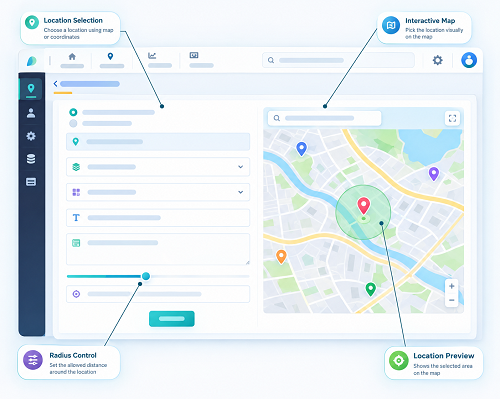
- Whether location information is displayed on an interactive map.
- Whether administrators can identify outdated location updates.
- Whether location tracking works across different mobile devices.
Ask vendors to demonstrate the tracking process using actual mobile devices rather than relying only on presentation slides.
Businesses should also understand that GPS tracking may not always provide continuous or perfectly accurate location information, particularly indoors, underground, or in areas with poor connectivity.
3. Evaluate Geofencing and Location-Based Attendance
Geofencing allows businesses to create virtual geographical boundaries around specific locations. When an employee enters or exits a defined area, the software can record the event or trigger a notification, depending on the system configuration.
This feature is particularly useful for UAE companies operating across multiple offices, warehouses, construction sites, customer locations, and service areas.
Compare vendors based on the following capabilities:
| Geofencing feature | What businesses should check |
|---|---|
| Multiple geofences | Whether the system supports multiple work locations |
| Custom boundaries | Whether administrators can define the required geographical area |
| Entry and exit alerts | Whether notifications can be triggered automatically |
| Location-based attendance | Whether employees can check in from approved locations |
| Site visit verification | Whether managers can review employee visits |
| Geofence reporting | Whether entry and exit records can be exported |
For example, a construction company managing projects in Dubai, Abu Dhabi, and Sharjah may need separate geofences for each project site. The software should allow authorised managers to monitor attendance and site visits without manually checking every employee's location.
Businesses should also verify whether employees can check in outside an authorised geofence and whether such attempts can be flagged for approval.
4. Check Mobile Application Compatibility and Performance
Live employee tracking software depends heavily on mobile applications because employees generally use smartphones to share location information, record attendance, and receive work instructions.
A poorly designed mobile application can reduce employee adoption and create inaccurate tracking records.
When comparing vendors, evaluate:
- Compatibility with Android and iOS devices.
- Ease of installation and registration.
- Battery consumption during location tracking.
- Application performance during long working shifts.
- Background location permission requirements.
- Offline functionality and data synchronisation.
- User-friendly attendance and check-in screens.
- Mobile application security and authentication.
Businesses should test the application on the devices employees actually use. This is especially important for organisations with large field teams using different smartphone models.
Also check how the vendor handles application updates, device compatibility issues, and technical problems affecting location reporting.
5. Compare Attendance and Workforce Management Features
Location tracking alone may not be sufficient for businesses that want to improve overall workforce management. A more comprehensive solution can combine GPS tracking with attendance, shift scheduling, leave management, and employee activity monitoring.
Compare the following capabilities:
| Feature | Business benefit |
|---|---|
| GPS attendance | Records employee check-in and check-out locations |
| Shift scheduling | Helps managers assign employees to different shifts |
| Overtime tracking | Supports the review of additional working hours |
| Break management | Helps monitor scheduled and recorded breaks |
| Leave management | Connects employee availability with workforce planning |
| Attendance correction | Allows authorised users to review attendance exceptions |
| Employee activity reports | Provides visibility into assigned work and completion status |
For UAE organisations with rotating shifts, split shifts, and multiple work locations, these features can simplify HR administration.
Businesses should also determine whether attendance information can be reviewed and approved before being transferred to payroll. This helps reduce errors caused by incomplete attendance records or unverified overtime entries.
6. Review Data Privacy and Security Measures
Employee location information is sensitive because it can reveal movement patterns, work schedules, and visits to specific locations. UAE businesses should carefully assess how vendors collect, process, store, and protect this information.
The UAE Personal Data Protection Law (Federal Decree-Law No. 45 of 2021) establishes requirements concerning the processing and protection of personal data, subject to its scope and applicable exceptions. Certain sectors and free zones may also be subject to separate data protection frameworks.
During vendor evaluation, ask:
- Where is employee location data stored?
- Is data encrypted during transmission and storage?
- Who can access live employee locations?
- Does the platform support role-based permissions?
- Can administrators maintain access and activity logs?
- How long is location history retained?
- Can employee data be exported or permanently deleted when appropriate?
- Does the vendor provide a documented privacy and security policy?
- Does the vendor use third-party service providers to process employee information?
Businesses should also understand whether tracking can be restricted to working hours and authorised business activities.
A responsible tracking policy should explain the purpose of monitoring, the information collected, who can access it, and how long it is retained. Businesses should obtain appropriate legal and privacy guidance before implementing employee monitoring.
7. Assess UAE-Specific Business Requirements
Not every employee tracking platform is equally suitable for the UAE market. Businesses should check whether vendors understand local operational requirements and can support organisations working across different emirates.
Important considerations include:
Multi-location management: The software should support offices, warehouses, branches, project sites, and customer locations across the UAE.
Arabic and English support: Both administrators and employees may benefit from bilingual interfaces, notifications, and reports.
Local working arrangements: The system should support different shift patterns, weekly rest days, work schedules, and field-based operations.
UAE time settings: Attendance records, location events, and reports should use the correct UAE time zone.
Local customer support: Vendors should provide accessible support during the business's operating hours.
Compliance support: The platform should help maintain accurate records without claiming that GPS tracking alone guarantees compliance with UAE employment or data protection laws.
Businesses should ask vendors to demonstrate how the platform handles employees working across Dubai, Abu Dhabi, Sharjah, Ajman, and other emirates.
8. Compare Reporting and Analytics Capabilities
Reporting features help managers convert location and attendance information into useful operational insights. A good platform should provide more than a map showing where employees are currently located.
Evaluate whether vendors offer:
- Daily employee location reports.
- Attendance and punctuality reports.
- Employee movement history.
- Site visit reports.
- Route and travel summaries.
- Geofence entry and exit reports.
- Missed check-in and check-out reports.
- Task completion reports.
- Department-wise and location-wise summaries.
- Custom report generation and export options.
For example, a field service company may want to identify how many customer visits were completed by each technician during a particular week. A delivery company may need reports showing route progress and delayed assignments.
Check whether reports can be exported into Excel, CSV, or PDF formats. Also determine whether managers can schedule automatic reports or access dashboards without manually generating them.
9. Evaluate Integration With Payroll, HRMS, and Other Systems
Employee tracking software becomes more valuable when it connects with the organisation's existing business applications.
Without integration, HR teams may need to transfer attendance information manually, increasing administrative work and the possibility of errors.
Check whether the vendor supports integration with:
- Payroll management software.
- Human Resource Management Systems (HRMS).
- Attendance and time management systems.
- Enterprise Resource Planning (ERP) platforms.
- Workforce scheduling applications.
- Customer Relationship Management (CRM) software.
- Task and field service management platforms.
For UAE businesses, payroll integration is particularly useful when employee attendance, approved overtime, and working hours are used during salary processing.
However, businesses should verify how the integration works. Ask whether data is transferred automatically through APIs, scheduled synchronisation, or downloadable files.
Also confirm whether the integration supports approval workflows and whether changes made in one system are reflected in the other.
10. Compare Vendor Pricing and Total Cost of Ownership
Software pricing is an important factor, but businesses should avoid selecting a vendor based only on the lowest subscription fee.
Different vendors may use different pricing models, including per-employee subscriptions, per-device charges, fixed monthly fees, or customised enterprise pricing.
Compare the complete cost structure before making a decision.
| Cost component | Questions to ask |
|---|---|
| Subscription fees | Is pricing based on employees, devices, or locations? |
| Implementation | Are setup and configuration charges included? |
| Mobile applications | Are employee mobile applications included? |
| GPS tracking | Are real-time tracking features available in the selected plan? |
| Geofencing | Is there a limit on the number of geofences? |
| Integrations | Are API access and third-party integrations included? |
| Training | Are administrator and employee training sessions chargeable? |
| Support | Is technical support included or separately billed? |
| Data storage | Are there additional charges for historical location records? |
| Upgrades | Are software updates and new features included? |
For example, a vendor offering a low monthly subscription may charge extra for advanced reporting, integrations, or additional geofences. Another vendor may offer these features as part of a higher-priced package.
Calculate the total cost over the expected contract period and compare it against the operational benefits.
11. Check Vendor Experience and Industry Expertise
A vendor's experience can influence the quality of implementation, technical support, and long-term software performance.
Businesses should assess whether the vendor has experience serving organisations with similar workforce structures.
Ask vendors about:
- Their experience in the UAE market.
- Industries they currently support.
- The size of workforces managed through their platform.
- Experience with field-based and mobile employees.
- Previous implementation projects.
- Customer references and case studies.
- Availability of local implementation partners.
- Experience supporting multi-location businesses.
A vendor that understands logistics operations may be suitable for a delivery company, while a construction business may need a provider experienced in project-site attendance and workforce deployment.
Request relevant customer references where possible. Speak to existing customers about system reliability, support quality, implementation time, and any unexpected costs.
12. Assess Implementation, Training, and Customer Support
Even feature-rich software can fail to deliver results if implementation is poorly managed or employees do not understand how to use it.
Before selecting a vendor, understand the complete implementation process.
Check whether the vendor provides:
- Initial business requirement assessment.
- Employee and department data configuration.
- GPS and geofence setup.
- Mobile application deployment.
- Integration with existing systems.
- Administrator training.
- Employee onboarding assistance.
- User documentation and training materials.
- Post-implementation support.
Customer support is equally important. Businesses should ask whether assistance is available through phone, email, live chat, or a dedicated account manager.
Check the vendor's service-level agreement (SLA) for response times, issue resolution targets, support availability, escalation procedures, and service availability commitments.
A vendor should clearly explain what happens if the tracking system becomes unavailable or location updates stop working.
13. Request a Live Demonstration and Proof of Concept
A vendor demonstration helps businesses understand how the software performs in practical situations. However, a standard presentation may not reveal the system's limitations.
Instead, request a demonstration based on actual business workflows.
The demonstration should cover:
- Employee registration and mobile application setup.
- Real-time GPS location monitoring.
- Attendance check-in and check-out.
- Geofence creation and location-based alerts.
- Employee movement history.
- Shift and task assignment.
- Attendance and location reporting.
- Administrator permissions.
- Payroll or HRMS integration.
- Data export and backup options.
Where possible, conduct a proof of concept (PoC) with a small group of employees.
For example, a UAE company with 100 field employees could test the system with 10 to 15 employees across different locations and job roles. The test should evaluate location accuracy, mobile application performance, reporting quality, employee usability, and administrative effort.
Define measurable success criteria before starting the PoC so that vendors can be evaluated consistently.
14. Compare Vendors Using a Structured Evaluation Scorecard
A vendor scorecard helps businesses compare multiple software providers using the same criteria. It reduces the risk of selecting a solution based on sales presentations or pricing alone.
The following sample scorecard can be adapted to business requirements.
| Evaluation criteria | Suggested weight |
|---|---|
| GPS tracking accuracy and reliability | 15% |
| Geofencing and location-based attendance | 10% |
| Mobile application performance | 10% |
| Attendance and workforce management | 10% |
| Data privacy and security | 15% |
| UAE-specific requirements | 10% |
| Reporting and analytics | 10% |
| Integration capabilities | 5% |
| Pricing and total cost | 5% |
| Implementation and customer support | 10% |
| Total | 100% |
Ask each evaluation team member to score vendors against the same criteria. A simple rating scale from 1 to 5 can be used:
- 1 – Poor: Does not meet the requirement.
- 2 – Below expectations: Meets only limited requirements.
- 3 – Acceptable: Meets the basic requirement.
- 4 – Good: Meets most requirements effectively.
- 5 – Excellent: Fully meets the requirement and provides additional value.
Multiply each criterion's rating by its assigned weight to calculate a weighted score. This allows decision-makers to compare vendors objectively.
The weights should be adjusted according to the organisation's priorities. For example, a logistics company may assign greater importance to GPS tracking and route visibility, while a construction company may prioritise geofencing and multi-site attendance.
15. Watch for Common Mistakes When Selecting a Vendor
Businesses should avoid several common mistakes during the software selection process.
Choosing based only on price: A low-cost platform may lack essential features or require expensive add-ons.
Ignoring mobile application performance: Software that consumes excessive battery power or frequently stops updating locations may create operational problems.
Overlooking data privacy: Employee location information should be handled through clear policies, access controls, and appropriate security measures.
Accepting unverified feature claims: Vendors should demonstrate important features instead of relying on marketing descriptions.
Ignoring integration requirements: A platform that cannot connect with existing payroll or HR systems may increase manual work.
Skipping the proof of concept: Testing the software with actual employees helps identify usability and performance issues before full deployment.
Failing to review contract terms: Businesses should examine renewal conditions, cancellation provisions, data ownership, service commitments, and data export options before signing.
Conclusion
Comparing live employee tracking software vendors in the UAE requires more than reviewing GPS features and subscription prices. Businesses should evaluate tracking accuracy, geofencing, mobile application performance, attendance management, data protection, reporting, integrations, implementation, and customer support.
The right platform should match the organisation's workforce structure and operational requirements while providing reliable information to managers and HR teams. UAE businesses should also pay close attention to employee privacy, local data protection requirements, and clear monitoring policies.
A structured vendor scorecard, practical software demonstration, and proof of concept can help decision-makers assess competing solutions before committing to a long-term contract.
Ultimately, the best live employee tracking software is not necessarily the one with the most features or the lowest price. It is the solution that provides dependable tracking, simplifies workforce management, supports business operations, and delivers measurable value over time.
Score vendors on map visibility, permissions, field usability and integrations rather than map screenshots alone. Include an InnBuilt demonstration using real UAE team workflows.