How Can Field Service Companies in the UAE Dispatch Technicians Efficiently?
How Can Field Service Companies in the UAE Dispatch Technicians Efficiently?
Field service companies in the UAE often manage technicians who travel to customer sites for installation, maintenance, inspection, repair, and emergency service work. When technicians are dispatched manually through phone calls, spreadsheets, or messaging applications, scheduling can become difficult as the number of service requests increases.
An efficient digital dispatch system can help companies assign the right technician, organize appointments, reduce unnecessary travel, and keep customers informed. When integrated with mobile attendance and field-service software, dispatching can also provide better visibility into technician availability, site visits, working hours, and service completion.
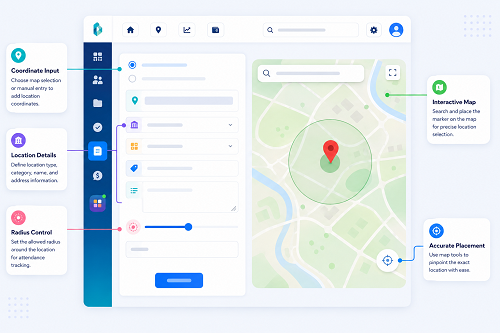
1. Centralize Service Requests
The first step is to maintain a centralized list of service requests.
Each job can include:
- Customer name
- Service location
- Contact person
- Service type
- Priority
- Required skills
- Preferred appointment time
- Equipment or asset information
- Job instructions
- Expected duration
Instead of keeping separate lists across spreadsheets, emails, and messaging applications, dispatchers can manage jobs from one system.
This creates a single source of information for the field-service team.
2. Match Jobs With Technician Skills
Not every technician should be assigned to every service request.
A dispatch system can match jobs according to:
- Technical skills
- Certifications
- Product knowledge
- Experience
- Assigned territory
- Current workload
- Availability
- Vehicle or equipment requirements
For example, an air-conditioning service request can be assigned to a technician with the appropriate HVAC experience rather than simply choosing the nearest available employee.
This improves the likelihood of completing the job on the first visit.
3. Consider Technician Location
Location can be useful when deciding which technician should handle a service call.
For example, three technicians may be available:
- Technician A — Dubai
- Technician B — Sharjah
- Technician C — Abu Dhabi
If a new service request is received in Sharjah, the dispatcher can consider the technician's current work location, schedule, skills, and expected travel time.
Location should be one factor in dispatching rather than the only factor.
4. Schedule Jobs Around Existing Appointments
Efficient dispatching requires visibility into the technician's complete schedule.
For example:
- 9:00 AM — Customer A
- 11:30 AM — Customer B
- 2:00 PM — Customer C
If an urgent request arrives at 12:00 PM, the dispatcher can determine whether the technician has sufficient time to accept it without disrupting the existing schedule.
This reduces double-booking and unrealistic appointment commitments.
5. Use Priority-Based Dispatching
Not every service request has the same urgency.
Businesses can classify jobs as:
- Emergency
- High priority
- Standard
- Scheduled maintenance
- Follow-up
- Preventive maintenance
An emergency equipment failure may need immediate dispatch, while routine maintenance can be scheduled later.
Priority rules help dispatchers make decisions consistently instead of handling every request on a first-come, first-served basis.
6. Optimize Technician Routes
When technicians have multiple appointments, route planning can reduce unnecessary travel.
For example:
Customer A → Customer B → Customer C → Customer D
Instead of sending a technician back and forth between distant locations, dispatchers can group appointments geographically where practical.
Route planning should account for:
- Traffic
- Appointment windows
- Service duration
- Customer priority
- Technician skills
- Vehicle availability
- Travel distance
Actual travel conditions can change throughout the day, so dispatchers should be able to adjust schedules when necessary.
7. Give Technicians Mobile Job Details
Once a technician is assigned a job, the information should be available through a mobile application.
The technician may need access to:
- Customer address
- Contact details
- Service history
- Job instructions
- Equipment information
- Appointment time
- Priority
- Safety instructions
- Required parts
- Customer notes
This reduces the need for technicians to call the office repeatedly for basic information.
8. Use Mobile Check-In at Customer Sites
Technicians can confirm arrival through mobile attendance or field-service software.
A typical process is:
Technician Arrives → Mobile Check-In → Location Verification → Job Starts
The system can record the time and, where appropriate, the location associated with the check-in.
Geo-fencing can be used to verify that the technician is within an approved customer or project location.
GPS accuracy can vary, particularly around large buildings, indoor areas, underground facilities, or locations with weak connectivity. Therefore, businesses should maintain an exception process for legitimate location discrepancies.
9. Record Job Completion Digitally
At the end of the service visit, technicians can update the job from their mobile device.
Information may include:
- Work completed
- Parts used
- Service findings
- Additional work required
- Customer comments
- Photos where appropriate
- Completion time
- Follow-up requirement
The service record can then be sent to the office without waiting for a technician to return.
10. Handle Job Reassignment
Field conditions can change quickly.
A technician may:
- Become unavailable
- Require additional parts
- Encounter a longer-than-expected job
- Face vehicle problems
- Receive an emergency assignment
- Be delayed at another customer site
Dispatch software should allow authorized managers to reassign jobs.
For example:
Original Technician → Job Delayed → Dispatcher Reviews Availability → Job Reassigned → Customer Notified
A clear audit trail should show when and why the reassignment occurred.
11. Track Technician Availability
Dispatchers need to know which technicians are actually available.
A useful dashboard can show statuses such as:
- Available
- Assigned
- Travelling
- On-site
- Job completed
- On break
- Unavailable
- Off duty
This gives dispatchers a clearer operational picture than relying on phone calls or messaging groups.
The information should be limited to what is operationally necessary rather than becoming continuous employee surveillance.
12. Manage Parts and Equipment Before Dispatch
A technician may reach a customer location but be unable to complete the job because the required part is missing.
Before dispatching, businesses can check:
- Required spare parts
- Tools
- Safety equipment
- Replacement units
- Vehicle inventory
- Technician equipment
This can reduce repeat visits and improve first-time fix rates.
13. Monitor Key Dispatch KPIs
Field-service companies can measure dispatch performance using KPIs such as:
| KPI | What It Measures |
|---|---|
| First-time fix rate | Jobs completed on the first visit |
| Response time | Time from request to technician response |
| Travel time | Time spent travelling between assignments |
| On-time arrival | Appointments reached within the expected window |
| Job completion time | Duration of service work |
| Technician utilization | Productive assigned work relative to available time |
| Repeat visits | Jobs requiring additional visits |
| Customer satisfaction | Customer experience after service |
These metrics can help managers identify scheduling and resource problems.
14. Connect Dispatch With Attendance and Payroll
Field-service dispatching becomes more powerful when connected with attendance.
A typical workflow is:
Job Assignment → Technician Travel → Site Check-In → Service Work → Site Check-Out → Attendance → Payroll
Approved attendance information can then support working-hour calculations, overtime processes, or other payroll inputs according to company policy and applicable UAE requirements.
This reduces duplicate data entry between operations and HR.
15. Use Exception-Based Management
Dispatchers do not need to constantly monitor every technician.
Instead, systems can generate alerts for:
- Technician running late
- Missed appointment
- Unexpected location
- Job exceeding expected duration
- Missing check-out
- Customer cancellation
- Vehicle issue
- Repeated route delays
- Technician unavailable for an urgent job
This allows managers to focus on situations requiring intervention.
16. Protect Technician and Customer Location Data
Field-service systems may process customer addresses, technician locations, schedules, service histories, and other business information.
Businesses should consider:
- Role-based access
- Secure authentication
- Appropriate data retention
- Limited access to location history
- Audit logs
- Secure data transmission
- Vendor security controls
- Clear employee policies
- Appropriate handling of customer information
Continuous GPS tracking should not automatically be required for every technician. Appointment-based check-ins and location verification may be sufficient for many service workflows.
17. Best Practices for UAE Field Service Companies
Companies can improve technician dispatch by:
- Centralizing service requests.
- Matching jobs with technician skills.
- Considering location and availability.
- Using priority-based scheduling.
- Grouping nearby appointments where practical.
- Giving technicians mobile access to job details.
- Using geo-fenced check-ins where appropriate.
- Recording job completion digitally.
- Allowing authorized job reassignment.
- Monitoring dispatch KPIs.
- Connecting attendance with payroll.
- Using exception-based alerts.
- Protecting employee and customer information.
Conclusion
UAE field service companies can dispatch technicians more efficiently by combining centralized job management, skill-based assignment, technician availability, location information, route planning, mobile job instructions, digital check-ins, and real-time exception handling.
The goal is not simply to send the nearest technician to every customer. Effective dispatch considers skills, availability, location, appointment windows, job priority, travel time, and required equipment.
When dispatch, mobile attendance, field-service operations, and payroll systems work together, businesses can reduce scheduling errors, improve technician productivity, provide better customer service, and maintain more accurate records of field work.
InnBuilt Field Management can match UAE technician assignments with job location and availability, giving dispatchers a clearer way to prioritise appointments and track work in progress.