How Can Managers View Live Field Team Locations Without Micromanaging in the UAE?
How Can Managers View Live Field Team Locations Without Micromanaging in the UAE?
Managing employees who work outside a traditional office can be challenging. UAE businesses may have technicians, sales representatives, delivery teams, maintenance workers, security personnel, and project staff working across multiple customer locations.
Live location technology can help managers understand where field teams are working, coordinate assignments, respond to customer requests, and identify operational delays. However, simply giving managers continuous access to employee locations can create unnecessary monitoring and may encourage micromanagement.
The better approach is to use live-location visibility as an operational coordination tool, rather than treating it as a way to constantly monitor employee behavior.
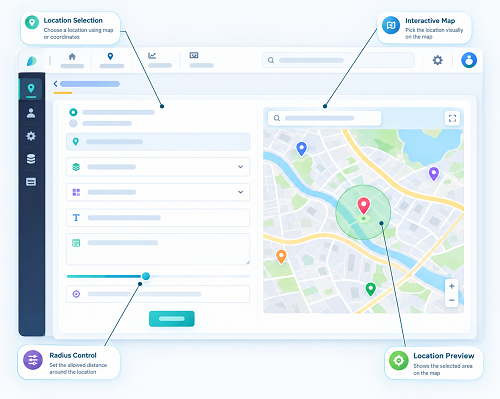
1. Define the Purpose of Live Location Visibility
Before enabling live tracking, managers should identify what problem the technology is intended to solve.
Common legitimate operational purposes include:
- Assigning the nearest technician to a customer
- Coordinating field-service appointments
- Checking whether employees have reached assigned sites
- Managing urgent service requests
- Supporting employee safety
- Coordinating multiple project locations
- Identifying operational delays
The purpose should be clearly defined before deciding how frequently location information needs to be collected.
If the only requirement is confirming that an employee arrived at a customer location, a geo-fenced check-in may be sufficient instead of continuous tracking.
2. Give Managers a Team-Level View
Managers do not necessarily need detailed information about every employee's movement throughout the day.
A dashboard can instead provide a high-level view such as:
| Employee | Assignment | Status | Location Status |
|---|---|---|---|
| Technician A | Client Site 1 | On assignment | At site |
| Technician B | Client Site 2 | Travelling | En route |
| Technician C | Client Site 3 | Completed | Left site |
| Technician D | Client Site 4 | Not checked in | Exception |
This gives managers operational visibility without encouraging them to examine every movement.
The goal is to answer:
“Do I need to take action?”
rather than:
“Where exactly has this employee been every minute?”
3. Use Location Data for Exceptions
One of the most effective ways to avoid micromanagement is to make the system exception-driven.
Instead of continuously reviewing the location dashboard, managers can receive alerts when something requires attention.
Examples include:
- Employee has not reached an assigned site
- Employee is significantly delayed
- Employee leaves a designated work location unexpectedly
- Customer appointment is approaching but employee has not arrived
- Employee reports a location problem
- Field assignment changes
This allows managers to focus on situations that genuinely require intervention.
4. Avoid Constant Manual Monitoring
Managers should not be expected to stare at a live map throughout the working day.
Continuous manual monitoring can create several problems:
- Managers spend too much time watching location data.
- Employees may feel unnecessarily monitored.
- Small movements can be misinterpreted.
- Managers may focus on activity rather than outcomes.
- HR teams may receive unnecessary location-related disputes.
A better workflow is:
Live location → Automated status → Exception detected → Manager reviews → Action taken
This turns location information into a decision-support tool.
5. Focus on Work Outcomes
For many field employees, productivity should not be measured simply by where they are at every moment.
Managers should also consider:
- Customer appointments completed
- Service requests resolved
- Tasks completed
- Project milestones
- Response times
- Working hours
- Customer feedback
- Quality of work
For example, a technician may spend part of the day travelling between customer locations. Seeing the technician's movement does not necessarily tell the manager whether the day's work was successful.
Live location should therefore complement, rather than replace, performance management.
6. Set Appropriate Tracking Hours
UAE employers should clearly define when a live location is active.
For example, an organization might configure location visibility around:
- Scheduled working hours
- Active field assignments
- Customer-service appointments
- Approved on-call periods
Managers should not assume that access to a company device means they can continuously monitor an employee outside working hours.
Clear tracking schedules help establish boundaries between work-related monitoring and personal time.
7. Use Geo-Fences for Site Verification
Geo-fencing can reduce the need for continuous monitoring.
For example, if a technician is assigned to a customer site, the system can establish a virtual boundary around the location.
The system can then help determine:
Employee entered site → Check-in available
Employee left site → Check-out or departure event
The manager may not need to watch the employee's location continuously.
This can provide useful site-level visibility while limiting unnecessary location collection.
8. Use Statuses Instead of Detailed Movement
A manager dashboard does not always need to show a detailed trail.
Instead, the system can provide useful statuses such as:
- Not started
- Checked in
- Travelling
- At customer site
- Task completed
- Delayed
- Offline
- Exception
These statuses allow managers to understand the operational situation quickly.
For example:
Technician A — At Client Site — Task in progress
may be more useful than a detailed map showing every movement during the previous two hours.
9. Establish Alert Thresholds
Too many alerts can become another form of micromanagement.
Businesses should establish meaningful thresholds.
For example, instead of notifying a manager every time an employee moves outside a small area, the system might notify the manager only when:
- An employee misses a scheduled check-in
- A significant delay occurs
- An employee leaves an assigned site unexpectedly
- A high-priority customer appointment is affected
Thresholds should reflect actual operational requirements.
10. Give Employees Clear Information
Employees should understand how live-location technology is being used.
Employers should explain:
- Why location information is collected
- When tracking is active
- What managers can see
- Whether location is stored historically
- How long information is retained
- Who can access the information
- How location-related issues can be reported
Clear communication can reduce uncertainty and help employees understand that the technology is intended to support field operations rather than unnecessarily monitor them.
11. Restrict Manager Access
Not every manager needs access to every field employee.
Access can be based on organizational responsibilities.
For example:
Team Supervisor → Assigned team
Regional Manager → Assigned region
Operations Manager → Relevant field operations
HR → Attendance and workforce records as required
Role-based access reduces unnecessary exposure of employee location information.
12. Protect Historical Location Data
Live location and historical location records are different.
A manager may need to know where an employee currently is to assign a customer visit. That does not necessarily mean the manager needs access to months of detailed location history.
Organizations should establish appropriate retention and access rules for historical location information.
They should also assess applicable UAE data protection and privacy requirements when collecting, storing, and using employee location information.
13. Avoid Using Location as the Only Performance Measure
Location data can be useful, but it should not automatically become a performance score.
For example, an employee spending more time at a particular location does not necessarily mean they are more productive.
Managers should combine location information with operational records such as:
- Completed assignments
- Service quality
- Customer satisfaction
- Response times
- Attendance
- Approved working hours
- Task completion
This creates a more balanced approach to workforce management.
14. Create a Process for Location Exceptions
Technology is not always perfect.
Employees may appear outside an assigned location because of:
- GPS inaccuracies
- Poor connectivity
- Building interference
- Device problems
- Temporary assignment changes
- Emergency work
- Customer-site changes
Managers should investigate before treating an unexpected location as a policy violation.
A practical workflow is:
Location exception → Employee explanation → Supervisor review → Verification → Appropriate action
This is more effective than automatically assuming that every location anomaly represents employee misconduct.
15. Use Live Location to Improve Employee Safety
Live location can also support employee safety when there is a genuine operational need.
For example, field teams working alone or at remote sites may benefit from location visibility during active assignments.
Businesses can establish procedures for:
- Emergency situations
- Missed check-ins
- Unexpected loss of communication
- High-risk assignments
- Emergency response
Safety-related tracking should still be clearly defined within company policies.
16. Connect Location With Attendance and Payroll Carefully
Live location should not automatically be treated as a payroll record.
For example, a manager may see that an employee's device was near a customer site. The attendance system may separately record the employee's official check-in and check-out.
A suitable workflow is:
Location information → Attendance verification → Supervisor review → Working hours → Payroll
This distinction helps avoid payroll decisions based solely on raw location information.
17. Best Practices for UAE Managers
Managers can avoid micromanagement by following these practices:
- Use live location for operational coordination, not constant surveillance.
- Define the specific business purpose for tracking.
- Use geo-fenced check-ins where continuous tracking is unnecessary.
- Focus on exceptions instead of monitoring every movement.
- Use meaningful alerts and avoid excessive notifications.
- Give managers access only to the teams they supervise.
- Define when tracking is active.
- Communicate tracking practices clearly to employees.
- Protect historical location records.
- Combine location data with actual work outcomes.
- Investigate location anomalies before taking action.
- Review privacy and data protection requirements.
- Give employees a process for reporting location errors.
- Regularly review whether continuous tracking is still necessary.
Conclusion
Live location can be valuable for UAE businesses managing distributed field teams, but its effectiveness depends on how managers use it.
The goal should not be to watch employees continuously. Instead, managers should use location information to coordinate assignments, identify exceptions, support field operations, verify site presence, and respond to genuine business needs.
A combination of team-level dashboards, geo-fenced attendance, exception-based alerts, limited access, defined tracking hours, employee transparency, and outcome-based performance management can provide operational visibility without creating a culture of micromanagement.
When implemented responsibly, live field tracking can help managers know when intervention is actually needed while giving employees the autonomy to complete their work professionally.
Managers can focus on active jobs rather than constant surveillance. InnBuilt Field Management can surface assigned field visits and progress to help UAE supervisors coordinate teams with proportionate oversight.