What Should UAE Field Teams Test During a Live Tracking Software Demo?
Introduction
Live tracking software helps UAE businesses monitor field employees, coordinate mobile teams, verify customer visits, manage attendance, and improve operational visibility. It is particularly useful for organisations in logistics, construction, facilities management, field sales, delivery services, maintenance, and other industries where employees regularly work outside the office.
However, choosing live tracking software based only on a vendor presentation can lead to problems after implementation. A platform may look impressive during a demonstration but perform differently when employees use it across multiple locations, devices, and working conditions.
A practical software demo allows field teams, HR managers, operations managers, and IT administrators to evaluate how the system performs in real working situations. They can test GPS accuracy, location updates, geofencing, mobile application performance, attendance records, reporting, and integration capabilities before making a purchasing decision.
For UAE businesses, testing should also consider local operating conditions, including travel between emirates, outdoor working environments, mobile network availability, different shift arrangements, and employee data privacy.
This article explains the essential features and practical scenarios UAE field teams should test during a live tracking software demonstration.
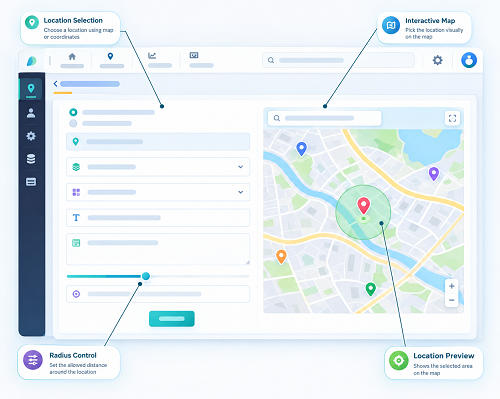
1. Test Real-Time GPS Location Accuracy
GPS accuracy is one of the first features field teams should evaluate during a software demo. The platform should provide reliable information about employee locations so managers can coordinate field activities and verify work-related visits.
During the demonstration, ask the vendor to show the live location of employees using actual smartphones.
Check the following:
- Whether the employee's current location appears correctly on the map.
- How frequently the location is refreshed.
- Whether managers can view multiple employees simultaneously.
- Whether the platform displays the time of the last location update.
- Whether location information remains available when employees move.
- Whether the system identifies outdated or unavailable location data.
- Whether managers can view employee locations across different UAE locations.
Practical test: Ask two or three employees to move between nearby locations while the operations manager monitors their positions on the dashboard. Compare the displayed locations with their actual positions.
For example, a facilities management company operating across Dubai should test whether supervisors can monitor technicians travelling between customer properties.
Businesses should remember that GPS accuracy can vary because of device capabilities, satellite visibility, network conditions, and physical surroundings. The vendor should explain how the software handles these limitations.
2. Check Location Update Frequency
Real-time tracking does not always mean that location information is updated continuously. Some platforms refresh employee positions every few seconds, while others use longer intervals or adjust updates according to movement and battery settings.
The update frequency can directly affect operational decisions.
During the demo, ask:
- Can administrators configure location update intervals?
- Does the system update locations while employees are moving?
- Are updates less frequent when employees remain stationary?
- Can managers see the timestamp of each update?
- Does the software indicate when a location is no longer current?
- Can update frequency be adjusted for different employee groups?
Practical test: Have an employee walk or drive along a short route while the manager observes the dashboard. Record how long it takes for the employee's location to appear at each new position.
This test is particularly useful for delivery companies, mobile maintenance teams, and businesses that require frequent location visibility.
3. Evaluate GPS Tracking Under Different Working Conditions
Field employees in the UAE may work in office buildings, warehouses, construction sites, parking areas, outdoor locations, and densely developed urban environments. GPS performance can differ across these settings.
A demonstration should include different working conditions rather than testing only in an open area.
| Working environment | What to test |
|---|---|
| Outdoor locations | GPS accuracy and location refresh |
| Office buildings | Indoor location limitations |
| Warehouses | Location reporting in enclosed spaces |
| Construction sites | Location visibility around large structures |
| Parking areas | Location consistency when employees enter or leave |
| Urban areas | Location accuracy near tall buildings |
| Remote work locations | Performance with variable network connectivity |
Practical test: Ask the vendor to demonstrate how the application behaves when an employee moves from an outdoor area into a large building or warehouse.
The purpose is to understand the platform's actual performance and limitations. Businesses should not assume that standard GPS tracking will provide precise indoor positioning without additional technologies.
4. Test Geofencing and Location-Based Alerts
Geofencing allows businesses to create virtual boundaries around offices, warehouses, project sites, and customer locations. The software can record employee entry and exit events or trigger alerts when configured conditions are met.
This feature is especially useful for UAE businesses with employees working at multiple locations.
During the demo, test whether administrators can:
- Create geofences around different work locations.
- Set the size and boundaries of each geofence.
- Assign employees to specific locations.
- Receive entry and exit notifications.
- Identify employees who enter or leave an authorised area.
- View historical geofence activity.
- Generate location-based attendance reports.
Practical test: Create a geofence around a sample project site. Ask an employee to enter and leave the defined area using the mobile application. Check whether the dashboard records both events accurately.
For example, a construction company managing projects in Abu Dhabi and Dubai may need separate geofences for each project location. The demo should show whether managers can monitor both sites through a single dashboard.
Also test what happens when an employee is close to the geofence boundary. GPS variations may occasionally cause incorrect entry or exit events, so businesses should understand how the system handles these situations.
5. Verify Mobile Attendance Check-In and Check-Out
Many live tracking platforms combine GPS monitoring with mobile attendance management. This allows employees to record their working hours and provide location information when checking in or out.
During the demonstration, test the complete attendance process.
Check whether employees can:
- Log in securely to the mobile application.
- Record attendance from authorised locations.
- Check in and check out using GPS verification.
- View their recorded attendance details.
- Receive confirmation after successful check-in.
- Submit attendance correction requests.
- Record attendance across different shifts.
- View missed check-in or check-out notifications.
Practical test: Ask an employee to check in at an approved work location and then attempt another check-in outside the permitted area. Observe how the software responds.
The platform should clearly indicate whether an attendance entry is accepted, rejected, or flagged for administrator review.
For UAE businesses with employees working at customer sites, warehouses, and project locations, location-based attendance can reduce manual verification and improve record accuracy.
6. Test Route Tracking and Travel History
Route tracking helps managers understand the movement of field employees during assigned working activities. It can be valuable for delivery personnel, sales representatives, technicians, and mobile service teams.
During the demo, ask the vendor to show:
- The employee's route during a selected period.
- Previous location records.
- Start and end points of recorded journeys.
- Time spent at different locations.
- Route deviations, where supported.
- Travel summaries and distance calculations.
- Options for filtering route history by employee and date.
Practical test: Ask an employee to travel between three test locations. Once the journey is completed, review the recorded route and compare it with the actual journey.
For example, a UAE delivery company may want to verify whether a driver visited the assigned delivery locations in the expected sequence.
Businesses should also check whether the platform distinguishes between work-related movement and other location activity according to its configuration and monitoring policy.
7. Evaluate Offline Tracking and Data Synchronisation
Field employees may experience temporary connectivity interruptions while working in remote areas, large buildings, underground parking facilities, or locations with weak mobile network coverage.
A useful live tracking platform should explain what happens when internet connectivity becomes unavailable.
During the demo, test:
- Whether the application continues recording permitted location information offline.
- Whether attendance events can be stored temporarily.
- Whether recorded data synchronises after connectivity returns.
- Whether offline records retain their original timestamps.
- Whether managers can identify delayed or missing updates.
- Whether the system prevents duplicate attendance records during synchronisation.
Practical test: Temporarily disable mobile internet on a test device, perform an approved activity, and restore the connection. Check whether the platform synchronises the available records correctly.
Not every platform supports offline location collection. Ask the vendor to explain precisely which functions continue working without an internet connection.
8. Check Mobile Application Performance and Battery Consumption
Field employees may use their smartphones throughout the working day for navigation, communication, attendance, and task management. A tracking application that drains battery quickly or frequently stops working can create operational difficulties.
During the demo, evaluate:
- Application loading speed.
- Login and authentication time.
- Battery consumption during tracking.
- Application stability during long shifts.
- Background location permission requirements.
- Compatibility with Android and iOS devices.
- Performance when switching between applications.
- Behaviour after the phone restarts.
- Handling of location permission changes.
Practical test: Run the tracking application on a test device for a representative working period. Observe battery consumption, location update consistency, and application stability.
Businesses should test devices similar to those used by their actual employees rather than relying only on the vendor's demonstration equipment.
9. Test Employee and Manager Dashboards
A live tracking system should provide clear information to employees, supervisors, and administrators. Different user roles should have access to the information they need without exposing unnecessary employee data.
During the demonstration, check whether:
- Employees can view their own attendance and work records.
- Supervisors can monitor their assigned teams.
- Operations managers can view multiple departments or locations.
- HR administrators can review attendance exceptions.
- Administrators can configure user permissions.
- Managers can filter employees by location, department, or status.
- The dashboard displays clear alerts and notifications.
For example, a field service company may have separate supervisors for Dubai, Sharjah, and Abu Dhabi. Each supervisor should be able to access the relevant team information without automatically receiving unrestricted access to every employee's records.
The dashboard should also be easy to use during busy operational periods.
10. Verify Alerts and Notifications
Automated alerts help managers respond quickly to attendance issues, missed visits, and other operational exceptions.
However, businesses should check whether notifications are configurable and relevant to their actual workflows.
Ask the vendor to demonstrate alerts for:
- Employee check-in and check-out.
- Geofence entry and exit.
- Missed attendance records.
- Late arrivals.
- Unavailable location updates.
- Missed customer visits.
- Assigned task delays.
- Unusual or unexpected location events, where supported.
Practical test: Configure a sample alert for an employee entering a defined work location. Check whether the supervisor receives the notification through the available channels.
Also verify whether alerts can be sent through in-app notifications, email, SMS, or other supported channels.
Businesses should avoid systems that generate excessive notifications without allowing administrators to control alert frequency and recipients.
11. Test Task Assignment and Field Visit Management
Some live tracking platforms provide task management features alongside GPS tracking. These functions help managers assign jobs, monitor progress, and verify whether employees complete scheduled visits.
This is especially useful for maintenance companies, sales teams, inspection services, and field support operations.
During the demo, evaluate whether managers can:
- Assign tasks to individual employees.
- Set task locations and deadlines.
- Share customer or site information.
- Monitor task status.
- Record arrival at customer locations.
- Capture task completion details.
- Upload photographs or supporting documents.
- Add comments and remarks.
- Review completed and pending assignments.
Practical test: Create a sample maintenance task at a customer location and assign it to a technician. Ask the technician to acknowledge the task, reach the location, and mark it as completed.
The manager should be able to review the task status and associated location records from the dashboard.
12. Evaluate Reporting and Data Export
Reporting capabilities help UAE businesses use tracking information for workforce planning, attendance reviews, operational analysis, and customer service monitoring.
During the demo, request examples of commonly used reports.
| Report type | What to verify |
|---|---|
| Live location report | Current employee positions and update timestamps |
| Attendance report | Check-in, check-out, and recorded working hours |
| Route history report | Employee movement during selected periods |
| Geofence report | Entry and exit events at defined locations |
| Field visit report | Completed and pending customer visits |
| Employee activity report | Assigned work and recorded task status |
| Exception report | Missed updates and attendance irregularities |
| Team summary | Location and activity information by department |
Also test whether reports can be filtered by employee, date, department, location, or project.
Check whether the platform supports Excel, CSV, and PDF exports. If the business needs automated reporting, ask whether reports can be scheduled and distributed to authorised managers.
13. Check Integration With Payroll and HRMS Systems
Live tracking software may generate attendance and work-related information that HR and payroll teams need for further processing.
During the demo, businesses should understand how information moves between the tracking platform and existing business systems.
Test whether the software supports integration with:
- Payroll management systems.
- HRMS platforms.
- Attendance management applications.
- ERP software.
- Workforce scheduling systems.
- Field service management platforms.
For UAE organisations, integration can help transfer approved attendance records and overtime information into payroll workflows.
Ask the vendor to demonstrate whether integration is automatic or requires manual file uploads. Also check whether the system supports API connectivity, scheduled data synchronisation, and approval workflows.
Businesses should verify that location data is not automatically treated as proof of payable working hours or overtime without appropriate review and approval.
14. Review Employee Data Privacy and Access Controls
Employee tracking involves collecting location-related information, so privacy and security should be part of every software demonstration.
UAE businesses should assess whether the platform supports their legal obligations, internal monitoring policies, and employee data protection requirements.
During the demo, check:
- Whether tracking can be configured for authorised working periods.
- Whether administrators can control access to location information.
- Whether role-based permissions are available.
- Whether the platform maintains access logs.
- Whether location records are encrypted.
- Where employee data is stored and processed.
- How long historical location data is retained.
- Whether data can be exported or deleted in accordance with applicable requirements.
The UAE Personal Data Protection Law (Federal Decree-Law No. 45 of 2021) may apply to employee personal data processing, depending on the organisation and relevant exceptions. Certain free zones and regulated sectors may follow separate data protection frameworks.
Businesses should request the vendor's security documentation, data processing terms, and information about any third-party service providers.
A clear employee monitoring policy should explain why tracking is used, what information is collected, who can access it, and how the information is handled.
15. Test Arabic and English Language Support
UAE organisations often employ people from different linguistic backgrounds. A bilingual software interface can improve adoption and reduce misunderstandings.
During the demo, check whether the platform supports:
- Arabic and English mobile interfaces.
- Arabic and English administrator dashboards.
- Attendance notifications in both languages.
- Employee instructions and help documentation.
- Reports that display information correctly in Arabic.
- Language settings for individual users.
Ask the vendor to demonstrate how employees can switch between languages and whether the translated interface covers all major features.
Do not assume that an Arabic-language option in the marketing material means every screen, notification, and report is fully translated.
16. Evaluate System Reliability and Technical Support
A tracking platform must remain dependable during normal business operations. If the system becomes unavailable, managers may lose visibility into field activities and employees may experience problems recording attendance.
During the demo, ask the vendor about:
- Historical system availability.
- Infrastructure and hosting arrangements.
- Backup and recovery procedures.
- Scheduled maintenance notifications.
- Application update processes.
- Technical support availability.
- Issue escalation procedures.
- Service-level agreement (SLA) commitments.
Request information about response and resolution targets for critical issues.
For UAE businesses with employees working early morning, evening, or overnight shifts, support availability should match operational requirements.
Conclusion
A live tracking software demo is an important opportunity for UAE businesses to evaluate whether a platform can support their actual field operations. Rather than focusing only on product features, organisations should test how the software performs when employees travel between locations, record attendance, complete customer visits, and work under different connectivity conditions.
GPS accuracy, location update frequency, geofencing, route history, mobile application performance, offline synchronisation, reporting, and employee data protection should all be included in the evaluation.
Businesses should also involve HR, IT, operations managers, and field employees in the demonstration. Each group can identify different requirements and potential limitations.
By using realistic UAE field scenarios, a structured evaluation scorecard, and a small proof of concept, organisations can make a more informed purchasing decision.
Ultimately, the right live tracking software should provide dependable location visibility, simplify field workforce coordination, improve attendance management, and support business operations without creating unnecessary complexity for employees or administrators.
Test a full field-day scenario from assignment to visit completion, with missed connectivity and manager alerts. Ask InnBuilt to show the employee and supervisor views in the demo.