How Can UAE Maintenance Teams Track Repeat Visits and Service Deadlines?
How Can UAE Maintenance Teams Track Repeat Visits and Service Deadlines?
Maintenance companies in the UAE often manage multiple properties, customer sites, equipment, technicians, and recurring service schedules at the same time. Without a structured system, teams may miss preventive maintenance dates, forget follow-up visits, or repeatedly send technicians to the same site without understanding the service history.
A digital maintenance management system can help UAE businesses track repeat visits, monitor service deadlines, assign technicians, and maintain a complete history of completed and pending work. When integrated with mobile attendance and field service tools, it can also connect technician activity with attendance, travel, and payroll records.
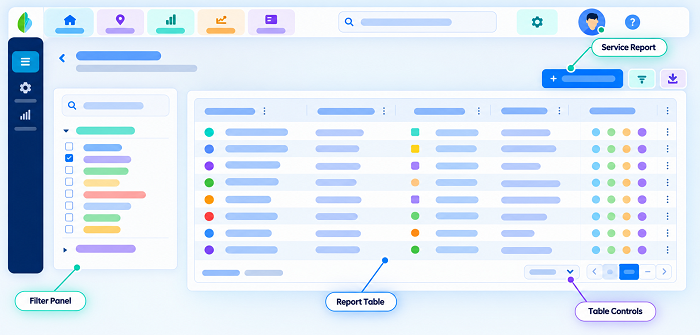
1. Maintain a Centralized Service History
Every customer, property, asset, or equipment unit should have a digital service history.
The record can include:
- Customer and site details
- Equipment or asset information
- Previous service dates
- Technician assigned
- Work performed
- Parts or materials used
- Service duration
- Customer confirmation
- Photos or documents
- Follow-up requirements
- Next service deadline
When a technician receives a repeat job, they can review previous records before arriving at the site. This reduces repeated diagnosis and helps technicians understand recurring problems.
2. Set Service Deadlines for Every Job
Maintenance teams should record the next required service date immediately after completing a job.
For example, if an air-conditioning unit requires maintenance every three months, the system can automatically create the next service deadline. Similar schedules can be created for elevators, generators, fire safety equipment, electrical systems, plumbing equipment, and other assets.
A service schedule can include:
| Service Type | Frequency | Tracking Requirement |
|---|---|---|
| Preventive maintenance | Monthly | Next service date |
| Equipment inspection | Quarterly | Inspection deadline |
| Contract maintenance | As agreed | Contract schedule |
| Warranty service | As required | Warranty expiry |
| Emergency repair | Follow-up based | Repeat visit date |
This helps managers identify upcoming work before deadlines are missed.
3. Track Repeat Visits Separately
A repeat visit does not always indicate poor service. It may be required because a repair needs additional parts, the problem requires specialist attention, or a scheduled follow-up inspection is necessary.
The system should record the reason for every repeat visit, such as:
- Follow-up inspection
- Replacement part required
- Repair incomplete
- Customer-requested revisit
- Recurring equipment problem
- Warranty service
- Preventive maintenance
- Technician unable to complete the original job
This allows managers to distinguish planned repeat visits from avoidable repeat service calls.
4. Link Service Jobs to Specific Assets
Tracking only the customer name may not provide enough information for maintenance operations.
A better approach is to link every service job to a specific asset or equipment unit. For example:
Customer → Property → Equipment → Service Job → Technician → Service History
If a customer has several air-conditioning units, each unit can have its own maintenance history and service deadline.
This makes it easier to identify equipment that frequently requires repairs and may need replacement or deeper inspection.
5. Use Mobile Apps for Technicians
Field technicians can update service jobs directly from their mobile devices.
A typical workflow can be:
Job Assigned → Technician Travels → Arrival Check-In → Service Work → Job Update → Completion → Customer Confirmation → Next Deadline
Technicians can record arrival and completion times, add notes, upload relevant photos, update job status, and indicate whether another visit is required.
This reduces dependence on paper forms, phone calls, and manually prepared service reports.
6. Use Location Verification for Site Visits
For maintenance businesses with technicians working across different UAE locations, mobile location verification can help confirm that the technician reached the assigned customer site.
Businesses may use geo-fenced check-ins around approved service locations. When the technician arrives within the configured area, the mobile system can record the attendance or job-arrival event.
However, GPS accuracy can vary because of buildings, network conditions, device settings, and other environmental factors. Therefore, an exception process should be available when a legitimate technician is unable to check in accurately.
Location verification should support service operations rather than become the only measure of technician performance.
7. Create Automatic Deadline Alerts
Managers should not have to manually check every maintenance contract or spreadsheet for upcoming deadlines.
A maintenance system can generate alerts for:
- Service due soon
- Service deadline today
- Overdue service
- Follow-up required
- Repeat visit pending
- Contract nearing expiry
- Warranty nearing expiry
- Technician assignment pending
- Customer confirmation pending
For example, a manager could receive an alert several days before a scheduled preventive-maintenance visit. The job can then be assigned before the deadline arrives.
8. Monitor Overdue and Missed Services
A dashboard can give maintenance managers a quick view of outstanding work.
Useful categories include:
- Due today
- Due this week
- Upcoming
- Overdue
- Repeat visits
- Waiting for parts
- Waiting for customer confirmation
- Technician reassignment required
- Completed
This makes it easier to prioritize urgent work and prevent service commitments from being overlooked.
9. Measure Repeat Visit Rates
One important KPI is the repeat visit rate.
A simple calculation is:
Repeat Visit Rate = Repeat Service Visits ÷ Total Service Visits × 100
For example, if a maintenance company completed 500 service jobs in a month and 40 required repeat visits:
40 ÷ 500 × 100 = 8%
Managers can investigate whether repeat visits are caused by normal preventive schedules, parts availability, technician skill gaps, incomplete repairs, or recurring equipment failures.
The objective should not simply be to eliminate every repeat visit. Instead, businesses should understand whether repeat visits are planned and necessary or indicate operational problems.
10. Track Service Deadlines by Customer and Technician
Managers may need different views of the same information.
A customer-level view can show:
- Open service jobs
- Completed jobs
- Upcoming maintenance
- Overdue services
- Repeat visits
- Contract status
A technician-level view can show:
- Assigned jobs
- Today's schedule
- Pending repeat visits
- Upcoming appointments
- Completed work
- Jobs requiring follow-up
This allows supervisors to manage both customer commitments and technician workloads.
11. Connect Maintenance With Attendance and Payroll
For companies employing technicians and field maintenance workers, connecting service records with attendance can reduce administrative work.
For example:
Mobile Check-In → Job Arrival → Service Activity → Job Completion → Attendance → Payroll
Attendance data can help HR determine working hours, overtime, absences, and approved field assignments. Service records provide operational information about the technician's assigned work.
These systems should not automatically treat every difference between job duration and attendance as misconduct. Exceptions such as travel, customer delays, emergency assignments, and equipment issues should be reviewed.
12. Use Customer Confirmation for Completed Jobs
After completing a maintenance task, the technician can request digital confirmation from the customer or site representative where appropriate.
The completion record may contain:
- Service completed date
- Arrival and completion time
- Work performed
- Parts used
- Technician notes
- Photos where appropriate
- Customer confirmation
- Next service date
This creates a more reliable service history and reduces disputes about whether a job was completed.
13. Identify Assets With Frequent Repeat Problems
Repeat-visit data becomes particularly valuable when analyzed by equipment or asset.
Suppose one type of machine generates significantly more repeat visits than similar equipment. Management can investigate whether the issue is related to:
- Equipment age
- Poor maintenance history
- Parts availability
- Installation quality
- Technician capability
- Operating conditions
- Recurring technical faults
This turns maintenance data into a tool for improving asset reliability and service quality.
14. Keep an Audit Trail of Schedule Changes
Maintenance deadlines can change because of customer requests, technician availability, emergency work, parts shortages, or site restrictions.
The system should record important changes, including:
- Original service date
- Revised service date
- Reason for change
- Person who changed the schedule
- Technician reassignment
- Completion status
An audit trail helps managers understand why a service deadline changed rather than relying on informal messages or spreadsheets.
15. Useful KPIs for UAE Maintenance Teams
A maintenance dashboard can include:
- Preventive maintenance completion rate
- On-time service rate
- Overdue service count
- Repeat visit rate
- First-time fix rate
- Average response time
- Average job completion time
- Technician utilization
- Customer confirmation rate
- Open service jobs
- Contract renewal rate
- Asset-level repeat failure rate
These KPIs help managers identify operational bottlenecks and improve scheduling.
Best Practices for Tracking Repeat Visits and Deadlines
UAE maintenance businesses can improve service control by following a few practical principles:
- Keep one digital service history for each customer and asset.
- Record the reason whenever a repeat visit is required.
- Set the next service deadline before closing a recurring maintenance job.
- Use automated reminders for upcoming and overdue work.
- Give technicians mobile access to job history and schedules.
- Use geo-fenced check-ins when location verification is operationally useful.
- Provide an exception process for GPS, network, customer, or assignment issues.
- Connect field attendance with payroll where appropriate.
- Track planned versus actual service completion.
- Review repeat-visit trends by customer, technician, asset, and service type.
- Maintain appropriate access controls and retention practices for employee and customer data.
- Use dashboards to focus management attention on exceptions rather than continuously monitoring every technician.
Conclusion
Tracking repeat visits and service deadlines becomes much easier when UAE maintenance teams replace spreadsheets and manual follow-ups with a centralized digital workflow. By maintaining asset-level service histories, scheduling recurring work, sending deadline alerts, recording mobile job updates, and analyzing repeat visits, businesses can improve service reliability and customer satisfaction.
When maintenance management is connected with mobile attendance, location verification, and payroll, companies can also create a more complete workflow from technician assignment to service completion and payroll processing. The result is better visibility into field operations, fewer missed deadlines, and more informed maintenance decisions.
Repeat maintenance visits need continuity. InnBuilt Field Management can keep UAE service requests, technician assignments and completion updates together so supervisors spot overdue work.