How Can Mobile Attendance Reduce Time Theft for UAE Field Teams?
How Can Mobile Attendance Reduce Time Theft for UAE Field Teams?
Managing attendance for employees who work outside the office can be challenging for UAE businesses. Field sales teams, service technicians, maintenance workers, consultants, delivery teams, and construction personnel may start and finish their work at different client or project locations.
Traditional attendance methods such as paper registers, spreadsheets, or manually reported working hours can make it difficult to confirm when and where work actually began. Mobile attendance software can reduce these gaps by allowing employees to record attendance from approved locations using their smartphones.
When properly configured, mobile attendance can help reduce time theft while improving attendance accuracy, payroll processing, and accountability.
1. What Is Time Theft in Field Attendance?
Time theft occurs when recorded working time does not accurately represent the employee's actual working time.
For field teams, examples may include:
- Reporting an earlier start time than the actual arrival.
- Recording attendance from a location where the employee is not working.
- Asking another person to record attendance.
- Remaining marked as working after leaving a site.
- Reporting attendance manually without reliable supporting records.
- Repeatedly claiming working hours that cannot be verified.
Not every attendance discrepancy is intentional. GPS inaccuracies, network problems, changing client locations, and legitimate work-related travel can also create unusual records.
Therefore, mobile attendance should be designed to verify and manage exceptions, rather than automatically treating every discrepancy as misconduct.
2. How Mobile Attendance Helps Prevent False Check-Ins
A mobile attendance application can require employees to check in through their smartphones when they arrive at an assigned workplace.
Depending on the system, the check-in can capture information such as:
- Employee identity
- Date and time
- Assigned work location
- GPS position
- Device information
- Attendance status
- Check-in and check-out events
This creates a digital attendance record that is easier for HR and managers to review than handwritten or manually submitted attendance.
3. Use Geo-Fencing for Approved Work Locations
Geo-fencing is one of the most useful features for field attendance.
Employers can create an approved geographical boundary around:
- Client offices
- Construction sites
- Service locations
- Retail branches
- Project sites
- Temporary work locations
When an employee attempts to check in, the application can verify whether the device is within the permitted area.
For example:
Assigned Client Site → Employee Arrives → Mobile Check-In → Location Verification → Attendance Recorded
This can make it more difficult to claim attendance from an unrelated location.
4. Reduce Buddy Punching
Mobile attendance can also help reduce buddy punching, where one employee records attendance on behalf of another.
Employers can use employee-specific accounts and, where appropriate, additional authentication methods such as:
- Mobile credentials
- Device verification
- PINs
- Face verification
- One-time authentication
- Location verification
The appropriate combination depends on the employer's operational and privacy requirements.
For field teams, combining employee authentication with location verification can provide stronger attendance controls than relying on a simple manual timesheet.
5. Capture Real Check-In and Check-Out Times
Mobile attendance provides a digital timestamp when an employee checks in or checks out.
For example:
| Event | Recorded Time |
|---|---|
| Check-in at Client A | 8:57 AM |
| Check-out from Client A | 12:05 PM |
| Check-in at Client B | 12:42 PM |
| Check-out from Client B | 4:15 PM |
This gives HR a chronological record of attendance activity.
It also makes it easier to identify unusual gaps, missing check-outs, repeated late check-ins, or unusually long working periods.
6. Track Attendance Across Multiple Client Sites
Field employees may visit several locations during a single working day.
Mobile attendance can connect employees with their assigned schedules and locations.
For example:
Employee → Client A → Client B → Client C
The system can maintain separate attendance events for each approved site.
This is useful for UAE businesses with:
- Field sales representatives
- HVAC technicians
- Maintenance teams
- Cleaning teams
- Security personnel
- Construction workers
- Installation teams
- Consultants
- Healthcare field staff
Managers can review whether employees attended their assigned locations without requiring employees to return to a central office simply to record attendance.
7. Use Exception Alerts Instead of Constant Monitoring
The objective should not be to monitor every employee movement throughout the day.
Instead, employers can configure alerts for unusual attendance events, such as:
- Check-in outside an approved location
- Late check-in
- Missing check-out
- Excessively long gaps
- Multiple location exceptions
- Attendance outside scheduled hours
- Repeated unusual attendance patterns
This allows managers to focus on exceptions rather than manually reviewing every attendance record.
8. Connect Mobile Attendance With Payroll
Mobile attendance becomes more valuable when it is connected directly to payroll.
A typical workflow is:
Mobile Check-In → Attendance Record → Working Hours → Leave/Overtime → Payroll
Accurate attendance records can reduce manual data entry and help payroll teams identify discrepancies before salary processing.
For example, if an employee's approved working hours, overtime, or absence information is calculated from verified attendance data, payroll teams may spend less time reconciling spreadsheets.
Employers should still configure payroll rules according to applicable UAE employment requirements and the company's approved policies.
9. Handle Legitimate Field Exceptions
A strong mobile attendance system should not punish employees for circumstances outside their control.
Examples include:
- Client location changed unexpectedly.
- An employee was sent to another site by a manager.
- GPS accuracy was temporarily poor.
- The mobile network was unavailable.
- Emergency service work required an unscheduled location.
- The employee was delayed by a client appointment.
The system should allow employees or supervisors to submit an exception request.
A manager can then approve the adjustment while maintaining an audit trail.
10. Protect Employee Location Information
Location-enabled attendance involves employee data that should be handled carefully.
Employers should consider:
- Why location data is being collected.
- Whether continuous tracking is actually necessary.
- Who can access location information.
- How long attendance/location records are retained.
- How data is secured.
- Whether third-party vendors process the information.
- How employees are informed about the system.
- How inaccurate location records can be challenged.
For many attendance purposes, location-based check-ins may be sufficient without continuous live tracking.
This approach can help balance attendance verification with employee privacy.
11. Prevent Manipulation of Attendance Records
Employers should also protect the attendance system itself.
Useful controls include:
- Role-based access
- Audit logs
- Restricted manual corrections
- Approval workflows
- Duplicate check-in prevention
- Device authentication
- Automatic timestamps
- Location validation
- Change history
- Supervisor approval for exceptions
If HR manually changes an attendance record, the system should ideally preserve who made the change, when it was made, and the reason.
This creates greater accountability.
12. Best Practices for UAE Field Teams
To reduce time theft effectively, UAE employers should:
- Assign employees to approved work locations.
- Use geo-fenced mobile check-ins where appropriate.
- Capture actual check-in and check-out times.
- Use employee-specific authentication.
- Create clear rules for mobile attendance.
- Configure exception alerts.
- Allow legitimate exceptions to be explained.
- Restrict manual attendance changes.
- Maintain an audit trail.
- Integrate attendance with payroll.
- Train employees and managers.
- Review attendance patterns periodically.
- Avoid using location data for unrelated monitoring.
Conclusion
Mobile attendance can significantly improve attendance accuracy for UAE field teams by replacing informal time reporting with employee-specific digital check-ins, timestamps, location verification, geo-fencing, exception workflows, and audit trails.
The strongest approach is not simply to track employees continuously. Instead, employers can use mobile attendance to verify key work events, investigate unusual records, and connect approved attendance information with payroll.
When implemented transparently and with appropriate privacy and security controls, mobile attendance can reduce time theft while giving HR teams a more reliable way to manage distributed field workforces.
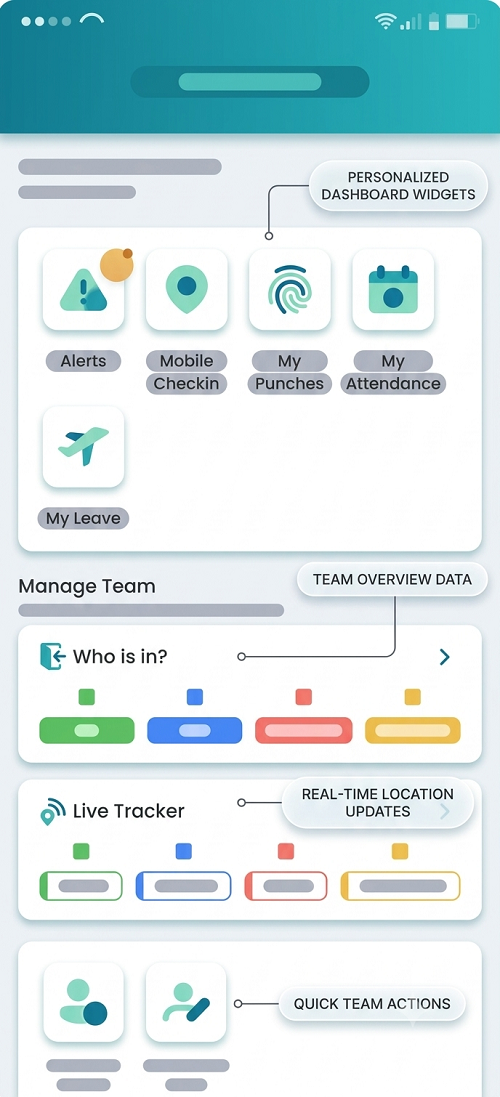
Mobile punches with site context can reduce disputed field hours. InnBuilt Attendance Software gives UAE supervisors a way to review late starts, missed visits and exceptions before approving timesheets.