How Can Mobile Attendance Reduce Missed Check-Ins for UAE Teams?
How Can Mobile Attendance Reduce Missed Check-Ins for UAE Teams?
Missed check-ins are a common attendance challenge for employees working across UAE offices, branches, warehouses, construction sites, customer locations, and remote work environments. An employee may forget to clock in, arrive directly at a client location, or be unable to use a physical attendance device because they are working away from the office.
Mobile attendance provides an alternative by allowing authorized employees to record attendance using a smartphone or mobile workforce application. When combined with reminders, GPS or geofencing, shift schedules, and approval workflows, mobile attendance can reduce missing attendance records and improve payroll accuracy.
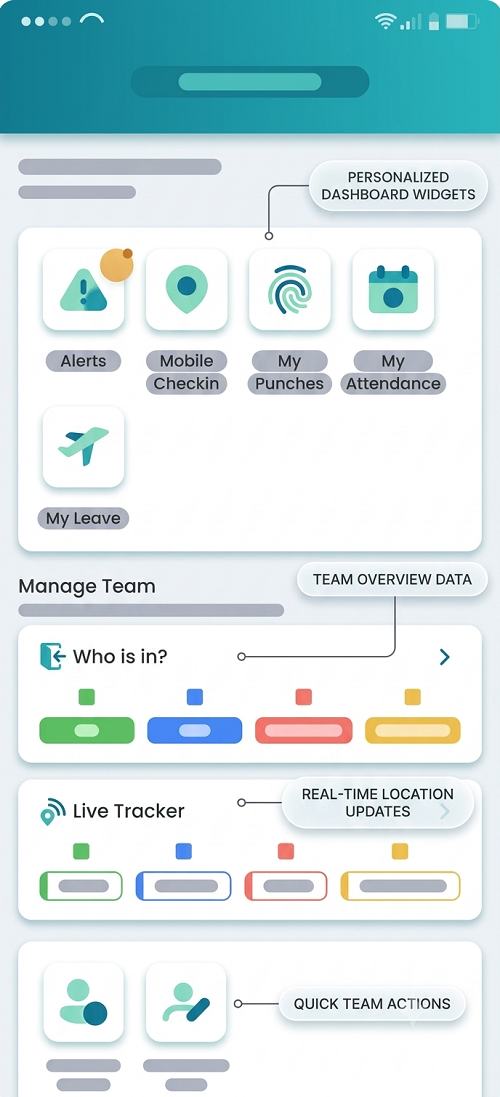
1. Allow Employees to Clock In From Their Phones
Instead of requiring employees to find a biometric machine, a mobile application can allow them to record attendance from an approved location.
The basic workflow is:
Open app → Confirm shift → Clock in → Attendance recorded
This is particularly useful for employees who start work at different locations.
2. Send Automatic Check-In Reminders
Employees may simply forget to clock in when they arrive at work.
A mobile attendance system can send reminders shortly before or after the scheduled start time.
For example:
- 8:45 a.m. – Shift reminder
- 9:00 a.m. – Scheduled start
- 9:10 a.m. – Missing check-in alert
This gives the employee an opportunity to correct the missed attendance promptly.
3. Match Attendance With Employee Shifts
The mobile application can display the employee's scheduled shift.
For example:
- Date: Monday
- Location: Dubai Branch
- Shift: 9:00 a.m.–6:00 p.m.
The employee knows exactly when and where attendance is expected, reducing confusion caused by changing schedules.
4. Use GPS Verification
GPS can help verify that the employee is at an approved location when recording attendance.
This can be useful for:
- Field technicians
- Sales employees
- Delivery teams
- Construction workers
- Service employees
- Employees working at customer locations
The organization should establish clear policies around location collection and use appropriate privacy and data-security controls.
5. Use Geofencing
Employers can create a virtual boundary around an approved workplace.
For example, a company can create a geofence around its Abu Dhabi office. When an employee enters the designated area, the mobile application can support an attendance reminder or permit clock-in according to company settings.
This helps connect attendance with the employee's assigned workplace.
6. Reduce Dependence on Physical Attendance Machines
Physical biometric systems work well in fixed workplaces, but they may not be practical for employees who:
- Work at multiple branches
- Visit customers
- Travel between sites
- Work at construction projects
- Deliver products
- Perform field maintenance
Mobile attendance gives these employees a convenient way to record attendance without returning to a central office.
7. Support Multiple UAE Locations
A single company may operate in:
- Dubai
- Abu Dhabi
- Sharjah
- Ajman
- Fujairah
- Ras Al Khaimah
- Umm Al Quwain
Employees may also temporarily work at different branches.
A mobile system can assign employees to the appropriate worksite and shift, reducing the possibility of missed check-ins when they are working away from their normal location.
8. Provide a Missed Check-In Workflow
Even with reminders, employees may occasionally forget to record attendance.
Instead of requiring an email or paper form, the employee can submit a correction request through the mobile application.
For example:
Missed check-in → Employee submits request → Reason entered → Manager reviews → Attendance corrected
The system can retain the approval history for future reference.
9. Work With Temporary Off-Site Assignments
Employees may start their day at a client location rather than at the office.
HR can create an approved off-site assignment in advance.
The employee can then record attendance against the approved assignment instead of being marked absent from the normal office.
This is useful for:
- Client meetings
- Business travel
- Training
- Project work
- Site inspections
- Customer service visits
10. Support Offline Attendance
Some employees may work at locations where internet connectivity is temporarily unavailable.
Where the application supports offline attendance, employees can record an attendance event and synchronize the information when connectivity is restored.
This can reduce missing records caused by temporary network problems.
11. Notify Managers About Missing Attendance
Mobile attendance can also help managers identify missing check-ins.
For example:
Shift starts → No check-in → System identifies exception → Manager receives notification
The manager can then contact the employee or arrange replacement coverage where necessary.
This is more efficient than discovering the problem at the end of the payroll period.
12. Use Employee Self-Service
Employees should be able to review their own attendance history through the mobile application.
They can check:
- Today's attendance
- Previous attendance
- Working hours
- Breaks
- Late arrivals
- Missing check-ins
- Overtime
- Leave
Giving employees direct visibility encourages them to identify and correct errors before payroll processing.
13. Connect Attendance With Leave
A missed check-in does not always mean that an employee was absent.
The employee may have:
- Approved leave
- Business travel
- Remote-work approval
- Training
- Off-site assignment
- Shift change
Integrating attendance with leave and scheduling helps the system distinguish between genuine absence and an approved alternative work arrangement.
14. Integrate Attendance With Payroll
Missed check-ins can create payroll problems if they result in incorrect absence or working-hour calculations.
An integrated system can use approved attendance data to support:
Attendance → Working hours → Leave → Overtime → Payroll
This reduces manual reconciliation and helps payroll teams identify exceptions before finalizing salary calculations.
15. Maintain an Attendance Audit Trail
Every correction should be traceable.
A digital audit trail can record:
- Original attendance status
- Correction request
- Reason
- Employee
- Manager
- Approval date
- Updated attendance
This provides greater transparency than manually editing attendance spreadsheets.
16. Protect Employee Data
Mobile attendance may process personal information, device information, and location data. UAE employers should establish appropriate policies for collecting, using, securing, and retaining this information.
Organizations should consider:
- Employee notification
- Purpose limitation
- Access controls
- Data security
- Retention periods
- Authorized administrators
- Applicable UAE data-protection requirements
Location functionality should be configured only to the extent necessary for the organization's legitimate attendance or workforce-management purposes.
17. Use Attendance Analytics
Once attendance is digitized, HR teams can identify patterns in missed check-ins.
Useful metrics include:
- Missed check-ins by employee
- Missed check-ins by branch
- Missed check-ins by shift
- Correction requests
- Late arrivals
- Mobile versus physical attendance
- Repeated attendance exceptions
This can help HR identify whether the issue is employee behavior, shift scheduling, device availability, or a technical problem.
Conclusion
Mobile attendance can significantly reduce missed check-ins for UAE teams by providing employees with a convenient way to record attendance wherever they are authorized to work. Automatic reminders, GPS or geofencing, shift-based notifications, self-service corrections, offline capabilities, and manager alerts can make attendance more reliable.
For organizations operating across offices, branches, warehouses, construction sites, and customer locations, integrating mobile attendance with leave, scheduling, overtime, and payroll creates a more complete workforce management process. It helps employees maintain accurate attendance records while giving HR and managers better visibility into working hours and attendance exceptions.
A phone-based check-in gives mobile UAE teams an alternative to a fixed clock. InnBuilt Attendance Software can capture punch times and flag gaps for employee or manager correction.