How to Compare Mobile Apps, Biometric Devices, and Kiosks for UAE Attendance Tracking
How to Compare Mobile Apps, Biometric Devices, and Kiosks for UAE Attendance Tracking
Choosing the right attendance tracking technology is an important decision for UAE employers managing employees across offices, construction sites, factories, warehouses, retail outlets, hospitals, and other workplaces. Accurate attendance records help businesses monitor working hours, manage shifts, calculate overtime, and maintain reliable payroll information.
However, not every organization has the same attendance management requirements. Employees working at a fixed office location may be able to record attendance through fingerprint or facial recognition devices, while field employees may need mobile attendance applications with GPS and geo-fencing capabilities. Businesses with large workforces at factories, warehouses, and industrial facilities may prefer shared attendance kiosks installed at entry and exit points.
The three common attendance tracking options are mobile attendance apps, biometric attendance devices, and attendance kiosks. Each technology offers different advantages, costs, security features, and operational capabilities.
UAE employers should compare these solutions based on workforce size, employee mobility, workplace locations, attendance policies, integration requirements, and budget before selecting a system. This guide explains how businesses can evaluate these options and choose the most suitable attendance tracking technology.
1. Understand the Three Attendance Tracking Technologies
Before comparing different solutions, employers should understand how mobile apps, biometric devices, and kiosks capture employee attendance.
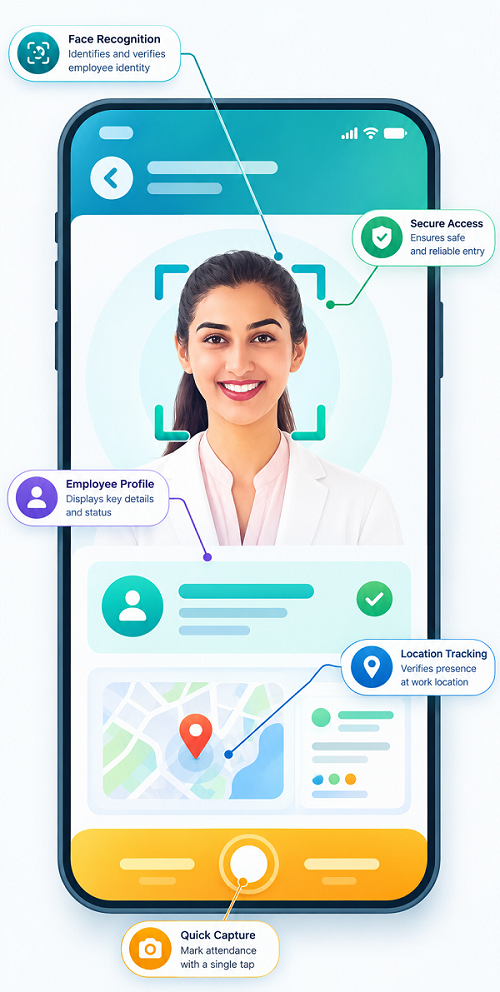
Mobile Attendance Applications
Mobile attendance applications allow employees to record their working hours using smartphones or tablets. Employees can check in and check out through the application, depending on the company's attendance policies.
Common features include:
- GPS-based attendance verification.
- Geo-fenced check-in and check-out.
- Mobile facial recognition.
- Real-time attendance notifications.
- Leave and attendance request management.
- Employee shift information.
- Remote workforce attendance tracking.
- Attendance reports for HR teams.
Mobile attendance apps are particularly useful for UAE companies employing field technicians, delivery drivers, construction workers, sales representatives, maintenance teams, and employees working across multiple client locations.
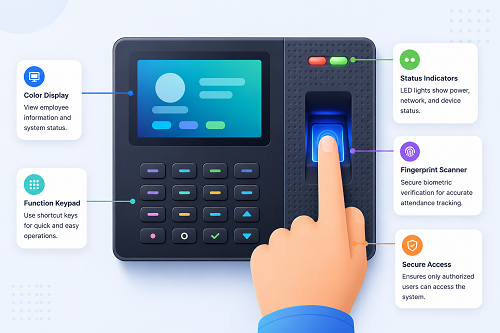
Biometric Attendance Devices
Biometric attendance devices use unique physical characteristics to verify employee identity before recording attendance.
Common biometric technologies include:
- Fingerprint recognition.
- Facial recognition.
- Iris recognition.
- Palm recognition.
Employees authenticate themselves using an installed device at the workplace entrance or designated attendance point.
These systems are commonly used in offices, factories, warehouses, hospitals, and other workplaces where employees report to fixed locations.
Attendance Kiosks
Attendance kiosks are shared terminals installed at designated workplace locations. Employees use these terminals to record their attendance through different authentication methods.
Depending on the model, a kiosk may support:
- Employee ID and PIN entry.
- RFID or access cards.
- Fingerprint verification.
- Facial recognition.
- Touchscreen attendance registration.
- QR-code-based check-in.
Kiosks are useful for workplaces with large employee groups, shared entry points, and multiple shifts. They can also be configured to support visitor registration, employee self-service, and other workforce management activities.
2. Compare Mobile Apps, Biometric Devices, and Kiosks
The best way to evaluate these technologies is to compare their functionality, accessibility, cost, and suitability for different workplace environments.
| Comparison Factor | Mobile Apps | Biometric Devices | Attendance Kiosks |
|---|---|---|---|
| Attendance method | Smartphone or tablet | Fingerprint, face, or other biometrics | Shared terminal |
| Employee mobility | High | Limited to device location | Limited to kiosk location |
| GPS tracking | Usually available | Generally unavailable | Generally unavailable |
| Geo-fencing | Often available | Not typically available | Not typically available |
| Identity verification | GPS, facial verification, device authentication | Biometric matching | Depends on authentication method |
| Hardware requirements | Employee smartphones or tablets | Dedicated biometric terminals | Shared kiosk terminals |
| Internet dependency | Depends on app design | Depends on device configuration | Depends on device configuration |
| Multiple-location support | Suitable for distributed teams | Requires devices at locations | Requires kiosks at locations |
| Employee convenience | High for mobile workers | High at fixed entry points | Convenient for shared workplace access |
| Initial investment | Often lower | Hardware and installation costs | Hardware and installation costs |
| Maintenance | App and device support | Hardware and software maintenance | Terminal and software maintenance |
| Best suited for | Field and remote teams | Fixed-location employees | Large shared workplaces |
The comparison shows that each solution serves a different purpose. Mobile apps offer greater flexibility, biometric devices provide identity verification at fixed locations, and kiosks offer centralized attendance registration for employees sharing workplace facilities.
3. Evaluate Attendance Accuracy and Identity Verification
Attendance accuracy is one of the most important factors when selecting an attendance tracking solution.
Incorrect attendance records can affect payroll calculations, overtime payments, leave balances, and employee working-hour reports.
Mobile Apps
Mobile attendance applications can use GPS, geo-fencing, device authentication, and facial verification to improve attendance accuracy.
For example, a construction company in Dubai can create geo-fenced attendance locations for different project sites. Employees can record their attendance when they enter an authorized location, subject to the application's configured verification rules.
However, GPS-based attendance alone does not always confirm an employee's identity. Employers should consider additional authentication measures where necessary.
Biometric Devices
Biometric devices verify employees using registered physical characteristics. Fingerprint and facial recognition systems can help reduce proxy attendance and unauthorized check-ins.
For example, a manufacturing company in Abu Dhabi can install facial recognition terminals at factory entrances to verify employees before recording their shift attendance.
Employers should consider environmental conditions, device accuracy, verification speed, and biometric enrollment quality when selecting equipment.
Attendance Kiosks
Kiosks can use biometric verification, RFID cards, employee IDs, or PINs.
Their accuracy depends on the authentication method selected. A kiosk using only an employee ID or PIN may not provide the same identity assurance as a properly configured biometric system.
For businesses concerned about proxy attendance, kiosks with facial or fingerprint authentication may provide additional verification.
4. Compare GPS Tracking and Location Verification
Location verification is particularly important for UAE businesses managing employees who work outside traditional office environments.
Mobile Apps
Mobile attendance applications can use GPS coordinates and geo-fencing to verify whether employees are checking in from authorized locations.
For example:
- Construction employees can check in at assigned project sites.
- Delivery drivers can record attendance at distribution hubs.
- Field technicians can register arrival at customer locations.
- Sales representatives can record attendance during assigned territory visits.
- Maintenance teams can check in at different service locations.
Employers should evaluate whether the application supports location verification during check-in and check-out, location restrictions, and appropriate controls against inaccurate location reporting.
Biometric Devices
Traditional biometric devices generally verify identity at the installed terminal rather than tracking an employee's geographical location.
They are suitable when employees are expected to report to a fixed workplace, such as an office, factory, hospital, or warehouse.
Attendance Kiosks
Kiosks also record attendance at designated physical locations. They can be installed at workplace entrances, security checkpoints, staff areas, and employee reporting stations.
However, employees working at external locations will need another attendance recording method unless additional terminals are installed.
Comparison: Mobile applications are generally more suitable for geographically distributed employees, while biometric devices and kiosks are better suited to fixed workplace attendance.
5. Compare Initial Investment and Ongoing Costs
Cost is another important consideration when selecting attendance technology. UAE employers should evaluate both initial implementation expenses and recurring operating costs.
Mobile App Costs
Mobile attendance applications generally require a software subscription, configuration, and employee onboarding.
Potential expenses include:
- Monthly or annual software subscriptions.
- GPS and geo-fencing feature charges.
- Employee mobile device requirements.
- Software integration expenses.
- Technical support and maintenance.
If employees already have compatible smartphones and the company permits their use for attendance, additional hardware investment may be limited.
Biometric Device Costs
Biometric attendance systems require dedicated hardware at workplace locations.
Potential expenses include:
- Fingerprint or facial recognition terminals.
- Device installation and configuration.
- Network connectivity.
- Biometric enrollment.
- Hardware maintenance and replacement.
- Software licensing and integration.
Companies with multiple branches may need to purchase and install several devices.
Attendance Kiosk Costs
Kiosk solutions may require touchscreen terminals, mounting equipment, authentication devices, and installation services.
Additional costs may include:
- Kiosk hardware purchase.
- Employee identification accessories.
- Software configuration.
- Network infrastructure.
- Hardware servicing.
- Replacement of damaged components.
The following table summarizes the cost considerations.
| Cost Factor | Mobile Apps | Biometric Devices | Kiosks |
|---|---|---|---|
| Initial hardware cost | Usually low if devices already exist | Moderate to high | Moderate to high |
| Software subscription | Common | Depends on vendor | Depends on vendor |
| Installation cost | Generally low | Required | Required |
| Employee onboarding | Required | Biometric enrollment | User or biometric enrollment |
| Maintenance | App and device support | Device servicing | Terminal servicing |
| Expansion cost | Often lower | Additional devices | Additional kiosks |
Employers should request detailed quotations from vendors and calculate the total cost of ownership over three to five years rather than comparing only the initial purchase price.
6. Evaluate Employee Convenience and Adoption
Attendance software should be convenient for employees as well as HR administrators. Complicated check-in procedures can create delays, employee dissatisfaction, and inaccurate attendance records.
Mobile Apps
Mobile applications offer convenience to employees who regularly travel between locations.
Employees can check in using their smartphones without visiting a centralized attendance terminal. However, employers should consider employees who do not have smartphones, have limited digital literacy, or are uncomfortable using personal devices for work-related tracking.
Biometric Devices
Biometric devices offer a straightforward attendance process. Employees simply authenticate themselves at an installed terminal.
However, large employee groups arriving simultaneously may create queues during shift changes.
Employers should evaluate the device's authentication speed and capacity to handle peak attendance periods.
Attendance Kiosks
Kiosks provide a shared attendance facility for employees who may not have individual smartphones or access to personal devices.
They can be useful in industrial workplaces, warehouses, and large facilities where employees enter and exit through common access points.
However, poorly positioned kiosks can create congestion during shift transitions.
7. Compare Performance Across Different UAE Industries
Attendance requirements vary significantly across industries. Employers should choose technology based on the actual working environment rather than selecting a solution simply because it is popular.
| Industry | Mobile Apps | Biometric Devices | Kiosks |
|---|---|---|---|
| Construction | Excellent for multiple project sites | Suitable for site entrances | Useful at large project facilities |
| Manufacturing | Suitable for mobile supervisors | Excellent for factory shifts | Suitable for large workforce entrances |
| Retail | Useful for employees across branches | Suitable for individual stores | Useful in large retail facilities |
| Hospitality | Useful for employees across properties | Suitable for hotel staff entrances | Useful for large hotel operations |
| Healthcare | Suitable for home-care and field staff | Suitable for hospital employees | Useful for large hospitals |
| Logistics | Excellent for drivers and field teams | Suitable for warehouses | Useful at distribution hubs |
| Professional services | Useful for hybrid and remote teams | Suitable for office-based employees | Generally suitable for shared office access |
| Facilities management | Excellent for mobile cleaning and maintenance teams | Suitable for fixed client facilities | Useful at large managed properties |
Construction Companies
Construction businesses often operate across multiple project locations. Mobile apps with GPS and geo-fencing can help record attendance at assigned sites.
Biometric devices and kiosks can complement mobile attendance at large projects where workers report through designated entry points.
Manufacturing Businesses
Manufacturing companies generally require accurate shift-based attendance tracking. Biometric devices can verify employees entering factory premises, while kiosks can support high-volume attendance registration.
Retail and Hospitality Businesses
Retail chains and hotels may have employees working across different branches and rotating shifts.
Mobile apps can support managers and employees working across locations, while biometric devices or kiosks can handle fixed-location attendance.
Healthcare Organizations
Hospitals and clinics often manage multiple shifts, emergency coverage, and employees working across different facilities.
Biometric devices and kiosks can support attendance at hospitals, while mobile applications can be useful for home-care professionals and visiting healthcare teams.
Logistics and Distribution Companies
Logistics businesses may use mobile applications for drivers, delivery personnel, and field teams. Biometric devices and kiosks can be installed at warehouses and distribution centres to monitor fixed-location employees.
8. Consider Data Security and Employee Privacy
Data protection is an important consideration when implementing attendance tracking technology in the UAE.
Employers may collect different categories of employee information depending on the selected system.
- Mobile apps: GPS coordinates, device information, check-in timestamps, and facial verification data where enabled.
- Biometric devices: Fingerprint templates, facial recognition data, employee identification details, and attendance history.
- Kiosks: Employee IDs, access card details, PIN information, biometric information, and check-in records.
UAE employers should assess how the attendance system collects, stores, processes, and protects employee information.
Important considerations include:
- Data access controls: Only authorized HR personnel and administrators should access attendance records.
- Secure data storage: Employee information should be protected through appropriate security controls.
- Data encryption: Sensitive information should be protected during transmission and storage.
- Retention policies: Employers should establish appropriate retention and deletion procedures.
- Employee transparency: Employees should understand what information is collected and how it is used.
- Vendor security: Businesses should evaluate the vendor's security practices and data-processing arrangements.
The UAE Personal Data Protection Law (Federal Decree-Law No. 45 of 2021) establishes requirements for processing personal data, subject to its scope and applicable exceptions. Biometric information and location information should receive particular attention during system selection and configuration.
Employers should obtain appropriate legal and privacy guidance before deploying biometric or continuous location-monitoring features. They should also check whether specific free-zone or sector-specific requirements apply.
9. Check Integration with Payroll and HR Software
Attendance tracking should not operate as an isolated process. It should connect with the company's existing HR and payroll systems wherever possible.
Integration helps HR teams transfer verified attendance information into payroll calculations without repeatedly entering employee data.
Employers should check whether the selected technology supports:
- Payroll software integration.
- HRMS and employee database synchronization.
- Leave and absence management.
- Shift scheduling and overtime calculations.
- Employee master data synchronization.
- Automated attendance report generation.
- API connectivity with third-party business applications.
For example, a UAE manufacturing company can use biometric devices to record factory attendance, while the integrated payroll system uses approved working hours and overtime records for monthly salary processing.
Similarly, a logistics company can collect driver attendance through mobile applications and synchronize approved attendance records with its payroll platform.
Before purchasing, employers should ask vendors to demonstrate the complete attendance-to-payroll workflow.
10. Evaluate Offline Attendance and Network Reliability
Internet connectivity can vary across construction sites, remote project locations, warehouses, and industrial facilities.
Therefore, employers should evaluate how attendance technology performs when network connectivity is unavailable.
Mobile applications: Check whether the application supports offline check-ins, secure local storage, and automatic synchronization when connectivity returns.
Biometric devices: Check whether devices can store attendance transactions locally and synchronize records with the central system after network restoration.
Attendance kiosks: Verify whether kiosks can continue recording employee check-ins during temporary connectivity interruptions.
Employers should also check how the system handles duplicate transactions, incorrect timestamps, synchronization failures, and device clock settings.
Offline functionality is particularly important for businesses operating in remote UAE locations where uninterrupted internet access cannot always be guaranteed.
11. Compare Reporting and Workforce Analytics Capabilities
Attendance reporting helps HR departments and managers understand workforce availability and identify attendance-related issues.
The selected solution should provide reports that match the organization's operational requirements.
| Reporting Requirement | Mobile Apps | Biometric Devices | Kiosks |
|---|---|---|---|
| Daily attendance reports | Yes | Yes, through integrated software | Yes, through integrated software |
| Late arrival reports | Yes | Yes | Yes |
| Overtime reports | Yes | Yes | Yes |
| GPS attendance reports | Yes, if supported | No, generally | No, generally |
| Multi-location reports | Yes | Yes, with centralized integration | Yes, with centralized integration |
| Shift attendance reports | Yes | Yes | Yes |
| Payroll-ready exports | Vendor dependent | Vendor dependent | Vendor dependent |
Employers should prioritize systems that provide centralized dashboards, customizable reports, attendance exceptions, and downloadable records.
12. Consider a Hybrid Attendance Tracking Approach
UAE businesses do not necessarily need to choose only one attendance tracking technology. A hybrid attendance management system can combine mobile applications, biometric devices, and kiosks.
This approach is useful for organizations with employees working in different environments.
For example, a large UAE facilities management company may have:
- Mobile attendance applications for cleaning and maintenance teams working at customer locations.
- Biometric devices for employees reporting to the central office.
- Attendance kiosks for security personnel and other employees at large facilities.
Similarly, a construction company may install biometric terminals at major project entrances while using geo-fenced mobile attendance for supervisors and employees working across smaller sites.
A hybrid system provides flexibility while allowing HR teams to manage attendance information through one centralized platform.
13. Prepare a Vendor Evaluation Checklist
Before purchasing attendance tracking software, UAE employers should evaluate vendors using a structured checklist.
The following questions can help businesses compare different solutions.
| Evaluation Area | Questions to Ask Vendors |
|---|---|
| Mobile attendance | Does the application support GPS and geo-fencing? |
| Biometric technology | Does the device support fingerprint or facial recognition? |
| Kiosk functionality | Can multiple employees record attendance through shared terminals? |
| Attendance security | What authentication and anti-proxy controls are available? |
| Offline capability | Can attendance be recorded without an internet connection? |
| Payroll integration | Can attendance data be transferred automatically to payroll? |
| Shift management | Does the system support rotating and night shifts? |
| Reporting | Can HR generate customized attendance reports? |
| Data protection | How is employee information collected, stored, and protected? |
| Scalability | Can the solution support additional branches and employees? |
| Technical support | What support and maintenance services are included? |
| Pricing | Are there additional hardware, integration, or renewal charges? |
Employers should request product demonstrations and conduct a pilot test before finalizing the purchase.
Conclusion
Comparing mobile attendance applications, biometric devices, and attendance kiosks helps UAE employers select technology that matches their workforce structure and operational requirements.
Mobile apps are particularly suitable for field employees, remote teams, and businesses managing multiple work locations. Biometric devices provide reliable identity verification at fixed workplaces, while attendance kiosks offer convenient shared attendance registration for large employee groups.
However, the best solution is not necessarily the technology with the most features or the lowest purchase price. Employers should evaluate attendance accuracy, employee convenience, hardware requirements, location verification, data protection, payroll integration, scalability, and long-term maintenance costs.
For organizations with different employee categories and work environments, a hybrid attendance tracking system may offer the most practical approach. By testing available solutions and comparing their performance against actual business requirements, UAE employers can implement an attendance management system that improves workforce visibility, supports accurate payroll processing, and strengthens day-to-day workforce administration.
Match check-in methods to desk workers, site teams and mobile staff. Compare InnBuilt options with alternatives on usability, connectivity, equipment upkeep and verification needs.