What Should UAE Employers Test in a Payroll Software Demo?
What Should UAE Employers Test in a Payroll Software Demo?
Introduction
Selecting payroll software is an important decision for businesses operating in the United Arab Emirates (UAE). The right platform can simplify salary processing, reduce manual calculations, improve payroll accuracy, and help employers manage applicable employment and salary payment requirements.
However, a software presentation alone does not prove that a payroll system can handle an organisation's actual requirements. Vendors may demonstrate attractive dashboards and standard features, but employers need to understand how the platform performs when processing real payroll scenarios, handling employee changes, generating Wage Protection System (WPS) files, and calculating final settlements.
A payroll software demo gives HR, finance, and management teams an opportunity to evaluate the product before purchasing it. Instead of simply watching the vendor explain features, employers should request practical demonstrations using representative employee data and business scenarios.
This article explains what UAE employers should test during a payroll software demo, which questions to ask vendors, and how to evaluate the results before making a purchasing decision.
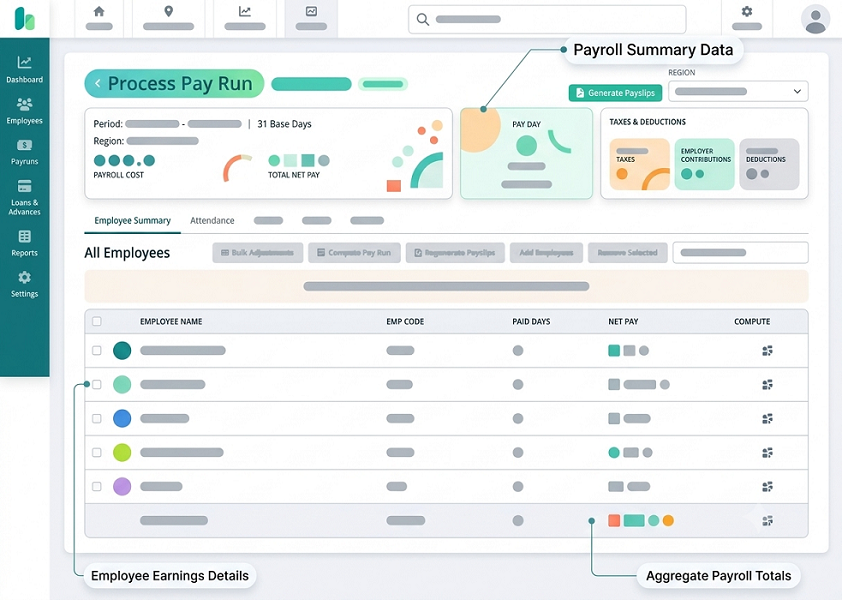
1. Test UAE Payroll Compliance Capabilities
The first area to evaluate is whether the software supports the payroll requirements applicable to the organisation.
UAE employers may need to manage different salary structures, employment arrangements, leave adjustments, overtime payments, employee benefits, and final settlements.
During the demo, ask the vendor to demonstrate how the system handles:
- Employee employment information.
- Basic salary and allowances.
- Salary revisions.
- Working days and unpaid leave adjustments.
- Overtime calculations.
- Employee joining and termination.
- End-of-service benefit calculations.
- Final settlement processing.
- Payroll records and approval history.
Do not accept a general statement that the software is "UAE compliant." Ask the vendor to explain which requirements are supported by standard functionality and which require configuration or manual intervention.
Practical demo scenario:
Ask the vendor to create an employee record with a basic salary, housing allowance, transport allowance, and a defined employment arrangement. Then process a sample payroll and review how the system calculates the employee's gross and net salary.
Ask the vendor to explain the calculation rules and show where the relevant settings are maintained.
Questions to ask:
- Which UAE payroll requirements does the system support?
- How are regulatory changes reflected in the software?
- Can payroll rules be configured for different employee categories?
- Does the system maintain historical salary records?
- Can administrators review the calculation details?
- Which calculations require manual adjustments?
The objective is to verify that the software supports the organisation's actual payroll processes rather than relying on generic compliance claims.
2. Check Wage Protection System (WPS) File Generation
WPS support should be a priority during a UAE payroll software demonstration where the organisation is subject to the relevant requirements.
The system should help employers prepare salary payment information and generate the appropriate files for their applicable WPS arrangements.
Ask the vendor to demonstrate the complete workflow rather than simply showing a WPS option in the menu.
Test whether the software can:
- Maintain employee bank and payment details.
- Prepare salary payment information.
- Generate the required WPS file format.
- Validate employee information before file generation.
- Identify missing or incorrect payment details.
- Compare payroll totals with the generated salary file.
- Store previously generated files.
- Record corrections and reprocessed files.
Practical demo scenario:
Ask the vendor to process payroll for a sample group of employees and generate the relevant WPS file.
Include one employee with incomplete bank details. Check whether the software identifies the missing information and prevents or flags the relevant record before file generation.
Then ask the vendor to demonstrate how an administrator corrects the information and generates the revised file.
Questions to ask:
- Does the software support our establishment's WPS requirements?
- Which file formats and payment channels are supported?
- Does the system validate salary and bank information?
- Can it identify rejected or incorrect records?
- Can payroll totals be reconciled with WPS files?
- Is assistance available when a file is rejected?
WPS processes may vary depending on the employer's establishment and applicable arrangements. Employers should confirm that the demonstrated workflow is appropriate for their specific situation.
3. Test Salary Structure Configuration
UAE businesses may use different salary structures depending on employee roles, contracts, and company policies.
A payroll system should allow administrators to configure salary components without depending on repeated manual calculations.
During the demo, ask the vendor to create employees with different salary structures.
Check whether the system supports:
- Basic salary.
- Housing allowance.
- Transport allowance.
- Communication allowance.
- Other fixed allowances.
- Variable allowances.
- Sales commissions.
- Performance incentives.
- Recurring deductions.
- One-time payments.
Practical demo scenario:
Create two sample employees:
- Employee A receives a basic salary, housing allowance, and transport allowance.
- Employee B receives a basic salary, transport allowance, and variable sales commission.
Ask the vendor to process payroll for both employees and show the salary breakdown.
Check whether administrators can assign different salary components, change allowances, and define effective dates without creating unnecessary duplicate employee records.
Questions to ask:
- Can different salary structures be assigned to individual employees?
- Can allowances be configured as fixed or variable?
- Does the system support commission and incentive calculations?
- Can salary revisions take effect from a specified date?
- Can administrators review historical salary components?
- Can the system generate detailed gross-to-net calculations?
A successful demonstration should show that the system can accommodate the organisation's existing salary policies and future changes.
4. Verify Automated Salary and Overtime Calculations
Manual payroll calculations can lead to errors, especially when organisations have large workforces or complex salary arrangements.
Employers should test how the software calculates salaries using employee information, approved attendance records, and configured payroll rules.
Ask the vendor to demonstrate:
Regular salary calculations
- Monthly salary processing.
- Daily and hourly wage calculations.
- Mid-month employee joining.
- Employee termination during a payroll period.
- Salary revisions.
- Retroactive salary adjustments.
Attendance-related calculations
- Unpaid leave deductions.
- Approved absence adjustments.
- Late arrival adjustments, where applicable under the employer's lawful policy.
- Overtime payments.
- Attendance-based salary inputs.
Other payroll calculations
- Recurring deductions.
- Salary advances.
- Approved reimbursements.
- Incentives and commissions.
- One-time payments.
Practical demo scenario:
Create an employee who joins in the middle of a payroll month. Ask the vendor to calculate the employee's salary using the organisation's configured pro-rating method.
Next, enter approved overtime hours and unpaid leave information. Review the final payroll calculation and confirm that each adjustment is displayed separately.
Questions to ask:
- Can the system calculate pro-rated salaries?
- Can overtime rules be configured?
- Can approved attendance information flow into payroll?
- Does the software show how each deduction is calculated?
- Can payroll administrators correct calculation errors?
- Are previous payroll changes recorded in an audit trail?
Employers should compare the results with independently verified calculations rather than assuming that automated calculations are automatically correct.
5. Evaluate End-of-Service Benefit and Final Settlement Calculations
Employee exits require careful payroll processing. Depending on the employee's circumstances and applicable arrangements, the employer may need to calculate outstanding salary, eligible leave encashment, applicable end-of-service benefits, and other settlement components.
A payroll demo should include a complete employee exit scenario.
Check whether the system supports:
- Employee joining and termination dates.
- Employment history.
- Basic salary history.
- Eligible service period calculations.
- Applicable end-of-service benefit calculations.
- Leave balance and encashment.
- Notice-period adjustments.
- Approved deductions.
- Final settlement statements.
- Settlement approval workflows.
Practical demo scenario:
Ask the vendor to process the resignation of a sample employee.
Provide the employee's joining date, termination date, salary history, leave balance, and relevant employment details.
Ask the system to prepare a final settlement statement and explain each calculation.
Check whether the software allows HR administrators to review the figures, make authorised corrections, and approve the settlement.
Questions to ask:
- Does the software support UAE end-of-service benefit calculations?
- Can it handle different employment and benefit arrangements?
- Does it use the relevant salary history?
- Can eligible leave balances be included in final settlement?
- Can the system produce a detailed settlement statement?
- Does it maintain completed settlement records?
Employers should verify the applicable calculation method for their employee categories. Not all employees necessarily follow the same end-of-service benefit arrangement.
6. Test Attendance and Leave Management Integration
Payroll accuracy often depends on reliable attendance and leave information.
If the organisation uses a separate attendance management system, payroll software should be able to receive approved information without requiring repeated manual data entry.
During the demo, evaluate whether the platform can import or synchronise:
- Employee attendance records.
- Working hours.
- Approved overtime.
- Unpaid leave.
- Paid leave information.
- Absence records.
- Employee shift details, where relevant.
Practical demo scenario:
Ask the vendor to import attendance information for a sample group of employees.
Include the following cases:
- An employee with regular attendance.
- An employee with approved overtime.
- An employee with unpaid leave.
- An employee with an attendance correction.
- An employee with an approved leave request.
Review how the imported information affects payroll.
Check whether the software distinguishes between approved and pending attendance adjustments. It should not automatically treat every attendance exception as an authorised payroll deduction.
Questions to ask:
- Which attendance systems can integrate with the payroll platform?
- Can attendance information be imported automatically?
- How are duplicate records handled?
- Can payroll administrators review attendance exceptions?
- Does the system retain a history of attendance adjustments?
- Can integration failures be identified and corrected?
A reliable integration should provide visibility into the source of payroll adjustments and allow authorised users to review exceptions before payroll approval.
7. Check HRMS, Accounting, and ERP Integrations
Payroll systems often need to exchange information with other business applications.
During the demo, employers should verify whether the vendor can connect the payroll platform with their existing HRMS, accounting software, ERP system, and other relevant applications.
Test the following integration areas:
| Integration | What to demonstrate |
|---|---|
| HRMS | Employee details, joining dates, transfers, and salary revisions |
| Attendance software | Working hours, overtime, absence, and leave adjustments |
| Accounting software | Payroll journals, salary expenses, and liabilities |
| ERP | Department, project, and cost-centre information |
| Banking systems | Supported salary payment preparation and reconciliation |
| Expense management | Approved reimbursements and claims |
Practical demo scenario:
Ask the vendor to import employee information from a sample HRMS file or connected application.
After processing payroll, request the vendor to generate accounting entries and demonstrate how they are transferred to the accounting system.
Check whether the software provides an error report when an employee record or accounting code cannot be matched.
Questions to ask:
- Which systems can integrate with the payroll platform?
- Are APIs or standard connectors available?
- Is data synchronisation automatic or manual?
- How are integration errors handled?
- Are custom integrations chargeable?
- Can the system maintain integration logs?
Do not accept a statement that the system "supports integration" without checking the actual data flow and associated costs.
8. Test Employee Self-Service and Mobile Accessibility
Employee self-service functionality can reduce routine HR queries and give employees convenient access to their payroll information.
During the demo, ask the vendor to show the employee portal from an employee's perspective.
Check whether employees can:
- View and download payslips.
- Review salary breakdowns.
- Access previous payroll statements.
- Check leave balances.
- Request salary certificates.
- Submit payroll queries.
- Update permitted personal information.
- Submit bank detail changes for approval.
- Access payroll documents through mobile devices.
Practical demo scenario:
Ask the vendor to log in as a sample employee and download a payslip.
Next, submit a request to update personal or bank information. Log in as an HR administrator and review how the request is received, checked, and approved.
Check whether employees can access only their own information.
Questions to ask:
- Does the platform provide a mobile-friendly employee portal?
- Can employees access previous payslips?
- Can employees submit payroll-related requests?
- Are bank detail changes subject to approval?
- Does the system support multiple languages?
- Can access be controlled by employee roles?
Testing the employee experience is important because a system that is easy for administrators but difficult for employees may generate additional support requests.
9. Review Payroll Reports and Analytics
Payroll reports help HR and finance teams monitor salary expenses, identify errors, and maintain reliable records.
Ask the vendor to generate reports during the demo rather than simply displaying sample dashboard screenshots.
Important reports to test include:
| Report | What to verify |
|---|---|
| Payroll summary | Total salary expenses for the selected period |
| Employee salary register | Employee-wise salary breakdown |
| Payslip report | Individual salary statements |
| Allowance report | Fixed and variable salary components |
| Deduction report | Payroll deductions and adjustments |
| Overtime report | Approved overtime hours and payments |
| Leave adjustment report | Leave-related payroll changes |
| WPS report | Salary file and payment information |
| End-of-service report | Applicable employee benefit calculations |
| Payroll variance report | Differences between payroll periods |
| Department-wise report | Salary costs by department or location |
Practical demo scenario:
Ask the vendor to generate payroll reports for two consecutive months.
Include employees with salary revisions, new joiners, overtime payments, and unpaid leave adjustments.
Review whether the software identifies changes between the two payroll periods and allows authorised users to export the information.
Questions to ask:
- Can reports be filtered by department, location, and payroll period?
- Can administrators create custom reports?
- Can reports be exported to Excel or PDF?
- Does the dashboard show payroll variances?
- Can historical payroll information be retrieved?
- Can reporting access be restricted by user role?
Good reporting features should make payroll information easier to understand, verify, and share with authorised stakeholders.
10. Evaluate Payroll Approval Workflows and Audit Trails
Payroll information should pass through appropriate review and approval stages before salaries are finalised.
The software should support the organisation's internal controls and clearly record changes made during payroll processing.
During the demo, test whether the platform supports:
- Payroll preparation by authorised administrators.
- Review by HR managers.
- Financial approval by authorised personnel.
- Final payroll authorisation.
- Role-based access.
- Approval notifications.
- Payroll locking after approval, where supported.
- Historical payroll records.
- User activity logs.
Practical demo scenario:
Ask the vendor to create a payroll approval workflow involving three users:
- Payroll administrator prepares the payroll.
- HR manager reviews employee and salary information.
- Finance manager provides final approval.
Ask the vendor to demonstrate what happens if the HR manager identifies an incorrect allowance.
Check whether the payroll is returned for correction, whether the correction is recorded, and whether the revised payroll requires approval again.
Questions to ask:
- Can approval workflows be customised?
- Can different roles have different permissions?
- Does the system record who approved payroll?
- Are changes after approval tracked?
- Can unauthorised users modify payroll information?
- Can payroll records be locked after final approval?
An effective approval process reduces the risk of unauthorised changes and provides a clear history of payroll decisions.
11. Test Data Security and Privacy Controls
Payroll software stores sensitive employee information, so employers should examine security and privacy controls during the demonstration.
Do not limit the evaluation to the vendor's general security claims. Ask to see the actual access settings and available controls.
Test the following:
- Role-based access.
- Multi-factor authentication.
- Password and login policies.
- Encryption during data transmission and storage.
- User activity logs.
- Secure document access.
- Backup and recovery arrangements.
- Data export permissions.
- Employee record access restrictions.
Practical demo scenario:
Create two user accounts:
- A payroll administrator who can access authorised payroll records.
- A department manager who can access only permitted department-level information.
Log in using both accounts and compare the information each user can view or modify.
Ask the vendor to show the activity log for a salary modification and explain how security incidents are managed.
Employers should also ask where data is hosted, whether information is transferred internationally, and how the vendor supports applicable data protection obligations.
The UAE Personal Data Protection Law (Federal Decree-Law No. 45 of 2021) applies to many organisations processing personal data in the UAE, subject to its scope and exclusions. DIFC and ADGM organisations should consider their separate data protection frameworks.
12. Assess Implementation, Training, and Customer Support
A payroll system may have strong features but still fail to meet business expectations if implementation and ongoing support are inadequate.
During the demo, discuss how the vendor will help the organisation move from its existing payroll process to the new platform.
Ask for details about:
Implementation
- Initial configuration.
- Employee data migration.
- Salary structure setup.
- Payroll rule configuration.
- Attendance and HRMS integration.
- Testing and validation.
- Go-live support.
Training
- Payroll administrator training.
- HR and finance user training.
- Employee self-service guidance.
- User manuals and documentation.
- Refresher training.
Customer support
- Support availability.
- Response and resolution targets.
- Technical troubleshooting.
- Payroll processing assistance.
- Regulatory and product updates.
- Dedicated account management.
Practical demo scenario:
Ask the vendor to present a sample implementation plan for your organisation's employee count and system requirements.
Request a breakdown of the activities, responsibilities, expected timeline, and additional charges.
Also ask the vendor to explain what support is available if the first live payroll run produces an error.
A reliable vendor should provide clear implementation responsibilities and realistic support commitments rather than making broad promises.
13. Test Pricing and Identify Additional Costs
A payroll software demo is also an opportunity to understand the total cost of purchasing and operating the system.
The advertised subscription price may not include implementation, data migration, integrations, training, customisation, or premium support.
Ask the vendor to explain the complete pricing structure.
| Cost component | What to verify |
|---|---|
| Subscription | Monthly or annual licence charges |
| Employee licences | Charges based on active or total employees |
| Implementation | Initial setup and configuration costs |
| Data migration | Charges for transferring employee and payroll records |
| Integration | HRMS, attendance, and accounting connection fees |
| Training | Administrator and employee training costs |
| Support | Included and premium support charges |
| Customisation | Additional development costs |
| Hosting and storage | Any extra infrastructure charges |
| Upgrades | Whether product updates are included |
Questions to ask:
- What features are included in the quoted subscription?
- Are there additional charges for WPS support?
- Is employee data migration included?
- Are standard integrations included?
- What happens when the employee count increases?
- Are support and software updates included?
- What are the contract renewal and cancellation conditions?
Request a written quotation that separates recurring charges from one-time expenses.
Conclusion
A payroll software demo should help UAE employers determine whether a platform can handle their actual payroll requirements, not simply show what features are available.
Employers should test UAE payroll compliance capabilities, WPS file generation, salary structures, automated calculations, end-of-service benefits, attendance integration, reporting, employee self-service, approval workflows, and data security.
It is equally important to evaluate implementation services, training, vendor support, and the total cost of ownership.
Before selecting a vendor, prepare a standard set of payroll scenarios and ask every shortlisted provider to demonstrate the same processes. Compare the results using a structured checklist and weighted scorecard.
A thorough demonstration helps organisations identify limitations early, avoid unexpected costs, and select payroll software that can support accurate, efficient, and well-controlled payroll operations in the UAE.
Run a sample payroll with joiners, leavers, leave and corrections rather than watching a generic presentation. Ask InnBuilt to demonstrate review, approval and export steps.