How Can UAE Businesses Manage Rotating Shifts and Weekly Rest Days?
How Can UAE Businesses Manage Rotating Shifts and Weekly Rest Days?
Rotating shifts are common in UAE businesses that operate beyond traditional office hours. Hospitals, hotels, security companies, manufacturing plants, logistics providers, retail businesses, customer-service centres, and other 24/7 operations may need employees to work different shifts throughout the week.
Managing these schedules effectively requires employers to balance working hours, weekly rest days, shift rotations, attendance, leave, overtime, and operational coverage.
Under the UAE private-sector Labour Law, normal working hours are generally 8 hours per day or 48 hours per week, subject to the applicable exceptions and provisions. Employees are also entitled to a weekly rest day in accordance with the law and employment arrangements.
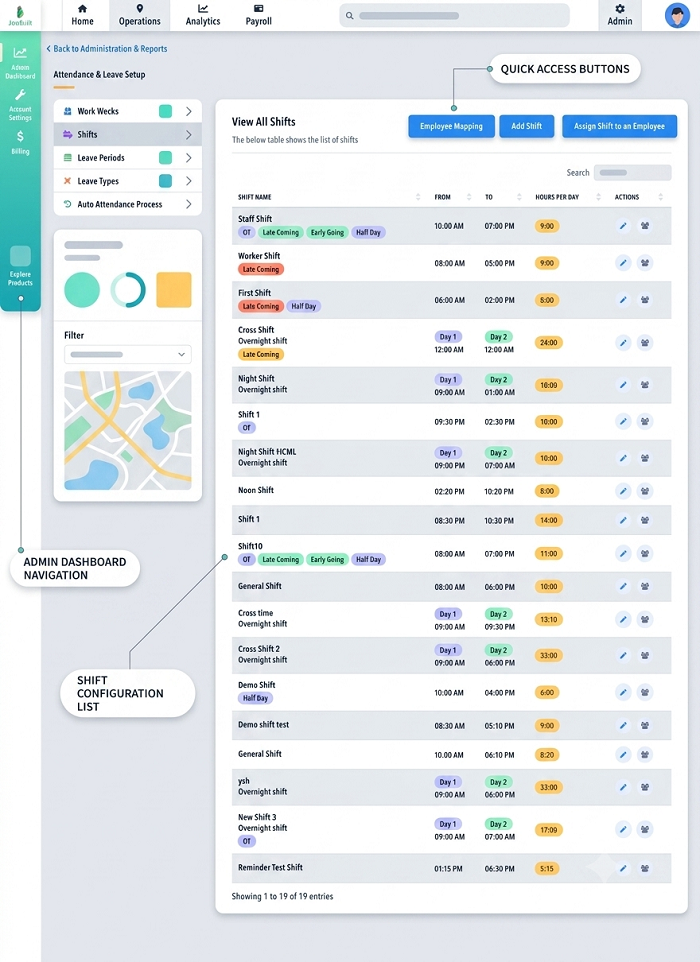
1. Create a Rotating Shift Schedule
The first step is to establish a predictable rotation.
For example:
- Week 1: Morning shift
- Week 2: Evening shift
- Week 3: Night shift
- Week 4: Morning shift
The exact rotation should depend on the company's operating requirements and employee schedules.
A digital workforce-management system can publish the roster in advance and notify employees when shifts change.
2. Define Weekly Rest Days
Businesses should clearly identify each employee's weekly rest day.
Unlike traditional office schedules, employees working in 24/7 operations may have different rest days.
For example:
| Employee | Working Pattern | Weekly Rest |
|---|---|---|
| Employee A | Sunday–Thursday | Friday |
| Employee B | Monday–Friday | Saturday |
| Employee C | Rotating shifts | Roster-based |
The schedule should clearly show when each employee is expected to work and when they are scheduled to rest.
3. Monitor Weekly Working Hours
A rotating schedule should not cause an employee's total working hours to exceed applicable limits.
For example:
Monday: 8 hours
Tuesday: 8 hours
Wednesday: 8 hours
Thursday: 8 hours
Friday: 8 hours
Saturday: 8 hours
Total: 48 hours
HR software can automatically calculate weekly totals and alert managers when scheduled hours need review.
4. Plan Rest Days Before Publishing the Roster
Weekly rest days should be incorporated into the roster rather than added after the schedule is created.
A practical workflow is:
Business coverage requirements → Employee shifts → Weekly rest days → Leave → Final roster
This helps managers maintain adequate coverage while giving employees predictable rest periods.
5. Rotate Rest Days Fairly
For businesses that operate seven days a week, managers can rotate weekly rest days.
For example:
Week 1: Employee A rests Sunday
Week 2: Employee A rests Monday
Week 3: Employee A rests Tuesday
A documented rotation can help distribute weekend and weekday rest days fairly.
6. Avoid Excessive Consecutive Working Days
Managers should monitor how many consecutive shifts employees are scheduled to work.
For example, if an employee works several consecutive days and then moves directly into another demanding shift, the schedule may create fatigue and operational risks.
A scheduling system can flag employees with unusual or excessive consecutive-shift patterns for managerial review.
7. Manage Morning-to-Night Shift Changes Carefully
Moving employees between shifts requires careful planning.
For example:
Monday: 2 PM–10 PM
Tuesday: 6 AM–2 PM
A scheduling system should highlight this type of rapid shift change so the manager can review whether the roster provides appropriate recovery time.
This is particularly important for safety-sensitive roles.
8. Handle Night Shifts Across Calendar Days
A night shift may begin on one day and finish on the next.
For example:
Monday 10 PM → Tuesday 6 AM
Attendance software should treat this as one scheduled shift while correctly recording the calendar dates and total working hours.
This prevents errors in:
- Attendance
- Overtime
- Payroll
- Rest-day calculations
9. Integrate Attendance With the Shift Roster
The attendance system should compare actual attendance with the employee's assigned shift.
For example:
Scheduled: 10 PM
Actual clock-in: 10:04 PM
Scheduled end: 6 AM
Actual clock-out: 6:02 AM
This information can then be used for attendance and payroll calculations according to company policy and applicable law.
10. Manage Shift Swaps Through Approval
Employees may need to exchange shifts because of personal commitments.
A controlled shift-swap process can be:
Employee A requests swap → Employee B accepts → Manager approves → Roster updated
The approved schedule should then flow automatically into attendance.
This prevents an employee who has properly swapped a shift from being incorrectly marked absent.
11. Track Leave Against the Actual Roster
Annual leave and other types of leave should be managed against the employee's actual work schedule.
For shift-based employees, HR should not automatically assume a Monday-to-Friday workweek.
The system should identify:
- Scheduled working days
- Weekly rest days
- Public holidays
- Approved leave
- Actual attendance
This helps ensure that leave records are accurate.
12. Manage Public Holidays
Rotating employees may be scheduled to work during UAE public holidays.
If an employee works during an official public holiday, the employer should record the actual work and apply the applicable compensation rules under UAE Labour Law. Article 28 provides specific alternatives for employees required to work on public holidays.
The attendance record should therefore identify:
Public holiday → Scheduled to work → Actual hours → Applicable compensation
13. Track Overtime Separately
Actual hours should be compared with scheduled hours to identify additional working time.
For example:
Scheduled: 8 hours
Actual: 10 hours
Additional: 2 hours
The applicable overtime rules and company approval procedures should then be applied.
14. Create Minimum Staffing Levels
Managers should determine the minimum number of employees required for each shift.
For example:
| Shift | Required | Scheduled |
|---|---|---|
| Morning | 8 | 8 |
| Evening | 8 | 9 |
| Night | 5 | 5 |
If an employee requests leave, the manager can immediately determine whether replacement coverage is needed.
15. Maintain Backup Coverage
Businesses operating continuously should maintain backup resources.
Potential options include:
- Cross-trained employees
- Relief teams
- Standby employees
- Temporary workers where legally appropriate
- On-call technical staff
This reduces disruption when an employee reports sick or cannot attend a scheduled shift.
16. Use Mobile Attendance for Field Teams
Mobile attendance can be useful when employees work at different locations.
Examples include:
- Security teams
- Maintenance technicians
- Delivery teams
- Field service workers
- Construction teams
Employees can record attendance against their assigned shift, while managers can monitor coverage remotely.
17. Use Employee Self-Service
Employees should be able to view their schedules through a self-service portal.
They can check:
- Upcoming shifts
- Rest days
- Leave
- Shift changes
- Attendance
- Approved swaps
- Overtime
Mobile notifications can alert employees when a roster changes.
18. Track Ramadan and Other Special Schedules
Employers should account for statutory working-hour changes that apply during Ramadan.
Rather than manually modifying attendance records, HR can create a separate Ramadan schedule and assign it to applicable employees.
This allows the system to automatically calculate the revised scheduled hours.
19. Maintain an Audit Trail
Employers should retain records of:
- Published schedules
- Shift changes
- Rest-day changes
- Shift swaps
- Manager approvals
- Attendance
- Overtime
- Leave
- Public-holiday work
This creates a reliable record for payroll processing and compliance reviews.
20. Connect Scheduling With Payroll
An integrated workforce system can connect:
Roster → Attendance → Rest days → Leave → Overtime → Payroll
This reduces duplicate data entry and allows payroll teams to work from approved attendance records.
Example of a Rotating Shift Plan
A manufacturing company operates three shifts:
| Shift | Time |
|---|---|
| Morning | 6:00 AM–2:00 PM |
| Evening | 2:00 PM–10:00 PM |
| Night | 10:00 PM–6:00 AM |
Employees rotate between shifts according to a published roster.
The HR system should monitor:
- Daily working hours
- Weekly working hours
- Weekly rest days
- Shift changes
- Leave
- Overtime
- Public-holiday work
- Attendance exceptions
Managers can then identify staffing gaps before the shift begins.
Conclusion
UAE businesses can manage rotating shifts and weekly rest days more effectively by creating structured rosters, monitoring working hours, scheduling rest days in advance, controlling shift swaps, and integrating attendance with leave and payroll.
For 24/7 operations, a workforce-management system provides greater visibility into employee schedules and helps managers maintain staffing coverage while monitoring working hours and rest arrangements. When combined with clear policies and regular compliance reviews, automated scheduling can reduce attendance errors and make rotating-shift management more efficient.
Rotating rosters become easier to manage when InnBuilt Shift Management displays weekly rest assignments, staff availability and swap approvals for UAE teams in one place.