10 Benefits of Using Face Recognition Attendance Software
10 Benefits of Using Face Recognition Attendance Software
Managing employee attendance accurately is essential for HR, payroll, and workforce management. Traditional methods such as paper registers, attendance cards, and manual spreadsheets can require significant administrative effort and may result in errors or attendance fraud.
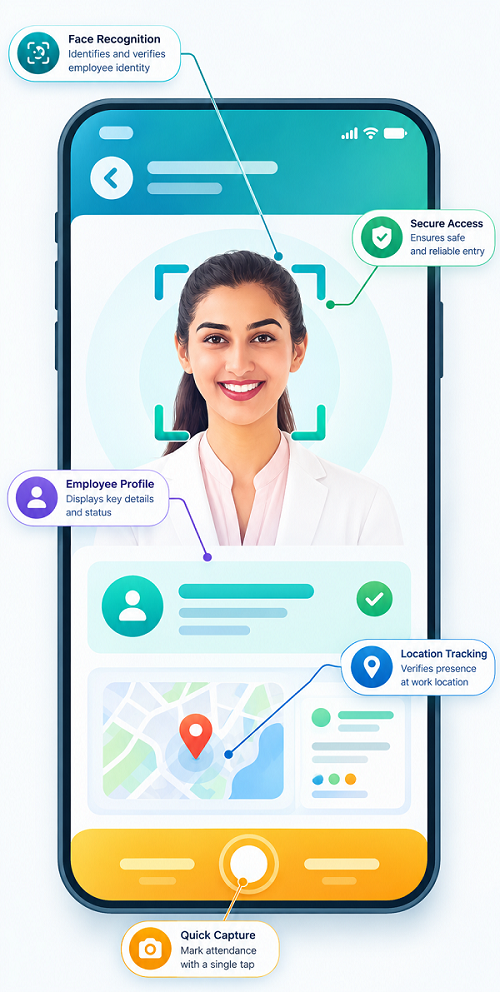
Face recognition attendance software provides a modern, contactless way to identify employees and record attendance. By using facial recognition technology, businesses can automate attendance collection and connect attendance information with shift management, leave, and payroll processes.
Here are 10 major benefits of using face recognition attendance software.
1. Reduces Manual Attendance Work
Maintaining attendance registers and manually entering attendance data can consume valuable HR time.
Face recognition attendance software automatically records employee attendance after successful facial verification. HR teams do not need to collect attendance sheets or repeatedly enter attendance information into spreadsheets.
This can reduce repetitive administrative work and allow HR professionals to focus on other important activities.
2. Helps Improve Attendance Accuracy
Manual attendance processes can result in incorrect entries, missing records, or data-entry mistakes.
Face recognition software automatically identifies the employee and records the attendance event digitally. This can help create more consistent attendance records.
HR teams can access centralized attendance data instead of relying on handwritten registers or multiple spreadsheets.
3. Helps Prevent Proxy Attendance
Proxy attendance occurs when one employee records attendance on behalf of another employee.
Because face recognition attendance is based on facial verification, it can make proxy attendance more difficult compared with manual registers, cards, or PIN-based systems.
The level of protection depends on the recognition technology and anti-spoofing capabilities used by the particular solution.
4. Provides Contactless Attendance
Unlike fingerprint scanners, face recognition systems can allow employees to record attendance without touching a shared biometric surface.
This makes the attendance process convenient and can be particularly useful in workplaces where businesses prefer contactless identification.
Employees can simply face the supported camera or device and complete the verification process.
5. Saves Time During Attendance Recording
Large organizations may have many employees arriving and leaving at similar times. Manual attendance processes can create queues and require additional administrative effort.
Face recognition systems can provide a fast way to identify employees and record attendance, depending on the device and software configuration.
This can help businesses streamline attendance collection during peak entry and exit periods.
6. Supports Multiple Locations
Businesses with multiple offices, branches, stores, factories, or project sites can use centralized attendance software to manage employee attendance across locations.
HR teams can view attendance information from different locations through a centralized dashboard, depending on the software's architecture.
This can be particularly useful for organizations with distributed workforces.
7. Works With Mobile Attendance
Some face recognition attendance solutions support mobile applications that allow employees to record attendance using smartphones.
This can be useful for:
- Field employees
- Sales teams
- Service technicians
- Construction workers
- Remote employees
- Employees working at customer locations
Businesses may also combine face verification with GPS or location-based controls where appropriate.
8. Helps Improve Payroll Processing
Employee attendance can affect working hours, leave, overtime, and salary calculations according to company policies.
When face recognition attendance software is integrated with payroll software, attendance information can be used as an input for payroll processing.
A typical process can be:
Face Recognition → Attendance → Working Hours → Leave & Overtime → Payroll
This reduces the need to manually transfer attendance information between systems and can help minimize payroll-related data-entry errors.
9. Supports Shift and Working-Hour Management
Businesses operating multiple shifts can connect face recognition attendance with shift management software.
For example, if an employee is assigned to a 9:00 AM–6:00 PM shift, the system can compare their recorded attendance with the assigned schedule.
This can help identify:
- Late arrivals
- Early departures
- Absences
- Overtime
- Missed punches
- Shift deviations
This provides managers with better visibility into employee working hours.
10. Improves Employee Self-Service
Modern attendance systems can provide employees with access to their attendance information through mobile applications or employee portals.
Depending on the system, employees may be able to:
- View attendance records
- Check working hours
- View shift schedules
- Check leave balances
- Submit attendance correction requests
- Apply for leave
- View attendance-related notifications
This reduces the need for employees to contact HR for routine attendance information.
Additional Benefits of Face Recognition Attendance Software
Apart from the ten primary benefits, businesses may also gain advantages such as:
- Digital attendance records
- Faster attendance reporting
- Centralized workforce information
- Reduced dependency on spreadsheets
- Better attendance visibility
- Automated notifications
- Attendance dashboards
- Integration with HR software
- Better workforce planning
Face Recognition Attendance for Different Industries
Manufacturing
Factories can use face recognition attendance to manage employees working across different production shifts and departments.
Retail
Retail businesses can monitor attendance across multiple stores and branches through centralized attendance software.
Healthcare
Hospitals can manage attendance for employees working across different departments and shifts.
Construction
Construction companies can use mobile face attendance for employees working at different project locations.
Hospitality
Hotels and restaurants can use face attendance to manage employees working across morning, evening, and night shifts.
Security Agencies
Security companies can use digital attendance solutions to maintain employee attendance records across multiple client locations, subject to applicable policies and requirements.
Field-Service Businesses
Service technicians, sales teams, and other field employees can use mobile face attendance to record attendance outside traditional office environments.
Face Recognition Attendance vs. Manual Attendance
| Feature | Manual Attendance | Face Recognition Attendance |
|---|---|---|
| Attendance recording | Manual | Automated |
| Data entry | Required | Reduced |
| Proxy attendance risk | Higher | Lower |
| Contactless | Yes | Yes |
| Digital records | Requires manual processing | Built-in |
| Real-time visibility | Difficult | Possible |
| Mobile support | No | Possible |
| Shift integration | Manual | Possible |
| Payroll integration | Manual | Possible |
| Reporting | Time-consuming | Automated |
Security and Privacy Considerations
Face recognition uses biometric information, so businesses should carefully consider how employee data is collected, processed, stored, protected, and retained.
Before implementing face recognition attendance software, organizations should evaluate:
- How facial information is stored
- Who can access employee biometric data
- What security controls are available
- How long information is retained
- How employees are informed about data usage
- What happens when an employee leaves
- Applicable privacy and data-protection requirements
Organizations should establish appropriate policies and select technology providers with suitable security measures.
How to Choose the Right Face Recognition Attendance Software
Businesses should consider their workforce size and operational requirements before selecting a solution.
Important features to evaluate include:
- Facial recognition performance
- Anti-spoofing capabilities
- Mobile attendance
- GPS support, if required
- Shift management
- Leave management
- Payroll integration
- Multiple-location support
- Employee self-service
- Attendance reports
- Security features
- Data privacy controls
- Ease of use
- Customer support
The best solution is one that fits the organization's attendance process and integrates smoothly with its existing HR and payroll systems.
Conclusion
Face recognition attendance software can help businesses automate employee attendance while improving convenience, visibility, and workforce management.
From reducing manual attendance work and helping prevent proxy attendance to supporting mobile employees, shift management, and payroll integration, facial recognition can provide significant benefits for modern organizations.
For businesses managing multiple shifts, locations, or field employees, integrating face recognition attendance with attendance, shift, leave, and payroll software can create a more efficient and connected workforce management system.
However, businesses should evaluate recognition performance, security, privacy, and integration capabilities carefully before implementing a face attendance solution.
Businesses using InnBuilt Face Recognition Attendance Software gain faster check-ins, fewer proxy entries, touch-free access, real-time visibility, and more accurate payroll records.