Attendance and Payroll Automation for Indian Companies
Attendance and Payroll Automation for Indian Companies
Managing employee attendance and payroll manually can become increasingly difficult as a company grows. HR teams may have to maintain attendance records, calculate working hours, manage leave, track overtime, process salary calculations, prepare payslips, and maintain payroll records.
For Indian companies, these activities may also involve applicable statutory payroll requirements.
Attendance and Payroll Automation connects employee attendance with payroll processing through a centralized digital system. Instead of repeatedly entering attendance information into spreadsheets and manually calculating salary inputs, companies can create a structured workflow from attendance recording to payroll processing.
This can help reduce repetitive HR work, improve data consistency, and make payroll preparation more efficient.
What Is Attendance and Payroll Automation?
Attendance and payroll automation means using software to digitally manage employee attendance and use approved attendance information as an input for payroll.
A typical workflow is:
Employee Check-In → Attendance → Working Hours → Leave/Overtime → Approval → Payroll → Payslip → Reports
Depending on the software, employees can record attendance through:
- Biometric devices
- Fingerprint
- Face recognition
- Mobile applications
- Web applications
- GPS-based attendance
- Geofencing
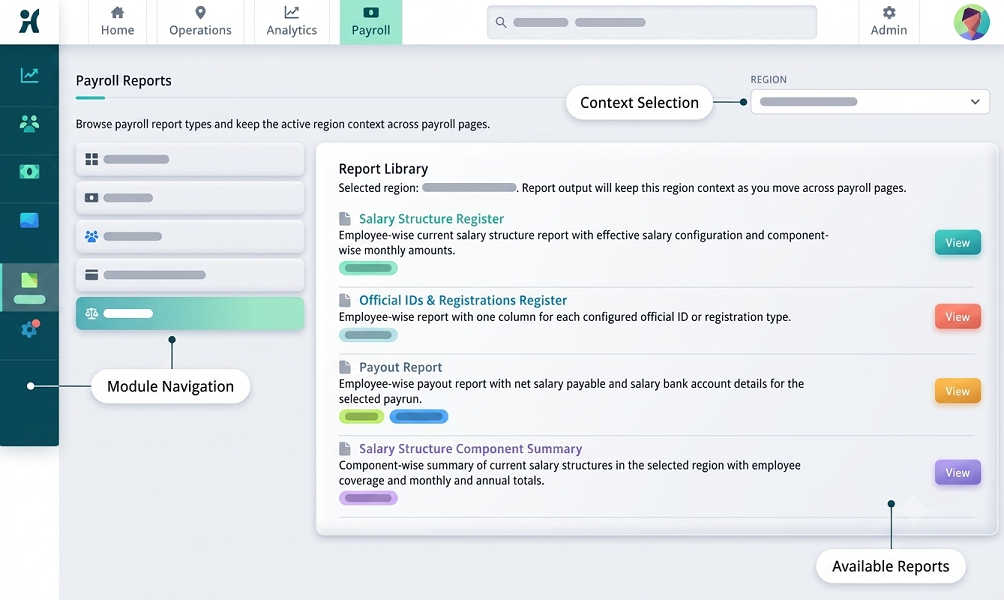
Payroll functionality may include salary structures, earnings, deductions, payslips, payroll reports, and applicable statutory calculations.
Why Indian Companies Need Attendance and Payroll Automation
Many organizations still use separate systems for attendance and payroll.
For example:
Biometric Device → Excel → Manual Attendance Review → Payroll Spreadsheet
This process can create additional administrative work.
An integrated approach can simplify the workflow:
Attendance System → Approved Attendance → Payroll Software
This reduces the need to repeatedly transfer information between systems.
1. Automate Employee Attendance
The first step is digitizing attendance.
Employees can record attendance using an appropriate method for their workplace.
Office Employees
Biometric or web attendance can be suitable.
Factory Employees
Biometric attendance with shift management can be useful.
Field Employees
Mobile attendance may be more practical.
Remote Employees
Web or mobile attendance can support approved remote work arrangements.
2. Automatically Calculate Working Hours
Once check-in and check-out information is recorded, the system can calculate working hours according to configured rules.
For example:
Check-In: 9:05 AM
Check-Out: 6:15 PM
The software can calculate working time while applying configured break and shift rules.
This can eliminate repeated manual calculations.
3. Automate Shift Management
Indian companies in sectors such as manufacturing, healthcare, hospitality, security, BPO, and logistics may operate multiple shifts.
For example:
| Shift | Timing |
|---|---|
| Morning | 6 AM–2 PM |
| General | 9 AM–6 PM |
| Evening | 2 PM–10 PM |
| Night | 10 PM–6 AM |
Attendance software can assign employees to shifts and process attendance based on configured schedules.
4. Handle Night Shifts Automatically
Night shifts can cross calendar dates.
For example:
Check-In: 10 PM Monday
Check-Out: 6 AM Tuesday
A properly configured system should treat both events as part of the same shift.
Businesses should test their actual night-shift scenarios before implementation.
5. Automate Leave Management
Leave information can be directly connected to attendance.
A typical workflow is:
Employee Applies Leave → Manager Approves → Leave Balance Updated → Attendance Updated → Payroll Uses Approved Data
This helps reduce manual transfer of leave information between separate spreadsheets.
6. Automate Attendance Regularization
Employees sometimes forget to check in or check out.
For example:
An employee worked the full day but forgot to record the check-out.
The employee can submit a regularization request through the system where supported.
Employee Request → Manager Approval → Attendance Updated
An audit trail can record the correction.
7. Track Overtime Automatically
Attendance data can help identify additional working hours.
For example:
Scheduled: 8 hours
Actual: 10 hours
Additional: 2 hours
The system can flag the additional time for approval.
Overtime eligibility and payment should follow the company's policy and applicable requirements.
8. Connect Attendance With Payroll
This is one of the biggest benefits of automation.
Attendance information can affect payroll through:
- Paid days
- Unpaid leave
- Overtime
- Attendance-related deductions
- Other company-specific salary rules
A typical automated workflow is:
Attendance → Leave → Overtime → Approval → Payroll
This can reduce duplicate data entry.
9. Automate Salary Calculations
Payroll software can calculate employee salary based on configured salary structures.
Depending on the system, payroll can include:
Earnings
- Basic salary
- Allowances
- Incentives
- Overtime
- Other earnings
Deductions
- Provident Fund
- ESI where applicable
- Professional Tax where applicable
- TDS where applicable
- Other authorized deductions
The exact calculations depend on the employee, company, location, applicable rules, and payroll configuration.
10. Support Indian Payroll Requirements
Indian payroll can involve several statutory requirements.
Depending on the organization and employee circumstances, these may include:
- Provident Fund
- Employees' State Insurance
- Professional Tax
- Labour Welfare Fund
- Tax Deducted at Source
Payroll software can help automate applicable calculations and maintain payroll records.
However, businesses should verify current statutory rules, thresholds, rates, wage definitions, exemptions, and applicability before processing payroll.
Software configuration should be reviewed whenever regulations change.
11. Automate Professional Tax
Professional Tax is imposed according to state-specific rules where applicable.
For companies operating in states that levy Professional Tax, payroll software can help calculate and record the applicable deduction.
Because slabs and requirements vary by state, companies should ensure that their payroll system supports the relevant state configuration.
12. Automate Provident Fund Processing
Eligible employers may have Provident Fund responsibilities.
Payroll software can help calculate applicable employee and employer contributions based on configured rules.
Companies should ensure that their software is updated according to current EPF requirements and that payroll configurations are reviewed regularly.
13. Automate ESI Calculations
Eligible employees and establishments may come under Employees' State Insurance requirements.
Payroll software can help process applicable ESI deductions and employer contributions.
Businesses should verify current eligibility and contribution requirements before processing payroll.
14. Generate Payslips Automatically
Once payroll is processed, software can generate employee payslips.
A payslip may contain:
- Employee details
- Salary period
- Earnings
- Deductions
- Net salary
- Other configured information
Digital payslips can reduce manual document preparation.
15. Employee Self-Service
An integrated HR system can provide employees with access to:
- Attendance
- Working hours
- Leave
- Overtime
- Payslips
- Salary information
- Attendance correction requests
This can reduce routine HR queries.
16. Manager Approval Workflow
Automation does not mean that every transaction should happen without human review.
Managers can review:
- Leave
- Overtime
- Attendance regularization
- Missing punches
- Other attendance exceptions
A typical workflow is:
Employee Request → Manager Review → Approval → Payroll Input
This creates better control over payroll-related attendance information.
17. Automate Payroll Reports
Payroll automation can generate reports such as:
- Salary register
- Payroll summary
- Employee salary report
- Earnings report
- Deduction report
- Attendance report
- Overtime report
- Leave report
- Payslip report
- Statutory reports, where supported
The exact reports depend on the payroll software.
18. Multi-Branch Payroll and Attendance
Companies operating in multiple locations may have employees across different branches.
For example:
Head Office → Chennai → Bengaluru → Hyderabad → Mumbai → Pune
A centralized system can manage attendance and payroll across locations.
Companies should ensure that location-specific payroll requirements are correctly configured.
19. Cloud-Based Attendance and Payroll
Cloud-based systems can allow authorized HR teams and managers to access information from supported devices.
Potential benefits include:
- Centralized employee records
- Remote access
- Multi-location management
- Online reports
- Employee self-service
- Easier system administration
Businesses should evaluate:
- Data security
- User permissions
- Backups
- Availability
- Data retention
- Vendor data handling
before selecting a cloud platform.
20. Automate Attendance for Field Employees
Field employees can create challenges for traditional attendance systems.
Examples include:
- Sales representatives
- Service technicians
- Delivery teams
- Construction workers
- Field supervisors
Mobile attendance can allow employees to record attendance from approved locations.
GPS or geofencing may be used where appropriate.
Businesses should establish transparent policies for location tracking.
21. Automate Remote Employee Attendance
Remote employees can record attendance using supported web or mobile applications.
A company can configure policies for:
- Working hours
- Check-in
- Check-out
- Breaks
- Leave
- Attendance regularization
This provides a structured attendance process for remote and hybrid teams.
22. Reduce Payroll Errors
Manual payroll can produce errors because of:
- Wrong attendance
- Incorrect leave
- Missing overtime
- Incorrect salary inputs
- Duplicate data
- Manual calculations
Automation can reduce some of these risks by creating a connected data flow.
For example:
Attendance → Approved Data → Payroll
However, automated payroll should still have review and validation procedures.
23. Improve Payroll Processing Speed
Manual payroll preparation may require several rounds of spreadsheet review.
An automated process can reduce repetitive tasks.
Instead of:
Attendance Register → Excel → Leave Sheet → Overtime Sheet → Payroll Sheet
companies can use:
Attendance System → Approval → Payroll
This can make payroll preparation more structured.
24. Maintain an Audit Trail
Payroll and attendance records may change because of:
- Attendance corrections
- Leave adjustments
- Overtime approvals
- Salary revisions
- Payroll corrections
An audit trail can record:
Who Changed the Record → What Changed → When It Changed
This can improve transparency and internal controls.
25. Improve Employee Transparency
Employees can access their own information through employee self-service.
They may be able to see:
- Attendance
- Leave
- Overtime
- Payslips
- Salary details
This can help employees identify discrepancies earlier and raise correction requests.
Attendance and Payroll Automation for Different Industries
IT Companies
Useful features:
- Web attendance
- Remote attendance
- Leave management
- Payroll
- Payslips
- Employee self-service
Manufacturing
Useful features:
- Biometric attendance
- Multiple shifts
- Overtime
- Weekly offs
- Payroll integration
Construction
Useful features:
- Mobile attendance
- GPS/geofencing
- Project-wise attendance
- Overtime
- Payroll
Retail
Useful features:
- Branch-wise attendance
- Shift management
- Mobile/biometric attendance
- Leave
- Payroll
Hospitals
Useful features:
- Multiple shifts
- Night shifts
- Department-wise attendance
- Leave
- Overtime
- Payroll
Security Agencies
Useful features:
- Mobile attendance
- GPS
- Geofencing
- Site-wise attendance
- Shift management
- Payroll
Restaurants and Hotels
Useful features:
- Multiple shifts
- Night attendance
- Overtime
- Department-wise reports
- Payroll
Manual Payroll and Attendance vs. Automation
| Feature | Manual Process | Automated Process |
|---|---|---|
| Attendance | Register/Excel | Digital |
| Working hours | Manual | Automated/configurable |
| Leave | Separate tracking | Integrated |
| Overtime | Manual | Automated/configurable |
| Salary calculation | Manual/formulas | Automated/configurable |
| Payslips | Manual | Automated |
| Reports | Manual | Automated |
| Multiple locations | Difficult | Supported |
| Employee self-service | Limited | Available |
| Audit trail | Limited | Available in many systems |
| Payroll integration | Manual | Integrated/available |
How to Implement Attendance and Payroll Automation
Step 1: Assess Current Processes
Identify how attendance and payroll are currently managed.
Step 2: Define Requirements
List:
- Employee count
- Locations
- Shifts
- Leave rules
- Overtime rules
- Salary structures
- Applicable statutory requirements
Step 3: Select Software
Choose a system that supports the required attendance and payroll functionality.
Step 4: Configure Attendance
Set up:
- Employees
- Departments
- Shifts
- Weekly offs
- Grace periods
- Leave rules
- Overtime rules
Step 5: Configure Payroll
Set up:
- Salary structures
- Earnings
- Deductions
- Applicable statutory components
- Payroll periods
Step 6: Integrate Attendance and Payroll
Connect approved attendance information to payroll.
Step 7: Test
Test:
- Regular attendance
- Late arrival
- Early leaving
- Missing punch
- Leave
- Overtime
- Night shifts
- Salary calculations
- Statutory deductions
Step 8: Run a Parallel Payroll
For the first payroll cycles, compare automated results with the existing process.
Step 9: Go Live
After successful validation, move to the automated process.
Common Mistakes to Avoid
1. Automating Without Defining Policies
Software cannot compensate for unclear attendance rules.
2. Ignoring Exceptions
Missing punches, leave, and overtime should have approval workflows.
3. Not Testing Night Shifts
Cross-midnight attendance can cause unexpected results if incorrectly configured.
4. Using Incorrect Payroll Rules
Statutory calculations should be reviewed against current requirements.
5. Ignoring Data Security
Employee salary and attendance information should be appropriately protected.
6. Not Training Employees
Employees should understand check-in, check-out, leave, and regularization procedures.
7. Not Testing Integration
Attendance-to-payroll data should be validated before production use.
Key Benefits of Attendance and Payroll Automation
Businesses can potentially achieve:
- Reduced manual HR work
- Faster payroll preparation
- Better attendance accuracy
- Automated working-hour calculations
- Easier leave management
- Better overtime tracking
- Simplified payslip generation
- Improved employee self-service
- Centralized records
- Better reporting
- Multi-location support
- Improved payroll data consistency
Frequently Asked Questions
What is attendance and payroll automation?
It is the use of software to digitally record employee attendance and use approved attendance, leave, and overtime information as inputs for payroll processing.
Can attendance software automatically calculate salary?
Attendance software can provide attendance-related payroll inputs. Complete salary calculation generally requires payroll functionality or integration with payroll software.
Can Indian payroll software manage PF and ESI?
Many payroll systems support applicable PF and ESI calculations. Companies should verify current rules and ensure the system is correctly configured.
Can it calculate Professional Tax?
Many payroll systems support Professional Tax for applicable states. Companies should verify the relevant state slab and current requirements.
Can attendance and payroll software manage multiple branches?
Yes, many systems support centralized multi-location attendance and payroll management.
Can field employees use attendance software?
Yes. Mobile attendance can be useful for field employees, with GPS or geofencing available in some systems.
Is biometric attendance required?
No. Companies can choose biometric, mobile, web, or other attendance methods depending on their workforce.
Can employees access payslips?
Many integrated systems provide employee self-service through web portals or mobile applications.
Conclusion
Attendance and Payroll Automation for Indian Companies can transform a traditionally manual HR process into a connected digital workflow.
Instead of managing attendance, leave, overtime, and payroll through separate spreadsheets, companies can create a structured process:
Employee Check-In → Attendance → Leave/Overtime → Approval → Payroll → Payslip → Reports
The right solution depends on the company's employee size, industry, locations, shift structure, field workforce, remote-work model, payroll requirements, statutory obligations, and security needs.
Automation can reduce repetitive HR work and improve the consistency of attendance and payroll data. However, businesses should not rely on automation without review. Attendance exceptions, payroll calculations, statutory requirements, and employee changes should still be validated before payroll is finalized.
For Indian companies, a well-configured attendance and payroll system can provide a scalable foundation for managing employees, simplifying HR operations, and preparing accurate and timely payroll.
Indian companies can connect approved attendance directly to salary and statutory calculations with InnBuilt Attendance and Payroll Software. Processing time falls while the monthly audit trail improves.