Attendance Management Software for Small and Medium Businesses
Attendance Management Software for Small and Medium Businesses
Managing employee attendance is an essential part of running a small or medium-sized business. As the workforce grows, maintaining attendance through paper registers, Excel spreadsheets, or manual records can become time-consuming and difficult to manage.
Attendance Management Software for Small and Medium Businesses helps automate employee attendance, working hours, leave, shifts, overtime, and attendance reporting. It can also connect attendance data with payroll, reducing repetitive HR work and improving data accuracy.
For businesses that want to move away from manual attendance processes, an attendance management system can provide a simple and scalable solution.
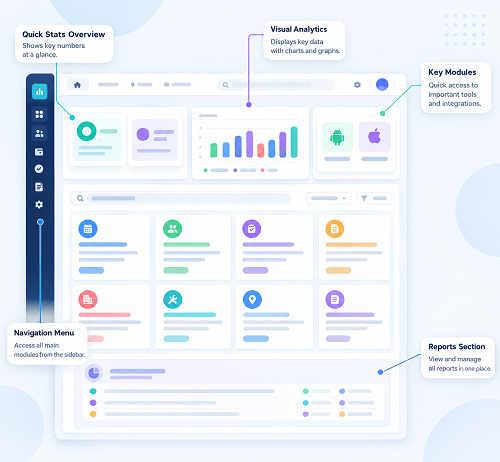
What Is Attendance Management Software?
Attendance Management Software is a digital system used to record, manage, and monitor employee attendance.
Depending on the business requirements, employees can mark attendance through:
- Mobile applications
- Biometric devices
- GPS
- Geofencing
- Web browsers
- RFID cards
- Facial recognition
The system automatically stores attendance information and can process working hours, leave, shifts, overtime, and other attendance-related information.
A typical process is:
Employee → Attendance → Attendance Processing → HR Review → Payroll
This reduces the need for HR teams to manually collect and calculate attendance information.
Why Small and Medium Businesses Need Attendance Software
Many small businesses initially manage attendance using registers or spreadsheets because their workforce is relatively small.
However, as the business grows, manual processes can create several challenges.
HR teams may spend time:
- Collecting attendance
- Updating spreadsheets
- Calculating working hours
- Managing leave
- Checking missing punches
- Preparing monthly reports
- Calculating overtime
- Sending attendance data to payroll
Attendance software automates many of these activities and allows businesses to manage attendance through a centralized system.
Key Features for Small and Medium Businesses
1. Simple Employee Attendance
The software should make it easy for employees to mark attendance.
Depending on the workforce, businesses can use:
- Mobile attendance
- Biometric attendance
- Web attendance
- GPS attendance
Small businesses should select only the attendance methods they actually need rather than paying for unnecessary features.
2. Mobile Attendance
Mobile attendance is useful for employees who work remotely or travel for work.
Sales employees, service engineers, construction workers, and field teams can mark attendance using a mobile application.
If required, organizations can use GPS or geofencing features to support location-based attendance policies.
3. Biometric Attendance
For employees working from a fixed office, factory, warehouse, or store, biometric attendance can be a convenient option.
Fingerprint or facial recognition can authenticate employees when they enter or leave the workplace.
Small businesses can connect compatible biometric devices to attendance software for centralized attendance management.
4. GPS and Geofencing
GPS attendance can be useful when employees work at different locations.
Geofencing allows businesses to define approved attendance locations.
For example, a construction business can create a location around a project site and allow authorized employees to mark attendance within that area.
Businesses should establish appropriate policies concerning location tracking, privacy, data access, and retention.
5. Shift Management
Small and medium businesses may have employees working different schedules.
Attendance software can manage:
- General shifts
- Morning shifts
- Evening shifts
- Night shifts
- Rotational shifts
- Flexible working hours
- Weekly offs
This is particularly useful for retail stores, restaurants, manufacturing units, security agencies, and service businesses.
6. Leave Management
Leave management can be integrated with attendance.
Employees can submit leave requests, managers can approve them, and the approved leave can be reflected in attendance records.
This eliminates the need to maintain separate leave and attendance spreadsheets.
7. Overtime Tracking
If employees work beyond their scheduled hours, the software can help identify overtime based on configured rules.
For example:
Scheduled working hours: 9:00 AM–6:00 PM
Actual attendance: 9:00 AM–7:30 PM
The system can identify the additional working period for review and approval.
Businesses should configure overtime rules according to their internal policies and applicable requirements.
8. Attendance Regularization
Employees can sometimes forget to mark attendance or experience technical problems.
A regularization feature allows employees to submit correction requests.
For example:
Missing punch → Employee request → Manager approval → Attendance correction
This creates a structured process instead of relying on emails, WhatsApp messages, or paper forms.
9. Employee Self-Service
Employee self-service reduces the number of routine attendance questions handled by HR.
Employees can access information such as:
- Attendance history
- Check-in and check-out times
- Working hours
- Leave balance
- Overtime
- Missing punches
- Regularization requests
This improves transparency and gives employees more control over their attendance information.
Attendance and Payroll Integration
Payroll is one of the most important areas where attendance automation can benefit small and medium businesses.
Attendance data may affect salary calculations through:
- Paid days
- Unpaid leave
- Absence
- Overtime
- Working days
- Other attendance-related adjustments
An integrated workflow can be:
Attendance → Leave → Overtime → Attendance Validation → Payroll
Instead of manually transferring information from an Excel spreadsheet to payroll, businesses can use integrated systems or standardized data exports.
This can reduce duplicate data entry and help minimize attendance-related payroll errors.
For businesses using payroll outsourcing, attendance software can also make it easier to provide accurate attendance data to the payroll service provider.
Benefits of Attendance Software for Small Businesses
Saves HR Time
Automation reduces repetitive attendance-related administrative work.
Reduces Manual Errors
Digital attendance reduces errors caused by manual data entry and calculations.
Improves Payroll Preparation
Payroll teams can access more organized attendance information.
Provides Better Visibility
Managers can quickly see employee attendance and staffing information.
Supports Remote Employees
Mobile and GPS attendance can help manage employees outside the office.
Simplifies Leave Management
Employees and managers can manage leave through a centralized system.
Improves Employee Transparency
Employees can access their own attendance records.
Supports Business Growth
A scalable system can accommodate additional employees and locations as the business expands.
Attendance Software for Different Small and Medium Businesses
Small IT Companies
IT companies may benefit from mobile attendance, employee self-service, flexible schedules, leave management, and payroll integration.
Retail Businesses
Retail stores can use attendance software to manage employees across different shifts and branches.
Construction Companies
Construction businesses can benefit from mobile attendance, GPS, geofencing, and project/site-wise attendance.
Manufacturing Businesses
Manufacturing companies may require biometric attendance, shift management, overtime tracking, and payroll integration.
Service Businesses
Service organizations with field employees can use mobile and location-based attendance to manage distributed teams.
Cloud-Based Attendance Software for SMBs
Cloud-based attendance software can be particularly useful for small and medium businesses because employees and HR managers can access the system from authorized devices without depending on a single local computer.
A cloud-based system can provide:
- Centralized attendance
- Remote access
- Multi-location management
- Automatic updates
- Employee self-service
- Online reports
- Payroll integration
Businesses should evaluate the provider's security, backup, access controls, data handling, and support arrangements before selecting a cloud-based system.
How to Choose the Right Attendance Software
Small and medium businesses should focus on their actual requirements.
Before selecting software, consider:
- Number of employees
- Number of locations
- Attendance methods required
- Shift patterns
- Remote or field employees
- Leave policies
- Overtime requirements
- Payroll integration
- Employee self-service
- Reporting requirements
- Security
- Pricing
- Scalability
- Customer support
The cheapest software is not always the best option. Similarly, businesses should avoid paying for complex features that they do not need.
Manual Attendance vs. Attendance Software
| Area | Manual System | Attendance Software |
|---|---|---|
| Attendance entry | Manual | Automated |
| Working-hour calculation | Manual | Automated |
| Leave management | Separate | Integrated |
| Overtime | Manual | Automated/Configurable |
| Reports | Manual | Automated |
| Employee access | Limited | Self-service |
| Multiple locations | Difficult | Centralized |
| Mobile attendance | Limited | Available |
| Payroll data | Manual transfer | Integration/export |
| Scalability | Limited | Better suited for growth |
Implementation Tips for SMBs
Businesses should take a practical approach when implementing attendance software.
Start With Clear Policies
Define working hours, shifts, leave, weekly offs, overtime, and attendance correction rules before configuring the system.
Train Employees
Employees should understand how to mark attendance and submit regularization or leave requests.
Test Before Going Live
Run the system with sample or historical data before using it for actual payroll.
Review Attendance Before Payroll
HR should review missing punches, leave, overtime, and other exceptions before payroll processing.
Keep Access Controlled
Only authorized HR and managers should be able to modify attendance records.
Conclusion
Attendance Management Software for Small and Medium Businesses provides an effective way to replace manual attendance registers and spreadsheets with a centralized digital process.
The right solution can help SMBs manage employee attendance, shifts, leave, overtime, mobile attendance, GPS, regularization, reporting, and payroll integration from one platform.
For a small office, a simple cloud-based attendance system may be sufficient. A growing business with multiple branches, field employees, or complex shifts may need more advanced features such as biometric integration, GPS, geofencing, and multi-location management.
The key is to choose software based on your current requirements while ensuring that it can scale as your business grows.
With the right attendance system, small and medium businesses can reduce HR administration, improve attendance accuracy, simplify payroll preparation, and create a more transparent and efficient employee attendance management process.
Small and medium businesses can replace registers and spreadsheets with InnBuilt Attendance Software. Quick setup, mobile access, simple approvals, and payroll-ready data support growth without increasing HR workload.