Attendance Management System for Companies in India
Attendance Management System for Companies in India
Managing employee attendance is an essential part of HR and payroll operations for companies in India. As organizations grow, tracking attendance through paper registers, Excel spreadsheets, or separate records can become time-consuming and difficult to maintain.
An Attendance Management System for Companies in India provides a centralized way to record employee attendance, calculate working hours, manage shifts, track leave and overtime, handle attendance corrections, and generate reports.
Modern systems can support employees working in offices, factories, retail stores, hospitals, construction sites, client locations, and remote environments.
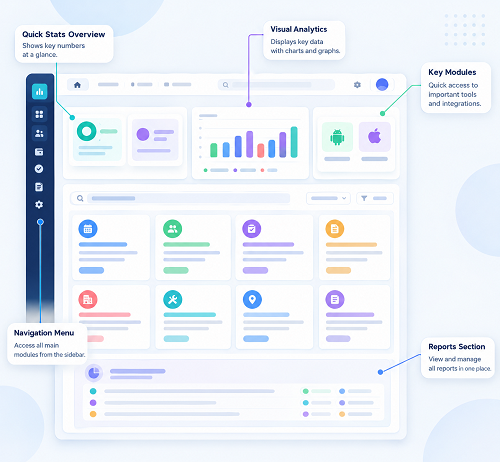
What Is an Attendance Management System?
An Attendance Management System is software that digitally records and manages employee attendance.
Employees can record attendance using different methods depending on their workplace:
- Biometric devices
- Fingerprint
- Face recognition
- Mobile application
- Web application
- GPS-based attendance
- Geofencing
- QR-based attendance
A typical process is:
Employee Check-In → Attendance Record → Working Hours → Leave/Overtime → Approval → Reports → Payroll
The right attendance method depends on the company's workforce and attendance policies.
Why Companies in India Need an Attendance Management System
Indian companies can have very different workforce structures.
Employees may work:
- Fixed office hours
- Multiple shifts
- Night shifts
- Remote locations
- Customer sites
- Factories
- Construction projects
- Multiple branches
For example, an IT company may need remote attendance, while a manufacturing company may require biometric attendance and shift management.
A security company may need location-based attendance, while a retail chain may need branch-wise attendance.
Therefore, companies should choose an attendance system based on their actual operational requirements.
1. Automated Employee Attendance
An attendance system replaces manual attendance registers with digital records.
Traditional Process
Employee → Register → HR Entry → Excel
Automated Process
Employee → Digital Check-In → System Record
This can reduce repetitive data entry and make attendance information easier to manage.
2. Biometric Attendance
Biometric attendance is useful for employees working at fixed locations.
Common biometric methods include:
- Fingerprint
- Face recognition
It can be used in:
- Offices
- Factories
- Warehouses
- Hospitals
- Retail outlets
- Educational institutions
Businesses should ensure that the biometric system and its data practices meet their internal security and applicable privacy requirements.
3. Mobile Attendance
Mobile attendance is particularly useful for employees who work away from the office.
Examples include:
- Sales teams
- Service engineers
- Field employees
- Construction workers
- Supervisors
- Remote employees
Employees can record attendance through an authorized mobile application.
4. GPS Attendance
GPS-enabled attendance can associate an attendance event with a location.
For example:
Employee Reaches Customer Site → Mobile Check-In → Location Recorded
This can provide additional visibility for field attendance.
Companies should clearly communicate location-tracking practices and comply with applicable privacy requirements.
5. Geofencing
Geofencing allows a company to define an approved geographic area.
For example:
Office → Approved Geofence → Employee Check-In
This can be useful for organizations where employees are expected to check in from specific locations.
The geofence should be configured according to actual workplace conditions.
6. Shift Management
Many Indian companies operate multiple shifts.
For example:
| Shift | Timing |
|---|---|
| Morning | 6 AM–2 PM |
| General | 9 AM–6 PM |
| Evening | 2 PM–10 PM |
| Night | 10 PM–6 AM |
An attendance management system can assign employees to shifts and calculate attendance according to configured rules.
This is particularly useful for:
- Manufacturing
- Hospitals
- Hotels
- Restaurants
- Security agencies
- BPOs
- Logistics
7. Night-Shift Attendance
Night shifts require special handling because check-in and check-out can occur on different calendar dates.
For example:
Check-In: 10 PM Monday
Check-Out: 6 AM Tuesday
The attendance system should correctly associate both records with the relevant shift.
Companies should test their actual overnight shift patterns before implementation.
8. Automatic Working-Hour Calculation
Attendance software can calculate working hours from check-in and check-out records.
For example:
Check-In: 9:10 AM
Check-Out: 6:20 PM
The system can calculate working time according to configured rules for breaks, shifts, and minimum working hours.
This can reduce manual calculations by HR teams.
9. Leave Management
Attendance and leave management can be connected in one system.
Employees can:
- Apply for leave
- View leave balance
- Check leave history
- Track approval status
Managers can review and approve requests.
The process becomes:
Leave Request → Approval → Leave Record → Attendance
10. Attendance Regularization
Employees may sometimes forget to punch in or punch out.
For example:
An employee worked the entire day but forgot to record the check-out.
The employee can submit a regularization request where supported.
Typical workflow:
Employee Request → Manager Approval → Attendance Updated
An audit trail can record the correction.
11. Overtime Tracking
Employees may work additional hours due to business requirements.
For example:
Scheduled: 8 hours
Actual: 10 hours
Additional: 2 hours
Attendance software can identify additional working time for review and approval.
Actual overtime eligibility and payment should follow the organization's policy and applicable requirements.
12. Attendance and Payroll Integration
Attendance can affect payroll through:
- Paid days
- Unpaid leave
- Overtime
- Attendance-related deductions
- Other organization-specific salary rules
A typical integrated workflow is:
Attendance → Leave → Overtime → Approval → Payroll
Integration can reduce duplicate data entry and improve payroll preparation.
Businesses should verify the exact integration and calculation capabilities before implementation.
13. Employee Self-Service
Employee self-service can reduce routine HR queries.
Depending on the system, employees may be able to:
- View attendance
- View working hours
- Apply for leave
- View leave balance
- Submit attendance corrections
- Review attendance history
- Access payslips if payroll is integrated
This gives employees greater visibility into their own records.
14. Manager Approval Workflows
Managers can review attendance exceptions before records are finalized.
For example:
Missing Punch → Employee Regularization → Manager Review → Approval → Attendance Updated
This provides better control over attendance changes.
15. Attendance Dashboard
An attendance dashboard can provide a centralized overview of workforce attendance.
For example:
Total Employees: 250
Present: 220
Absent: 15
On Leave: 15
Depending on the system, dashboards may also show:
- Late employees
- Early departures
- Missing punches
- Overtime
- Branch-wise attendance
- Department-wise attendance
16. Attendance Reports
Companies can use reports to analyze employee attendance.
Common reports include:
Daily Attendance Report
Shows attendance for a selected date.
Monthly Attendance Report
Provides monthly attendance summaries.
Employee-Wise Report
Shows individual attendance history.
Department-Wise Report
Provides attendance by department.
Branch-Wise Report
Useful for companies with multiple locations.
Late Coming Report
Shows late arrivals according to configured rules.
Overtime Report
Provides overtime information for review.
Leave Report
Shows employee leave records.
17. Multi-Location Attendance Management
Companies with multiple offices or branches can manage attendance centrally.
For example:
Head Office → Chennai / Bengaluru / Hyderabad / Mumbai / Pune
HR can manage attendance from a centralized platform while branch managers can receive access based on their roles.
18. Attendance Management for Remote Employees
Remote and hybrid work requires flexible attendance methods.
Employees may work from:
- Home
- Office
- Customer locations
- Approved remote locations
Mobile or web attendance can help companies manage attendance without requiring employees to be physically present at the main office.
Organizations should establish clear remote attendance policies.
19. Attendance for Field Employees
Field employees may work at multiple customer or project locations.
Examples include:
- Sales representatives
- Service engineers
- Technicians
- Construction workers
- Delivery teams
Mobile attendance can help these employees record attendance from approved locations.
GPS and geofencing may be used where appropriate.
20. Attendance for Manufacturing Companies
Manufacturing companies often need:
- Biometric attendance
- Shift management
- Overtime tracking
- Department-wise attendance
- Weekly-off management
- Payroll integration
An attendance system can centralize attendance information across production teams and departments.
21. Attendance for Retail Companies
Retail companies may operate multiple stores.
A centralized attendance system can manage:
- Store-wise attendance
- Employee transfers
- Multiple shifts
- Leave
- Overtime
- Branch reports
This becomes particularly useful as the number of stores increases.
22. Attendance for Construction Companies
Construction workers often operate at project sites.
Mobile attendance combined with GPS or geofencing can help businesses record site attendance.
For example:
Project Site → Mobile Check-In → Attendance Recorded
The company can then consolidate attendance across projects.
23. Attendance for Hospitals
Hospitals may operate 24 hours a day and have employees working in different shifts.
Attendance software can help manage:
- Doctors
- Nurses
- Technicians
- Administrative employees
- Support staff
Important features may include night-shift management, leave, overtime, and department-wise reporting.
24. Attendance for Security Agencies
Security guards may be deployed across multiple client locations.
Security companies may need:
- Mobile attendance
- GPS
- Geofencing
- Site-wise attendance
- Shift management
- Supervisor monitoring
- Night-shift support
A centralized system can help manage attendance across customer sites.
25. Cloud-Based Attendance Management
Cloud-based systems can allow authorized users to access attendance information through supported devices.
Potential benefits include:
- Centralized data
- Remote access
- Multi-location management
- Employee self-service
- Online reports
Before selecting a cloud platform, companies should evaluate:
- Security
- Access controls
- Data backup
- Availability
- Data retention
- Integration capabilities
26. Offline Attendance
Some employees may work in locations with poor internet connectivity.
Before selecting attendance software, companies should ask:
Can employees record attendance when there is no internet connection?
Some systems can temporarily store attendance information and synchronize it later.
This should be tested at actual work locations before deployment.
27. Attendance Audit Trail
Attendance records may sometimes be corrected because of:
- Missing punches
- Device problems
- Shift changes
- Approved regularization
- Administrative corrections
An audit trail can record:
Original Record → Correction → Approver → Updated Record
This improves transparency and accountability.
28. Data Security and Privacy
Employee attendance data should be protected through appropriate security controls.
A suitable system may include:
- User authentication
- Role-based access
- Permissions
- Audit logs
- Secure data transmission
- Data backups
For GPS-based attendance, companies should clearly define how location information is collected, used, accessed, and retained.
Benefits of an Attendance Management System
Reduces Manual Work
HR teams spend less time maintaining registers and spreadsheets.
Improves Attendance Accuracy
Automated records can reduce common data-entry errors.
Saves HR Time
Reports and calculations can be generated faster.
Improves Payroll Preparation
Approved attendance information can be provided to payroll.
Supports Multiple Locations
Companies can manage attendance across offices, branches, and project sites.
Supports Field and Remote Employees
Mobile attendance can provide flexibility for distributed workforces.
Simplifies Leave Management
Leave and attendance can be managed in one workflow.
Improves Employee Transparency
Employees can access their attendance records through self-service.
Attendance Management System vs. Excel
| Feature | Excel | Attendance System |
|---|---|---|
| Attendance entry | Manual | Digital |
| Working hours | Manual/formulas | Automated/configurable |
| Leave | Separate | Integrated in many systems |
| Shift management | Manual | Configurable |
| Mobile attendance | Limited | Available |
| GPS | No | Available in some systems |
| Multiple branches | Difficult | Supported |
| Reports | Manual | Automated |
| Employee self-service | Limited | Available |
| Audit trail | Limited | Available in many systems |
| Payroll integration | Manual/export | Available in some systems |
Excel can be adequate for very small teams with simple requirements. As employee numbers and operational complexity increase, dedicated attendance software can provide greater automation.
How to Choose the Best Attendance Management System
Before selecting software, companies should evaluate:
- Employee count
- Number of branches
- Industry
- Fixed or mobile workforce
- Remote employees
- Shift requirements
- Night shifts
- Biometric compatibility
- Mobile attendance
- GPS
- Geofencing
- Leave management
- Overtime
- Attendance regularization
- Payroll integration
- Employee self-service
- Reports
- Security
- Offline capability
- Scalability
- Customer support
Common Mistakes When Implementing Attendance Software
Choosing Software Based Only on Price
A low-cost system may not support important business requirements.
Ignoring Shift Requirements
Night and rotating shifts should be tested before implementation.
Not Testing Mobile Attendance
Field employees need a reliable mobile experience.
Ignoring Network Connectivity
Test the system at actual workplaces, especially remote project sites.
Not Defining Attendance Policies
Businesses should establish rules for:
- Shift timings
- Grace periods
- Breaks
- Late coming
- Early leaving
- Overtime
- Leave
- Regularization
Not Testing Payroll Integration
Attendance data should be tested thoroughly before using it for payroll.
Example of an Automated Attendance Workflow
Consider a company with 200 employees across three branches.
Step 1: Employee Check-In
Employees record attendance using biometric or mobile attendance.
Step 2: Attendance Processing
The system records attendance and calculates working hours.
Step 3: Leave
Approved leave is reflected in attendance.
Step 4: Exceptions
HR reviews:
- Missing punches
- Late attendance
- Early leaving
- Overtime
Step 5: Approval
Managers approve attendance corrections and overtime.
Step 6: Payroll
Approved attendance information is transferred to payroll.
Step 7: Reporting
HR and management generate attendance reports.
This provides a structured attendance process without relying heavily on spreadsheets.
Frequently Asked Questions
What is an attendance management system?
It is software used to record, calculate, monitor, and report employee attendance. It can also integrate attendance with leave, overtime, and payroll.
Is an attendance management system suitable for small companies?
Yes. Small companies can use simple biometric, mobile, or web-based systems according to their requirements.
Can attendance software work for multiple branches?
Yes, many systems support centralized attendance management for multiple locations.
Can it track field employees?
Yes. Mobile attendance can support field employees, while GPS or geofencing may provide additional location-based verification.
Can attendance software integrate with payroll?
Many systems provide payroll integration or attendance exports. The exact capabilities depend on the software.
Can it manage night shifts?
Many systems support night and cross-midnight shifts. Companies should test their specific shift configurations before implementation.
Can employees apply for leave through attendance software?
Many systems provide integrated leave management and employee self-service.
Does attendance software calculate overtime?
Many systems can calculate or identify overtime based on configured rules. Overtime should be reviewed and approved according to company policy and applicable requirements.
Conclusion
An Attendance Management System for Companies in India can replace manual attendance processes with a centralized and structured digital workflow.
Whether a company has office employees, factory workers, field teams, remote employees, or multiple branches, the right system can help manage:
Check-In → Working Hours → Shifts → Leave → Overtime → Approval → Reports → Payroll
The most suitable system depends on the company's size, industry, workforce model, number of locations, shift patterns, attendance methods, payroll requirements, security needs, and future growth plans.
For a successful implementation, companies should not only evaluate software features but also test real-world scenarios such as night shifts, missed punches, overtime, leave, multiple branches, remote employees, field attendance, network interruptions, and payroll integration.
A well-configured attendance management system can reduce HR administration, improve attendance visibility, simplify payroll preparation, and give companies a more efficient way to manage their workforce.
InnBuilt Attendance Management System centralises employees, branches, shifts, leave, overtime, exceptions, and reports for companies across India.