Attendance Software for Field Employees
Attendance Software for Field Employees
Managing attendance for field employees can be more challenging than managing attendance for employees working in a fixed office. Sales representatives, service engineers, delivery teams, technicians, installation workers, surveyors, healthcare workers, and other field employees may spend most of their working day away from the company's office.
Traditional attendance registers and office-based biometric systems may not be practical for employees who travel between customer locations, project sites, branches, or other work locations.
Attendance Software for Field Employees helps businesses digitally record attendance, track working hours, manage field schedules, monitor attendance locations where appropriate, process leave, and connect attendance data with payroll.
What Is Attendance Software for Field Employees?
Attendance software for field employees is a digital system that allows employees to record attendance while working outside a traditional office environment.
Depending on the software and company policy, employees may record attendance through:
- Mobile application
- GPS-enabled check-in
- Geofencing
- Web application
- QR code
- Biometric device at a fixed location
- Other approved attendance methods
A typical workflow is:
Employee Reaches Work Location → Mobile Check-In → Attendance Recorded → Work/Hours → Check-Out → Attendance Report
The exact process depends on the organization's operational and privacy requirements.
Why Businesses Need Field Employee Attendance Software
Field employees may work across different locations every day. For example:
- Monday: Customer A
- Tuesday: Customer B
- Wednesday: Project Site
- Thursday: Customer C
- Friday: Branch Office
Managing attendance manually can make it difficult for HR to know when and where attendance was recorded. A field attendance system can provide a centralized record of attendance.
1. Mobile Attendance
Mobile attendance is one of the most useful features for field employees. Employees can use a smartphone application to:
- Check in
- Check out
- View attendance
- Apply for leave
- Request attendance correction
- View attendance history
This eliminates the need for employees to return to an office simply to record attendance.
2. GPS-Based Attendance
GPS can be used to record the location associated with an attendance event, depending on the system and company policy.
For example:
Employee Arrives at Customer Location → Opens Attendance App → Location Verified → Check-In Recorded
This can provide businesses with additional context about where field attendance was recorded. Organizations should clearly communicate location-tracking practices and comply with applicable privacy requirements.
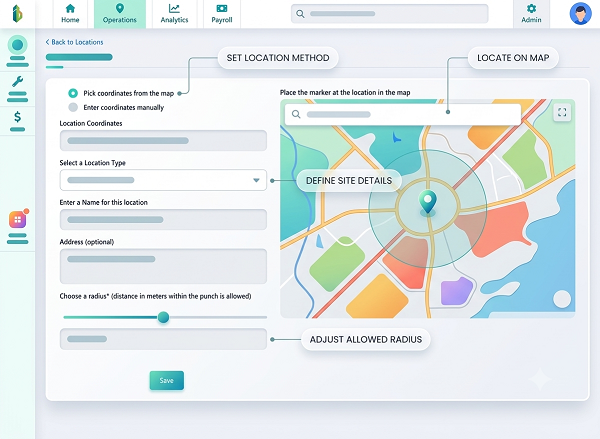
3. Geofencing
Geofencing allows businesses to define an approved geographical area for attendance. This can be useful for employees working at:
- Construction sites
- Customer premises
- Service centres
- Project locations
- Warehouses
The appropriate radius and rules should be determined by the organization's operational requirements.
4. Real-Time Attendance Visibility
A centralized dashboard can help managers view field attendance.
| Employee | Status | Location/Work Mode |
|---|---|---|
| Employee A | Present | Customer Site |
| Employee B | Present | Project Site |
| Employee C | On Leave | — |
| Employee D | Not Checked In | — |
The availability of real-time information depends on connectivity and the software's synchronization capabilities.
5. Field Employee Check-In and Check-Out
A simple workflow can be:
Start Work → Check-In | Finish Work → Check-Out
The system records the attendance event, replacing paper attendance sheets and manual messages to supervisors.
6. Multiple Customer Locations
Field employees may visit multiple customers in one day. Attendance software can help organizations distinguish between attendance and customer visits. For detailed customer-visit tracking, businesses may also require a field-service or workforce-management system; attendance software alone may not provide full route or job management functionality.
7. Working-Hour Calculation
Attendance software can calculate working hours using check-in and check-out records. Breaks and other attendance rules can also be configured where supported, reducing manual calculations by HR.
8. Field Employee Shift Management
Some field employees may work scheduled shifts (e.g., Morning Shift: 7 AM–3 PM, General Shift: 9 AM–6 PM, Evening Shift: 2 PM–10 PM). Attendance software can assign shifts and identify attendance exceptions based on the employee's schedule.
9. Flexible Working Hours
Field employees may not always follow conventional office timings. Businesses can configure attendance rules according to their actual work arrangements, which is especially useful for field service teams.
10. Attendance for Sales Employees
Sales representatives frequently travel to customer offices, retail outlets, distributor locations, meetings, and events. Mobile attendance allows sales employees to record attendance without visiting the company office.
11. Attendance for Service Engineers
Service engineers travel to customer sites to install equipment, repair machinery, perform maintenance, inspect systems, and provide technical support. Mobile attendance helps record their working-day attendance.
12. Attendance for Delivery Employees
Delivery teams spend most of their working day on the road. Mobile attendance records their workday start and end. A dedicated logistics or field-service system may be needed alongside attendance software for detailed delivery tracking.
13. Attendance for Construction and Project Teams
Construction workers and project employees work at temporary sites. Mobile or location-based attendance helps organizations record attendance at approved project locations when employees do not report to a permanent office.
14. Attendance for Healthcare Field Workers
Field healthcare employees work at patient homes, clinics, community locations, and outreach sites. Mobile attendance records attendance away from the main facility.
15. Leave Management
Field employees can apply for leave through a mobile application or employee portal:
Employee Applies Leave → Manager Reviews → Leave Approved → Attendance Updated
16. Attendance Regularization
If field employees forget to check in or check out, they can submit a regularization request:
Missing Punch → Employee Request → Manager Approval → Attendance Updated
17. Overtime Tracking
Attendance software can identify additional working hours beyond scheduled shifts and route them for manager approval.
18. Late Coming and Early Leaving
Attendance software compares actual attendance against scheduled work timings and flags late arrivals or early departures according to configured rules.
19. Attendance and Payroll Integration
Attendance information directly impacts payroll via paid days, unpaid leave, overtime, and deductions:
Field Attendance → Leave → Overtime → Approval → Payroll
20. Manager Approval
Managers can review team attendance, leave requests, missing punches, corrections, overtime, and late attendance through a structured workflow.
21. Employee Self-Service
Field employees gain access to attendance history, check-in/out features, working hours, leave balances, and regularization requests directly via app or web portals.
22. Multi-Location Field Attendance
Centralized attendance software allows HR to manage employees spread across different cities, districts, states, customer sites, and project locations within one platform.
23. Location-Based Attendance Reports
Reports aggregate data on check-in/out times, assigned vs. recorded locations, and work modes to give management clearer operational context.
24. Cloud-Based Attendance Software
Cloud systems provide remote access, centralized data, multi-location support, and automatic updates for distributed field teams.
25. Offline Attendance Support
Some systems allow offline attendance recording when internet access is unavailable, synchronizing data automatically once connectivity is restored.
26. Battery and Device Considerations
Organizations must consider smartphone battery consumption, device compatibility, GPS permissions, and offline capabilities when deploying mobile apps.
27. Data Security and Privacy
Systems require security features like user authentication, role-based access, permission management, secure transmission, audit logs, and clear location tracking policies.
28. Attendance Audit Trail
An audit trail maintains transparency by recording regularization requests, approvals, timestamps, and adjustments.
29. Attendance Dashboard for Managers
Dashboards display real-time metrics on total checked-in employees, absent staff, employees on leave, late arrivals, and total working hours.
30. Branch and Field Attendance Together
Centralized platforms can unite fixed office biometric records and field employee mobile check-ins into one system.
31. Contractor and Temporary Field Workers
Attendance software can be customized to separate and track regular staff from temporary contractors across installation, maintenance, or construction tasks.
Best Features to Look for in Field Employee Attendance Software
| Feature | Importance |
|---|---|
| Mobile attendance | Very High |
| GPS/location support | High |
| Geofencing | High |
| Offline support | Very High |
| Working-hour calculation | Very High |
| Multiple locations | Very High |
| Shift management | High |
| Leave management | High |
| Attendance regularization | High |
| Overtime tracking | High |
| Employee self-service | Very High |
| Manager approval | Very High |
| Payroll integration | Very High |
| Attendance dashboard | High |
| Location-wise reports | High |
| Role-based access | Very High |
| Audit trail | High |
| Data security | Very High |
| Cloud access | High |
| Scalability | Very High |
GPS Attendance vs. Geofencing
GPS Attendance
Records the specific geographical coordinates associated with an attendance event.
Geofencing
Establishes a virtual boundary around an approved area to restrict or validate check-ins only when within the region.
Mobile Attendance vs. Biometric Attendance
| Requirement | Mobile | Biometric |
|---|---|---|
| Field employees | Excellent | Not practical |
| Office employees | Good | Excellent |
| Customer locations | Excellent | Limited |
| Project sites | Excellent | Possible |
| Remote employees | Excellent | Not suitable |
| GPS | Available in some apps | Not primary |
| Fixed location | Good | Excellent |
| Internet dependency | Usually relevant | Depends on device/setup |
Common Attendance Problems for Field Employees
- Employees Away From Office: Traditional biometric devices aren't practical.
- Multiple Work Locations: Frequent travel to customer or project sites.
- Manual Attendance: Inconsistent reporting over calls or messaging apps.
- Location Verification: Difficulty confirming where attendance was recorded.
- Poor Connectivity: Weak mobile internet at remote sites.
- Missing Punches: Forgotten check-ins or check-outs.
- Working-Hour Calculation & Payroll Errors: Complex manual calculation of field working hours.
Example of Field Employee Attendance Workflow
- 8:45 AM: Employee reaches customer site.
- 8:50 AM: Employee opens app and performs Check-In.
- 9:00 AM: Service work begins.
- 5:30 PM: Work completed; Check-Out.
- 5:35 PM: Attendance processed; working hours calculated automatically.
- End of Month: Approved attendance synced to payroll.
Attendance Software vs. Manual Attendance for Field Employees
| Feature | Manual Method | Attendance Software |
|---|---|---|
| Mobile check-in | Difficult | Yes |
| Location information | Manual | Available in some systems |
| Working-hour calculation | Manual | Automated |
| Leave management | Separate process | Integrated in many systems |
| Reports | Time-consuming | Automated |
| Multi-location management | Difficult | Supported |
| Attendance corrections | Manual | Workflow-based |
| Payroll integration | Difficult | Available in some systems |
| Real-time visibility | Limited | Available depending on system |
| Audit trail | Limited | Available in many systems |
How Attendance Software Helps Field Workforce Management
- Reduces manual attendance tracking
- Enables remote check-in across multiple sites
- Automates working-hour and overtime calculations
- Integrates field employee leave and attendance regularization
- Improves real-time manager visibility and streamlines payroll
Conclusion
Attendance Software for Field Employees provides businesses with a practical way to manage attendance when employees work outside traditional office environments. Selecting the right system depends on workforce size, work locations, device access, offline capabilities, connectivity, and specific payroll/security requirements.
A typical field attendance workflow is: Employee Reaches Work Location → Mobile Check-In → Attendance Recorded → Work Completed → Check-Out → Working Hours → Approval → Payroll
For organizations with sales teams, service engineers, construction workers, delivery teams, healthcare workers, technicians, and other mobile employees, field attendance software can reduce manual processes and provide better visibility into workforce attendance.
The right system should be selected based on the organization's field workforce size, work locations, mobile device availability, connectivity, attendance policies, privacy requirements, payroll process, and reporting needs. Before implementation, businesses should test practical scenarios such as poor internet connectivity, multiple customer locations, missed punches, location changes, employee transfers, GPS accuracy, battery usage, overtime, leave, and payroll integration. This helps ensure the attendance system works effectively in real-world field conditions.
Field employees record attendance from approved locations through the InnBuilt Employee Tracking App. Geolocation and time verification give managers visibility and provide reliable payroll hours.