Best Attendance Management Software in India
Best Attendance Management Software in India
Managing employee attendance is an important part of HR and payroll operations. As businesses grow, maintaining attendance through paper registers, spreadsheets, or separate systems can become time-consuming and difficult to control.
Attendance Management Software in India helps businesses automate employee check-in and check-out, working-hour calculations, shifts, leave, overtime, attendance corrections, and reports. Many modern systems also support biometric devices, mobile attendance, GPS, cloud access, and payroll integration.
For companies with employees working from offices, branches, factories, construction sites, client locations, or remotely, choosing the right attendance software can significantly simplify workforce management.
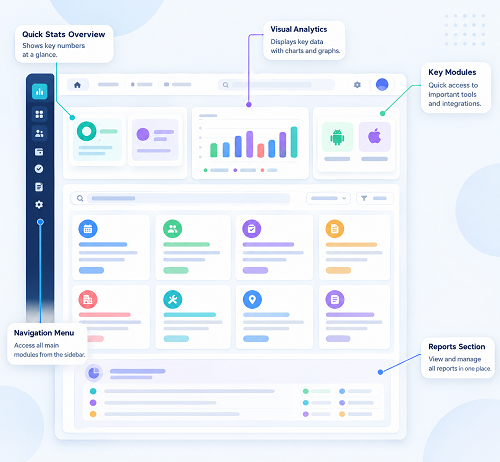
What Is Attendance Management Software?
Attendance Management Software is a digital system used to record and manage employee attendance.
Instead of manually maintaining registers or Excel sheets, businesses can record attendance electronically through supported methods such as:
- Biometric devices
- Face recognition
- Mobile applications
- Web applications
- GPS-based attendance
- Geofencing
- QR-based attendance
A typical process is:
Employee Check-In → Attendance Record → Working Hours → Leave/Overtime → Approval → Payroll
Why Businesses in India Need Attendance Software
Indian businesses operate across a wide variety of industries and workforce models.
Employees may work in:
- Corporate offices
- Factories
- Retail outlets
- Hospitals
- Hotels
- Restaurants
- Schools
- Construction sites
- Client locations
- Remote locations
- Multiple branches
Each business may have different attendance requirements.
For example, an IT company may need remote and hybrid attendance, while a manufacturing company may need biometric and shift management. A security agency may require GPS and multi-site attendance, while a retail chain may need branch-wise attendance.
Therefore, the best attendance software is not necessarily the software with the most features. It is the system that best matches the organization's actual workforce requirements.
Key Features of the Best Attendance Management Software
1. Biometric Attendance
Biometric attendance allows employees to record attendance using supported devices such as:
- Fingerprint
- Face recognition
This is useful for employees working at fixed locations such as offices, factories, warehouses, and retail outlets.
2. Mobile Attendance
Mobile attendance is useful for:
- Field employees
- Sales teams
- Remote workers
- Client-site employees
- Service engineers
- Supervisors
Employees can record attendance through a mobile application according to company policies.
3. GPS Attendance
GPS-enabled attendance can associate an attendance event with a location.
For example:
Employee Reaches Customer Site → GPS Verification → Check-In
This can be useful for organizations with mobile employees.
Businesses should clearly communicate location-tracking policies and comply with applicable privacy requirements.
4. Geofencing
Geofencing allows an organization to define an approved geographical area.
For example:
Office Location → Geofence → Employee Check-In
This can help businesses manage location-based attendance.
The geofence should be configured according to the actual workplace and business requirements.
5. Shift Management
Businesses with multiple shifts need flexible attendance software.
For example:
| Shift | Timing |
|---|---|
| Morning | 6 AM–2 PM |
| General | 9 AM–6 PM |
| Evening | 2 PM–10 PM |
| Night | 10 PM–6 AM |
The software should correctly handle shift assignments and attendance calculations.
6. Night-Shift Support
Organizations such as hospitals, hotels, security agencies, BPOs, and IT support companies may operate throughout the night.
For example:
Check-In: 10 PM
Check-Out: 6 AM
The system should correctly process attendance that crosses midnight.
Businesses should test overnight scenarios before implementation.
7. Working-Hour Calculation
Attendance software can automatically calculate working hours.
For example:
Check-In: 9:15 AM
Check-Out: 6:30 PM
The system calculates working time based on configured break and attendance rules.
This reduces manual calculations by HR.
8. Leave Management
Attendance and leave management can be combined in one system.
Employees can:
- Apply for leave
- View leave balance
- Check leave history
- Track approval status
Managers can approve or reject leave requests.
9. Attendance Regularization
Employees may occasionally forget to check in or check out.
For example:
Employee Worked Full Day → Missing Punch
The employee can submit a regularization request.
A typical process is:
Request → Manager Approval → Attendance Updated
The system can maintain an audit trail of the change.
10. Overtime Tracking
Employees may work additional hours because of:
- Production requirements
- Client deadlines
- Peak business periods
- Maintenance
- Emergency work
- Special projects
Attendance software can identify additional working hours for review and approval.
Actual overtime eligibility and payment should follow company policies and applicable employment requirements.
Attendance Software for Different Industries
The best attendance system depends heavily on the industry.
IT Companies
Important features include:
- Remote attendance
- Hybrid attendance
- Flexible working hours
- Mobile/web access
- Shift management
Manufacturing Companies
Important features include:
- Biometric attendance
- Shift management
- Overtime
- Multiple departments
- Payroll integration
Construction Companies
Important features include:
- Mobile attendance
- GPS
- Geofencing
- Project/site management
- Field workforce support
Retail Businesses
Important features include:
- Branch-wise attendance
- Multiple shifts
- Mobile attendance
- Employee transfers
- Centralized reporting
Hospitals
Important features include:
- 24/7 shift management
- Night-shift support
- Multiple departments
- Overtime
- Leave management
Hotels and Restaurants
Important features include:
- Shift management
- Night shifts
- Department-wise attendance
- Overtime
- Multiple locations
Security Agencies
Important features include:
- GPS attendance
- Geofencing
- Multi-site attendance
- Guard deployment
- Shift management
- Supervisor monitoring
Cloud-Based Attendance Software
Cloud-based attendance software allows authorized users to access attendance information through supported devices.
Potential benefits include:
- Centralized attendance
- Remote access
- Multiple-location management
- Employee self-service
- Centralized reports
- Easier system administration
Cloud solutions can be particularly useful for companies with branches in multiple cities or states.
Before selecting a cloud platform, businesses should evaluate security, data backup, availability, access controls, and data handling.
Attendance Software for Multiple Branches
Businesses with multiple branches often face challenges when collecting attendance from each location.
For example:
Head Office → Chennai Branch / Bengaluru Branch / Hyderabad Branch / Coimbatore Branch
A centralized attendance system can provide branch-wise attendance reports from one platform.
HR can view:
- Branch-wise attendance
- Employee-wise attendance
- Department-wise attendance
- Shift-wise attendance
- Leave
- Overtime
Attendance Software for Remote Employees
Remote and hybrid work has created new attendance requirements.
Employees may work from:
- Home
- Approved remote locations
- Client sites
- Co-working spaces
Mobile and web attendance can help organizations record attendance without requiring employees to visit an office.
The company should clearly define its remote-work and attendance policies.
Attendance Software and Payroll Integration
Attendance data can affect payroll through:
- Paid days
- Unpaid leave
- Overtime
- Attendance-related deductions
- Other organization-specific rules
An integrated process can be:
Attendance → Leave → Overtime → Approval → Payroll
This can reduce duplicate data entry and help payroll teams work with approved attendance information.
Businesses should verify the exact integration capabilities before selecting a system.
Employee Self-Service
A good attendance system should make routine attendance activities easier for employees.
Employees may be able to:
- View attendance
- Check working hours
- Apply for leave
- View leave balance
- Request attendance correction
- Review attendance history
This can reduce routine HR queries.
Attendance Dashboard
A centralized dashboard can provide HR and managers with an overview of workforce attendance.
It may show:
- Total employees
- Present employees
- Absent employees
- Employees on leave
- Late employees
- Missing punches
- Overtime
- Branch-wise attendance
The availability of real-time information depends on system connectivity and configuration.
Attendance Reports
Useful reports include:
Daily Attendance Report
Shows employee attendance for a selected date.
Monthly Attendance Report
Provides monthly attendance summaries.
Employee Attendance Report
Shows individual attendance history.
Department-Wise Report
Displays attendance by department.
Branch-Wise Report
Useful for organizations with multiple locations.
Shift-Wise Report
Shows attendance according to shift.
Late Coming Report
Identifies late attendance.
Overtime Report
Shows overtime records for review.
Leave Report
Provides employee leave information.
How to Compare Attendance Software in India
When comparing different attendance solutions, businesses should consider more than just the software price.
| Feature | What to Check |
|---|---|
| Attendance methods | Biometric, mobile, web |
| Remote attendance | Supported or not |
| GPS | Availability and controls |
| Geofencing | Available if required |
| Shift management | Multiple/rotating shifts |
| Night shifts | Cross-midnight support |
| Leave | Integrated management |
| Overtime | Tracking and approval |
| Regularization | Approval workflow |
| Payroll | Integration options |
| Branches | Multi-location support |
| Reports | Custom and standard reports |
| Employee self-service | Mobile/web access |
| Security | Roles, permissions, audit logs |
| Offline support | Important for field teams |
| Scalability | Suitable for future growth |
| Support | Implementation and customer support |
Common Mistakes When Choosing Attendance Software
Choosing Based Only on Price
The cheapest software may not provide the features your workforce actually needs.
Ignoring Shift Requirements
Businesses with night or rotating shifts should test these scenarios before purchase.
Not Testing Mobile Attendance
Field and remote employees need a reliable mobile experience.
Ignoring Payroll Integration
Attendance data often affects salary processing, so integration should be evaluated early.
Not Checking Multi-Location Support
Companies planning to expand should ensure the system can support additional branches.
Overlooking Security
Attendance and employee information should be protected through appropriate access controls.
Not Testing Real-World Scenarios
Businesses should test missing punches, overtime, leave, night shifts, employee transfers, and connectivity problems before implementation.
Manual Attendance vs. Attendance Software
| Feature | Manual/Excel | Attendance Software |
|---|---|---|
| Attendance recording | Manual | Automated |
| Working-hour calculation | Manual | Automated/configurable |
| Leave management | Separate | Integrated in many systems |
| Multiple branches | Difficult | Supported |
| Mobile attendance | Difficult | Available |
| GPS | No | Available in some systems |
| Shift management | Manual | Configurable |
| Reports | Time-consuming | Automated |
| Payroll integration | Difficult | Available in some systems |
| Audit trail | Limited | Available in many systems |
| Employee self-service | Limited | Available |
| Central dashboard | No | Yes |
Benefits of Using Attendance Management Software
Businesses can benefit from:
Reduced Manual Work
HR teams spend less time entering and consolidating attendance data.
Better Attendance Accuracy
Automated attendance records can reduce common manual-entry errors.
Faster Reporting
HR can generate attendance reports without manually combining spreadsheets.
Improved Payroll Preparation
Approved attendance data can be used for payroll processing.
Better Workforce Visibility
Managers can quickly view attendance across teams and locations.
Easier Leave Management
Leave and attendance can be managed through one platform.
Improved Employee Self-Service
Employees can access their own attendance information.
Scalability
A centralized system can be easier to manage as employee numbers and locations increase.
Best Attendance Software for Small and Large Businesses
Small Businesses
Small businesses may prioritize:
- Easy setup
- Affordable pricing
- Mobile attendance
- Leave management
- Basic reports
- Payroll integration
Medium Businesses
Medium-sized companies may require:
- Multiple branches
- Shift management
- Employee self-service
- Biometric integration
- Approval workflows
- Payroll integration
Large Enterprises
Large organizations may require:
- Multi-location support
- Multiple attendance devices
- Advanced access controls
- Regional management
- Detailed reporting
- API/integration capabilities
- Scalability
- Strong security controls
Why Attendance Software Is Better Than Excel for Growing Businesses
Excel can be useful for basic attendance management when the workforce is small. However, as the number of employees and locations increases, maintaining spreadsheets can become difficult.
Attendance software can automate:
Check-In → Working Hours → Leave → Overtime → Approval → Reports → Payroll
This reduces repetitive data entry and provides a centralized source of attendance information.
Frequently Asked Questions
What is the best attendance management software in India?
The best attendance software depends on the company's employee size, industry, attendance method, number of locations, shift requirements, remote-work model, and payroll process. Businesses should compare systems based on their actual requirements rather than choosing solely by brand name or price.
Can attendance software track remote employees?
Yes, many modern attendance systems support mobile or web-based attendance for remote employees. Some also provide GPS or location-based functionality.
Can attendance software integrate with payroll?
Many attendance platforms offer payroll integration or export attendance data for payroll processing. The exact integration depends on the software and payroll platform.
Is biometric attendance better than mobile attendance?
Neither is universally better. Biometric attendance is generally suitable for fixed workplaces, while mobile attendance is more useful for field, remote, and distributed employees. Businesses with different workforce types may use both.
Can attendance software manage night shifts?
Many systems support night and cross-midnight shifts, but businesses should test their specific shift scenarios before implementation.
Can attendance software manage multiple branches?
Yes, multi-location attendance is a common requirement for growing businesses. Branch-wise access and reporting should be checked when comparing software.
Does attendance software calculate overtime?
Many systems can calculate or identify overtime based on configured rules. Overtime should be reviewed and approved according to company policy and applicable requirements.
Conclusion
The best Attendance Management Software in India is the one that fits your organization's workforce, attendance policies, locations, shifts, and payroll requirements.
A small office may need simple biometric attendance and leave management, while a large organization may require cloud-based attendance, mobile and GPS attendance, multiple branches, shift management, employee self-service, overtime tracking, payroll integration, and detailed reporting.
A good attendance management process can be summarized as:
Employee → Check-In → Attendance → Working Hours → Leave/Overtime → Approval → Reports → Payroll
Before choosing a solution, businesses should evaluate features, ease of use, scalability, security, integration capabilities, mobile support, multi-location functionality, implementation, and customer support.
Most importantly, test the software using real business scenarios—such as remote employees, field workers, night shifts, multiple branches, missing punches, overtime, employee transfers, and poor internet connectivity—before making a final decision. This helps ensure the chosen attendance software can support the organization's day-to-day operations and future growth.
Indian businesses can manage mobile and face check-ins, shifts, leave, overtime, branches, and payroll integration through InnBuilt Attendance Management Software.