Biometric Attendance System vs. Mobile Attendance App
Biometric Attendance System vs. Mobile Attendance App
Accurate employee attendance is essential for HR management, working-hour calculations, leave tracking, overtime processing, and payroll. Traditionally, businesses have relied on biometric attendance machines installed at office entrances. With the growth of remote work, field employees, and multi-location businesses, mobile attendance apps have also become a popular option.
Both systems can automate attendance tracking, but they are designed for different workplace environments.
So, which is better: a Biometric Attendance System or a Mobile Attendance App?
The answer depends on where employees work, how attendance needs to be verified, the number of locations, and how the business manages its workforce.
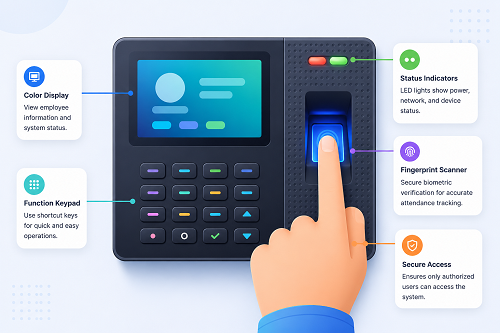
What Is a Biometric Attendance System?
A biometric attendance system records employee attendance using a person's unique biometric characteristics.
Common methods include:
- Fingerprint
- Facial recognition
- Other supported biometric identification methods
An employee typically registers with the attendance device and then uses the biometric method to check in and check out.
For example:
Employee Arrives → Biometric Verification → Check-In Recorded
At the end of the working day:
Employee Leaves → Biometric Verification → Check-Out Recorded
The system can then calculate attendance and working hours.
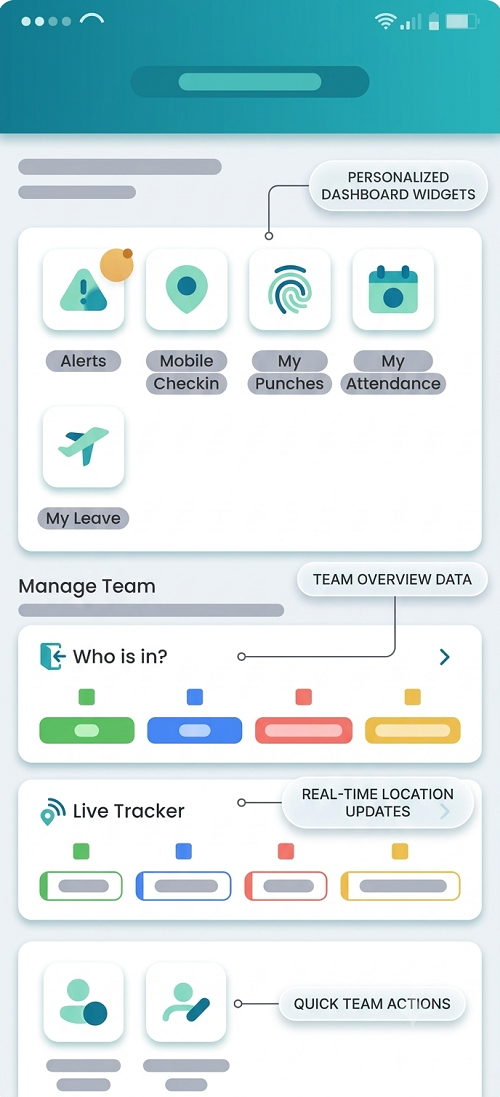
What Is a Mobile Attendance App?
A mobile attendance app allows employees to record attendance using a smartphone or other supported mobile device.
Depending on the software, it may support:
- Mobile check-in/check-out
- GPS/location verification
- Geofencing
- Photo or selfie verification
- Attendance history
- Leave applications
- Attendance regularization
- Working-hour tracking
A typical workflow is:
Employee Opens App → Check-In → Verification → Attendance Recorded
Mobile attendance can be particularly useful for remote and field employees.
Biometric vs. Mobile Attendance: Quick Comparison
| Feature | Biometric Attendance | Mobile Attendance App |
|---|---|---|
| Attendance device | Dedicated machine | Smartphone |
| Best for | Fixed workplaces | Remote/field/distributed teams |
| Employee identification | Biometric | App-based verification |
| GPS | Usually not the primary method | Often available |
| Multiple locations | Possible with suitable setup | Generally easier |
| Remote attendance | Limited | Suitable |
| Field attendance | Limited | Suitable |
| Hardware requirement | Yes | Employee smartphone |
| Internet dependency | Depends on system | Usually required for cloud sync |
| Employee self-service | Limited depending on system | Common |
| Leave management | Usually separate/integrated | Often available |
| Payroll integration | Possible | Possible |
| Setup | Hardware installation | App deployment |
| Maintenance | Device maintenance | App/software maintenance |
1. Attendance Verification
The biggest difference is how employees are identified.
Biometric System
Employees use a fingerprint or face-recognition system, depending on the device.
This provides a physical attendance point.
Mobile App
Employees use their smartphone to record attendance. Depending on the system, verification may involve:
- Login credentials
- GPS
- Geofencing
- Face verification
- Device authentication
Businesses should select the verification method that best matches their attendance policy.
2. Workplace Environment
Biometric systems are particularly suitable for employees who work at a fixed location.
Examples include:
- Factories
- Offices
- Warehouses
- Retail stores
- Schools
- Hospitals
Employees pass through the designated attendance point and mark their attendance.
Mobile apps are more flexible for employees who work outside a fixed workplace.
Examples include:
- Sales employees
- Field service teams
- Construction workers
- Delivery teams
- Remote employees
- Project-based employees
3. Remote Employees
Biometric attendance is generally designed around a physical attendance device.
This makes it less convenient for employees working from home or other remote locations.
A mobile app can allow authorized employees to record attendance from their approved work location.
For example:
Work From Home → Mobile App → Check-In
This makes mobile attendance more suitable for remote work environments.
4. Field Employees
Field employees may spend most of their working day away from the office.
A biometric machine cannot easily follow them from one customer location to another.
A mobile attendance app can provide a more practical solution.
Depending on the software, the business may use:
Mobile Check-In + GPS + Geofencing
This can help organizations verify that employees are recording attendance from an approved location.
5. GPS and Location Verification
Location tracking is one of the major advantages of mobile attendance apps.
Depending on the software, businesses can define an approved location or geographical area.
For example:
Office Location → Geofence → Employee Check-In
If an employee attempts to check in outside the permitted area, the application may flag or prevent the attendance based on configured rules.
Businesses should have clear policies regarding location tracking and employee privacy.
6. Hardware Requirements
Biometric attendance requires dedicated hardware.
A business may need:
- Biometric attendance device
- Power supply
- Network connection
- Installation
- Device maintenance
Mobile attendance generally requires employees to have compatible smartphones and the relevant application.
This can reduce the need to install attendance hardware at every location.
7. Multiple Locations
Consider a company with:
- Head Office
- Branch A
- Branch B
- Warehouse
- Project Site
Installing and maintaining biometric machines at every location can require additional hardware and administration.
A mobile attendance app can potentially allow employees at different locations to use the same centralized system.
This makes mobile attendance attractive for distributed workforces.
8. Cost Considerations
The total cost depends on the number of employees, locations, devices, software features, and subscription model.
Biometric System Costs May Include:
- Attendance devices
- Installation
- Networking
- Software
- Maintenance
- Replacement hardware
Mobile Attendance Costs May Include:
- Software subscription
- Mobile application
- Employee devices
- Data connectivity
- Optional location or verification features
Businesses should compare the total cost of ownership, rather than only comparing the software subscription price.
9. Ease of Deployment
A biometric system requires physical installation.
The process may include:
Purchase Device → Install Device → Configure Network → Register Employees → Test → Start Attendance
A mobile system can often be deployed through:
Create Employee Accounts → Install App → Configure Policies → Employee Login → Start Attendance
The exact setup depends on the software.
10. Attendance From Multiple Work Locations
Mobile attendance is generally more flexible when employees work from different approved locations.
For example:
- Employee A → Office
- Employee B → Customer Site
- Employee C → Project Site
- Employee D → Home
A mobile system can potentially manage all four attendance scenarios through a centralized platform, provided the company's policies permit those attendance locations.
11. Employee Self-Service
Mobile attendance applications often provide employee self-service features.
Employees may be able to:
- Check attendance
- Check working hours
- Apply for leave
- View leave balances
- Submit attendance corrections
- View attendance history
Biometric devices generally focus primarily on attendance capture, although the associated software may provide employee self-service through a separate portal.
12. Leave Management
Attendance software should ideally connect attendance with leave management.
For example:
Employee → Leave Request → Manager Approval → Leave Balance → Attendance
Mobile applications can make this process convenient because employees can submit requests directly from their phones.
13. Attendance Regularization
Employees sometimes forget to mark attendance.
For example:
Employee forgets Check-In → Submits Regularization → Manager Approves → Attendance Updated
Both biometric-based and mobile systems can support regularization if the associated software includes this feature.
The important factor is the approval workflow and audit trail.
14. Working-Hour Calculation
Both systems can calculate working hours if they record check-in and check-out accurately.
For example:
- Check-In: 9:00 AM
- Check-Out: 6:00 PM
- Break: 1 hour
- Net Working Time: 8 hours
The system can use this information for attendance reports and, where configured, payroll or overtime processing.
15. Shift Management
Both biometric and mobile systems can support shift-based attendance if the software provides shift management.
For example:
| Shift | Timing |
|---|---|
| Morning | 6 AM–2 PM |
| General | 9 AM–6 PM |
| Evening | 2 PM–10 PM |
| Night | 10 PM–6 AM |
Businesses with multiple shifts should verify that the software correctly handles shift assignment, late arrival, early leaving, and overnight shifts.
16. Night-Shift Attendance
Night shifts can cross midnight.
For example:
- Check-In: 10:00 PM
- Check-Out: 6:00 AM next day
The attendance software should recognize these records as part of the same shift.
This is important for:
- Security services
- Manufacturing
- Hospitals
- BPOs
- Hospitality
- Logistics
17. Attendance and Payroll Integration
Attendance information is often an important input for payroll.
For example:
Attendance → Working Hours → Leave → Overtime → Payroll
Both biometric and mobile systems can potentially integrate with payroll software.
When evaluating a solution, check whether it can transfer:
- Present days
- Absent days
- Paid leave
- Unpaid leave
- Overtime
- Working hours
- Attendance adjustments
Integration can reduce manual data entry and payroll errors.
18. Internet Connectivity
Mobile attendance apps generally depend on mobile data or Wi-Fi to transmit attendance information to the cloud system.
Biometric devices may also require network connectivity, particularly when attendance needs to be synchronized with a centralized server.
Some systems may provide offline storage or synchronization features.
Before purchasing, ask the vendor: What happens when the internet connection is unavailable?
This is especially important for factories, construction sites, and remote locations.
19. Data Security and Privacy
Both systems collect employee information.
Businesses should evaluate:
- Data encryption
- User authentication
- Role-based access
- Audit logs
- Data storage
- Backup procedures
- Access permissions
For mobile attendance, businesses should also understand how location data, device information, and any biometric/photo verification data are collected and handled.
Businesses should establish clear employee policies and comply with applicable privacy and employment requirements.
20. Which System Is Easier for Employees?
This depends on the workforce.
Biometric
Employees simply approach the attendance device and authenticate. This can be very convenient for fixed workplaces.
Mobile
Employees can mark attendance directly from their phones. This is convenient for remote and field employees.
Therefore:
- Fixed Workplace → Biometric may be simpler
- Distributed Workforce → Mobile may be more convenient
Biometric Attendance: Advantages
A biometric system can provide:
- Physical attendance point
- Fast employee identification
- Suitable for fixed workplaces
- Reduced dependence on employee smartphones
- Support for fingerprint or facial recognition
- Centralized attendance when connected to software
Biometric Attendance: Limitations
Potential limitations include:
- Hardware investment
- Installation requirements
- Device maintenance
- Less flexibility for remote workers
- Additional setup for multiple locations
- Dependence on device availability
Mobile Attendance App: Advantages
Mobile attendance can provide:
- Remote attendance
- Field attendance
- GPS/location options
- Employee self-service
- Multiple-location flexibility
- Lower dependence on dedicated attendance hardware
- Convenient deployment
- Mobile access to attendance information
Mobile Attendance App: Limitations
Potential considerations include:
- Smartphone dependency
- Internet/mobile data requirements
- Device compatibility
- Battery issues
- Location/privacy considerations
- Need for appropriate controls against misuse
Which Is Better for Small Businesses?
For a small business with one office and employees working regular hours, a biometric attendance system can be a practical choice.
For a small business with sales staff, field workers, remote employees, or multiple locations, a mobile attendance app may provide greater flexibility.
Which Is Better for Factories?
Factories often have employees entering through a fixed location.
A biometric system can therefore be suitable because employees can mark attendance when entering and leaving the premises.
However, the final choice should also consider shifts, multiple gates, overtime, and payroll integration.
Which Is Better for Field Employees?
For field employees, a mobile attendance app is generally more practical.
Employees can record attendance from approved locations using their smartphones.
GPS or geofencing can provide additional location verification where appropriate.
Can Businesses Use Both?
Yes.
Some businesses can use a hybrid attendance system.
For example:
- Office Employees → Biometric
- Field Employees → Mobile App
Both can feed into the same centralized attendance platform.
The workflow can be:
Biometric + Mobile Attendance → Centralized Attendance System → Leave & Overtime → Payroll
This can be a useful approach for businesses with mixed workforces.
Biometric vs. Mobile: Quick Decision Guide
Choose Biometric Attendance when:
- Employees work from a fixed location.
- The business has a factory or office.
- Dedicated attendance hardware is acceptable.
- Employees should mark attendance at a physical entry point.
- Smartphone-based attendance is unnecessary.
Choose a Mobile Attendance App when:
- Employees work remotely.
- Employees work in the field.
- The company has multiple locations.
- GPS/location verification is useful.
- Employees need mobile self-service.
- The business wants to minimize dedicated attendance hardware.
Choose Both when:
- The workforce includes office and field employees.
- Different locations require different attendance methods.
- The business wants centralized attendance management.
Questions to Ask Before Choosing
Before selecting an attendance solution, ask:
- Where do employees work?
- How many locations does the business have?
- Do employees work remotely?
- Are there field employees?
- Are multiple shifts required?
- Does the system support night shifts?
- Can attendance integrate with payroll?
- Does it support leave management?
- Can employees request attendance corrections?
- Does mobile attendance support GPS or geofencing?
- What happens if internet connectivity is unavailable?
- How is employee data protected?
- What hardware is required?
- What is the total cost of ownership?
- Can the system scale as the business grows?
Conclusion
Both Biometric Attendance Systems and Mobile Attendance Apps can provide effective employee attendance management, but they serve different workplace needs.
Biometric attendance is particularly suitable for offices, factories, warehouses, retail stores, and other fixed workplaces where employees regularly enter and leave through a designated location.
Mobile attendance is more suitable for remote employees, field workers, sales teams, project teams, and businesses operating across multiple locations.
For businesses with a mixed workforce, a combination of both can provide the most flexibility:
Biometric + Mobile Attendance → Centralized Attendance → Leave & Overtime → Payroll
The right choice should be based on workforce location, attendance verification requirements, shift structure, number of locations, payroll integration, security, employee experience, and total cost.
Rather than asking which technology is universally better, businesses should ask: Which attendance method best matches the way our employees actually work?
InnBuilt Mobile Attendance App and Face Attendance Software provide flexible alternatives to fixed biometric devices. Businesses can use the right verification method for offices, branches, or field teams.