Biometric Attendance vs. Cloud-Based Attendance Software
Biometric Attendance vs. Cloud-Based Attendance Software
Employee attendance is an important part of HR and payroll management. Businesses need reliable attendance data to track working hours, manage shifts, calculate leave and overtime, and process payroll accurately.
Traditionally, organizations have relied on biometric attendance systems such as fingerprint or facial-recognition devices. Today, cloud-based attendance software offers businesses a more flexible approach, allowing employees to record attendance through mobile applications, web portals, biometric devices, GPS, or other methods.
But which option is better—Biometric Attendance or Cloud-Based Attendance Software?
The answer depends on your workforce, locations, attendance policies, and business requirements.
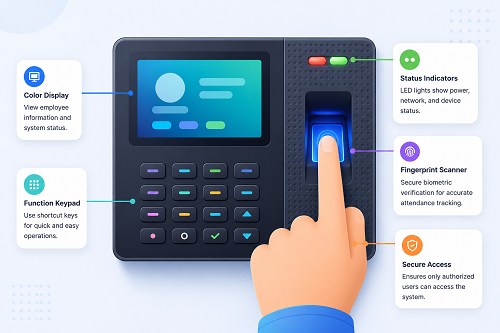
What Is Biometric Attendance?
Biometric attendance uses an employee's unique biological characteristics to record attendance.
Common biometric methods include:
- Fingerprint recognition
- Facial recognition
- Iris recognition
- Other biometric authentication methods
An employee registers their biometric information with the attendance system and uses it to authenticate when entering or leaving the workplace.
For example:
Employee → Fingerprint/Facial Recognition → Attendance Device → Attendance Record
Biometric attendance is commonly used in offices, factories, warehouses, schools, hospitals, and other fixed workplaces.
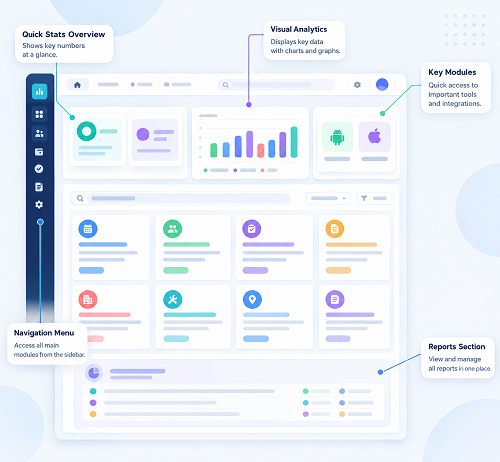
What Is Cloud-Based Attendance Software?
Cloud-based attendance software is an online attendance management system where attendance information is stored and processed through a centralized cloud platform.
Employees may be able to mark attendance through:
- Mobile applications
- Web browsers
- GPS
- Geofencing
- Biometric devices connected to the cloud
- Facial recognition
- Other supported attendance methods
HR managers can access attendance information from an authorized device without depending on a single physical attendance machine.
A typical workflow is:
Employee → Mobile/Web/Biometric → Cloud Attendance System → HR Dashboard → Payroll
Biometric vs. Cloud-Based Attendance: Key Differences
| Feature | Biometric Attendance | Cloud-Based Attendance Software |
|---|---|---|
| Primary method | Fingerprint/face/device | Mobile, web, GPS, biometric and more |
| Physical device | Usually required | May or may not be required |
| Fixed workplace | Excellent | Excellent |
| Remote employees | Limited | Better suited |
| Field employees | Limited | GPS/mobile support |
| Multiple locations | Requires multiple devices | Centralized management |
| Real-time access | Depends on system | Usually available through cloud |
| Shift management | Basic to advanced | Usually comprehensive |
| Leave management | May be separate | Often integrated |
| Payroll integration | Depends on system | Common feature |
| Employee self-service | Limited in basic systems | Usually available |
| Scalability | Hardware-dependent | Generally easier to scale |
| Maintenance | Device maintenance required | Primarily software-based |
| Data access | Device/local server depending on setup | Internet-based authorized access |
Advantages of Biometric Attendance
1. Strong Employee Authentication
Biometric attendance uses physical characteristics to authenticate employees. This can make it more difficult for one employee to mark attendance on behalf of another.
2. Suitable for Fixed Workplaces
Factories, offices, warehouses, hospitals, and other fixed locations can benefit from biometric devices placed at entry or exit points.
3. Simple Employee Experience
Once employees are registered, marking attendance can be as simple as placing a finger on a scanner or looking at a facial-recognition device.
4. Reduces Manual Attendance
Biometric systems eliminate paper attendance registers and reduce manual attendance entry.
Limitations of Biometric Attendance
Biometric attendance also has limitations.
Physical Hardware Is Required
Businesses need to purchase, install, and maintain biometric devices.
Less Suitable for Mobile Employees
Employees who work at customer locations, construction sites, or in the field cannot always access a fixed biometric machine.
Multiple Locations Require More Devices
A company with many branches may need biometric devices at each location and an appropriate method to consolidate the information.
Device-Related Issues
Power failures, network connectivity problems, device faults, or recognition issues may occasionally affect attendance recording.
Advantages of Cloud-Based Attendance Software
1. Access Attendance from Anywhere
Because the system is cloud-based, authorized HR managers can access attendance information from different locations.
This is useful for companies with multiple offices, branches, and remote employees.
2. Supports Remote and Field Employees
Employees can mark attendance through mobile or web applications where permitted.
GPS and geofencing can provide additional location-based controls for field teams.
3. Centralized Multi-Location Management
Businesses can manage attendance for employees across different branches, offices, stores, factories, and project sites through one platform.
For example, a retail company with multiple stores can view attendance across locations without collecting separate Excel files from every branch.
4. Easy Reporting
Cloud-based systems can automatically generate reports such as:
- Daily attendance
- Monthly attendance
- Late arrivals
- Absences
- Working hours
- Overtime
- Leave
- Missing punches
- Location-wise attendance
5. Employee Self-Service
Employees can access their attendance information through a mobile or web portal.
Depending on the software, they can:
- View attendance
- Apply for leave
- Submit regularization requests
- Check working hours
- View overtime
- Review attendance history
6. Payroll Integration
Cloud-based attendance software can connect attendance with payroll.
The workflow can be:
Attendance → Leave → Overtime → Attendance Validation → Payroll
This reduces the need to manually transfer attendance information into payroll.
Is Cloud-Based Attendance Better Than Biometric Attendance?
Not necessarily.
In many cases, the best solution is a combination of both.
For example, a company may use biometric devices for employees working at its headquarters and factories while using mobile/GPS attendance for field employees.
Both attendance methods can feed data into the same cloud-based attendance management platform.
This creates a hybrid approach:
Office Employees → Biometric Device
Field Employees → Mobile/GPS
Remote Employees → Mobile/Web
↓
Cloud Attendance Management Software
↓
HR + Payroll
This can provide greater flexibility than relying on a single attendance method.
Which Is Better for Different Businesses?
IT and Technology Companies
Cloud-based attendance software may be more suitable because employees may work remotely, from offices, or on flexible schedules.
Manufacturing Companies
Biometric attendance can be useful for factory employees working at fixed locations and shifts. Connecting biometric devices to cloud software can provide centralized HR management.
Construction Companies
Cloud-based mobile and GPS attendance can be particularly useful for employees working across multiple project sites.
Retail Businesses
A combination of biometric and cloud-based attendance can help manage employees across multiple stores.
Small Businesses
A simple cloud-based mobile attendance system may be sufficient if the workforce does not require biometric authentication.
Security and Privacy Considerations
Both biometric and cloud-based systems involve employee information and therefore require appropriate security controls.
Businesses should consider:
- Role-based access
- Secure authentication
- Data encryption
- Access logs
- Data backup
- Data retention policies
- Employee privacy
- Appropriate use of location data
- Protection of biometric information
Biometric information requires particular care because it is inherently linked to an individual. Organizations should understand applicable privacy and data-protection requirements before collecting and storing biometric information.
Cost Comparison
The total cost depends on the solution and business size.
Biometric Attendance Costs May Include:
- Biometric devices
- Installation
- Networking
- Maintenance
- Device replacement
- Software
- Integration
Cloud-Based Attendance Costs May Include:
- Software subscription
- Implementation
- Mobile application
- Integration
- Optional biometric hardware
- Support
A business should compare total cost of ownership, rather than looking only at the initial purchase price.
Biometric Attendance + Cloud Software: A Modern Approach
Businesses do not necessarily have to choose between biometric and cloud-based attendance.
Modern attendance management platforms can connect biometric devices to cloud software.
For example:
Fingerprint/Facial Recognition → Biometric Device → Cloud Platform → Attendance Processing → Payroll
This allows businesses to retain biometric authentication at fixed locations while gaining centralized cloud-based management.
Final Verdict
Biometric Attendance is an excellent option for organizations where employees work at fixed locations and strong attendance authentication is important.
Cloud-Based Attendance Software is generally more flexible for businesses with multiple locations, remote employees, field workers, mobile teams, or distributed workforces.
For many growing organizations, a cloud-based attendance platform that supports biometric, mobile, GPS, and web attendance may provide the most flexible solution.
The right choice depends on your employee locations, workforce size, shift structure, attendance policies, payroll requirements, and budget.
Conclusion
The comparison between Biometric Attendance vs. Cloud-Based Attendance Software is not simply about choosing one technology over another.
Biometric devices provide convenient authentication at fixed workplaces, while cloud-based software provides centralized management, reporting, mobility, and integration.
For businesses looking to modernize attendance management, a hybrid solution can offer the best of both approaches:
Biometric + Mobile + GPS + Cloud + Payroll Integration
This allows businesses to manage attendance across offices, factories, stores, construction sites, and remote workplaces while maintaining a centralized HR and payroll process.
InnBuilt Attendance Software combines cloud accessibility with support for biometric attendance inputs where needed. Businesses can centralise office, mobile, and device records instead of operating disconnected systems.