Challenges of Managing Night Shifts and Overnight Employees
Challenges of Managing Night Shifts and Overnight Employees
Many businesses need employees to work beyond traditional daytime hours. Manufacturing plants, hospitals, hotels, restaurants, security agencies, logistics companies, call centers, and other organizations may operate throughout the night or 24 hours a day.
While night shifts help businesses maintain continuous operations, managing overnight employees can be more complex than managing standard daytime schedules. HR teams and managers need to handle shift planning, attendance, employee availability, overtime, communication, safety, and payroll accurately.
Shift management software can help businesses organize night schedules, track attendance, and connect employee working hours with payroll processes.
This guide explains the common challenges of managing night shifts and practical ways businesses can address them.
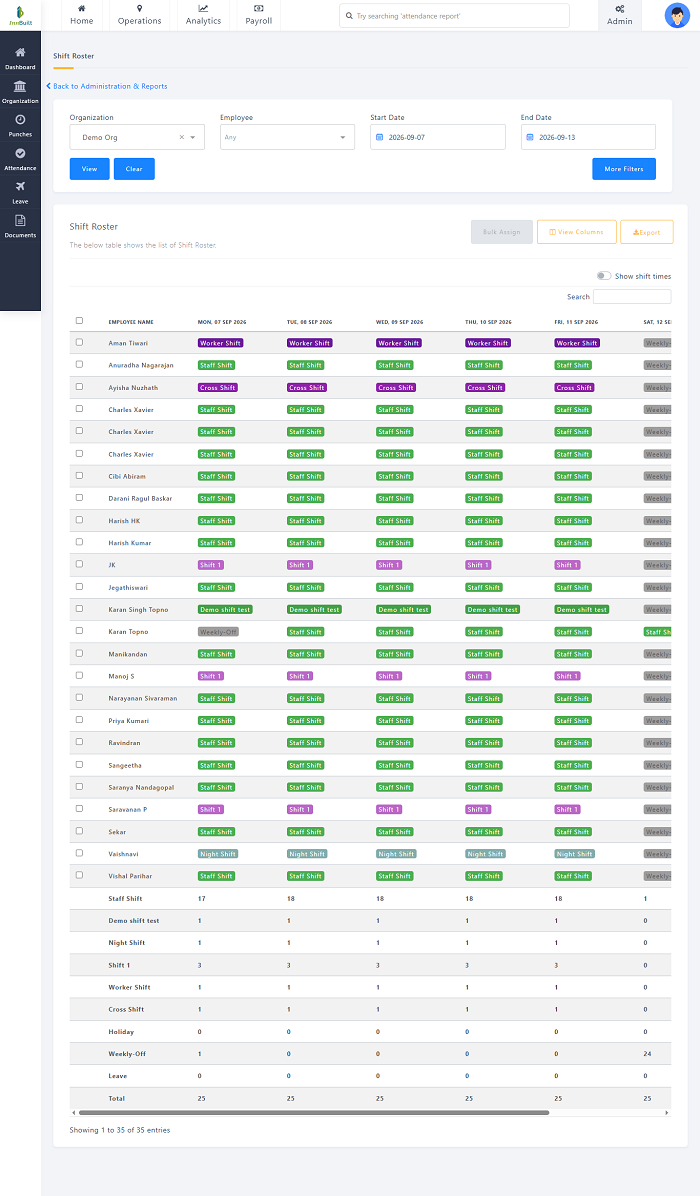
What Is a Night Shift?
A night shift is a work schedule that takes place primarily during nighttime hours. The exact timing varies between organizations.
Examples include:
- 6:00 PM to 2:00 AM
- 8:00 PM to 4:00 AM
- 10:00 PM to 6:00 AM
- 11:00 PM to 7:00 AM
Some overnight shifts cross midnight and continue into the following calendar day.
This makes accurate shift configuration particularly important for attendance and payroll processing.
Common Challenges of Managing Night Shifts
1. Scheduling Overnight Employees
Creating a night-shift schedule can be challenging when businesses have multiple teams, rotating employees, weekly offs, leave, and changing staffing requirements.
Managers need to ensure that every overnight shift has sufficient employees while avoiding unnecessary overtime.
How to Avoid It
Use predefined shift templates and recurring schedules.
Shift management software can help managers create night shifts, assign employees, and maintain recurring rosters without repeatedly creating schedules manually.
2. Managing Shifts That Cross Midnight
An overnight shift may start on one day and finish on another.
For example:
10:00 PM Monday → 6:00 AM Tuesday
Manual attendance systems may create confusion when the punch-out occurs on a different calendar date.
How to Avoid It
Configure the system specifically for overnight shifts and ensure that attendance software can correctly associate the employee's punch-in and punch-out with the assigned shift.
This is particularly important when working hours are used for payroll calculations.
3. Tracking Night-Shift Attendance
Attendance tracking can become complicated when employees report late at night and leave the following morning.
Managers may need to distinguish between:
- Scheduled attendance
- Late arrival
- Early departure
- Absence
- Missed punch
- Overtime
How to Avoid It
Integrate shift scheduling with attendance software.
The system can compare actual punch times with the employee's assigned overnight shift and provide better visibility into attendance deviations.
4. Employee Fatigue
Working at night can be challenging for employees because their work schedule differs from the typical daytime routine.
Fatigue may affect concentration, productivity, and overall work performance.
How to Avoid It
Businesses should create reasonable scheduling practices and provide adequate rest between shifts.
Managers should also avoid unnecessary last-minute changes to night schedules and monitor excessive working hours.
Organizations should follow applicable workplace requirements and internal policies when designing overnight schedules.
5. Frequent Shift Rotation
Some organizations rotate employees between day and night shifts.
For example:
- Week 1: Morning
- Week 2: Evening
- Week 3: Night
Frequent changes can make schedules difficult to manage and may create confusion for employees.
How to Avoid It
Use consistent rotation patterns and communicate schedules well in advance.
Shift management software can automate recurring rotation schedules and provide employees with visibility into upcoming assignments.
6. Managing Night-Shift Overtime
Employees may work beyond their scheduled hours when a replacement is late, workload increases, or another employee is absent.
If overtime is not monitored carefully, labor costs can increase.
How to Avoid It
Compare scheduled working hours with actual attendance.
Attendance software can help managers identify employees who work beyond their scheduled shift and provide overtime reports for review.
Organizations should apply their established overtime policies and applicable employment requirements.
7. Finding Replacement Employees
Unexpected absence during a night shift can be particularly difficult because fewer employees and managers may be available.
An uncovered night shift can affect business operations.
How to Avoid It
Maintain a list of employees who are eligible and available to cover specific shifts.
A digital scheduling system can make it easier for managers to identify potential replacements based on role, location, availability, and scheduled working hours.
8. Communication With Overnight Employees
Night-shift employees may not be physically present when daytime HR teams are available.
Important schedule changes may therefore be difficult to communicate.
How to Avoid It
Use digital communication and employee self-service tools.
A mobile employee app can allow workers to access:
- Shift schedules
- Schedule changes
- Attendance information
- Leave information
- Notifications
- Company updates
This reduces dependence on face-to-face communication.
9. Managing Leave for Night-Shift Employees
Leave management can become complicated when an overnight shift crosses midnight.
For example, an employee may start work on Friday night and finish on Saturday morning.
How to Avoid It
Use attendance and leave systems that support overnight shifts and apply clearly defined organizational rules for how such shifts are treated.
HR teams should ensure that leave policies clearly explain how overnight shifts are handled.
10. Payroll Calculation Issues
Night shifts can create payroll complexities when working hours cross calendar dates.
Additional factors such as overtime, leave, attendance deductions, and shift-related allowances may also need to be considered according to company policies.
How to Avoid It
Connect shift management and attendance software with payroll processing.
A typical workflow can be:
Night Shift Schedule → Attendance → Working Hours → Overtime/Leave → Payroll
This reduces manual transfer of attendance information.
11. Maintaining Adequate Staffing
Night shifts may require fewer employees than daytime shifts, but certain roles still need continuous coverage.
Understaffing can increase workload and affect operations.
How to Avoid It
Determine the minimum staffing requirement for each overnight shift.
Consider:
- Employee roles
- Workload
- Location
- Business activity
- Required skills
- Expected demand
Review staffing requirements regularly.
12. Skill Coverage During Night Shifts
It is not enough to simply have a certain number of employees on duty.
The right skills and roles must also be available.
For example, a manufacturing facility may require a trained technician during every night shift.
How to Avoid It
Include employee skills, roles, certifications, and responsibilities when creating schedules.
Managers should verify that every critical overnight shift has the required skill coverage.
13. Managing Multiple Night Shifts
Large organizations may have several overnight teams operating across different departments or locations.
Maintaining multiple spreadsheets can make scheduling and monitoring difficult.
How to Avoid It
Use centralized shift management software that organizes employees by:
- Department
- Location
- Role
- Shift
- Team
This can provide managers with a clearer view of overnight staffing.
14. Monitoring Late Arrivals and Early Departures
Night-shift employees may have different attendance patterns from daytime employees.
Manually checking attendance against overnight schedules can be time-consuming.
How to Avoid It
Use automated attendance reports that compare scheduled and actual working times.
Managers can then review late arrivals, early departures, absences, and other attendance deviations.
15. Employee Safety and Workplace Support
Overnight employees may work when fewer supervisors and support staff are available.
Certain workplaces may also have additional safety considerations during nighttime operations.
How to Avoid It
Businesses should establish appropriate night-shift safety procedures based on their workplace and industry.
Depending on the operation, this may include:
- Appropriate supervision
- Emergency procedures
- Security measures
- Communication channels
- Transportation arrangements where applicable
- Access to required facilities and support
Safety policies should be reviewed regularly.
How Shift Management Software Helps Manage Night Shifts
Dedicated shift management software can simplify many aspects of overnight workforce management.
Overnight Shift Configuration
Managers can create shifts that cross midnight and define appropriate start and end times.
Recurring Shift Schedules
Businesses can create recurring night-shift schedules for employees or teams.
Shift Rotation
Managers can configure rotational patterns involving morning, evening, and night shifts.
Attendance Integration
Actual attendance can be compared with the assigned night shift.
Overtime Monitoring
Managers can review employees who work beyond their scheduled hours.
Leave Integration
Approved leave can be considered when creating and updating night-shift rosters.
Employee Mobile Access
Employees can view their upcoming night shifts through a mobile application or employee portal where available.
Notifications
Employees can receive notifications about schedule assignments and approved changes.
Multiple-Location Management
Organizations with multiple facilities can manage overnight schedules across locations through a centralized system, depending on the software.
Best Practices for Managing Night-Shift Employees
Businesses can improve overnight workforce management by following these practices:
1. Publish Schedules in Advance
Give employees sufficient notice about their upcoming night shifts.
2. Create Clear Night-Shift Policies
Define rules for attendance, overtime, leave, shift changes, and replacements.
3. Configure Overnight Shifts Correctly
Make sure shifts that cross midnight are correctly configured in the attendance and payroll systems.
4. Monitor Working Hours
Regularly compare scheduled hours with actual attendance.
5. Avoid Excessive Overtime
Monitor employees who frequently work beyond their scheduled hours.
6. Provide Schedule Visibility
Allow employees to check their latest schedules through a centralized system or mobile application.
7. Maintain Backup Staffing
Have a process for handling unexpected absences during overnight shifts.
8. Consider Employee Skills
Make sure every shift has the appropriate employees and required skills.
9. Integrate Attendance With Payroll
Use consistent attendance data for payroll processing where appropriate.
10. Use Automation as the Workforce Grows
Businesses with complex overnight schedules can benefit from dedicated shift management software rather than relying entirely on spreadsheets.
Example of an Overnight Shift Schedule
A business operating three shifts might use a schedule such as:
| Shift | Timing | Example Team |
|---|---|---|
| Morning | 6:00 AM – 2:00 PM | Team A |
| Evening | 2:00 PM – 10:00 PM | Team B |
| Night | 10:00 PM – 6:00 AM | Team C |
The night shift begins on one calendar day and ends on the next. The attendance system should be configured to correctly associate the complete working period with the employee's assigned shift.
Night Shift Management With Attendance and Payroll
Managing night shifts becomes easier when scheduling, attendance, and payroll processes are connected.
A typical workforce management flow can be:
Shift Roster → Employee Attendance → Working Hours → Leave & Overtime → Payroll
The shift roster determines when employees are expected to work.
Attendance records capture when employees actually worked.
The system can then process working hours, approved leave, overtime, and other attendance-related information according to company policies before payroll processing.
This reduces the need for HR teams to manually reconcile separate spreadsheets.
Conclusion
Managing night shifts and overnight employees requires accurate scheduling, reliable attendance tracking, clear communication, and effective workforce planning.
Common challenges include shifts crossing midnight, employee fatigue, rotating schedules, unexpected absences, overtime, staffing requirements, skill coverage, leave management, and payroll processing.
Businesses can address these challenges by creating clear scheduling policies, planning shifts in advance, monitoring working hours, and providing employees with access to updated schedules.
For organizations operating multiple shifts or 24/7 operations, shift management software integrated with attendance and payroll systems can provide a centralized approach to managing overnight employees.
By connecting shift rosters, attendance, leave, overtime, and payroll, businesses can reduce manual work, improve schedule visibility, and create a more organized workforce management process.
Cross-date attendance, night allowances, breaks, overtime, and next-day check-outs are handled correctly by InnBuilt Night Shift Management Software.