Cloud-Based Attendance Software vs. Desktop Software
Cloud-Based Attendance Software vs. Desktop Software
Employee attendance is an important part of HR management and payroll processing. Businesses need an efficient way to record employee check-ins and check-outs, calculate working hours, manage leave, track overtime, and generate attendance reports.
Traditionally, many businesses used desktop-based attendance software installed on a computer or local server. Today, cloud-based attendance software has become increasingly popular because employees and managers can access attendance information from different locations.
But which option is better for your business?
The answer depends on your workforce, locations, IT requirements, budget, security expectations, and need for remote access.
This guide compares cloud-based attendance software and desktop attendance software to help businesses make an informed decision.
What Is Cloud-Based Attendance Software?
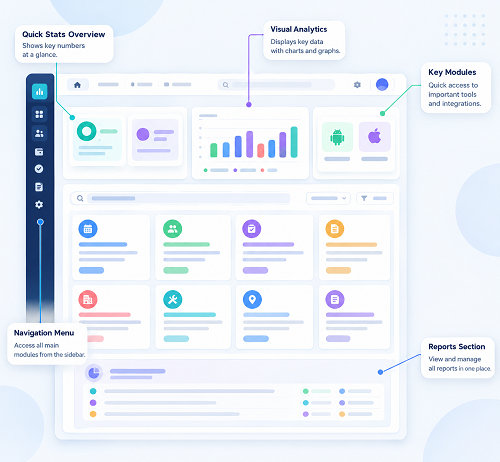
Cloud-based attendance software is hosted on remote servers and accessed through the internet.
Instead of installing the entire system on a local computer, authorized users can generally access the software through a web browser or mobile application.
A typical workflow may look like:
Employee Attendance → Cloud System → Attendance Processing → Reports → Payroll
Depending on the solution, employees may mark attendance using:
- Mobile application
- Web browser
- Biometric device
- GPS-based attendance
- Face recognition
- Other supported attendance devices
HR and managers can access the relevant information from authorized devices.
What Is Desktop Attendance Software?
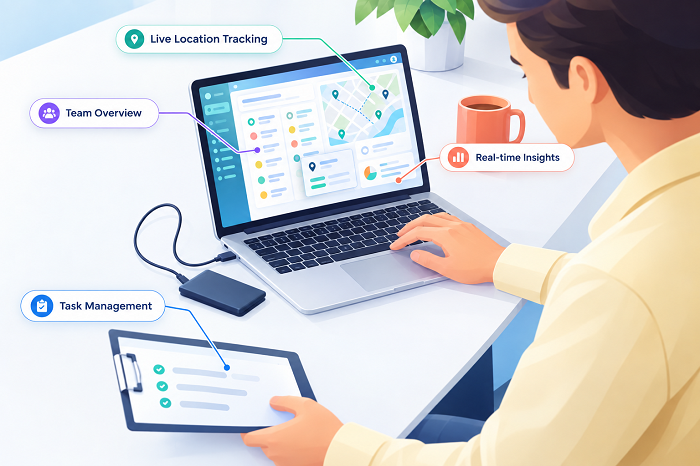
Desktop attendance software is installed on a local computer or organization's internal server.
The software and attendance database are generally managed within the business's local IT environment.
A typical setup may be:
Attendance Device → Local Computer/Server → Attendance Software → Reports
Employees may mark attendance through connected biometric devices or other supported methods.
HR generally accesses the system from computers connected to the local network.
Cloud vs. Desktop Attendance Software: Quick Comparison
| Feature | Cloud-Based | Desktop-Based |
|---|---|---|
| Installation | Usually minimal | Required |
| Access | Internet-based | Usually local/network |
| Remote access | Easy | More difficult |
| Multiple locations | Easier | More complex |
| Updates | Usually provider-managed | Often manual |
| Data hosting | Provider/cloud environment | Local server/computer |
| Mobile access | Common | Limited depending on system |
| Maintenance | Usually lower internal IT effort | Higher internal responsibility |
| Scalability | Generally easier | May require infrastructure changes |
| Internet dependency | Usually required for cloud access | Often less dependent on internet |
| Initial setup | Usually simpler | Can require installation/configuration |
| IT management | Mostly provider-managed | More customer-managed |
1. Accessibility
One of the biggest differences is how users access the system.
Cloud-Based Software
Authorized HR users can typically access attendance information through an internet connection.
This can be useful when HR teams work from:
- Head office
- Branch offices
- Home
- Different cities
- Multiple locations
Desktop Software
Desktop systems are generally accessed from the computer or local network where the software is installed.
Remote access may require additional infrastructure or configuration.
Winner for accessibility: Cloud-based software
2. Multiple Locations
Businesses with multiple offices or branches often need centralized attendance management.
Cloud-Based
Employees from different locations can generally send attendance information to the same centralized system.
For example:
Head Office | Branch A | Branch B | Warehouse → Centralized Cloud Attendance
Desktop-Based
A desktop system may require separate configurations, network connections, or data synchronization between locations.
Winner for multi-location management: Cloud-based software
3. Remote Employees
Remote and hybrid work have increased the need for flexible attendance management.
Cloud-based systems can support remote attendance through web or mobile applications, depending on the product.
Possible features include:
- Mobile check-in
- Web attendance
- Location-based attendance
- Attendance history
- Leave applications
Desktop systems may not be as convenient for employees who do not regularly work from the office.
Winner for remote workforce: Cloud-based software
4. Mobile Access
Mobile access is increasingly important for businesses with field and remote employees.
Cloud-based systems often provide mobile applications or mobile-friendly web interfaces.
Employees may be able to:
- Check in
- Check out
- Apply for leave
- View attendance
- Submit attendance corrections
Desktop software is generally designed around computer-based access, although some products may provide separate mobile functionality.
Winner for mobile accessibility: Cloud-based software
5. Software Updates
Software needs to be updated to fix bugs, introduce features, improve security, or maintain compatibility.
Cloud-Based Software
Updates are generally managed by the software provider.
Users usually access the latest available version without manually installing updates.
Desktop Software
Updates may require downloading and installing new versions on computers or servers.
Depending on the system, IT teams may need to manage the upgrade process.
Winner for update convenience: Cloud-based software
6. IT Maintenance
Cloud-based systems can reduce the amount of infrastructure that businesses need to maintain internally.
The provider generally manages the application infrastructure.
With desktop software, businesses may be responsible for:
- Software installation
- Local servers
- Database management
- Backups
- Hardware
- Network configuration
- Software updates
The exact responsibilities vary by product.
Winner for lower internal maintenance: Cloud-based software
7. Internet Dependency
This is one area where desktop software can have an advantage.
Cloud-based software normally requires internet connectivity for users to access the cloud system.
If internet connectivity is unavailable, some cloud systems may have limited or offline functionality depending on the product.
Desktop software can often operate within a local environment without continuous internet access.
However, remote synchronization and integrations may still require connectivity.
Winner for local/offline dependency: Desktop software
8. Data Storage
Cloud-Based
Attendance data is stored in the provider's cloud environment according to the provider's architecture and policies.
Businesses should check:
- Where data is stored
- Backup practices
- Encryption
- Access controls
- Data retention
- Disaster recovery
- Compliance practices
Desktop-Based
Data is generally stored on the organization's local computer or server.
This gives the business more direct control over its infrastructure, but it also means the business is responsible for appropriate security and backups.
Neither approach is automatically secure or insecure. Security depends on how the system and infrastructure are designed and managed.
9. Data Backup
Data backup is critical because attendance records may be needed for payroll, employee queries, and compliance purposes.
Cloud-Based
Cloud providers commonly provide backup and redundancy mechanisms, but businesses should verify exactly what is included.
Desktop-Based
The organization generally needs to manage its own backup strategy.
For example:
Local Database → Backup Server → External/Offsite Backup
Without proper backups, hardware failure or system damage could result in data loss.
10. Payroll Integration
Attendance data is often used as an input for payroll.
Cloud-based attendance software can make it easier to connect attendance with cloud-based payroll systems, depending on available integrations.
The workflow can be:
Attendance → Leave → Overtime → Approval → Payroll
Desktop attendance software may also integrate with payroll, but integration may require additional configuration or data export/import.
The important factor is not simply whether the software is cloud or desktop-based, but whether it supports the payroll integration your business needs.
11. Scalability
As a business grows, attendance requirements can become more complex.
A company may grow from 20 employees to 100 employees to 500 employees, adding multiple locations along the way.
Cloud-based systems are generally easier to scale because the business does not necessarily need to expand its own server infrastructure.
Desktop systems may require additional hardware, licenses, network capacity, or database infrastructure depending on the product.
Winner for easy scalability: Cloud-based software
12. Cost Considerations
The pricing models can be different.
Cloud-Based Software
Cloud attendance software commonly uses subscription-based pricing. Costs may depend on:
- Number of employees
- Features
- Number of users
- Attendance devices
- Mobile functionality
- Support
Desktop Software
Desktop software may involve:
- Software license
- Hardware
- Server
- Installation
- Maintenance
- Upgrades
- IT support
The cheapest option should not be selected based only on initial price. Businesses should compare the total cost of ownership.
13. Implementation
Cloud-based attendance software generally requires less local infrastructure.
A business may need to:
- Create the account
- Add employees
- Configure shifts
- Configure attendance policies
- Connect attendance devices if applicable
- Train employees
- Start attendance tracking
Desktop software may require:
- Computer installation
- Database configuration
- Network setup
- Device integration
- User installation
- Backup configuration
Implementation time varies by product and business complexity.
14. Security
Security should be a major consideration regardless of the deployment model.
For cloud software, businesses should ask providers about:
- Data encryption
- Authentication
- Role-based access
- Backups
- Security monitoring
- Data retention
- Disaster recovery
For desktop software, businesses need to manage:
- Local access
- Server security
- Network security
- Passwords
- Backups
- Antivirus/security controls
- Physical access
A cloud solution is not automatically safer than desktop software, and a desktop solution is not automatically safer than cloud software. The actual security architecture and implementation matter.
15. Employee Self-Service
Cloud-based attendance systems are often well suited to employee self-service.
Employees can potentially access the system using a browser or mobile application. They may be able to:
- View attendance
- Apply for leave
- Check leave balances
- Request attendance correction
- View working hours
Desktop systems may require employees to access a computer on the organization's network.
Cloud-Based Attendance Software: Advantages
Cloud-based attendance software can provide:
- Remote accessibility
- Mobile access
- Multi-location management
- Easier software updates
- Lower local infrastructure requirements
- Centralized data
- Easier scalability
- Employee self-service
- Easier integration with cloud applications
Cloud-Based Attendance Software: Limitations
Potential considerations include:
- Dependence on internet connectivity
- Subscription costs
- Data hosted by a third party
- Need to evaluate provider security
- Dependence on vendor availability
Businesses should review the provider's service terms, security practices, backup arrangements, and support.
Desktop Attendance Software: Advantages
Desktop-based systems can provide:
- Local data storage
- Greater control over local infrastructure
- Reduced dependence on continuous internet access
- Integration with existing local systems
- Potentially suitable for single-location businesses
Desktop Attendance Software: Limitations
Potential challenges include:
- Local installation
- IT maintenance
- Manual updates
- More complex remote access
- More difficult multi-location management
- Responsibility for backups
- Infrastructure requirements as the business grows
Which Is Better for Small Businesses?
For many small businesses, cloud-based attendance software can be attractive because it reduces infrastructure requirements and makes remote and multi-location access easier.
However, a small business operating from a single location with limited internet connectivity and an existing local IT infrastructure may still prefer desktop software.
The decision should be based on business requirements rather than technology trends.
Which Is Better for Multi-Location Businesses?
For businesses operating several branches, cloud-based software is generally more convenient.
A centralized system can provide:
Branch A | Branch B | Branch C → Central Attendance Database → HR Dashboard
This reduces the need to consolidate attendance information manually.
Which Is Better for Remote and Field Employees?
Cloud-based attendance software is generally more suitable for remote and field employees because employees can potentially record attendance using mobile or web applications.
Location-based attendance can also be used where appropriate and permitted by company policy.
Cloud vs. Desktop: Decision Checklist
Choose cloud-based attendance software if your business needs:
- Multiple locations
- Remote access
- Mobile attendance
- Field attendance
- Employee self-service
- Easy scalability
- Lower local IT maintenance
- Integration with cloud payroll/HR systems
Consider desktop attendance software if your business prioritizes:
- Local data management
- Limited internet dependency
- Existing local infrastructure
- Single-location operation
- Direct control over local servers
Questions to Ask Before Choosing
Before purchasing attendance software, ask:
- Can employees access attendance from mobile devices?
- Does it support biometric devices?
- Can it manage multiple shifts?
- Does it support night shifts?
- Can it manage multiple locations?
- Does it support remote and field employees?
- Can it calculate working hours?
- Does it manage leave?
- Does it track overtime?
- Can it integrate with payroll?
- What happens if the internet is unavailable?
- How is attendance data backed up?
- How is employee data protected?
- What access controls are available?
- How are software updates handled?
- What support is provided?
- Can the system scale with employee growth?
- What is the total cost of ownership?
Conclusion
The choice between Cloud-Based Attendance Software and Desktop Attendance Software depends on the organization's workforce, locations, technology infrastructure, budget, and attendance requirements.
Cloud-based software is generally more suitable for businesses that need remote access, mobile attendance, multiple-location management, employee self-service, payroll integration, and easy scalability.
Desktop software can still be appropriate for businesses that prefer local data management, limited internet dependency, and existing on-premise infrastructure.
For many growing businesses, a cloud-based system provides a more flexible approach:
Employee Attendance → Cloud Attendance → Leave & Overtime → Approval → Payroll
However, businesses should evaluate security, connectivity, integration, support, pricing, and actual workforce requirements before making a decision.
The best attendance software is ultimately the one that fits the way your employees work today while supporting how your business is expected to grow tomorrow.
Unlike standalone desktop tools, InnBuilt Cloud Attendance Software provides real-time updates, centralised backups, and mobile access across locations without local installation.