Common Payroll Mistakes Businesses Make and How to Avoid Them
Common Payroll Mistakes Businesses Make and How to Avoid Them
Payroll is one of the most important responsibilities of any business. Employees expect their salaries to be calculated correctly and paid on time, while businesses need to maintain accurate payroll records and meet applicable statutory and compliance requirements.
However, payroll involves many moving parts, including employee information, salary structures, attendance, leave, overtime, deductions, statutory contributions, and payroll reports. When these processes are managed manually or without proper controls, mistakes can occur.
Using Payroll Software and integrating it with Attendance Management Software can help businesses reduce repetitive work and improve payroll accuracy.
This article explains common payroll mistakes businesses make and practical ways to avoid them.
1. Incorrect Employee Information
Payroll calculations depend on accurate employee data.
Common errors include:
- Incorrect employee name
- Wrong employee ID
- Incorrect joining date
- Wrong bank information
- Incorrect salary structure
- Incorrect department
- Outdated statutory information
Even a small error in employee master data can affect payroll processing.
How to Avoid It
Maintain a centralized employee database and establish a process for reviewing employee information regularly.
Use role-based access so that only authorized users can modify important payroll information.
2. Incorrect Attendance Data
Attendance is an important payroll input for many businesses.
Incorrect attendance can result from:
- Missing check-in
- Missing check-out
- Incorrect shift assignment
- Wrong attendance status
- Duplicate attendance
- Unapproved attendance corrections
For example, an employee who worked for 26 days may accidentally be shown as present for only 25 days.
How to Avoid It
Use an Attendance Management Software that can capture attendance digitally and provide reports for HR review.
A typical workflow can be:
Attendance → Validation → Correction → Approval → Payroll
This reduces the need to manually enter attendance information into payroll spreadsheets.
3. Incorrect Leave Records
Leave is another common source of payroll errors.
An employee may have approved leave, but the payroll team may not receive the updated information.
For example:
- Approved Leave: 2 days
- Payroll Record: 0 days
This can result in an incorrect salary calculation.
How to Avoid It
Integrate leave management with attendance and payroll.
The process should be:
Leave Request → Manager Approval → Attendance Update → Payroll Input
This helps ensure payroll uses approved leave information.
4. Incorrect Overtime Calculation
Overtime can become complicated when employees work different shifts or locations.
Mistakes may occur when:
- Overtime hours are entered incorrectly
- Approval is missing
- Working hours are calculated incorrectly
- Different overtime rules are mixed
- Holiday or weekly-off work is not properly recorded
How to Avoid It
Use attendance software to calculate working hours and identify potential overtime according to configured rules.
A manager should review and approve overtime before it becomes a payroll input.
Attendance → Overtime Detection → Approval → Payroll
The exact overtime calculation should follow the organization's policy and applicable employment requirements.
5. Using Outdated Salary Information
Employees may receive:
- Salary increments
- Promotions
- Allowance changes
- Role changes
- Salary revisions
If the payroll system still uses the old salary structure, the employee may receive an incorrect salary.
How to Avoid It
Maintain a formal salary revision process.
For example:
Salary Revision Approved → Employee Master Updated → Payroll Uses New Structure
Keep a record of the effective date of each salary change.
6. Incorrect Payroll Deductions
Payroll may include several deductions depending on employee eligibility and applicable rules.
Examples can include:
- Provident Fund
- ESI
- Professional Tax
- Income-tax/TDS
- Salary advances
- Loans
- Other authorized deductions
Incorrect configuration or outdated information can lead to errors.
How to Avoid It
Use payroll software with configurable statutory payroll features and keep applicable settings updated.
Payroll teams should review statutory calculations and reports before finalizing payroll.
7. Incorrect Salary Proration
New employees joining during the payroll period or employees leaving during the month may require salary proration.
For example, an employee joins partway through the month.
The payroll team needs to calculate salary according to the organization's applicable payroll rules.
How to Avoid It
Use payroll software that supports joining and exit dates and automatically applies the configured proration method.
HR should verify new joiners and exits before final payroll approval.
8. Missing New Employees From Payroll
A new employee may join during the payroll period but fail to get added to the payroll system.
This can happen when HR and payroll teams maintain separate records.
How to Avoid It
Connect employee onboarding with payroll.
Use a checklist covering:
- Employee creation
- Salary structure
- Attendance setup
- Bank details
- Statutory information
- Payroll eligibility
A centralized employee database can reduce duplicate data entry.
9. Forgetting Employee Exits
Employee exits also need to be reflected in payroll.
If an employee who has already left remains active in payroll, the company may process an incorrect salary.
How to Avoid It
Maintain an employee exit workflow.
Exit Approved → Employee Status Updated → Final Attendance → Payroll Review → Final Settlement
The exact final-settlement process should follow company policy and applicable requirements.
10. Manual Excel Formula Errors
Excel can be useful for payroll analysis, but relying heavily on manual formulas can introduce errors.
Common problems include:
- Incorrect formulas
- Deleted formulas
- Wrong cell references
- Copy-and-paste errors
- Duplicate records
- Incorrect filters
How to Avoid It
Where appropriate, use dedicated payroll software for recurring salary calculations.
If spreadsheets are still used, implement validation checks and restrict editing of calculation cells.
11. Incorrect Payroll Cut-Off Dates
Payroll teams need a clear cut-off date for attendance, leave, overtime, and salary changes.
Without a defined cut-off, HR may continue receiving changes while payroll is being processed.
How to Avoid It
Establish clear monthly deadlines.
For example:
Attendance Cut-Off → Leave Cut-Off → Overtime Approval → Payroll Processing → Final Approval
Communicate these dates to employees, managers, HR, and finance teams.
12. Not Reviewing Payroll Before Processing
Automation can reduce manual work, but payroll should still be reviewed before finalization.
Mistakes can occur because of:
- Incorrect salary changes
- Unusual deductions
- Missing employees
- Unexpected overtime
- Incorrect attendance
- Incorrect leave
How to Avoid It
Create a payroll validation checklist.
Review:
- Employee count
- Gross salary
- Deductions
- Net salary
- Attendance
- Leave
- Overtime
- New joiners
- Exits
- Salary revisions
13. Not Reconciling Payroll Totals
Businesses should compare payroll totals with previous periods and supporting records.
For example, if the total payroll suddenly increases significantly, HR should investigate the reason.
How to Avoid It
Perform monthly reconciliation between:
- Employee Records
- Attendance
- Leave
- Overtime
- Payroll
- Bank Payment Data
This can help identify unusual differences before salary payments are released.
14. Incorrect Payslips
Payslips should accurately reflect the payroll processed for the employee.
Common errors include:
- Incorrect salary period
- Incorrect earnings
- Incorrect deductions
- Wrong employee information
- Incorrect net salary
How to Avoid It
Use payroll software to automatically generate payslips based on finalized payroll data.
Employees should also have access to their payslips through an employee self-service portal where available.
15. Poor Attendance and Payroll Integration
When attendance and payroll are maintained separately, HR may need to manually transfer information.
For example: Attendance Software → Excel → Payroll
Every manual transfer introduces another opportunity for errors.
How to Avoid It
Integrate attendance and payroll where possible.
The preferred workflow is:
Attendance → Leave & Overtime → Approval → Payroll
This can reduce duplicate data entry and improve the consistency of payroll inputs.
16. Incorrect Shift Assignment
Businesses with multiple shifts need accurate shift assignments.
For example:
- Morning Shift
- General Shift
- Evening Shift
- Night Shift
If an employee is assigned the wrong shift, the system may incorrectly calculate:
- Late coming
- Early leaving
- Working hours
- Overtime
How to Avoid It
Maintain accurate shift schedules and review employee shift assignments before payroll processing.
17. Mishandling Night-Shift Attendance
Night shifts can cross midnight.
For example:
- Check-In: 10:00 PM
- Check-Out: 6:00 AM next day
Manual systems may incorrectly treat the check-out as belonging to another attendance date.
How to Avoid It
Use attendance software that supports overnight shifts and configure the shift rules correctly.
18. Not Tracking Attendance Corrections
Employees may request corrections for missing punches or other legitimate attendance issues.
If HR changes attendance without documentation, it may become difficult to determine what happened later.
How to Avoid It
Use an attendance regularization workflow:
Employee Request → Manager Review → Approval → Attendance Update → Payroll
Maintain an audit trail for important changes.
19. Giving Too Many People Payroll Access
Payroll contains sensitive employee information.
If too many users can modify payroll data, the risk of unauthorized changes increases.
How to Avoid It
Use role-based access.
For example:
- Employee: Own Payroll Information
- Manager: Team-Level Information
- HR: Employee Payroll Administration
- Finance: Payroll Processing
The exact access structure should depend on organizational responsibilities.
20. Not Maintaining Payroll Records
Payroll records should be properly organized and retained according to applicable legal and company requirements.
How to Avoid It
Use secure digital storage and establish a payroll record-retention policy.
Maintain appropriate records of:
- Payroll
- Payslips
- Attendance
- Leave
- Overtime
- Salary revisions
- Payroll approvals
- Statutory reports
Manual Payroll vs. Automated Payroll
| Area | Manual Process | Automated Process |
|---|---|---|
| Employee data | Spreadsheet | Centralized |
| Attendance | Manual entry | Digital |
| Leave | Manual updates | Integrated |
| Overtime | Manual calculation | Rule-based |
| Salary calculation | Formulas | Automated |
| Deductions | Manual/formulas | Configured |
| Payslips | Manual | Automated |
| Reports | Manual | Automated |
| Corrections | Difficult to track | Workflow-based |
| Audit trail | Limited | Available |
How Payroll Software Helps Prevent Mistakes
A modern payroll system can help businesses:
Centralize Employee Information
All important employee payroll information can be maintained in one place.
Automate Calculations
Recurring salary calculations can be performed automatically based on configured rules.
Integrate Attendance
Attendance and payroll can share relevant information.
Automate Payslips
Payslips can be generated after payroll processing.
Generate Reports
Payroll reports can be created without manually consolidating multiple spreadsheets.
Maintain Audit Trails
Important changes and approvals can be recorded.
Provide Employee Self-Service
Employees can review attendance, leave, and payslips themselves.
Payroll Error Prevention Checklist
Before finalizing monthly payroll, HR teams can review:
- Employee master data
- New joiners
- Employee exits
- Salary revisions
- Attendance
- Leave
- Unpaid absence
- Overtime
- Shift changes
- Deductions
- Statutory calculations
- Payslips
- Payroll totals
- Bank payment information
- Required reports
- Payroll approvals
Best Practices for Accurate Payroll
Businesses should:
- Maintain accurate employee records.
- Integrate attendance and payroll.
- Establish clear payroll cut-off dates.
- Review attendance before payroll.
- Automate repetitive calculations.
- Maintain clear leave and overtime workflows.
- Track salary revisions with effective dates.
- Review new joiners and exits.
- Reconcile payroll totals every month.
- Use role-based access.
- Maintain audit trails.
- Protect employee payroll data.
- Keep statutory configurations current.
- Conduct regular payroll reviews.
Conclusion
Payroll mistakes can result from incorrect employee data, attendance errors, leave discrepancies, overtime calculations, outdated salary information, incorrect deductions, and manual spreadsheet errors.
The best way to reduce these risks is to create a structured payroll process that combines accurate employee data, automated calculations, attendance integration, approval workflows, and payroll validation.
A connected workflow can look like:
Employee Data → Attendance → Leave & Overtime → Payroll Calculation → Validation → Approval → Payslip
Payroll Software can automate many repetitive tasks, while Attendance Management Software can provide accurate attendance and working-hour information.
However, automation should always be supported by proper configuration and human review. Businesses should validate payroll before final processing and maintain appropriate records and controls.
By reducing manual data entry, connecting attendance with payroll, and establishing clear approval and validation processes, businesses can reduce common payroll mistakes, save HR time, and create a more reliable payroll process.
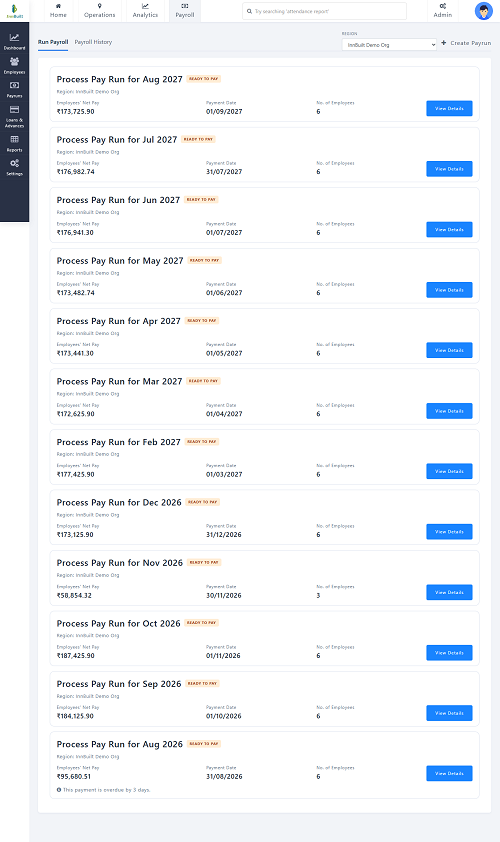
Common salary-processing mistakes are prevented by InnBuilt Payroll Software centralising employee data, validating attendance, and automating statutory calculations. Missing or inconsistent inputs are flagged before payroll closes.