Employee Privacy and GPS Live Tracking: What Businesses Should Know
Employee Privacy and GPS Live Tracking: What Businesses Should Know
GPS live tracking has become an important tool for businesses that manage field employees, sales teams, service technicians, delivery staff, construction workers, and employees working across multiple locations.
With a GPS-enabled mobile application, businesses can understand where employees are working, track field activities, verify visits, and improve workforce coordination. However, employee location information is sensitive. If GPS tracking is introduced without clear policies and appropriate controls, it can create privacy concerns and reduce employee trust.
For this reason, businesses should balance operational visibility with employee privacy.
The goal of GPS live tracking should not be to monitor employees unnecessarily. Instead, it should help organizations manage legitimate work activities while collecting only the information required for business purposes.
What Is GPS Live Tracking for Employees?
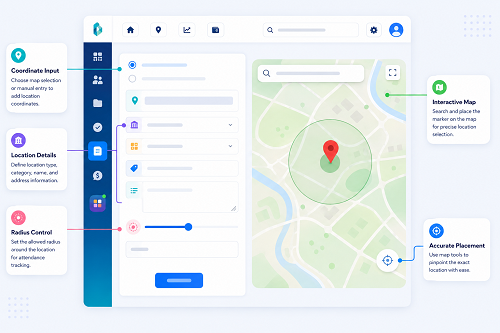
GPS live tracking uses location technology available on a smartphone or other GPS-enabled device to provide information about an employee's location.
Depending on the software and configuration, a business may be able to see:
- Current or recent employee location
- Check-in and check-out location
- Customer visit location
- Field activity location
- Travel routes during authorized work activities
- Distance travelled
- Assigned work locations
- Visit history
"Live tracking" does not necessarily mean that an employee's location must be monitored continuously. Different systems can operate using real-time updates, periodic location updates, or location capture only during specific attendance or work activities.
Why Businesses Use GPS Employee Tracking
GPS tracking can solve several practical workforce-management problems.
For example, a service company may have technicians visiting customers throughout the day. Managers may need to know whether a technician has reached the assigned location so that they can coordinate customer appointments.
Similarly, a sales organization may want to record customer visits, while a construction company may need attendance information from project sites.
Common business uses include:
- Field employee attendance
- Customer visit verification
- Worksite attendance
- Delivery coordination
- Service tracking
- Employee scheduling
- Route planning
- Field workforce management
- Location-based attendance
Why Employee Privacy Matters
Location data can reveal information about a person's movements and activities.
If collected unnecessarily or retained indefinitely, location information can create privacy risks.
For example, continuous location monitoring outside working hours could reveal where an employee lives, travels, shops, or spends personal time.
Therefore, businesses should clearly distinguish between work-related tracking and personal activities.
A responsible GPS tracking system should be designed around legitimate business requirements rather than unrestricted employee surveillance.
Important Things Businesses Should Know About GPS Tracking
1. Define a Clear Business Purpose
Before implementing GPS tracking, businesses should answer a basic question:
Why do we need employee location information?
A valid business purpose could include:
- Confirming attendance at a project site
- Managing customer visits
- Coordinating field service teams
- Verifying delivery activities
- Improving workforce scheduling
The purpose should be clearly defined before deciding what information to collect.
2. Track Only When Necessary
Businesses should avoid collecting location information when it is not required for work.
For example, if GPS is needed to verify a field employee's attendance, the organization should determine whether it needs location at check-in/check-out rather than continuous location throughout the entire day.
The appropriate approach depends on the actual business requirement and the organization's policies.
3. Inform Employees Clearly
Employees should know that GPS tracking is being used. Businesses should explain:
- Why location data is collected
- When tracking is active
- What information is collected
- Who can access it
- How the information is used
- How long information is retained
- How employees can raise concerns
Clear communication can prevent misunderstandings and improve employee acceptance.
4. Create a GPS Tracking Policy
A written GPS tracking policy can establish consistent rules. The policy may define:
- Eligible employees
- Working hours
- Authorized tracking periods
- Permitted uses
- Data access
- Data retention
- Security measures
- Employee responsibilities
- Exception procedures
The policy should be communicated to employees before implementation.
5. Limit Tracking to Working Activities
One of the most important privacy considerations is limiting tracking to legitimate work-related periods.
For example: 9:00 AM – 6:00 PM: Work tracking according to policy, and after working hours: Tracking disabled unless specifically required and appropriately justified.
The exact schedule should depend on the organization's work arrangements and applicable requirements. Businesses should be particularly careful with employees who work flexible hours, remote schedules, or irregular shifts.
GPS Tracking and Employee Attendance
GPS can be useful when combined with mobile attendance.
For example: Employee Opens Attendance App → Face Verification → GPS Location Captured → Attendance Recorded.
This can help a business verify that an employee marked attendance from an authorized work location. For field employees, this can be more practical than requiring them to visit a central office just to record attendance.
GPS Tracking and Face Attendance
Businesses can combine multiple technologies to improve attendance verification (e.g., Face Recognition + GPS + Time + Employee ID).
Face recognition can help verify who is recording attendance, while GPS can help establish where the attendance event occurred. This can be useful for:
- Construction sites
- Customer locations
- Field service
- Sales visits
- Delivery operations
- Multiple branches
However, businesses should collect only the location information necessary for the defined purpose.
GPS Live Tracking for Field Employees
Field employees are one of the main groups that can benefit from GPS tracking. Consider a service company with 20 technicians where each technician visits several customer locations every day.
Without a digital system, managers may rely on phone calls, WhatsApp messages, manual reports, customer confirmations, and spreadsheets. GPS-enabled field software can provide a centralized view of authorized work activity.
Managers may be able to see:
- Assigned employee
- Customer location
- Visit status
- Attendance
- Work progress
- Recent location updates
This can improve coordination without requiring managers to repeatedly call employees.
GPS Tracking Should Not Become Unnecessary Surveillance
There is an important difference between workforce management and employee surveillance. A business may need to know whether a technician has reached a customer site, but that does not automatically mean it needs to know the technician's location every minute of every day.
Businesses should therefore consider: Purpose → Necessity → Minimum Data → Limited Access → Secure Storage. This approach helps organizations use technology responsibly.
Who Should Have Access to Employee Location Data?
Access should be limited to people who genuinely need it for their job responsibilities:
- HR may need attendance-related information.
- Field managers may need current work-location information.
- Operations managers may need service or visit information.
- Senior management may need summarized reports.
Not every employee or administrator needs unrestricted access to everyone's location history. Role-based access controls can help limit unnecessary exposure.
Protect Employee Location Data
Location information should be treated as important business and employee data. Businesses should evaluate whether their GPS tracking solution provides appropriate safeguards such as:
- User authentication
- Role-based access
- Secure data transmission
- Secure storage
- Access logs
- Backup controls
- Data retention controls
- Data deletion procedures
Businesses should also evaluate the vendor's security practices before deploying the system.
How Long Should GPS Data Be Stored?
Businesses should avoid keeping employee location history indefinitely without a clear reason. A practical retention policy should consider:
- Business requirements
- Attendance requirements
- Operational needs
- Record-keeping obligations
- Applicable privacy requirements
- Security risks
Once information is no longer required for its legitimate purpose, the organization should consider appropriate deletion or anonymization procedures where applicable.
GPS Tracking for Remote Employees
Remote work creates additional privacy considerations. A remote employee may work from their home, a coworking space, or another approved location.
Businesses should carefully define whether GPS is actually necessary for remote attendance. For example, if the purpose is simply to confirm that an employee has started work, continuous location tracking may not be necessary. Companies should choose the least intrusive method that reasonably achieves the business objective.
GPS Tracking for Different Industries
Construction: GPS can help businesses manage employees working at different project sites and verify site attendance.
Field Service: Managers can coordinate technicians and monitor authorized customer visits.
Sales: GPS-enabled attendance and visit tracking can help sales teams document customer visits.
Logistics: Location information can support workforce coordination and delivery operations.
Security Agencies: Businesses can use location-based attendance and workforce management for employees assigned to different sites.
Healthcare: Field healthcare workers may need location-based attendance when visiting patients or facilities.
Retail: Businesses with employees moving between stores or branches can use location-aware workforce tools where appropriate.
Benefits of Responsible GPS Employee Tracking
When implemented properly, GPS tracking can provide several benefits:
- Better Field Visibility: Managers can understand where authorized field activities are taking place.
- Improved Attendance Verification: Location information can support attendance records for employees working away from the office.
- Better Workforce Coordination: Managers can assign or coordinate employees based on work locations.
- Faster Customer Service: Businesses can identify nearby field employees and coordinate service requests more efficiently.
- Reduced Manual Reporting: Employees may not need to send repeated location updates manually.
- Better Operational Records: Digital location and attendance information can support reporting and analysis.
GPS Tracking and Employee Trust
Technology alone does not determine whether employees accept GPS tracking. The way the technology is implemented matters.
Employees are more likely to accept tracking when businesses:
- Explain the purpose clearly
- Limit tracking to work requirements
- Protect collected information
- Restrict access
- Provide transparent policies
- Avoid unnecessary monitoring
- Provide a process for resolving concerns
Transparency should be part of the implementation strategy, not an afterthought.
Best Practices for Implementing GPS Live Tracking
Businesses can follow these practices when introducing GPS tracking:
- Define the Purpose: Clearly document why GPS tracking is required.
- Collect Minimum Necessary Data: Do not collect more location information than the business actually needs.
- Establish Working-Time Rules: Define when GPS tracking is active and when it should stop.
- Inform Employees: Provide clear information about tracking practices before implementation.
- Create a Written Policy: Document how location information is collected and used.
- Restrict Access: Allow only authorized users to access location information.
- Protect the Data: Use appropriate technical and organizational security measures.
- Review Data Retention: Do not retain location information longer than necessary for the defined purpose.
- Provide an Exception Process: Employees should have a way to report GPS errors, device problems, or incorrect location records.
- Review the System Regularly: Businesses should periodically review whether GPS tracking is still necessary and whether the data being collected remains appropriate.
Conclusion
GPS live tracking can provide significant value to businesses managing field and distributed employees. It can help improve attendance verification, workforce coordination, customer service, and operational visibility.
However, employee location data should be handled responsibly. Businesses should establish a clear purpose, collect only necessary information, limit tracking to appropriate work activities, restrict access, protect location data, and communicate policies transparently to employees.
The best GPS employee tracking strategy is not necessarily the one that collects the most information. It is the one that provides the right operational visibility while respecting employee privacy.
When GPS tracking is combined with mobile attendance, face recognition, shift management, leave, overtime, and payroll, businesses can build a more efficient workforce management process without losing sight of privacy and employee trust.
Privacy-conscious field tracking is supported by the InnBuilt Employee Tracking App through permission-based access, configurable working-hour tracking, role-based visibility, and transparent location policies. Businesses gain operational insight without applying unnecessary monitoring.