Employee Shortages and Shift Scheduling: How Businesses Can Manage Staffing Gaps
Employee Shortages and Shift Scheduling: How Businesses Can Manage Staffing Gaps
Employee shortages can create significant challenges for businesses, particularly when operations depend on multiple shifts or require continuous staffing. When employees are absent, resign, take leave, or become unavailable unexpectedly, managers may struggle to ensure that every shift has enough people.
Poor staffing can lead to increased workload, overtime, delayed work, reduced productivity, and customer-service issues.
Effective shift scheduling can help businesses respond to staffing gaps by providing better visibility into employee availability, shift requirements, and workforce capacity. With the help of shift management software, businesses can also automate scheduling, identify staffing shortages, and manage shift changes more efficiently.
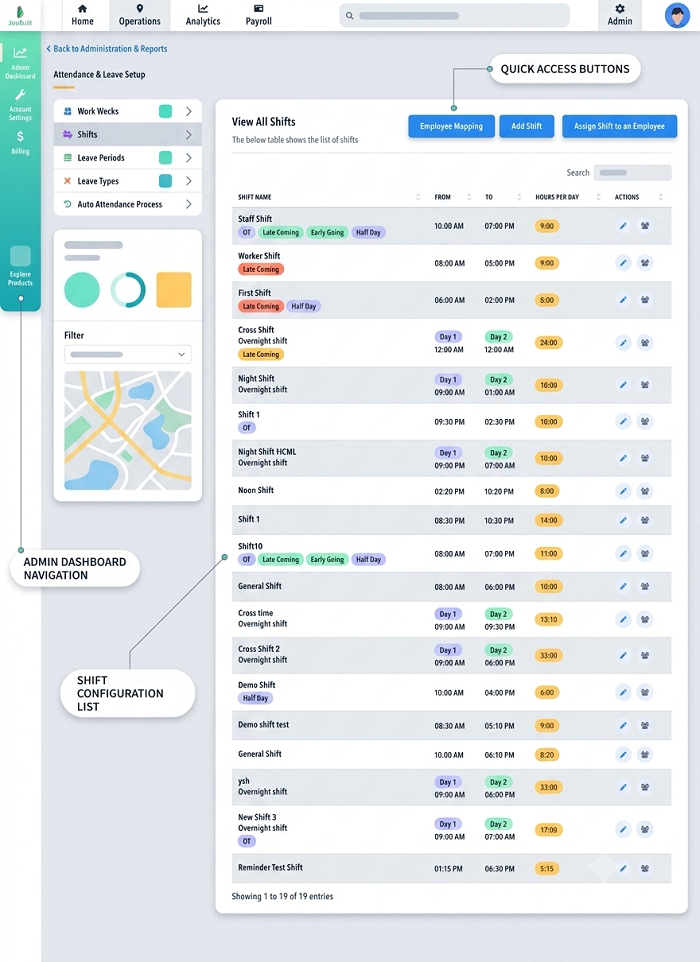
What Is an Employee Shortage?
An employee shortage occurs when a business does not have enough available employees to meet its operational staffing requirements.
A staffing gap can happen because of:
- Employee absenteeism
- Planned leave
- Unexpected illness
- Employee turnover
- Resignations
- Recruitment delays
- Seasonal demand
- Increased workload
- New projects
- Business expansion
- Skill shortages
For example, a factory may require 20 employees for a night shift but have only 16 available employees. The resulting four-person gap can affect production and increase pressure on the existing workforce.
How Employee Shortages Affect Shift Scheduling
Staffing shortages can make it difficult to create balanced schedules.
Managers may need to:
- Find replacement employees
- Move employees between shifts
- Approve overtime
- Reschedule weekly offs
- Reassign employees to different locations
- Prioritize critical tasks
- Hire temporary workers
When these activities are handled manually, managers may spend significant time updating spreadsheets and communicating changes.
Common Staffing Problems Caused by Employee Shortages
1. Unfilled Shifts
The most immediate problem is an uncovered shift. If an employee is absent and there is no replacement, the business may not have enough staff to maintain normal operations.
2. Excessive Overtime
When there are not enough employees, existing employees may be asked to work additional hours. This can increase labor costs and may contribute to employee fatigue.
3. Uneven Workload
Some employees may end up working more shifts than others. This can create dissatisfaction and make workforce planning difficult.
4. Frequent Schedule Changes
Managers may need to make last-minute changes to fill staffing gaps. Employees may become confused if schedule changes are not communicated properly.
5. Skill Gaps
Even when enough employees are available, the business may lack people with the specific skills required for a shift. For example, a manufacturing shift may require trained machine operators, but only general workers may be available.
How Businesses Can Manage Staffing Gaps
1. Identify Staffing Requirements in Advance
The first step is to understand how many employees are required for each shift.
Managers should consider:
- Business hours
- Workload
- Customer demand
- Employee roles
- Required skills
- Location
- Seasonal demand
- Historical staffing patterns
This helps businesses determine the minimum staffing requirements for each shift.
2. Create a Backup Staffing Plan
Businesses should prepare for unexpected absences rather than reacting after a shift becomes understaffed.
A backup staffing plan may include:
- Cross-trained employees
- Part-time employees
- Temporary workers
- On-call employees
- Approved overtime
- Internal shift swaps
The appropriate approach depends on the organization's workforce policies and operational requirements.
3. Maintain an Employee Availability List
Managers need to know which employees are available to work additional shifts. A centralized system can help track employee availability and existing assignments. This makes it easier to identify employees who may be suitable for covering an open shift.
4. Use Cross-Training
Cross-training employees can help businesses manage staffing gaps when specific employees are unavailable. For example, if employees are trained to perform more than one role, managers may have greater flexibility when assigning shifts. However, employees should only be assigned to tasks they are qualified and authorized to perform.
5. Manage Shift Swaps
Shift swaps can provide a practical way to cover unexpected staffing gaps. For example, an employee who cannot work a particular shift may exchange it with an eligible colleague.
Use an Approval Process
Businesses should establish clear rules for shift swaps.
A typical process can be:
Employee Request → Manager Review → Approval → Schedule Update → Employee Notification
This ensures that the official schedule remains accurate.
6. Monitor Employee Leave
Planned leave can create predictable staffing gaps. If managers know about upcoming leave in advance, they can plan replacement staffing before the affected shift occurs.
Solution: Connect leave management with shift scheduling. When an employee's leave is approved, the scheduling system can help managers identify shifts that may require replacement coverage.
7. Use Flexible Scheduling Where Appropriate
Businesses may use flexible scheduling arrangements to respond to changing staffing requirements. Depending on the organization, this could include:
- Flexible start times
- Split shifts
- Part-time schedules
- Temporary shift changes
- Additional shifts
- Alternative working arrangements
Any scheduling approach should comply with company policies and applicable employment requirements.
8. Prioritize Critical Shifts
Not every shift may have the same operational importance. For example, a manufacturing facility may have certain production lines that cannot operate without specific employees. Managers should identify critical shifts and prioritize staffing for those areas.
9. Monitor Overtime
Overtime can help cover short-term staffing gaps, but excessive reliance on overtime can increase labor costs and place additional pressure on employees.
Managers should monitor:
- Scheduled hours
- Actual hours
- Overtime hours
- Employees regularly working overtime
Clear overtime approval policies can help businesses control additional working hours.
10. Use Temporary or Contract Staff
For seasonal demand, temporary projects, or prolonged recruitment shortages, businesses may consider temporary or contract staffing where appropriate. This can provide additional workforce capacity without relying entirely on existing employees. Organizations should ensure that such arrangements follow applicable laws, contracts, and company policies.
How Shift Management Software Helps Manage Staffing Gaps
Manual scheduling becomes increasingly difficult when managers need to make frequent changes. Shift management software can provide tools for identifying and managing staffing gaps.
- Staffing Visibility: Managers can view employee schedules and identify shifts that have insufficient coverage.
- Employee Availability: The system can help managers understand employee availability when assigning or replacing shifts.
- Shift Replacement: Managers can identify potential replacement employees based on availability, role, location, or other configured criteria.
- Shift Swaps: Employees can submit shift-swap requests through the system, subject to approval.
- Leave Integration: Approved leave can be considered when creating and updating employee schedules.
- Attendance Integration: Actual attendance can be compared with scheduled shifts to identify attendance gaps.
- Overtime Monitoring: Managers can review employees who are working beyond their scheduled hours.
- Mobile Employee Access: Employees can view their schedules and receive notifications about approved changes through a mobile application where supported.
Employee Shortages and Attendance Management
Staffing gaps are closely connected to attendance management. For example, if an employee assigned to the morning shift does not report to work, the manager needs to know quickly so that a replacement can be arranged.
With digital attendance management, managers can monitor attendance information and identify unexpected absences.
A connected workflow can be:
Shift Schedule → Attendance → Absence Alert → Replacement → Updated Schedule
Employee Shortages and Payroll
Staffing shortages can also affect payroll because employees may work additional hours to cover vacant shifts.
For example:
- Scheduled Shift: 9:00 AM – 6:00 PM
- Actual Working Time: 9:00 AM – 8:00 PM
The additional working hours may need to be reviewed according to the organization's overtime policy. Integrating attendance, shift management, and payroll software can help ensure that approved working hours and overtime information are available for payroll processing.
Example: Managing a Staffing Gap
Consider a manufacturing company operating three shifts.
| Shift | Required Employees | Available Employees | Gap |
|---|---|---|---|
| Morning | 25 | 25 | 0 |
| Evening | 25 | 23 | 2 |
| Night | 20 | 17 | 3 |
The night shift has a shortage of three employees. The manager can:
- Check employee availability.
- Identify trained employees who can cover the shift.
- Review approved overtime options.
- Check whether eligible employees can swap shifts.
- Update the shift roster.
- Notify affected employees.
- Monitor actual attendance.
- Review overtime for payroll processing.
Best Practices for Managing Staffing Gaps
- Plan Ahead: Review upcoming schedules, leave, holidays, and expected demand before finalizing the roster.
- Maintain a Backup Workforce: Identify employees who can cover critical shifts when required.
- Cross-Train Employees: Develop a workforce with multiple skills where operationally appropriate.
- Monitor Attendance: Track attendance against scheduled shifts to identify unexpected absences quickly.
- Establish Shift-Swap Policies: Create clear rules for requesting and approving shift exchanges.
- Control Overtime: Monitor overtime and avoid depending on it as a permanent solution to staffing shortages.
- Communicate Changes Quickly: Notify employees whenever an approved schedule change affects their shift.
- Use Centralized Scheduling: Maintain one official employee schedule rather than multiple spreadsheets and message threads.
- Analyze Staffing Trends: Review historical attendance, turnover, overtime, and workload data to identify recurring staffing problems.
- Automate Scheduling: Use shift management software when workforce scheduling becomes too complex to manage manually.
How Businesses Can Reduce Future Staffing Gaps
Managing today's staffing shortage is only part of the solution. Businesses should also identify why staffing gaps occur repeatedly.
HR teams can analyze:
- Absenteeism patterns
- Employee turnover
- Overtime trends
- Seasonal demand
- Shift preferences
- Recruitment timelines
- Skill shortages
- Employee availability
- Department-level staffing requirements
Conclusion
Employee shortages can make shift scheduling difficult and affect productivity, employee workload, operating costs, and customer service.
Businesses can manage staffing gaps by planning schedules in advance, maintaining backup staffing options, cross-training employees, managing leave and shift swaps, monitoring overtime, and prioritizing critical shifts.
For organizations managing large teams or multiple shifts, shift management software can provide centralized scheduling, employee availability, shift replacement, attendance integration, overtime monitoring, and mobile employee access.
By connecting shift scheduling with attendance, leave, and payroll, businesses can respond more effectively to staffing gaps while creating a more organized and efficient workforce management process.
Staffing gaps are easier to manage when InnBuilt Shift Scheduling Software shows coverage, employee availability, overtime risk, and open assignments in one view.