Face Attendance for Remote and Field Employees: Benefits and Challenges
Face Attendance for Remote and Field Employees: Benefits and Challenges
Managing attendance for remote and field employees can be challenging because employees may work from customer locations, project sites, remote offices, or different locations throughout the day. Traditional attendance systems may not provide a convenient way to verify attendance when employees are away from a fixed workplace.
Face attendance software offers a digital way to verify employee identity using facial recognition through a supported device or mobile application. When combined with GPS and geo-fencing, it can provide both identity and location verification for employees working outside the traditional office.
However, face attendance also has challenges related to lighting, device quality, privacy, accuracy, and employee acceptance. Businesses should understand both the benefits and limitations before implementing the technology.
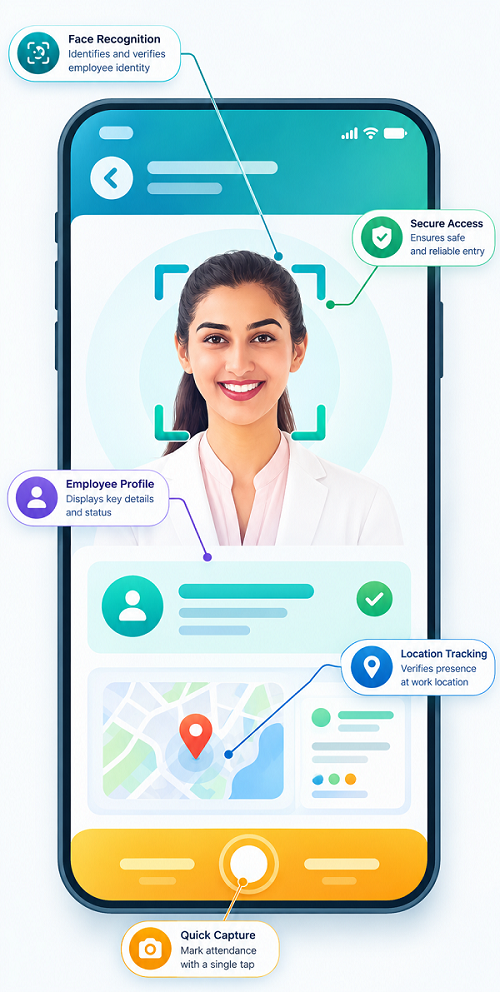
What Is Face Attendance?
Face attendance is an attendance-management technology that uses facial recognition to verify an employee's identity when they check in or check out.
Instead of using:
- Attendance registers
- ID cards
- PINs
- Fingerprints
employees can use their face as an identity-verification method, depending on the system.
For remote and field employees, face attendance can be integrated into a mobile employee application, allowing workers to record attendance from approved locations.
How Face Attendance Works for Remote and Field Employees
A typical face attendance process may involve the following steps:
- The employee opens the attendance application.
- The employee initiates check-in or check-out.
- The application captures an image or facial information.
- The system compares the face with the employee's registered profile.
- GPS information may be checked against an approved location or geo-fence.
- The attendance event is recorded.
- The information becomes available to authorized managers or HR personnel.
The exact process depends on the software and configuration.
When face recognition and location verification are used together, businesses can establish two layers of verification: who is marking attendance and where the attendance is being marked.
Benefits of Face Attendance for Remote and Field Employees
1. Reduces Proxy Attendance
Proxy attendance occurs when one employee attempts to record attendance for another employee.
Face verification makes this more difficult because the system checks the person attempting to mark attendance against their registered identity.
When combined with GPS or geo-fencing, the system can provide additional verification of the attendance event.
2. Convenient Mobile Attendance
Field employees may not have access to a biometric attendance machine.
A mobile face attendance system can allow employees to record attendance through a supported smartphone or device.
This can be useful for:
- Sales representatives
- Service technicians
- Construction workers
- Delivery teams
- Field executives
- Maintenance employees
3. Works Across Multiple Locations
Employees may work at different customer locations, project sites, branches, or temporary workplaces.
Face attendance can be used with approved location rules to support attendance across multiple locations.
This gives businesses greater flexibility than attendance systems tied to a single physical device.
4. Combines Identity and Location Verification
Face recognition verifies the employee's identity, while GPS and geo-fencing can help verify the location.
For example, a field technician assigned to a customer location can use the mobile application to check in. The system can verify the employee's face and check whether the device is within the approved location.
This combination can provide stronger attendance verification than relying on a manual check-in.
5. Reduces Manual Attendance Work
HR teams may spend considerable time collecting and verifying attendance information from remote employees.
Digital face attendance automatically records attendance events, reducing the need for employees to submit manual attendance reports.
This can save administrative time and improve record consistency.
6. Faster Attendance Processing
Face-based verification can make check-in and check-out quick for employees.
Instead of entering employee IDs or searching through a manual register, the employee can use the configured facial-recognition process.
This can be particularly useful when many field employees need to record attendance.
7. Better Attendance Records
Digital attendance records can provide information such as:
- Employee identity
- Check-in time
- Check-out time
- Attendance status
- Location information, where enabled
- Shift information
- Attendance exceptions
This can make attendance records easier for HR teams and managers to review.
8. Supports Field Workforce Management
Face attendance can become part of a broader field employee management system.
Businesses can combine attendance with:
- GPS tracking
- Geo-fencing
- Shift management
- Task management
- Field visits
- Leave management
- Payroll
This provides managers with a more complete view of field workforce activity.
Challenges of Face Attendance for Remote and Field Employees
1. Lighting Conditions
Facial recognition can be affected by poor lighting, excessive brightness, shadows, or backlighting.
Field employees may work in different environments throughout the day, so businesses should select software that performs reliably under realistic working conditions.
2. Camera Quality
The quality of the smartphone or device camera can affect face verification.
Older devices or damaged cameras may make recognition less reliable.
Businesses should identify supported device requirements before deployment.
3. Internet Connectivity
Some face attendance applications may require connectivity to process or synchronize attendance information.
Field employees working in remote areas may experience weak or intermittent internet connections.
Businesses should evaluate whether the software supports appropriate offline or delayed synchronization capabilities if this is important for their workforce.
4. GPS Accuracy
When face attendance is combined with GPS or geo-fencing, GPS accuracy becomes another consideration.
Employees working inside buildings, near tall structures, or in areas with weak GPS signals may experience location variations.
Geo-fence boundaries should therefore be configured carefully.
5. Employee Privacy
Facial recognition involves biometric or highly sensitive personal information, depending on how the system is implemented and applicable law.
Employees should be informed about:
- What information is collected
- Why facial verification is required
- How the information is used
- Who can access it
- How long it is retained
- How it is protected
Businesses should assess applicable privacy and employment requirements before implementing face attendance.
6. Employee Acceptance
Some employees may initially be uncomfortable with facial recognition.
Clear communication can help employees understand that the technology is being introduced to improve attendance verification and reduce manual processes.
Organizations should explain the process and provide appropriate support during implementation.
7. Recognition Errors
No facial-recognition system is perfect. Recognition may occasionally fail because of:
- Poor lighting
- Camera quality
- Significant changes in appearance
- Incorrect enrollment
- Face obstruction
- Device problems
A proper fallback or attendance-correction process can help HR teams handle legitimate exceptions.
8. Device and Operating System Compatibility
A mobile face attendance solution needs to work with the devices employees actually use.
Before implementation, businesses should check:
- Supported operating systems
- Camera requirements
- Application compatibility
- Device permissions
- Security requirements
Testing across commonly used devices can reduce deployment problems.
Face Attendance vs. Traditional Attendance
Traditional methods such as manual registers, cards, PINs, and fixed biometric machines can work well in controlled environments.
However, remote and field employees often need more flexible attendance options.
| Feature | Traditional Attendance | Face Attendance |
|---|---|---|
| Mobile attendance | Limited | Available with supported apps |
| Identity verification | Card/PIN/manual | Facial verification |
| Proxy attendance protection | Varies | Stronger identity verification |
| Multiple locations | Can be difficult | More flexible |
| GPS integration | Usually limited | Can be integrated |
| Remote employees | Less convenient | More suitable |
| Field employees | Less convenient | Suitable with mobile devices |
The best option depends on the organization's workforce, locations, policies, and technology requirements.
Best Practices for Implementing Face Attendance
Businesses can improve implementation by following a structured approach:
- Identify employees who need mobile attendance.
- Choose appropriate face attendance software.
- Check device and operating-system compatibility.
- Register employee profiles correctly.
- Configure GPS and geo-fencing rules if required.
- Test the system in actual field conditions.
- Create a process for recognition failures.
- Inform employees about the system and privacy practices.
- Restrict access to attendance and facial data.
- Review system performance regularly.
Combining Face Attendance With GPS and Geo-fencing
Face attendance can be particularly useful when combined with GPS and geo-fencing.
For example, a field service employee may be assigned to a customer site. The employee can check in through the mobile application using face verification. GPS can confirm the approximate location, while geo-fencing can determine whether the employee is within the approved area.
This creates a multi-layer attendance process:
- Face: Who is the employee?
- GPS: Where is the device?
- Geo-fence: Is the employee within the approved area?
This approach can help businesses improve attendance verification for mobile workforces, provided the technology is configured appropriately.
Who Can Benefit From Face Attendance?
Face attendance can be useful for organizations with:
- Remote employees
- Field employees
- Sales teams
- Service technicians
- Construction workers
- Delivery teams
- Maintenance teams
- Multi-location employees
- Mobile workforces
It can also complement fixed biometric or other attendance systems for employees who regularly work at office locations.
Conclusion
Face attendance can help businesses manage remote and field employees by providing convenient identity-based attendance verification through mobile devices. When combined with GPS and geo-fencing, it can add location verification and help reduce proxy attendance and manual attendance processes.
However, businesses should also consider challenges such as lighting, device compatibility, GPS accuracy, connectivity, recognition errors, privacy, and employee acceptance.
The most effective implementation combines face attendance, GPS, geo-fencing, mobile workforce management, shift scheduling, task management, and payroll processes according to the organization's actual needs.
With clear policies, appropriate technology, responsible data practices, and proper employee training, face attendance can become a useful component of modern workforce management.
Remote and field employees can mark verified attendance through InnBuilt Face Attendance Software using supported mobile devices, time stamps, and location controls. Businesses gain stronger identity verification, while clear connectivity, privacy, and exception policies help address field-use challenges.