Face Attendance for Retail, Restaurants, and Hospitality Businesses
Face Attendance for Retail, Restaurants, and Hospitality Businesses
Managing employee attendance can be challenging for retail, restaurant, hotel, and hospitality businesses. These industries often operate for long hours and depend on employees working across different shifts. Staff may include sales associates, cashiers, kitchen employees, waiters, housekeeping teams, receptionists, security personnel, and other frontline workers.
Traditional attendance registers, punch cards, and manual attendance processes can create unnecessary work for managers and HR teams. Face attendance software provides an automated way to verify employees and record their working hours.
By combining facial recognition with shift management, leave management, GPS, geo-fencing, and payroll integration, businesses can create a more organized approach to employee attendance.
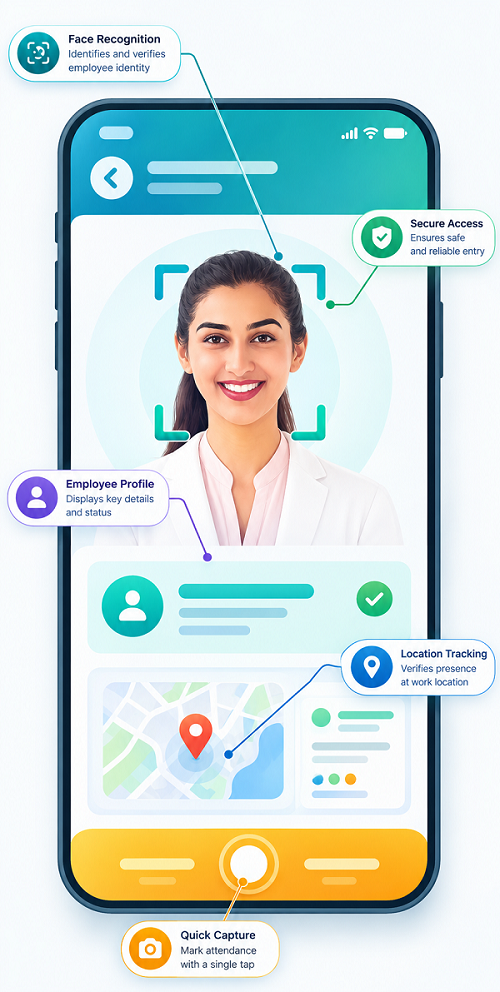
What Is Face Attendance?
Face attendance is an automated attendance system that uses facial recognition to verify an employee's identity during check-in and check-out.
Instead of using attendance cards, PINs, or manual registers, employees can use their face to record attendance through a supported device or mobile application.
For businesses with multiple stores, restaurants, hotels, or branches, attendance records can be managed through a centralized workforce management system.
Why Retail and Hospitality Businesses Need Face Attendance
Retail and hospitality businesses have unique workforce requirements. Employees may work different shifts depending on customer demand and business hours.
Common attendance challenges include:
- Multiple shifts during the day
- Early morning and late-night shifts
- Weekend and holiday staffing
- Large frontline workforces
- High employee movement between locations
- Manual attendance records
- Proxy or buddy punching
- Late arrivals and early departures
- Overtime tracking
- Multiple stores or properties
- Attendance data required for payroll
Face attendance can help automate these processes while giving managers better visibility into workforce attendance.
Key Features of Face Attendance Software
1. Facial Recognition
Employees can record attendance through facial verification. This reduces dependence on physical attendance cards and manual registers.
For retail stores and hospitality businesses, this can make employee check-in and check-out easier for frontline teams.
2. Shift-Based Attendance
Retail stores, restaurants, and hotels frequently use different shifts. Employees may work morning, afternoon, evening, or night shifts.
Face attendance software can connect attendance records with assigned employee shifts, helping managers monitor scheduled working hours.
3. Multiple Location Management
Businesses with several branches can manage attendance for different locations from one centralized system.
For example, a restaurant chain can manage attendance across multiple outlets, while a retail company can manage employees across different stores.
4. GPS and Geo-Fencing
GPS and geo-fencing can provide additional location-based attendance controls when mobile attendance is supported.
Businesses can define authorized locations around stores, restaurants, hotels, or other work sites and configure attendance policies accordingly.
5. Real-Time Attendance Monitoring
Managers can view attendance information and identify employees who are present, absent, late, or have attendance exceptions.
This can be especially useful when managers are responsible for multiple locations.
6. Overtime Tracking
Hospitality and restaurant employees may work beyond their scheduled shifts during busy periods.
Attendance software can help capture working hours and provide overtime information according to the organization's configured policies.
7. Leave Management
Employees can submit leave requests through a connected employee application where supported. Managers can review requests and HR teams can compare approved leave with attendance records.
8. Payroll Integration
Attendance data can be connected with payroll processes to reduce repetitive manual data entry.
Working days, absences, overtime, leave, and other configured attendance information can be made available for payroll processing.
9. Attendance Reports
Businesses can generate reports based on employee, store, branch, department, shift, or date.
Useful reports may include:
- Daily attendance
- Monthly attendance
- Shift-wise attendance
- Late arrival reports
- Early departure reports
- Absence reports
- Overtime reports
- Location-wise attendance
- Attendance exception reports
Benefits of Face Attendance for Retail Businesses
Better Employee Verification
Facial recognition helps verify that the employee recording attendance is the registered employee. This can help reduce proxy attendance.
Easier Store-Level Attendance Management
Store managers can monitor attendance without depending entirely on paper registers or manual spreadsheets.
Faster Check-In and Check-Out
Employees can record attendance through facial verification, helping simplify the process during busy store opening and closing times.
Supports Multiple Stores
Retail businesses with several branches can maintain attendance records across locations using a centralized system.
Better Workforce Visibility
Managers can quickly identify staffing gaps, late arrivals, and absences and take appropriate operational action.
Benefits for Restaurants
Restaurants often have employees working in different roles and shifts. Face attendance can help managers organize attendance for:
- Chefs and kitchen staff
- Waiters and servers
- Cashiers
- Cleaning staff
- Supervisors
- Delivery or support teams
- Restaurant managers
During busy periods, automated attendance can reduce the administrative workload associated with tracking employee working hours.
Benefits for Hotels and Hospitality Businesses
Hotels operate around the clock and may have employees working across several departments.
Face attendance can help manage attendance for:
- Front desk employees
- Housekeeping teams
- Kitchen staff
- Restaurant employees
- Maintenance teams
- Security staff
- Event and banquet teams
- Administrative employees
Different departments can have different shifts and schedules, making automated attendance particularly useful.
Face Attendance for Multiple Shifts
Shift management is an important requirement for retail and hospitality businesses.
A face attendance system can support different schedules such as:
- Morning shifts
- Afternoon shifts
- Evening shifts
- Night shifts
- Split shifts
- Rotating shifts
- Weekend shifts
Connecting attendance with shift schedules can help managers identify employees who arrive late, leave early, or work beyond their scheduled hours.
Face Attendance and GPS for Mobile Employees
Some hospitality and retail businesses have employees who work outside a fixed location or move between branches.
Combining face attendance with GPS and geo-fencing can provide additional verification.
Facial recognition helps verify the employee, while location-based features can help confirm that attendance is being recorded from an authorized location, where such functionality is configured.
This can be useful for employees visiting different outlets, event locations, or business sites.
Face Attendance vs. Traditional Attendance
| Feature | Traditional Attendance | Face Attendance |
|---|---|---|
| Employee verification | Card/register/PIN | Facial recognition |
| Proxy attendance control | Limited | Stronger identity verification |
| Manual data entry | Often required | Reduced |
| Shift management | Separate/manual | Can be integrated |
| Multi-location management | Difficult | Centralized |
| Overtime records | Often manual | Automated records |
| Attendance reports | Time-consuming | Faster |
| GPS/geo-fencing | Usually unavailable | Can be integrated |
| Payroll integration | May require manual transfer | Can be integrated |
Best Practices for Retail and Hospitality Businesses
Businesses should consider the following when implementing face attendance:
Choose Suitable Attendance Locations
Place attendance devices at appropriate employee entry or attendance points without disrupting customer-facing operations.
Configure Shifts Correctly
Create accurate schedules for different departments, stores, restaurants, and properties.
Set Location Rules
For mobile attendance, configure GPS or geo-fencing according to legitimate business requirements.
Train Employees
Explain how employees should check in and check out and what they should do if face recognition does not work.
Monitor Attendance Exceptions
Managers should regularly review late arrivals, absences, missed check-outs, and other exceptions.
Protect Employee Information
Facial recognition involves personal information. Businesses should use appropriate security controls, access restrictions, retention practices, and privacy procedures in accordance with applicable requirements.
Who Can Benefit from Face Attendance?
Face attendance can be useful for:
- Retail stores
- Supermarkets
- Shopping malls
- Restaurants
- Cafes
- Fast-food businesses
- Hotels
- Resorts
- Hospitality groups
- Catering companies
- Multi-branch businesses
- Event and banquet businesses
Conclusion
Face attendance for retail, restaurants, and hospitality businesses can simplify employee attendance management in industries where multiple shifts, long operating hours, frontline employees, and multiple locations are common.
Facial recognition provides a convenient way to verify employees, while features such as shift management, GPS, geo-fencing, leave management, overtime tracking, reports, and payroll integration can help create a more connected workforce management process.
For businesses managing employees across stores, restaurants, hotels, and other hospitality locations, choosing a flexible employee attendance software can reduce manual administrative work and provide managers with better visibility into daily workforce attendance.
Retail stores, restaurants, and hospitality businesses can manage distributed and shift-based teams through InnBuilt Face Attendance Software. Quick check-ins, outlet-wise records, late-hour support, and central reporting make attendance easier across busy customer-facing locations.