Face Attendance Security and Privacy: What Businesses Should Know
Face Attendance Security and Privacy: What Businesses Should Know
Face attendance software can make employee attendance management faster and more convenient. Instead of using registers, cards, or PINs, employees can use facial recognition to record their attendance.
However, facial recognition involves the processing of biometric information, so businesses need to pay close attention to security and privacy. Simply implementing face attendance software is not enough. Organizations should also understand how employee information is collected, stored, accessed, protected, and used.
A well-designed face attendance system should balance attendance automation with appropriate security controls and responsible data practices.
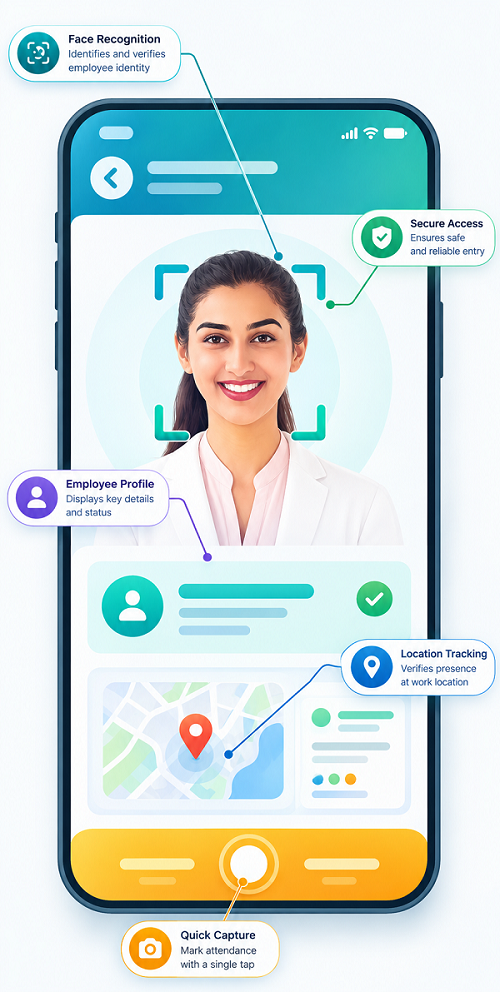
What Is Face Attendance?
Face attendance is an attendance management system that uses facial recognition technology to verify an employee's identity during check-in and check-out.
Depending on the solution, it may also work with:
- Mobile attendance
- GPS
- Geo-fencing
- Shift management
- Leave management
- Overtime tracking
- Payroll integration
- Attendance reports
Because facial recognition may involve biometric information, businesses should evaluate both the functionality and security of the system before deployment.
Why Security Matters in Face Attendance
Traditional attendance systems may use physical cards, passwords, or paper records. Face attendance introduces another category of information that requires careful handling.
Businesses should consider:
- How employee facial information is collected
- Where the information is stored
- Who can access it
- How it is transmitted
- How long it is retained
- How it is protected against unauthorized access
- What happens when an employee leaves the organization
Strong security practices can help reduce the risk of unauthorized access, data exposure, and misuse.
What Information Does a Face Attendance System Collect?
The exact information depends on the software and configuration. A system may process information such as:
- Employee name or ID
- Facial recognition data or facial template
- Attendance timestamps
- Check-in and check-out records
- Device information
- Location information, when GPS is enabled
- Shift information
- Attendance status
Businesses should understand exactly what data their chosen system collects rather than assuming every face attendance solution works in the same way.
Facial Images vs. Facial Templates
One important question businesses should ask is how facial information is stored.
Some systems may process an image during enrollment or verification and create a mathematical representation or facial template for recognition. A facial template is designed to represent characteristics used for matching rather than simply functioning as an ordinary photograph.
Organizations should ask their software provider:
- Is the original facial image stored?
- Is a facial template created?
- Where is the data stored?
- Is the data encrypted?
- Who can access it?
- Can administrators download the information?
- How is the information deleted?
Understanding the data architecture can help businesses make better security decisions.
Key Security Features to Look For
1. Data Encryption
Businesses should look for appropriate encryption for employee information both during transmission and, where applicable, while stored.
Encryption can help reduce the risk of information being exposed if unauthorized parties gain access to data.
2. Role-Based Access
Not every employee or manager needs access to facial information or attendance records.
Role-based permissions can restrict access according to job responsibilities. For example, HR administrators may have broader access than regular employees or supervisors.
3. Secure Authentication
Administrative accounts should use strong authentication controls. Where supported, multi-factor authentication can provide an additional layer of protection.
4. Audit Logs
An audit trail can help businesses identify administrative actions such as changes to employee records, attendance adjustments, or access to system information.
5. Secure Data Storage
Businesses should understand where attendance and facial recognition data is stored and what security controls are used to protect it.
6. Controlled Data Access
Access to employee information should be limited to authorized users. Businesses should regularly review administrator permissions and remove access that is no longer required.
Privacy Considerations for Employees
Employee privacy should be considered from the beginning of a face attendance implementation.
Businesses should clearly explain:
- Why face attendance is being introduced
- What information is collected
- How it is used
- Who can access it
- How long it may be retained
- Whether location information is also collected
- How employees can raise questions or concerns
Clear communication can help employees understand the purpose of the system and reduce uncertainty about biometric attendance.
Use Face Attendance Only for Legitimate Purposes
Businesses should define the purpose of collecting facial information.
If face recognition is introduced for employee attendance, organizations should avoid using the collected information for unrelated purposes without an appropriate legal and organizational basis.
A clear internal policy can explain the intended use of the system and the boundaries around employee data processing.
GPS and Geo-Fencing Privacy
Some face attendance systems combine facial recognition with GPS and geo-fencing.
This can help businesses verify attendance from authorized locations, particularly for field employees or employees working across multiple offices.
However, location tracking introduces additional privacy considerations.
Businesses should determine:
- When location information is collected
- Whether it is collected only during attendance events or continuously
- Who can view location information
- How long location information is retained
- Why location tracking is necessary
Organizations should avoid collecting more location information than is reasonably required for the stated business purpose.
Protecting Face Attendance Data
Businesses can follow several practical security measures:
Limit Access
Give access to employee information only to authorized personnel.
Use Strong Passwords
Administrative users should use strong, unique passwords and additional authentication controls where available.
Keep Software Updated
Use supported versions of attendance software and devices and apply relevant security updates.
Review Permissions
Regularly check who has access to employee and attendance information.
Establish Retention Rules
Define how long employee information should be retained and establish appropriate procedures for securely deleting information when it is no longer required.
Secure Devices
Attendance terminals, tablets, and mobile devices should be protected against unauthorized physical and digital access.
What Businesses Should Ask Their Software Provider
Before selecting face attendance software, HR and IT teams should ask the provider:
- How is facial recognition data stored?
- Is facial data encrypted?
- Is the original facial image retained?
- Where is employee data hosted?
- Who can access the data?
- Are administrator actions logged?
- Does the system support role-based access?
- How are deleted employee records handled?
- How is data protected during transmission?
- Does the system support appropriate privacy and security controls?
- How does GPS information work if location tracking is enabled?
- What happens to employee data when the organization's subscription ends?
The answers can help businesses evaluate whether a solution is suitable for their security requirements.
Employee Consent, Notice, and Applicable Requirements
Businesses should not treat privacy as only an IT issue. HR, legal, compliance, and management teams should work together when implementing biometric attendance.
Depending on the organization's location, workforce, and circumstances, different privacy, employment, and data-protection requirements may apply.
Organizations should provide appropriate notice and follow the requirements that apply to their processing of employee information. Where consent or another legal basis is required, businesses should implement the appropriate process rather than assuming that employee attendance software automatically provides it.
Face Attendance Security Best Practices
A practical implementation checklist includes:
- Define the purpose of face attendance.
- Collect only the information necessary for the intended purpose.
- Choose a provider with appropriate security controls.
- Protect administrator accounts.
- Use role-based access permissions.
- Encrypt sensitive information where appropriate.
- Secure attendance devices.
- Monitor system access and administrative activity.
- Establish data retention and deletion procedures.
- Explain the system clearly to employees.
- Review GPS and location-tracking settings.
- Regularly assess security and privacy practices.
Balancing Convenience and Privacy
The goal of face attendance should not simply be to automate employee check-in. Businesses should implement the technology in a way that is practical, secure, and transparent.
For example, an organization may use facial recognition to verify attendance at an office entrance without continuously monitoring employees throughout the day. Similarly, GPS may be configured for attendance verification rather than unnecessary continuous location monitoring, depending on the business requirement and system design.
Using technology proportionately can help businesses achieve attendance-management objectives while respecting employee privacy.
Conclusion
Face attendance security and privacy should be an important consideration for every business implementing facial recognition for employee attendance.
Facial recognition can simplify attendance management, reduce manual processes, and improve employee verification. However, businesses should carefully evaluate how biometric and related information is collected, stored, accessed, secured, and deleted.
A reliable face attendance software solution should provide appropriate security controls, access management, data protection, and administrative features. Businesses should also establish clear internal policies and communicate transparently with employees.
When security, privacy, and responsible data management are considered from the beginning, organizations can adopt face attendance technology with greater confidence while building trust among their employees.
InnBuilt Face Attendance Software supports secure attendance management through controlled access, employee consent processes, role-based visibility, and responsible handling of verification data. Clear retention and privacy policies help businesses balance accurate attendance with employee trust.