Face Attendance Software for Small and Medium Businesses
Face Attendance Software for Small and Medium Businesses
Managing employee attendance can become challenging as a small or medium-sized business grows. A few employees may be easy to track using attendance registers or spreadsheets, but managing dozens or hundreds of employees manually can quickly lead to errors, lost records, proxy attendance, and additional HR work.
Face attendance software provides a modern way for businesses to automate employee attendance using facial recognition. Instead of relying on attendance cards, PINs, or manual registers, employees can verify their identity using their face and record their attendance.
For small and medium businesses, this can provide a simple way to improve attendance accuracy, reduce administrative work, and connect attendance information with shift management, leave, overtime, and payroll.
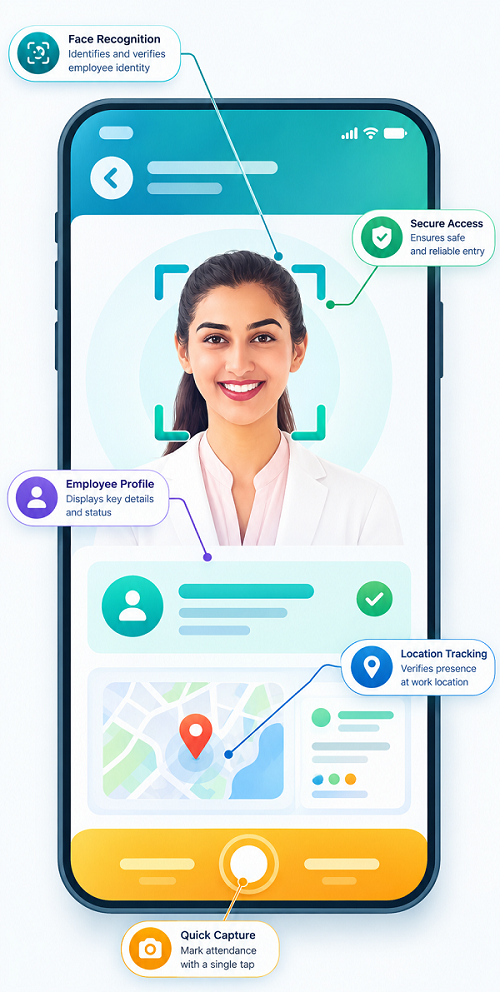
What Is Face Attendance Software?
Face attendance software is an employee attendance management system that uses facial recognition technology to identify employees and record their check-in and check-out times.
The basic process is:
Employee → Face Recognition → Identity Verification → Attendance Recorded → Attendance Report
Once employees are enrolled in the system, their facial information can be used for attendance verification according to the organization's configured policies.
Depending on the solution, attendance information can also be connected with:
- Employee records
- Working hours
- Shift schedules
- Leave management
- Overtime
- Payroll
- Attendance reports
- Multiple locations
Why Small and Medium Businesses Need Face Attendance Software
Small and medium businesses often have limited HR resources. HR teams may need to manage attendance, payroll, leave, employee records, and other administrative responsibilities at the same time.
Manual attendance creates several problems:
- Employees may forget to mark attendance
- Attendance registers can contain errors
- Employees may share cards or PINs
- HR teams spend time checking attendance
- Working hours may be calculated incorrectly
- Late arrivals can be difficult to monitor
- Overtime records may require manual verification
- Attendance data may need to be entered again into payroll software
Face attendance software can automate much of this process.
Key Benefits of Face Attendance Software for SMEs
1. Reduces Proxy Attendance
Proxy attendance occurs when one employee marks attendance on behalf of another employee.
This can happen with systems based on:
- Attendance cards
- PINs
- Passwords
- Manual registers
Face recognition verifies the person attempting to record attendance, making proxy attendance more difficult.
2. Improves Attendance Accuracy
Manual attendance depends heavily on employees and HR staff entering information correctly. Face attendance automatically records the attendance event after identity verification. This can reduce manual data-entry errors and provide a more consistent attendance record.
3. Saves HR Time
HR teams in small businesses often have to perform several tasks manually. With automated attendance, HR can spend less time:
- Collecting attendance sheets
- Checking registers
- Calculating working hours
- Identifying missing punches
- Preparing attendance reports
- Transferring attendance information to payroll
This allows HR teams to focus on more important employee and business activities.
4. Easy Employee Check-In and Check-Out
Employees do not need to remember an attendance card or PIN. They can simply use the configured face recognition system to verify their identity and record attendance. This can be particularly useful in workplaces where many employees arrive at the same time.
5. Supports Working-Hour Calculation
Attendance software can help calculate employee working hours based on recorded check-in and check-out information. HR teams can use the data to identify:
- Total working hours
- Late arrivals
- Early departures
- Missing attendance
- Absences
- Overtime
This reduces the need for manual calculations.
6. Helps Manage Employee Shifts
Many SMEs operate different working schedules.
| Shift | Timing |
|---|---|
| Morning | 6:00 AM – 2:00 PM |
| General | 9:00 AM – 6:00 PM |
| Evening | 2:00 PM – 10:00 PM |
| Night | 10:00 PM – 6:00 AM |
Face attendance can work alongside shift management software to determine whether employees attended their assigned shifts. This is useful for manufacturing, retail, hospitality, security, healthcare, logistics, and other businesses with shift-based operations.
7. Simplifies Leave Management
Attendance and leave records are closely connected. For example, if an employee is absent, HR may need to determine whether the absence was:
- Approved leave
- Unplanned absence
- Holiday
- Weekly off
- Unauthorized absence
When attendance and leave information are connected, HR can manage these records more efficiently.
8. Supports Overtime Tracking
Employees may occasionally work beyond their scheduled hours. Face attendance software can provide check-in and check-out records that help businesses review working hours and identify potential overtime. Organizations can then apply their own overtime policies and approval procedures.
9. Helps Improve Payroll Accuracy
Attendance information can affect payroll calculations. Late attendance, absences, leave, working hours, and overtime may all need to be considered according to company policies and applicable requirements.
A connected system can help create a workflow such as:
Face Attendance → Working Hours → Leave → Overtime → Payroll
This reduces the need for HR teams to manually transfer information between systems.
10. Provides Digital Attendance Records
Paper registers can be difficult to store, search, and maintain. Digital attendance records allow authorized users to access historical information more efficiently.
Businesses can review attendance by:
- Employee
- Department
- Date
- Shift
- Location
- Attendance status
Face Attendance for Different Types of SMEs
Manufacturing Businesses
Factories often have multiple shifts and large numbers of employees arriving at specific times. Face attendance can help businesses manage shift attendance, production workforce attendance, working hours, overtime, late arrivals, and multiple departments.
Retail Businesses
Retail stores may have different employee schedules depending on customer demand. Face attendance can help store managers monitor attendance and connect it with shift schedules.
Restaurants and Hotels
Hospitality businesses often operate for long hours and use multiple shifts. Face attendance can simplify employee attendance tracking across different departments and schedules.
Small Offices and IT Companies
Office-based businesses can use face attendance to replace manual registers and provide centralized attendance records for employees.
Security Agencies
Security companies often manage employees working at different locations and shifts. Attendance software can help organizations maintain structured attendance records for assigned employees.
Healthcare Businesses
Hospitals, clinics, and healthcare facilities may have employees working across multiple shifts. Face attendance can support attendance tracking while working alongside shift scheduling.
Face Attendance vs. Traditional Attendance
| Feature | Traditional Attendance | Face Attendance |
|---|---|---|
| Identity verification | Card/PIN/manual | Facial recognition |
| Proxy attendance | Higher risk | Reduced |
| Manual data entry | Often required | Reduced |
| Working-hour calculation | Often manual | Automated |
| Digital reports | Limited | Available |
| Shift integration | May require manual work | Can be integrated |
| Payroll integration | Separate process | Can be connected |
| Record searching | Time-consuming | Faster |
| HR workload | Higher | Lower |
What Features Should SMEs Look For?
Small and medium businesses do not necessarily need the most complicated attendance platform. They should focus on features that solve their actual workforce management problems.
Important features include:
Face Recognition
The system should provide reliable employee identification and fast attendance processing.
Employee Management
HR should be able to create, update, and manage employee profiles easily.
Attendance Dashboard
Managers should have a clear view of attendance status and employee working hours.
Shift Management
The software should support fixed, rotational, flexible, or multiple shifts if required.
Leave Management
Employees and managers should be able to manage leave information according to company policies.
Overtime Tracking
The system should help identify working hours beyond scheduled shifts.
Reports
Useful reports may include:
- Daily attendance
- Monthly attendance
- Employee attendance
- Late-coming report
- Absence report
- Working-hours report
- Overtime report
- Shift attendance report
Mobile or Cloud Access
Cloud-based systems can help authorized managers access attendance information from different locations.
Payroll Integration
Integration with payroll can reduce duplicate data entry and help maintain consistent employee attendance information.
How Much Does Face Attendance Software Cost?
The cost can vary depending on factors such as:
- Number of employees
- Number of locations
- Required hardware
- Software features
- Cloud or on-premise deployment
- Payroll integration
- Mobile access
- Support requirements
Instead of choosing a solution only because it is inexpensive, SMEs should consider the total value and cost of managing attendance manually. For example, if HR spends several hours every month correcting attendance records and preparing payroll data, automation may provide significant operational value.
How to Implement Face Attendance in an SME
A simple implementation process can include:
Step 1: Identify Attendance Requirements
Determine employee numbers, locations, shifts, working hours, and attendance policies.
Step 2: Select the Appropriate System
Choose software that matches the company's current requirements and expected growth.
Step 3: Create Employee Profiles
Register employees and complete the face enrollment process accurately.
Step 4: Configure Attendance Rules
Set working hours, shifts, grace periods, leave rules, and other applicable policies.
Step 5: Connect Related Modules
Where required, integrate attendance with shift management, leave, overtime, and payroll.
Step 6: Train Employees and HR
Explain how employees should record attendance and how HR should handle exceptions.
Step 7: Monitor and Review
Review attendance reports regularly and correct configuration or process issues.
Important Considerations for SMEs
Before implementing facial recognition, businesses should also consider employee privacy and data security.
Organizations should:
- Clearly communicate how the system is used
- Limit access to authorized personnel
- Protect employee data
- Follow applicable privacy and data-protection requirements
- Establish appropriate data retention practices
- Maintain procedures for attendance exceptions
The software should complement a clear attendance policy rather than replace proper HR processes.
How Face Attendance Supports Business Growth
An attendance system that works for 20 employees may not be suitable when the company grows to 100 or 500 employees. SMEs should therefore consider scalability when selecting software.
A scalable system can help businesses manage:
Employees → Departments → Shifts → Locations → Attendance → Leave → Overtime → Payroll
As the business grows, HR can continue using the same centralized process instead of introducing separate attendance systems for different teams or locations.
Conclusion
Face attendance software can be a practical solution for small and medium businesses looking to modernize employee attendance management.
By using facial recognition for identity verification, businesses can reduce proxy attendance, minimize manual data entry, improve attendance accuracy, and simplify working-hour tracking.
When combined with shift management, leave, overtime, reporting, and payroll, face attendance can become part of a broader workforce management system.
For SMEs, the best solution is not necessarily the one with the most features. It is the one that is accurate, easy to use, secure, scalable, and aligned with the company's workforce requirements.
With the right face attendance software, small and medium businesses can reduce HR administration and create a more efficient, organized, and reliable attendance management process.
Small and medium businesses can adopt InnBuilt Face Attendance Software without investing in complex attendance infrastructure. Fast check-ins, centralised records, simple administration, and payroll-ready data help small HR teams work efficiently.