Face Attendance Software in India: Features, Benefits, and How to Choose the Right System
Face Attendance Software in India: Features, Benefits, and How to Choose the Right System
Managing employee attendance efficiently is an important part of HR and payroll management. For businesses in India, handling attendance across offices, factories, retail stores, restaurants, project sites, and field locations can become difficult when organizations rely on manual registers or traditional attendance methods.
Face attendance software in India provides an automated way to verify employees and record their attendance using facial recognition technology. When combined with features such as shift management, leave management, GPS, geo-fencing, overtime tracking, reports, and payroll integration, it can become part of a complete workforce management solution.
However, not every face attendance system is the same. Businesses should evaluate features, security, usability, integrations, scalability, and pricing before selecting a solution.
What Is Face Attendance Software?
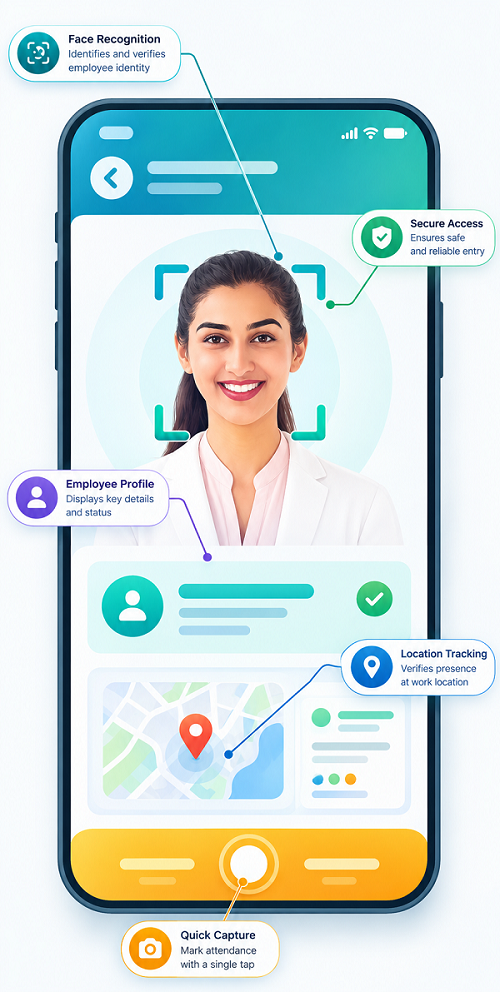
Face attendance software uses facial recognition technology to verify an employee when they check in or check out.
Instead of relying on attendance cards, PINs, or manual registers, employees can use their face to record attendance through a compatible attendance device, tablet, or mobile application.
The system can automatically maintain records such as:
- Check-in time
- Check-out time
- Working hours
- Late arrivals
- Early departures
- Absences
- Overtime
- Shift information
- Attendance exceptions
Depending on the software, GPS and geo-fencing can also be used for location-based attendance.
Why Face Attendance Software Is Useful for Indian Businesses
Indian businesses often have diverse workforce and workplace requirements. A company may have employees working in offices, factories, branches, warehouses, retail outlets, construction sites, or customer locations.
Traditional attendance methods can create problems such as:
- Manual data entry
- Lost or damaged attendance records
- Proxy attendance
- Difficult shift tracking
- Separate systems for different branches
- Time-consuming attendance calculations
- Errors during payroll preparation
Face attendance software can automate many of these routine activities and provide centralized attendance visibility.
Key Features of Face Attendance Software in India
1. Facial Recognition
Facial recognition is the primary feature of face attendance software. Employees can verify their identity using their face instead of cards or PINs.
This can make attendance more convenient while helping businesses strengthen employee verification.
2. Mobile Face Attendance
Some systems allow employees to record attendance using a mobile application.
This can be particularly useful for:
- Field employees
- Sales teams
- Service engineers
- Employees visiting customer locations
- Remote workers
- Employees working across multiple sites
Where appropriate, mobile face attendance can be combined with GPS or geo-fencing.
3. GPS Attendance
GPS functionality can help businesses identify the location associated with an attendance event.
For field employees and distributed teams, this can provide additional visibility into where attendance was recorded.
4. Geo-Fencing
Geo-fencing allows businesses to create virtual boundaries around authorized work locations.
For example, a company can configure locations around an office, factory, retail outlet, or project site and apply attendance rules based on those locations.
5. Multi-Location Attendance
Businesses with multiple branches or offices can manage attendance records across locations from a centralized platform.
This is useful for companies operating:
- Multiple offices
- Retail stores
- Restaurant outlets
- Factories
- Warehouses
- Project sites
- Regional branches
6. Shift Management
Indian businesses may operate general shifts, rotational shifts, night shifts, or multiple overlapping shifts.
Face attendance software can connect attendance records with employee shift schedules and help managers track working hours more effectively.
7. Leave Management
Integrating attendance with leave management allows HR teams to compare employee attendance with approved leave.
Employees may also be able to submit leave requests through an employee mobile application, depending on the software.
8. Overtime Tracking
For organizations where employees work beyond scheduled hours, attendance software can record working-hour information that can be used for overtime review according to company policies.
9. Attendance Reports
HR teams can generate reports based on employee, department, shift, location, or date.
Common reports include:
- Daily attendance
- Monthly attendance
- Late arrival
- Early departure
- Absence
- Overtime
- Shift-wise attendance
- Location-wise attendance
- Attendance exceptions
10. Payroll Integration
Attendance data can be connected with payroll software to reduce manual data transfers.
Information such as working days, leave, overtime, and attendance exceptions can be made available for payroll processing according to the organization's configured rules.
Benefits of Face Attendance Software
Reduces Proxy Attendance
Facial verification helps associate attendance with the registered employee and can reduce common forms of proxy or buddy punching.
Saves HR Time
Automated attendance reduces manual register maintenance, spreadsheet updates, and repetitive data entry.
Improves Attendance Accuracy
Digital records can reduce errors associated with handwritten attendance registers and manual calculations.
Faster Check-In and Check-Out
Employees can record attendance using facial recognition, reducing the need to carry cards or remember attendance PINs.
Better Attendance Visibility
Managers and HR teams can access centralized attendance information and identify attendance exceptions more quickly.
Supports Remote and Field Employees
Mobile face attendance combined with GPS and geo-fencing can be useful for employees who do not work from a fixed office.
Simplifies Multi-Branch Management
Businesses can manage attendance from multiple locations through one centralized system rather than maintaining separate manual records.
Helps Payroll Processing
Integrated attendance and payroll systems can reduce repetitive work and provide more consistent attendance information for payroll calculations.
How to Choose the Right Face Attendance Software in India
Choosing the right system requires more than simply comparing facial recognition features. Businesses should evaluate the complete attendance-management workflow.
1. Understand Your Workforce
First, identify how employees work.
Consider:
- Number of employees
- Number of locations
- Shift patterns
- Office and field employees
- Remote employees
- Mobile workforce
- Contract or temporary workforce
- Payroll requirements
The right system should match your actual workforce structure.
2. Check Facial Recognition Performance
Evaluate how the software performs in your working environment.
Consider camera quality, device compatibility, lighting conditions, recognition speed, and how the system handles normal changes in employee appearance.
A demonstration or pilot test can help verify whether the technology works effectively in your workplace.
3. Look for Mobile Attendance
If employees work outside a fixed office, mobile face attendance can be an important feature.
Check whether the mobile application supports the attendance and location controls your organization requires.
4. Evaluate GPS and Geo-Fencing
For distributed employees, check whether the system provides suitable GPS and geo-fencing capabilities.
Look for flexible location configuration and appropriate attendance controls rather than unnecessary continuous tracking.
5. Check Shift Management
If your business operates multiple shifts, make sure the software can support your actual schedules.
Check features for:
- Shift assignment
- Shift changes
- Rotational shifts
- Night shifts
- Overtime
- Late arrivals
- Early departures
6. Review Payroll Integration
Attendance software should work smoothly with your existing payroll process.
Ask whether the system can integrate with your payroll software or export the required attendance information in a usable format.
7. Consider Security and Privacy
Facial recognition involves employee biometric information, so security should be a major selection criterion.
Ask the provider about:
- Data encryption
- Access controls
- Administrator permissions
- Audit logs
- Data storage
- Data retention
- Data deletion
- Privacy practices
Businesses should also evaluate applicable Indian privacy and employment requirements before implementation.
8. Check Ease of Use
The software should be simple for both employees and administrators.
A complicated attendance system can reduce employee adoption and increase HR support requirements.
Look for:
- Easy employee enrollment
- Simple attendance process
- User-friendly dashboards
- Mobile access
- Clear reports
- Easy configuration
9. Evaluate Scalability
Choose a solution that can grow with your business.
If you plan to add employees, branches, factories, or offices, the system should be able to accommodate expansion without requiring a complete change in attendance infrastructure.
10. Compare Support and Implementation
Ask the provider about implementation, employee onboarding, training, technical support, device setup, and troubleshooting.
Good support can make the transition from manual attendance to automated attendance much smoother.
Face Attendance Software for Different Indian Businesses
Different industries can benefit from face attendance in different ways.
Offices
Useful for employee check-in, shift management, leave, and payroll integration.
Manufacturing
Useful for large workforces, multiple shifts, overtime, and factory attendance.
Retail
Useful for managing attendance across multiple stores and frontline employees.
Restaurants and Hotels
Useful for employees working across multiple shifts and departments.
Construction
Useful for project-site attendance and mobile workforce management.
Field Services
Useful for employees visiting customers or working across different locations.
IT and Technology Companies
Useful for office, hybrid, remote, and flexible workforces.
Conclusion
Face attendance software in India can help businesses modernize employee attendance management by replacing manual processes with automated facial verification. Features such as mobile attendance, GPS, geo-fencing, shift management, leave management, overtime tracking, multi-location support, reports, and payroll integration can make the system useful across different industries.
When choosing a face attendance solution, businesses should look beyond facial recognition alone. Security, privacy, ease of use, workforce requirements, location management, integrations, scalability, and customer support should all be considered.
The right employee attendance software should fit the organization's workforce and working model while making attendance management simpler for employees, managers, HR teams, and payroll administrators.
Indian businesses selecting face attendance technology can evaluate InnBuilt Face Attendance Software for identity verification, mobile accessibility, location controls, shift integration, payroll connectivity, privacy safeguards, and multi-branch reporting. Flexible configuration helps the system fit different workforce sizes and industries.