Face Recognition Attendance for Multiple Office Locations
Face Recognition Attendance for Multiple Office Locations
Managing employee attendance across multiple office locations can be challenging for HR teams. When employees work from different branches, offices, project sites, or regional locations, maintaining accurate attendance records becomes more difficult. Manual registers, separate attendance systems, and location-based reporting can create unnecessary administrative work.
Face recognition attendance provides a centralized way to record employee attendance across multiple locations. By combining facial recognition with mobile or device-based attendance, businesses can verify employee identity and maintain attendance records for different offices from a single system.
What Is Face Recognition Attendance?
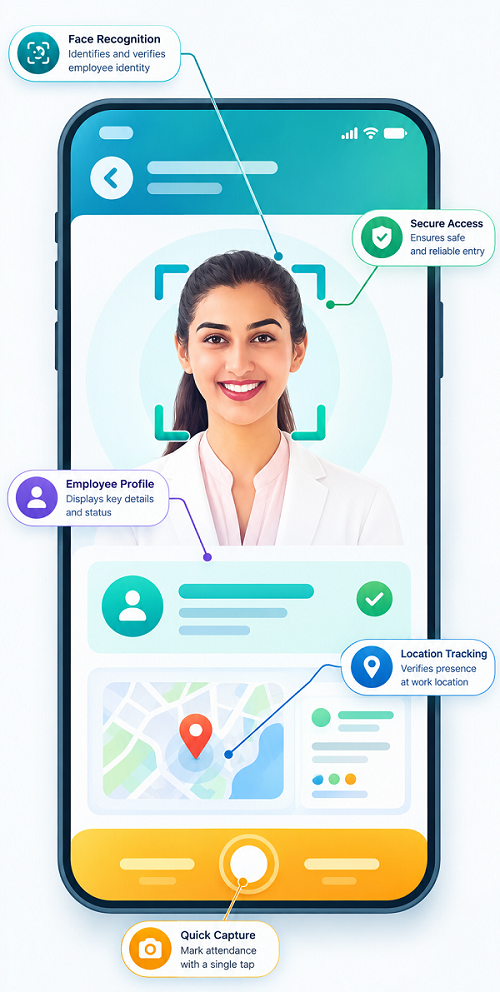
Face recognition attendance is an automated attendance system that uses facial recognition technology to identify employees when they check in or check out.
Instead of using attendance registers, cards, or passwords, employees can verify their identity using their face. Depending on the software configuration, the system can also use location information to determine where the attendance was recorded.
For businesses with multiple offices, this allows HR teams to manage attendance records from different locations through a centralized platform.
Why Businesses Need Multi-Location Attendance Management
Companies with several branches often face challenges such as:
- Managing separate attendance records for each office
- Tracking employees who move between locations
- Preventing attendance on behalf of another employee
- Monitoring attendance across branches
- Consolidating attendance data for payroll
- Managing different shifts and working schedules
- Checking late arrivals and early departures
- Generating location-wise attendance reports
A centralized face recognition attendance system can simplify these processes and reduce dependence on manual attendance management.
How Face Recognition Attendance Works Across Multiple Offices
A typical multi-location face attendance system follows a simple process:
- Employee registration – Employee facial information is securely enrolled in the attendance system.
- Office setup – Each branch or office is configured as an authorized attendance location.
- Employee assignment – Employees are assigned to their respective offices, branches, or permitted locations.
- Face verification – Employees use a supported attendance device or mobile application to verify their identity.
- Location verification – Where enabled, GPS or geo-fencing can confirm that attendance is recorded from an authorized location.
- Centralized records – Attendance information from different offices is collected in one system.
- HR reporting – HR teams can view attendance by employee, office, department, date, or shift.
This creates a consistent attendance process across the organization.
Benefits of Face Recognition Attendance for Multiple Locations
1. Centralized Attendance Management
HR teams can manage attendance records for multiple offices from one platform. Instead of checking separate registers or systems, administrators can access consolidated attendance information.
2. Reduces Proxy Attendance
Facial verification helps ensure that the person marking attendance is the registered employee. This can reduce common attendance issues associated with buddy punching or attendance marking on behalf of another employee.
3. Supports Multiple Branches
Businesses can create attendance locations for different branches, regional offices, project sites, or work locations. Employees can then be associated with the locations where they are authorized to work.
4. Better Employee Movement Tracking
Some employees may work at different branches during the week. A flexible attendance system can help businesses record attendance when employees are assigned to or authorized for multiple locations.
5. Faster Attendance Processing
Employees can record attendance without manually signing registers or entering employee numbers. This can make daily check-in and check-out faster, particularly in offices with a large workforce.
6. Location-Based Attendance
When integrated with GPS or geo-fencing, face recognition can provide an additional layer of verification. The system can check both who is marking attendance and, where configured, whether the attendance is being recorded from an authorized location.
7. Real-Time Attendance Visibility
HR and managers can get a centralized view of attendance across different offices. This makes it easier to identify absences, late arrivals, or attendance exceptions.
8. Easier Payroll Preparation
Consolidated attendance records can be used for payroll processing. Attendance data such as working days, absences, overtime, and approved leave can be brought together for payroll calculations.
9. Location-Wise Reports
HR teams can generate reports based on individual branches or locations. This can help managers compare attendance patterns and identify location-specific issues.
Face Recognition + GPS + Geo-Fencing
For businesses managing multiple offices, combining technologies can provide a more complete attendance solution.
Face recognition helps verify employee identity.
GPS can provide location information when attendance is recorded through a supported mobile device.
Geo-fencing can define an authorized geographical boundary around an office or worksite.
For example, a company may create separate geo-fences for its Chennai, Coimbatore, and Bengaluru offices. Employees assigned to each location can be allowed to record attendance within their authorized area, subject to the organization's attendance policies.
This combination can be particularly useful for businesses with employees who work across branches or frequently travel between locations.
Managing Employees Who Work at Different Locations
Not every employee works from one fixed office. Sales teams, service engineers, project employees, consultants, and managers may move between locations.
A multi-location attendance system can allow organizations to define authorized work locations and employee assignments. HR can then maintain a clearer record of where attendance was recorded without maintaining separate manual systems for every branch.
Organizations should configure location permissions according to actual job requirements rather than unnecessarily restricting employees who legitimately work across locations.
Multi-Location Attendance and Shift Management
Multiple offices often operate different working hours or shifts. A face recognition attendance system can be integrated with shift management to support:
- Different shifts for different branches
- Employee-specific schedules
- Shift start and end times
- Late arrival tracking
- Early departure tracking
- Overtime records
- Shift changes
- Location-specific attendance rules
This helps HR manage attendance and scheduling together instead of maintaining separate processes.
Challenges to Consider
Although face recognition attendance can simplify multi-location management, businesses should consider several factors before implementation.
Recognition Accuracy
Lighting, camera quality, device positioning, and environmental conditions can affect facial recognition. Businesses should select reliable hardware and configure the system properly.
Internet Connectivity
Some locations may have unstable internet connectivity. Businesses should check whether the attendance solution supports suitable offline or synchronization capabilities.
Employee Privacy
Facial recognition involves biometric information, so organizations should establish appropriate policies for collection, use, access, storage, and retention of such data and comply with applicable privacy and employment requirements.
Location Configuration
Incorrect office coordinates or geo-fence boundaries can cause attendance problems. Each location should be configured and tested carefully before deployment.
Best Practices for Multi-Office Face Attendance
Businesses can improve implementation by following these practices:
- Create accurate profiles for every office location.
- Assign employees to authorized locations.
- Test face recognition devices before deployment.
- Use GPS or geo-fencing where location verification is required.
- Provide employees with clear attendance guidelines.
- Define procedures for device or network failures.
- Restrict administrative access to attendance information.
- Regularly review attendance and exception reports.
- Integrate attendance with leave, shift, and payroll processes.
- Review privacy and data-retention practices regularly.
Who Can Benefit from Multi-Location Face Attendance?
Face recognition attendance can be useful for:
- Companies with multiple branches
- IT and technology companies
- Retail businesses
- Manufacturing organizations
- Construction companies
- Logistics businesses
- Service organizations
- Educational institutions
- Healthcare organizations
- Companies with regional offices
- Businesses with mobile and field employees
Conclusion
Face recognition attendance for multiple office locations can help businesses create a centralized and consistent approach to employee attendance management. By combining facial verification with location-based controls such as GPS and geo-fencing, organizations can improve attendance visibility across branches while reducing manual administrative work.
For businesses managing multiple offices, the right employee attendance software can bring face attendance, location management, shift scheduling, leave management, reporting, and payroll processes together in one platform. This makes it easier for HR teams to manage a distributed workforce and maintain organized attendance records across the organization.
Attendance across multiple offices can be centralised with InnBuilt Face Recognition Attendance Software while maintaining separate locations, shifts, holidays, and approval structures. Head office receives consolidated visibility without requiring every branch to manage isolated records.