Field Employee Management Software in India: Features, Benefits, and How to Choose the Right Solution
Field Employee Management Software in India: Features, Benefits, and How to Choose the Right Solution
Managing employees who spend most of their working day outside the office can be challenging for businesses in India. Sales representatives, field service technicians, delivery teams, construction workers, marketing executives, medical representatives, and other mobile employees work across different locations and may visit multiple customers or sites in a single day.
Traditional methods such as phone calls, WhatsApp messages, paper attendance registers, spreadsheets, and manual reports can make field employee management time-consuming and difficult to control.
Field employee management software provides a centralized way to manage field attendance, employee locations, customer visits, tasks, schedules, working hours, leave, and performance.
For Indian businesses with distributed teams, the right software can improve workforce visibility while reducing manual administrative work.
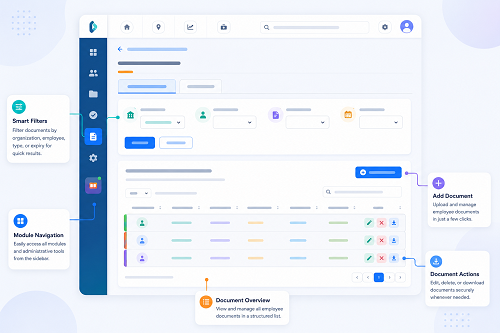
What Is Field Employee Management Software?
Field employee management software is a digital workforce management solution designed for employees who work outside a fixed office location.
It typically combines mobile applications with a web-based management dashboard.
Employees can use a mobile app to:
- Mark attendance
- Verify their identity
- Share work-related location information where required
- View assigned tasks
- Record customer visits
- Update work status
- Submit reports
- Apply for leave
- Submit expenses
Managers and HR teams can use a centralized dashboard to monitor and manage field activities.
A typical workflow is:
Employee → Mobile App → Attendance → Location/Visit → Tasks → Reports → Manager Dashboard
Depending on the software, these functions can also connect with shift management, payroll, leave, and other HR processes.
Why Indian Businesses Need Field Employee Management Software
India has a large and diverse workforce spread across cities, towns, industrial areas, customer locations, project sites, and rural markets.
Businesses may have employees working in:
- Sales territories
- Customer locations
- Construction sites
- Retail outlets
- Warehouses
- Delivery routes
- Service locations
- Hospitals
- Dealer networks
- Multiple branches
Managing these employees manually can create several challenges.
Common challenges include:
- Difficulty verifying field attendance
- Proxy attendance
- Inaccurate manual reports
- Limited visibility into customer visits
- Poor schedule coordination
- Excessive travel time
- Delayed reporting
- Difficulty monitoring working hours
- Leave-related staffing problems
- Manual payroll data preparation
- Managing employees across multiple locations
Field employee management software can bring these activities into one centralized system.
Key Features of Field Employee Management Software
The features required will vary by business, but several capabilities are particularly useful for Indian organizations.
1. Mobile Employee Attendance
Mobile attendance allows field employees to record attendance using their smartphones.
Instead of requiring employees to visit an office or biometric terminal, they can use the mobile application according to company attendance policies.
A typical process is:
Open App → Employee Verification → Check In → Attendance Recorded
Depending on the solution, attendance may also be associated with location information.
2. GPS-Based Location Tracking
GPS can help businesses manage authorized field activities and understand where employees are working.
It may provide information such as:
- Check-in location
- Customer visit location
- Worksite location
- Recent location updates
- Travel routes, where appropriate
- Visit history
GPS tracking should be used for legitimate business purposes, with employees clearly informed about when and why location information is collected.
3. Face Attendance
Some field employee management platforms support facial recognition through smartphones.
Face verification can help confirm that the employee recording attendance is the registered employee.
This can reduce the possibility of proxy attendance compared with systems that rely only on shared cards, PINs, or passwords.
A combined workflow may look like:
Face Verification + GPS + Time = Field Attendance Record
4. Customer Visit Management
Sales and service employees often visit several customers every day.
The software can allow employees to record:
- Customer name
- Visit date
- Visit time
- Location
- Visit purpose
- Notes
- Follow-up requirements
- Visit status
Managers can then review completed and pending visits through the dashboard.
5. Task Management
Managers can assign field activities directly to employees.
For example:
| Task | Employee | Location | Status |
|---|---|---|---|
| Customer Visit | Sales Executive | Chennai | Completed |
| Service Call | Technician | Coimbatore | In Progress |
| Dealer Visit | Sales Officer | Madurai | Pending |
Employees can update task status from their smartphones.
6. Employee Scheduling
Field teams often work according to customer appointments, territories, shifts, or project schedules.
Scheduling features can help managers assign:
- Working days
- Customer visits
- Locations
- Tasks
- Shifts
- Appointments
- Campaign activities
Employees can access their schedules from their mobile devices.
7. Territory Management
Sales and marketing teams may be responsible for specific territories.
A field management system can help businesses organize employees according to:
- City
- District
- State
- Sales territory
- Customer segment
- Dealer network
- Project location
This can help reduce overlapping assignments and improve territory coverage.
8. Leave Management
Field employees need leave just like office-based employees.
A mobile application can allow employees to submit leave requests without visiting the HR department.
Managers can review requests based on:
- Employee availability
- Scheduled visits
- Pending tasks
- Territory coverage
- Business requirements
Connecting leave and field scheduling can help prevent customer visits or service activities from being missed.
9. Working-Hour Tracking
Mobile attendance can provide check-in and check-out information that helps businesses calculate working hours according to their policies.
Reports may include:
- Total working hours
- Late arrivals
- Early departures
- Missing attendance
- Absence
- Overtime
Working-hour and overtime calculations should be configured according to company policies and applicable employment requirements.
10. Expense Management
Field employees may incur expenses for:
- Travel
- Fuel
- Parking
- Local transportation
- Accommodation
- Customer meetings
A mobile application can allow employees to submit expense claims and supporting information.
Managers can then review and approve expenses through a centralized process.
11. Real-Time or Near-Real-Time Dashboard
Managers may need current information about field operations.
Depending on the software, dashboards can display:
- Employee attendance
- Active field employees
- Recent location updates
- Customer visits
- Task status
- Pending activities
- Working hours
The exact update frequency depends on the software and network connectivity.
12. Reports and Analytics
Reports help businesses understand field workforce performance.
Attendance Reports
- Present employees
- Absences
- Late arrivals
- Working hours
Field Activity Reports
- Customer visits
- Completed tasks
- Pending activities
- Location-based activities
Performance Reports
- Leads generated
- Customer visits
- Sales activity
- Conversion information
Expense Reports
- Employee expenses
- Travel expenses
- Approved claims
- Pending claims
13. Payroll Integration
Attendance and field activity data can be connected with payroll where appropriate.
For example:
Mobile Attendance → Working Hours → Leave → Overtime → Payroll
This can reduce duplicate data entry and help HR teams work with more consistent attendance information.
14. Shift Management
Some field employees may work according to fixed or rotating schedules.
Field employee software can be integrated with shift management to handle:
- Morning shifts
- Evening shifts
- Night shifts
- Rotational shifts
- Flexible schedules
- Weekly offs
This is particularly useful for service, security, logistics, healthcare, and other businesses operating beyond standard office hours.
Benefits of Field Employee Management Software
1. Better Field Workforce Visibility
Managers can obtain a centralized view of employee attendance and authorized field activities.
2. Reduced Manual Work
HR and managers spend less time collecting spreadsheets, phone updates, and paper reports.
3. Improved Attendance Accuracy
Mobile attendance and identity verification can help create more reliable attendance records.
4. Reduced Proxy Attendance
Face verification can make it more difficult for one employee to record attendance for another employee.
5. Better Customer Visit Management
Managers can see whether planned customer activities have been completed.
6. Improved Scheduling
Digital schedules make it easier to assign employees to territories, customers, shifts, and tasks.
7. Faster Reporting
Field employees can submit information directly from their smartphones.
8. Better Workforce Coordination
Managers can coordinate employees based on location, availability, schedules, and assigned activities.
9. Improved Payroll Preparation
Structured attendance information can reduce manual attendance reconciliation before payroll processing.
Industries That Can Use Field Employee Management Software
Sales and Marketing
Sales executives can use mobile attendance, customer visit tracking, task management, and territory management.
Field Service
Service technicians can receive assignments, visit customers, update task status, and submit service reports.
Construction
Construction businesses can manage employees working across multiple project sites.
Logistics and Delivery
Businesses can coordinate field employees and manage attendance and work activities across delivery operations.
Healthcare
Field healthcare workers can use mobile attendance and authorized location-based work management.
Security Agencies
Security companies can manage employees assigned to different client locations and shifts.
Retail
Retail businesses can manage employees working across stores, branches, and promotional locations.
Pharmaceutical and Medical Sales
Medical representatives can use mobile tools to manage customer visits, attendance, schedules, and field activities.
How to Choose the Right Field Employee Management Software in India
Choosing software based only on the number of features or the lowest price can lead to problems later.
Businesses should evaluate the solution based on their actual workforce requirements.
1. Understand Your Field Workforce
Before selecting software, identify:
- Number of field employees
- Number of locations
- Territories
- Working schedules
- Attendance requirements
- Customer visits
- Reporting requirements
2. Check Mobile App Usability
Employees will use the mobile application regularly, so it should be simple and reliable.
Check whether employees can easily:
- Mark attendance
- View tasks
- Record visits
- Apply for leave
- Submit reports
- Update work status
3. Evaluate GPS Features
If location tracking is required, check:
- When tracking operates
- How frequently locations are updated
- Whether tracking can be configured
- How location data is stored
- Who can access location information
The system should support the organization's legitimate field-management requirements without unnecessary monitoring.
4. Check Face Recognition
If face attendance is important, test the recognition process under actual workplace conditions.
Consider:
- Recognition speed
- Camera requirements
- Enrollment process
- Different lighting conditions
- Failed-verification handling
5. Check Multiple-Location Support
If your organization operates across different cities or branches, ensure the software can manage employees and locations centrally.
6. Evaluate Reporting
Make sure the available reports match your business requirements.
The ability to filter reports by employee, date, department, territory, location, or activity can be valuable for managers.
7. Check Payroll and HR Integration
If the organization already uses payroll or HR software, check whether the field management solution can integrate with the existing system.
8. Consider Data Security and Privacy
Employee location and biometric information can be sensitive.
Businesses should evaluate:
- Data security
- Access controls
- User permissions
- Data retention
- Storage practices
- Audit logs
- Vendor security measures
Employees should also be informed about how attendance and location information is collected and used.
Field Employee Management Software vs. Manual Management
| Area | Manual Management | Field Management Software |
|---|---|---|
| Attendance | Registers/spreadsheets | Mobile attendance |
| Location | Phone calls/reports | GPS features where required |
| Customer visits | Manual reports | Digital visit records |
| Tasks | Calls/messages | Digital task assignment |
| Scheduling | Excel/manual | Centralized scheduling |
| Leave | Manual approval | Mobile leave workflow |
| Reports | Time-consuming | Automated reports |
| Payroll preparation | Manual data transfer | Integration options |
| Multiple locations | Difficult | Centralized management |
| Data visibility | Limited | Dashboard-based |
Best Practices for Implementing Field Employee Management Software
Businesses can improve adoption by following a structured implementation process.
Step 1: Define Requirements
Identify the workforce-management problems that need to be solved.
Step 2: Select Relevant Features
Choose only the features that are useful for the business.
Step 3: Configure Employees and Locations
Create employee profiles, territories, branches, customers, and work locations.
Step 4: Configure Attendance Rules
Set working hours, shifts, attendance rules, and approval procedures.
Step 5: Train Employees
Show employees how to use the mobile application and explain the organization's policies.
Step 6: Test the System
Run a pilot with a small group before deploying it across the entire organization.
Step 7: Monitor Results
Review attendance, field activities, reporting, and employee feedback after implementation.
Conclusion
Field employee management software can help Indian businesses manage employees who work outside traditional office environments.
By bringing together mobile attendance, GPS-based field management, face verification, customer visits, task management, scheduling, leave, expenses, reporting, and payroll integration, businesses can create a more organized workforce-management process.
However, choosing the right software requires more than comparing feature lists. Businesses should consider their workforce size, field operations, locations, mobile requirements, attendance policies, integrations, security, privacy, scalability, and support.
The right solution should make field work easier for employees while giving managers the visibility they need to coordinate operations effectively.
For growing Indian businesses, a centralized field employee management system can reduce manual administration, improve attendance and activity records, and provide a stronger foundation for managing a distributed workforce.
Indian businesses evaluating field workforce technology can use InnBuilt Field Management Software for mobile attendance, employee tracking, location-based verification, visit visibility, and centralised reports. Flexible controls help the solution fit different industries, team sizes, and field processes.