How Attendance Software Helps Reduce Payroll Errors
How Attendance Software Helps Reduce Payroll Errors
Payroll accuracy is essential for every business. Employees expect their salaries to be calculated correctly and paid on time, while businesses need reliable payroll records for HR administration, accounting, and compliance.
One of the common sources of payroll errors is incorrect or incomplete attendance data. Missing punches, incorrect working hours, unpaid leave, overtime calculations, and manual data entry can all affect the final salary calculation.
Attendance Management Software helps reduce these problems by automating attendance collection, processing, validation, reporting, and payroll integration.
This article explains how attendance software helps businesses reduce payroll errors and improve the efficiency of salary processing.
What Is the Connection Between Attendance and Payroll?
Employee attendance is directly or indirectly connected to payroll in many organizations.
Payroll calculations may depend on information such as:
- Days worked
- Days absent
- Paid leave
- Unpaid leave
- Working hours
- Overtime
- Late attendance
- Early departures
- Shift schedules
- Holidays
- Weekly offs
When this information is maintained manually, errors can occur during data entry and calculation.
A typical manual process may look like:
Attendance Register → Excel Sheet → HR Verification → Manual Calculations → Payroll
An automated process can simplify this to:
Attendance Software → Attendance Processing → Payroll Integration → Salary Calculation
1. Reduces Manual Data Entry
Manual data entry is one of the most common causes of payroll mistakes.
For example, an HR executive may need to manually enter attendance information for hundreds of employees into a spreadsheet. A single incorrect entry can affect an employee's salary.
Attendance software automatically captures check-in and check-out information and stores it digitally.
This reduces the amount of attendance data that HR teams need to enter manually.
2. Automatically Calculates Working Hours
Calculating working hours manually can be complicated when employees have different shifts, breaks, weekly offs, and schedules.
Attendance software can calculate working hours based on configured rules.
For example:
- Check-in: 9:10 AM
- Check-out: 6:20 PM
- Break: 60 minutes
The system can calculate the employee's effective working hours automatically.
This reduces errors caused by manual calculations.
3. Identifies Missing Punches
Employees may occasionally forget to check in or check out.
If missing punches are not identified before payroll processing, the attendance record may incorrectly show an absence or insufficient working hours.
Attendance software can flag missing punches and allow employees or managers to submit attendance regularization requests.
This gives HR teams an opportunity to correct attendance issues before payroll is finalized.
4. Improves Leave and Absence Accuracy
Leave without pay can affect an employee's salary.
With manual systems, HR teams may need to compare attendance sheets with separate leave records before preparing payroll.
An integrated attendance and leave management system can automatically reflect approved leave in attendance records.
This reduces the possibility of incorrectly treating approved leave as an absence or vice versa.
5. Reduces Overtime Calculation Errors
Overtime can be difficult to calculate manually, particularly for organizations with multiple shifts and large workforces.
Attendance software can identify working hours beyond scheduled hours based on configured rules.
For example, if an employee's scheduled working time ends at 6:00 PM and the employee works until 8:00 PM, the system can identify the additional working period for review and payroll processing.
The actual treatment of overtime should follow the company's policy and applicable legal requirements.
6. Handles Different Employee Shifts
Businesses such as manufacturing companies, hospitals, retail stores, hotels, logistics companies, and security agencies may operate multiple shifts.
Manual payroll processing can become complicated when employees have different working schedules.
Attendance software can assign employees to appropriate shifts and calculate attendance according to those schedules.
This helps reduce errors caused by applying the wrong shift timing to an employee.
7. Reduces Duplicate Data Entry
When attendance and payroll are maintained separately, HR teams may need to enter the same information multiple times.
For example:
Attendance Sheet → Excel → Payroll Software
Every additional manual transfer creates an opportunity for errors.
With integration, relevant attendance information can move electronically from the attendance system to payroll.
This reduces duplicate data entry and improves consistency.
8. Provides Payroll-Ready Attendance Reports
Before payroll is processed, HR teams need to review attendance information.
Attendance software can generate payroll-related reports showing:
- Total working days
- Paid days
- Unpaid days
- Leave
- Overtime
- Absence
- Late attendance
- Missing punches
- Working hours
These reports help HR and payroll teams identify discrepancies before salary calculations are completed.
9. Creates an Audit Trail
A reliable attendance system should maintain records of attendance changes and regularization requests.
For example, if an employee requests a correction to a missing punch, the system can record:
- Original attendance status
- Employee request
- Reason for correction
- Approval or rejection
- Person who approved the request
- Date of approval
An audit trail improves transparency and makes it easier to investigate attendance-related payroll disputes.
10. Improves Employee Transparency
Payroll errors are sometimes caused by employees not knowing what attendance information has been recorded.
Employee self-service allows employees to view their attendance and identify issues before payroll processing.
An employee may notice:
Missing attendance → Submit regularization request → Manager approval → Attendance corrected → Payroll processed
This gives employees an opportunity to help verify their own attendance records.
11. Helps Manage Multiple Locations
Organizations with multiple branches, offices, factories, or project sites can face significant challenges when collecting attendance data.
Attendance software provides a centralized system for managing attendance across locations.
For example, a construction company may have employees working across ten project sites. Instead of collecting ten separate attendance spreadsheets, HR can access attendance information through a centralized platform.
This reduces consolidation errors during payroll preparation.
12. Supports Remote and Field Employees
Remote and field employees can create additional attendance management challenges.
Mobile attendance, GPS, and geofencing features can help organizations record attendance for employees working outside traditional offices.
This can provide payroll teams with more consistent attendance information.
Businesses should establish clear policies regarding location tracking, privacy, data access, and employee rights before implementing these features.
Attendance Software and Payroll Integration
The strongest way to reduce payroll errors is to connect attendance management with payroll processing.
A typical automated workflow is:
Employee → Attendance → Leave → Shift → Overtime → Attendance Validation → Payroll
Before salary processing, HR can review exceptions and resolve discrepancies.
For businesses using payroll outsourcing, an attendance system can also make it easier to provide accurate and standardized attendance information to the payroll service provider.
Example: Manual vs. Automated Payroll Attendance
Consider a company with 300 employees.
Manual Process
HR collects attendance from spreadsheets and manually calculates:
- Working days
- Leave
- Absence
- Overtime
- Late attendance
The information is then entered into the payroll.
This creates several opportunities for data-entry and calculation errors.
Automated Process
Employees mark attendance digitally.
The system records check-in and check-out times, applies configured shift rules, integrates approved leave, identifies overtime, and produces payroll-ready attendance reports.
HR reviews exceptions before sending the data for payroll processing.
This significantly reduces repetitive manual work.
Does Attendance Software Eliminate All Payroll Errors?
No. Attendance software can reduce many common attendance-related payroll errors, but it cannot guarantee error-free payroll.
Errors may still occur because of:
- Incorrect system configuration
- Wrong employee data
- Incorrect shift assignments
- Policy changes
- Unauthorized adjustments
- Integration problems
- Incorrect payroll rules
Therefore, businesses should combine automation with appropriate HR review, access controls, testing, and regular reconciliation.
Best Practices for Reducing Payroll Errors
Businesses should:
- Keep employee information updated.
- Configure working hours and shifts correctly.
- Integrate attendance with leave management.
- Review missing punches before payroll processing.
- Verify overtime records.
- Provide employee self-service.
- Maintain an approval workflow for corrections.
- Reconcile attendance with payroll regularly.
- Restrict access to authorized users.
- Keep proper records of attendance changes.
Conclusion
Attendance Management Software can play an important role in reducing payroll errors by automating attendance tracking, working-hour calculations, leave integration, overtime tracking, shift management, reporting, and payroll data transfer.
Instead of relying on paper registers and spreadsheets, businesses can use a centralized digital system to create a more consistent attendance-to-payroll process.
The ideal workflow is:
Accurate Attendance → Automated Processing → HR Verification → Payroll Integration → Accurate Salary Processing
For businesses with large workforces, multiple locations, complex shifts, remote employees, or field workers, attendance automation can significantly reduce administrative effort and improve the quality of payroll data.
However, software should be supported by correct configuration, clear attendance policies, employee verification, and regular HR review. When technology and proper processes work together, businesses can build a more efficient and reliable attendance and payroll management system.
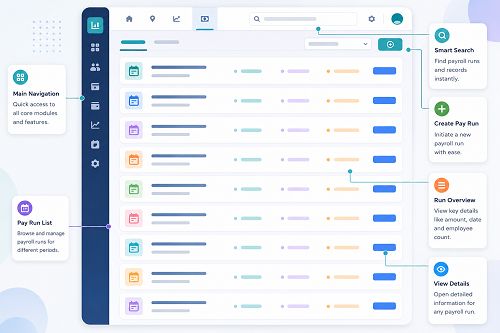
Payroll errors fall when InnBuilt Attendance Software converts approved attendance, leave, overtime, and late-coming records into verified payroll inputs. Duplicate entry and inconsistent calculations are eliminated.